

Overview
Config Profiles provides a controlled way to package and apply Genesis configuration. Use it to compare the active environment against a saved profile, dry-run changes, restore drift, import new configuration files, and export current state.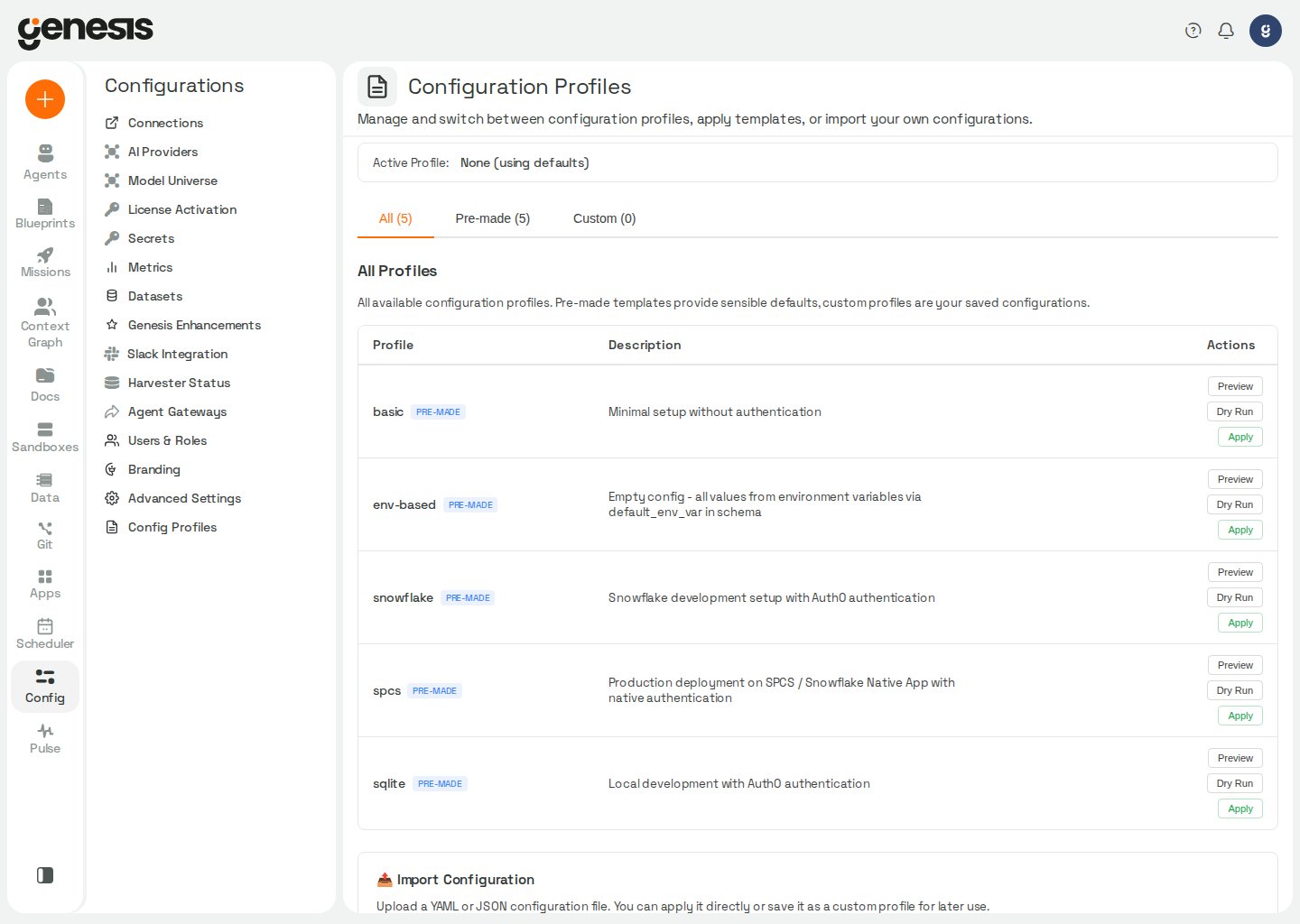
Status area
At the top of the page, Genesis summarizes the active profile, last load time, required-secret status, and drift from the active profile. Quick actions include Show Changes, Show Sources, Refresh, Save as Profile, and Restore Profile.Config sources
Show Sources opens a modal that lists schema fields with their effective value and which layer in the config priority chain is winning. Non-secret fields reportenv_override, database, db_env_var, default_env_var, or
default_plain; secret fields report env_override, custom_secret_ref, or
default_secret_ref. Filter by section or search by path.
Genesis loads this view only when you open the modal. Resolving every field’s
source is an expensive server operation and is not prefetched on page load.
Advanced Settings also shows a per-field source badge on each row; clicking it
loads a single path through the same API.
Work with templates and profiles
The main table supports All, Premade, and Custom tabs. From each row, admins can preview the profile, run a dry run, apply it, or delete custom profiles.Import and export
The import/export section supports YAML and JSON files, validation feedback, save-as-custom-profile behavior, immediate activation, and export of the current configuration. Full profile activation usesPOST /api/config/setup/apply, which replaces
only the top-level sections present in the file. Section replaces are
atomic — if activation fails partway through, touched sections roll back to
their prior values. Sections omitted from the
file are left unchanged in the database, so a minimal profile (for example just
llm and providers) does not wipe branding, auth, rate limits, or other
settings configured elsewhere. Within each touched section, fields absent from
the file are cleared and resolve to schema defaults at read time.
For SQLite-backed configuration, Genesis holds the shared metadata connection
for the full apply, so concurrent table setup cannot interrupt the transaction.
When the file includes a top-level connection section, Genesis writes each
connection as an individual row and merges with existing saved connections:
connections named in the file override or add, and connections not mentioned
survive. Omit the connection section entirely to leave all existing
connection rows untouched.
For targeted YAML/JSON patches that should touch only the paths you send — for
example updating llm.pricing without touching other fields — use
POST /api/config/setup/apply-partial instead; it merges onto the current
database state and leaves every other field unchanged. Partial apply rejects
connection payloads; use full apply with a connection section (merge
semantics above) or manage connections through /api/connections. Dict-valued
fields such as llm.pricing are preserved as a single unit during partial
apply and can be read back as one mapping via get() or get_section().
Startup loading
On every server restart, Genesis evaluates the configured profile before deciding whether the database still needs schema auto-population. This lets mounted or file-backed profiles replace default orNULL scaffold rows even
when every schema field is already present in APP_CONFIG.
Source priority (first match wins):
GENESIS_CONFIG_FILEenvironment variableGENESIS_CONFIG_TEMPLATEenvironment variable- Saved active profile path in the database (
_profile.path)
Section-scoped replace is atomic: Genesis clears and rewrites each touched
section inside one database transaction. If any field fails to apply, the
transaction rolls back and prior values in those sections remain unchanged —
callers never observe a half-cleared section.
When startup loading fails (for example a secret reference cannot be resolved
during apply), Genesis logs
Config profile apply FAILED with the profile name,
path, error list, and the config paths that were not applied. The listed
paths identify the values still supplied by their previous or default sources.
Genesis does not update saved profile metadata (_profile.path / file hash),
so the next restart retries the apply instead of treating the failed pass as
complete.
Schema auto-population inserts NULL placeholder rows only for paths with no
database row yet; it does not overwrite values written by startup migrations,
the UI, or API saves.
Normal pod restarts with an unchanged mounted file preserve later UI or API
edits. Updating the mounted file — for example through a Helm upgrade or
ConfigMap change — triggers a section-scoped reload on the next startup for
the sections that file contains; branding, auth, and other sections omitted
from the file keep their current database values. See
Setup AI Model — Infrastructure-managed deployments
for genesis-config.yaml mounting details.