

Overview
The Support and Enhancements page is the customer/admin workflow for tracking support issues and enhancement requests inside Genesis.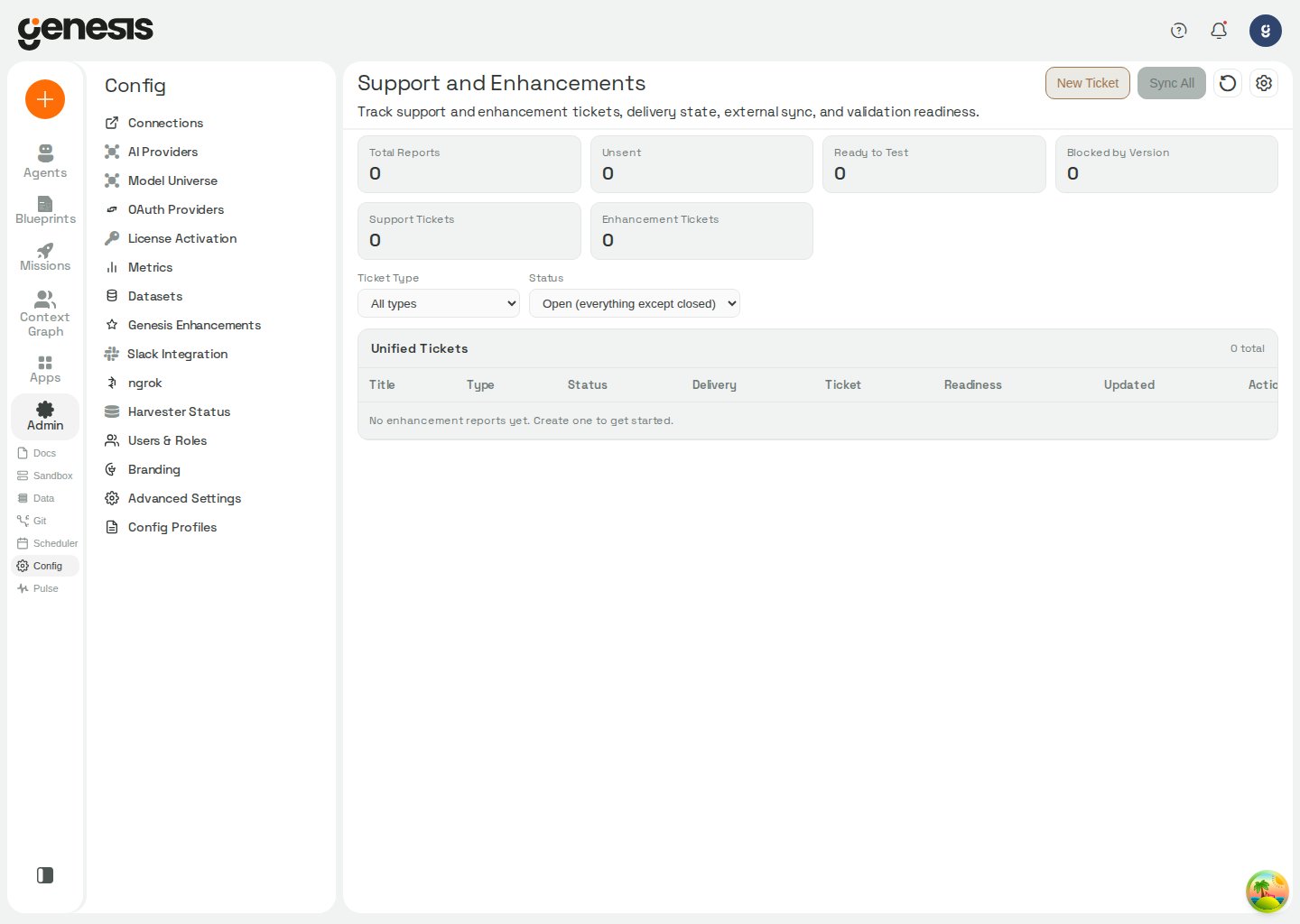
What the page supports
- viewing summary metrics,
- monitoring Genesis Self-Improvement activity and optionally drafting enhancement tickets from dormant agent threads,
- filtering tickets by source, type, or status,
- checking the per-report
Cursorstatus column for the latest Cursor Agent outcome, - creating a new ticket,
- syncing ticket state,
- reviewing ticket details,
- downloading a full report bundle or individual attachments when present,
- managing support and enhancement workflows.
Environment diagnostics
Administrators withaccess_config_panel, view_agents, view_users, and
view_connections can expand Other diagnostics on this page and choose
Export environment snapshot. Genesis downloads a timestamped ZIP inventory
of the deployment’s agents, skills, roles, connections, blueprints and runtime
configuration. No configuration key enables this control; visibility is based
on the four permissions, and the server checks them again when the export is
requested.
For the complete file list, response headers, handling guidance and
unavailable-section behavior, see POST
/api/admin/environment-snapshot/export.
Customer-facing note
This page is intended to help customers and admins manage support-oriented work in Genesis without exposing backend-only operational details.Software Factory
For internal operator visibility into coding-agent execution, admins can open the Software Factory page when the runtime enables it. It reports lane health, active runs, paginated run history and delivery evidence for the selected coding-agent backend. Viewing takes either theaccess_config_panel
permission used by other config admin pages or the dedicated
manage_genesis_enhancements entitlement; requesting a stop takes
manage_genesis_enhancements.
Use it to:
- check which backend is selected, whether it is enabled and configured, its concurrency limit, and the number of reserved slots,
- inspect active and recent runs, including issue, branch, status, timestamps, deadline, and any recorded error,
- review available verification, pull-request, CI, and review-loop evidence,
- request that an individual run stop.
genesis_enhancements.coding_agent.backend is itself enabled, and reads no
other backend’s flag to decide. Cursor keeps its flag in its own namespace,
genesis_enhancements.cursor_agent.enabled (schema default false; it honors
CURSOR_AGENT_TICKET_ENABLED when unset). Every later backend nests its own
under the coding-agent block. When the selected backend is disabled, the web
client redirects direct visits back to the Connections page instead of
rendering the page. See Advanced Settings — Provider-neutral coding-agent backend
for the selector and each backend’s enable flag and default.
If the page is unavailable or the lane is disabled or unconfigured, confirm
that the selected backend is enabled and has the required settings. For Cursor,
the adapter-specific requirements are:
- Local adapter (
adapter: local, oradapter: autowithCURSOR_AGENT_RUNNER_COMMANDset): requiresCURSOR_AGENT_RUNNER_COMMANDin the Genesis runtime environment. - Cloud adapter (
adapter: cloud, oradapter: autowithout a local runner command): requires a shared-scope Cursor connection,genesis_enhancements.cursor_agent.connection_name,genesis_enhancements.cursor_agent.target_repo_url, and optionallygenesis_enhancements.cursor_agent.target_base_ref(defaultmain) andgenesis_enhancements.cursor_agent.auto_create_pr(defaulttrue).
genesis-config.yaml, or via
GENESIS__GENESIS_ENHANCEMENTS__CURSOR_AGENT__* runtime overrides.
For local-command runs, if the git or pull request panel shows No git
or missing compare data, confirm that the recorded working_directory is
inside the allowed repo root (CURSOR_AGENT_REPO_ROOT or
CURSOR_AGENT_TARGET_WORKDIR). Set CURSOR_AGENT_GIT_BASE_REF when runs
should compare against something other than the default origin/main.
Cloud runs poll Cursor Cloud for branch_name, pr_url, and agent_url
instead of local git metadata. Open agent_url from the Software Factory page
when you need the hosted Cursor agent session.
Claude Code runs execute in Genesis against a per-run worktree. Their status
and verification metadata are read from the persisted run record; backend-
specific connection and timeout settings are documented in Advanced Settings.
The main Support and Enhancements table also includes a Cursor column. It
summarizes the latest saved Cursor run for each report as Not run,
Running, Completed, or an error state, and shows the shortened run_id or
the latest failure detail when available.
Genesis Self-Improvement
Operators can also use the Genesis Self-Improvement panel at the top of the page to review inactive agent conversations for actionable friction. The underlying API and stored metadata still use the dormant-review naming. Genesis scans dormant threads, runs an internal self-review, and then either records anoop result or creates standard draft support or enhancement
tickets. When a finding matches an existing open ticket, Genesis attaches the
new evidence to that ticket instead of opening another draft.
Use the panel to:
- pause or resume automatic scanning,
- save cadence and threshold settings such as
interval_minutes,dormant_after_minutes, andscan_lookback_days, - choose the review
model_tier, - run an immediate pass with Run once,
- inspect the current queue and open recently generated self-improvement tickets.
source_filter=dormant_thread_review) from direct agent- or
user-created reports (source_filter=direct).
The underlying dormant-review workflow starts in a safe evaluation mode by
default:
enabled: false, dry_run: true, create_drafts: false,
interval_minutes: 15, dormant_after_minutes: 60, and
model_tier: fast.
Genesis only creates draft tickets when dry_run is false and
create_drafts is true. Otherwise it still records queue state, run
summaries, and dedupe decisions without opening new tickets.
Viewing status, saving settings, and using Run once use the same
access_config_panel permission as the page itself, or the dedicated
manage_genesis_enhancements permission. The dedicated permission grants no
other configuration access. Starting or stopping the background scheduler
additionally requires manage_scheduler.
For the exact request and response fields exposed by this panel, see the
API Reference.
Create a ticket
The New Ticket flow currently collects these fields:- Title
- Ticket Type:
enhancementorsupport - Priority:
low,medium,high, orcritical - Summary
- Details
Status ladder
The main status chip now shows a version-aware delivery ladder instead of only the raw downstream ticket status. Genesis maps tickets into these labels:- Submitted
- Received
- In Progress
- Dev Completed
- Released to v1.2.1 style labels when
fixed_in_versionis newer than the running Genesis client version - Included in this version when
fixed_in_versionis at or below the running Genesis client version
v1.2 and 1.2.0 are treated as the same release.
The original downstream ticket status still appears beneath the ladder label for reference.
Report attachments
The report details drawer now includes an Attachments section. When a report was created from an agent workflow that attached artifacts, the drawer shows each downloadable file with its type and size. Common examples includethread_export.zip bundles created from the originating conversation and server.log when support-report log capture is enabled by workspace policy.
For support workflows, Genesis can attach the current conversation automatically and bundle a Markdown bug report alongside the export. When that bug report workflow is used for a support ticket, Genesis includes server.log by default unless workspace policy disables support-log capture.
For live troubleshooting before you export a bundle, capture the
X-Request-Id header from the failing Genesis response and search that value
in Pulse Monitoring using the
Request filter. That usually isolates the related API and background log
lines quickly.
Use the drawer’s Download bundle only option when you need the full package as one ZIP. Genesis builds a single bundle that includes report.md, report.json, scrub_manifest.json, and any attached artifacts for that report. Online submissions reuse that same ZIP as the downstream attachment payload.
Agent workflows that call genesis_enhancement_action with UPDATE_REPORT receive a regenerated bundle reflecting the latest report content. SUBMIT_REPORT also returns a fresh bundle when delivery did not succeed online so manual email or download fallbacks stay current; successful online delivery omits a redundant local bundle because the receiver already has the artifacts.
Enhancement Settings
Open Settings (gear icon) on Config → Support and Enhancements to manage connectivity, delivery, and offline exchange options.Autosend and operator consent
- Autosend Enabled is off by default. Genesis does not send scrubbed support bundles to the Genesis receiver until an operator explicitly turns autosend on.
- Turning autosend on opens a confirmation dialog explaining that scrubbed reports and attachments leave your network to the configured receiver so Genesis can file a support ticket. Choose Enable sending to persist the change, or Keep offline to stay in offline ZIP/email-only mode.
- The autosend toggle saves immediately when you confirm or disable it. Other fields in the modal still require Save Settings.
- When autosend is off, Genesis forces offline delivery even if Mode Preference is
onlineorauto.
Receiver and connectivity defaults
- Receiver Base URL defaults to
https://enhancements.genesiscomputing.ai. - Mode Preference accepts
auto,online, orofflineand defaults toautowhen autosend is enabled. - Sender ID defaults to
genesis-local. - Timeout (seconds) defaults to
20(minimum3). - EAI Reference defaults to
genesis_external_access. - Verify Offline Signatures defaults to
false. - Receiver Shared Secret is optional and stored masked in API responses.
Snowflake / SPCS external access
On Snowflake Native App / SPCS deployments, enabling autosend registers the receiver host as a custom endpoint for outbound delivery. The External Access Integration section in Enhancement Settings shows whether the configured EAI reference is assigned. Complete Approve External Access and Assign to Genesis for that reference before online submission can succeed.Support-bundle email size
Genesis limits support bundles used by email delivery withsupport.bundle_max_bytes (default: 15000000 bytes; environment variable:
SUPPORT_BUNDLE_MAX_BYTES). The 15 MB default leaves room for base64 email
encoding while staying below Gmail’s 25 MB inbound limit. Set the value to 0
to disable the budget. Negative or unparseable values fall back to the default.
When the budget is active, Genesis keeps diagnostics and omits only thread file
attachments that do not fit. Omitted attachments are listed in
file_manifest.json under excluded_files with the reason
bundle_size_budget. If the diagnostics alone exceed the ceiling, Genesis
keeps the diagnostics and marks the finished bundle as over the limit instead
of dropping evidence.
Send to Genesis Support
For support tickets with a clean scrub result, the report details drawer also includes a Send to Genesis Support section with three delivery paths:- Open as draft email downloads a
.emldraft with the scrubbed ZIP already attached. This works best with Outlook and Thunderbird. - Compose email manually opens a prefilled
mailto:message to the configured support address and downloads the scrubbed ZIP separately so you can attach it yourself. - Download bundle only downloads the scrubbed ZIP without any email prefill.
scrub_status: ok. If scrubbing is disabled or ends in error, Genesis keeps the plain ZIP download available and shows a warning so you can review scrub_manifest.json before sharing the bundle. If the bundle is over the ceiling, the drawer reports its size and recommends Download bundle only so you can share it another way. The same scrub settings also redact the report’s free-text fields before Genesis creates the downstream ticket. If Genesis cannot build a safe bundle or the receiver cannot accept the multipart upload, the send attempt fails cleanly instead of creating a partial or unsanitized ticket. The support recipient defaults to [email protected] unless your deployment overrides it.
Support tickets created from agent workflows can also attempt delivery immediately when Autosend Enabled is on and the deployment has a reachable Genesis Support receiver configured. Treat the recorded delivery outcome as the source of truth:
submittedmeans Genesis already delivered the ticket; use the downstream ticket link or status instead of asking the user to resend the bundle.queued_offline,receiver_not_configured,send_failed,submit_error, andsubmit_skippedmean Genesis created the ticket locally but it still needs manual delivery through the fallback options above.