

Overview
Agent Gateways is the configuration surface for exposing Genesis to external agent clients. For Claude Code and coworker laptops, use the hosted Genesis MCP Gateway remote endpoint (interactive v2 by default):https://<your-genesis-host>/mcp/v2/ and keeps https://<your-genesis-host>/mcp/v1/ for the legacy gateway flow.
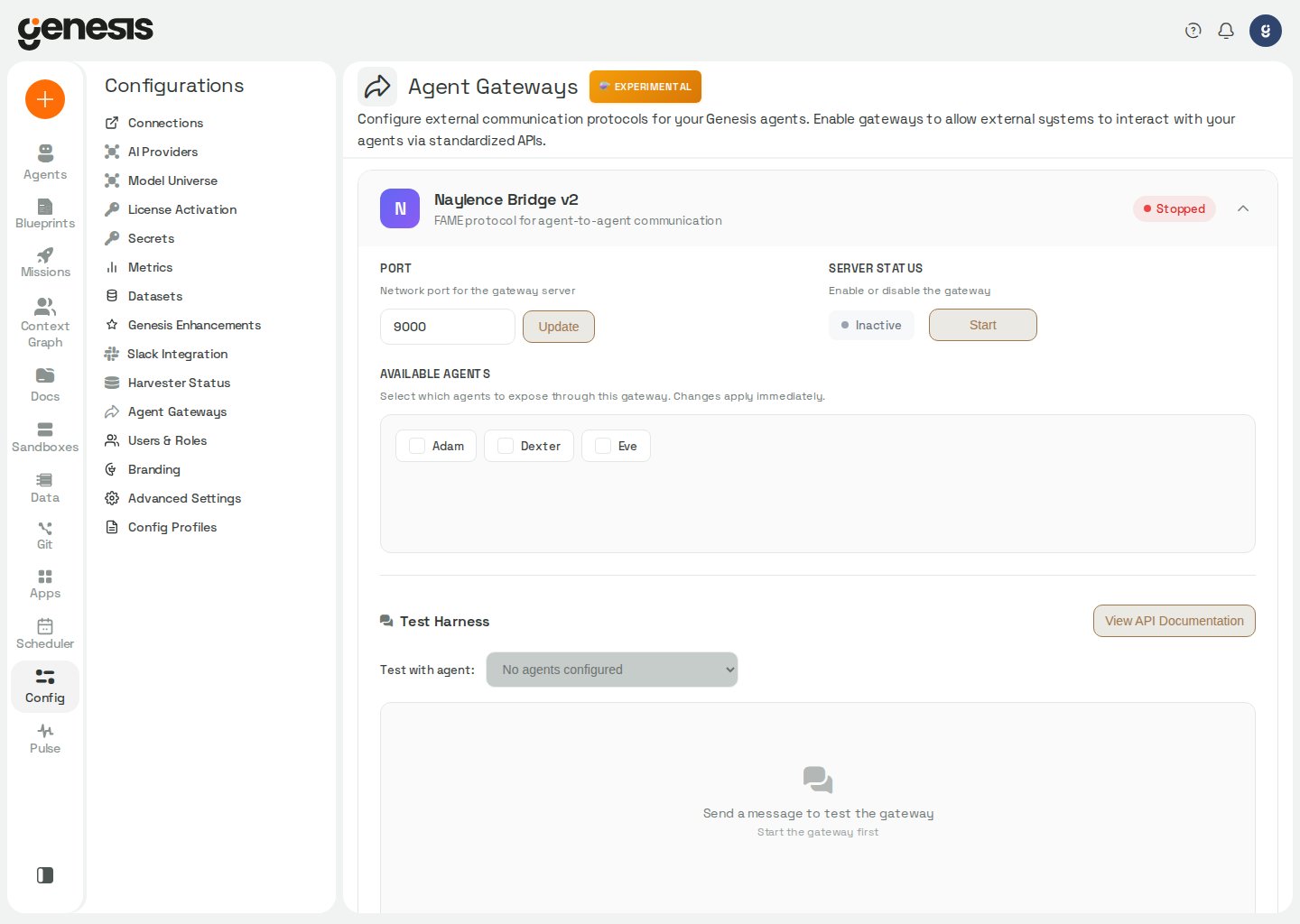
What the page includes
Enable Claude Code, Claude Desktop, Cursor or Cortex Code
For the client-by-client commands on both Snowflake Native App (SPCS) and hosted sign-in deployments, including Cortex Code, see Connect coding agents over MCP.- Open Config > Agent Gateways.
- Find Genesis MCP Gateway.
- Review the deployment summary. Local only means sign-in is off and the MCP address is loopback-only: MCP already works from this machine, and the card shows ready-to-run setup for Claude Code, Claude Desktop, and Cursor under the server name
genesis-local. The card also shows a Turn on sign-in section listing the identity-provider settings and the one callback URL to register before coworkers connect (see Turn on sign-in). When sign-in is off but the page was opened on a network address, the card reads Sign-in off instead: anyone who can reach that address can use MCP, so turn on sign-in before sharing it. If the card shows Blocked or Needs setup, expand Diagnostics details and fix the primary blocker before onboarding other users. - Choose Claude Code, Claude Desktop, Cursor or Cortex Code.
- Follow the numbered steps for that client. Each step has one line of instruction and at most one value to copy.
- Cortex Code: Its tab also offers Download the Genesis skill and the commands to install or add it. See Connect coding agents over MCP for the commands.
- Claude Code (hosted OAuth/OIDC): Add runs
claude mcp add ...; Sign in once starts interactiveclaude, where you type/mcp, pickgenesis, choose Authenticate and finish in the browser; Try it runs theclaude -psmoke test. The smoke test only works after the sign-in, becauseclaude -pruns without a window and cannot open a browser. - Claude Desktop (hosted): Add a custom connector under Settings > Connectors with the MCP URL shown, Sign in once by clicking Connect, then Try it with the prompt shown.
- Cursor (hosted): Add the
~/.cursor/mcp.jsonentry shown undermcpServers, keeping any servers already listed; Sign in once from Cursor Settings > Tools & MCP; then Try it in Cursor chat. - Local only: step 2 is Confirm (for example
/mcpshowsgenesis-localconnected) instead of a sign-in. Claude Desktop uses a localmcp-remotebridge because its hosted custom connectors cannot reach a loopback address. - Snowflake Native App / SPCS: Claude Code, Claude Desktop and Cursor run the local
@genesiscomputing/[email protected]bridge. The Add step has a small Snow CLI profile | Private key switch: the profile variant passes--snow-connection <snow_cli_profile>, and the private-key variant passes--auth private-key --account --user --role --private-key-filewith the values your administrator gave you. The key file stays on your machine; never paste it into a chat. Claude Code gets aclaude mcp addcommand, and Claude Desktop and Cursor get the matching config-file entry. Step 2, Check, runs the bridge’stestin a terminal with the same credential; it reports Health and MCP status as OK when the connection works. The page remembers your choice in this browser. Cortex Code has no switch: it reads~/.snowflake/connections.tomlitself, and a key-pair profile works there too.
- Anything only an admin does sits in the collapsed Admin setup (once per deployment) section below the steps, such as the OAuth redirect URI to register in your identity provider. People connecting a client never need it.
ChatGPT Classic in Genesis Desktop
In Genesis Desktop, open Config > Agent Gateways and use the local client list. On macOS, when ChatGPT Classic is installed and the newer ChatGPT desktop app or Codex app is not detected, its row says ChatGPT (classic app): can’t use local tools. Use the new ChatGPT app or Codex. Genesis does not offer Connect for ChatGPT Classic because it cannot reach a local MCP server.Deployments behind an authenticating proxy
Whenauth.provider is proxy and no auth.issuer is configured, the ingress proxy signs
users in and forwards the identity in a header. A remote MCP client cannot produce that
header, and Genesis holds no OIDC issuer of its own, so the card reports the deployment as
Header/proxy auth and the OIDC checks return not_applicable rather than blocking. MCP
clients connect with a Genesis personal access token instead: create one in API Keys and
send it as Authorization: Bearer <gp_...>. To offer browser OAuth as well, set
auth.issuer, auth.audience, auth.jwks_url and auth.client_id to the IdP the proxy
authenticates against.
In Auth0/OIDC deployments, Genesis can only surface the Claude
Client ID
when it is configured through auth.client_id, auth0.client_id,
AUTH0_CLIENT_ID, or AUTH_CLIENT_ID. If that value is missing, the
diagnostics summary reports a blocker until the deployment is updated.genesis_thread_id:
thread_continue, poll live activity with thread_get, and use update_goal when the broader objective changes. The default /mcp/ connector handles status, help and start_thread as well; /mcp/v1/ is needed only for ask, login, login_status and logout, which the v2 connector does not carry.
To load the optional prove-data-work skill in the same thread, use the default
/mcp/ connector with
genesis(action="read_skill", skill_name="prove-data-work", relative_path="SKILL.md").
See Genesis Prover for
when to use it.
Admin-only MCP defaults
Users with Config Panel access can manage the default hosted-MCP agent behavior directly from the Genesis MCP Gateway card:- Default MCP agent stores
default_agent_id. Current shows the agent hosted MCP actually uses, including one set by the deployment settingGENESIS_MCP_DEFAULT_AGENT_ID(shown as “from deployment setting …”); choosing an agent on the page overrides it, and clearing the choice falls back to the deployment setting. If neither is set, Genesis resolves a default per caller — Eve if that caller can access her, otherwise Adam, otherwise the first accessible agent alphabetically — so an MCP client can start working without choosing one. A caller with access to no agent is refused. - If default is unavailable stores
default_agent_unavailable_policy. Userequire_selectionto make the caller choose from accessible agents, orfirst_availableto let Genesis assign the caller’s first accessible agent automatically. Leave it on Use the deployment default and the deployment settingGENESIS_MCP_DEFAULT_AGENT_UNAVAILABLE_POLICYapplies, orrequire_selectionwhen that is not set either; Policy shows which one is in effect and where it came from.
Deployment requirements
- The public Genesis URL must use HTTPS.
- Load balancers, reverse proxies, and ingress controllers must preserve
X-Forwarded-ProtoandX-Forwarded-Host. - When forwarding headers are unreliable, set
GENESIS_MCP_PUBLIC_URL(orGENESIS_PUBLIC_BASE_URL) to the customer-facing HTTPS origin so hosted MCP OAuth metadata does not advertiselocalhost. See Hosted MCP for Claude Code. - For Anthropic Console Connect and similar clients that expect the MCP host to be the OAuth authorization server, set
GENESIS_OAUTH_PROXY_ENABLED=trueon the Genesis deployment. Genesis then servesGET /authorize,GET /oauth/callbackandPOST /oauth/tokenagainst the upstream issuer configured inauth.issuer, and completes the provider redirect itself: registerhttps://<genesis-host>/oauth/callbackonce on the OAuth app and no individual MCP client or coworker laptop needs an entry in the identity provider. Loopback callbacks and the fixed callbacks of Claude (claude.ai and Claude Desktop connectors), Cursor and VS Code are accepted without configuration; any other client callback must be listed verbatim inauth.mcp_client_redirect_uris, and unsafe callback schemes are refused. See Hosted MCP for Claude Code for the exact built-in callback list and matching rules. - The following public URLs must be reachable from the coworker’s laptop:
https://<your-genesis-host>/mcp/https://<your-genesis-host>/.well-known/oauth-protected-resourcehttps://<your-genesis-host>/.well-known/oauth-authorization-server
- In Auth0/OIDC-protected deployments, your OAuth/OIDC issuer and API audience must match the tokens accepted by Genesis.
In Snowflake Native App / SPCS deployments, the readiness card can show
Auth: Snowflake SPCS ingress and Issuer: not required. Checks that do not
apply to the current ingress path can appear as N/A, including the OIDC
issuer and API audience checks and, on Snowflake public ingress hosts, the
forwarding-header and configured-public-URL fallback checks.Customer guidance
- This page may be feature-gated and unavailable in some deployments.
- Many deployments show only the Genesis MCP Gateway card. Legacy gateway cards appear only when explicitly enabled for that deployment.
- Use the hosted MCP card’s tab for each coworker’s client, including Cortex Code. On Snowflake SPCS, follow that tab’s Snowflake-credential instructions rather than browser sign-in guidance; SPCS clients authenticate with the coworker’s own Snowflake credentials.
- Treat local stdio/device-grant MCP as a developer-only legacy path, not the standard customer onboarding flow.
- Hosted MCP uses a Genesis thread for durable context. On the default
/mcp/v2 connector, usethread_create,thread_continue,thread_get, andupdate_goalto collaborate over that shared thread. New v2 threads are created with ids such asmcp_<32-char-hex>and taggedmcp_originso the authenticated owner can reopen them in the Genesis UI when MCP threads are enabled for the deployment. Legacy/mcp/v1/callers still useaskas the explicit reasoning path. - Coding-agent sessions connected to the hosted MCP gateway can message each other through rooms (
room_list,room_create,room_join,room_send,room_read,room_who). Rooms need sign-in turned on. See MCP Rooms for Coding Agents. - Screenshots and generated files are returned with short-lived, single-use signed download URLs so external MCP clients can fetch them without browser cookies.
- Different non-MCP gateway types may have different behavior and setup requirements.
- Test the gateway before handing it off to downstream users or systems.
- In OAuth- or OIDC-protected deployments, the built-in test harness streams responses through your current signed-in session. If auth is still initializing, retry the stream test after the session is ready.