

Overview
Model Universe is the governance page for model availability. It lets admins browse the provider catalog, add approved models into the Genesis universe, define display names, and assign which workloads each model is available for.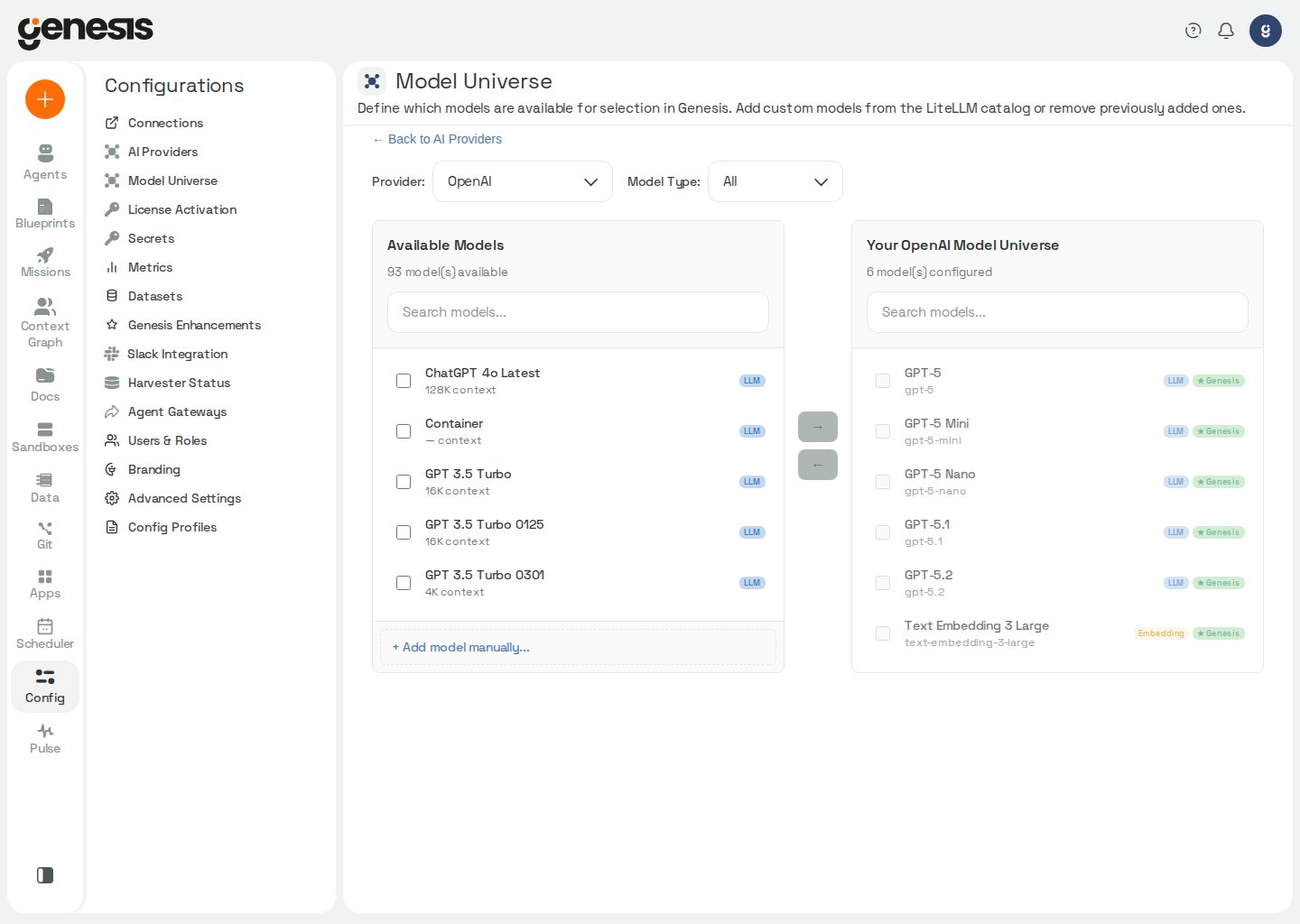
Workspace layout
When you open Model Universe from Change Models or the Embeddings tab,
Genesis appends
?from=chat or ?from=embeddings to the URL. The back link
returns to the matching AI Providers tab — on Stable
(?tab=llm or ?tab=embeddings at /config/llm-providers/) or on Beta
(?tab=chat or ?tab=embeddings at /config/ai-providers/).
On Genesis Desktop, provider selection and model actions are available only for
Genesis AI; interacting with another provider’s catalog opens the Genesis
Enterprise modal. See AI Providers for the
provider restriction.
Common tasks
- add a recommended model to the universe,
- register a custom model name,
- review LiteLLM Proxy models auto-discovered after provider save (
source_type: discovered), - inspect the underlying backend model for a proxy alias,
- change a display name,
- assign which workloads a model is available for,
- remove a non-required model.
If Genesis cannot load a provider catalog live, it falls back to the
recommended-model catalog in
config/llm_config.yaml rather than a separate
built-in list. Chat-model fallbacks come from llm_models.<provider>,
embedding fallbacks come from embedding_models.<provider>, and the Fast
tier uses models marked is_fast: true; if a provider has no is_fast
entries, Genesis reuses that provider’s main chat fallback list.For litellm_gemini, the shipped fast-tier catalog entry is
gemini/gemini-3.5-flash-lite; the shipped default chat entry is
gemini/gemini-3.8-flash. These are catalog defaults and can be replaced from
Change Models.For Anthropic-family models loaded through LiteLLM-managed providers,
Genesis also applies the deployment’s llm_context_overrides from
config/llm_config.yaml when it resolves model metadata. The current
claude-fable-5-1.max_input_tokens override is 900000, the
anthropic.family_default.max_input_tokens cap is 200000, the shipped
claude-opus-5-5.max_input_tokens and claude-opus-5.max_input_tokens
overrides are 900000, the
claude-opus-4-8.max_input_tokens and claude-opus-4-7.max_input_tokens
overrides are 300000. Databricks’ provider-qualified
databricks-claude-opus-5-5 identifier resolves to the claude-opus-5-5
override and databricks-claude-opus-5 to claude-opus-5, so both caps
are 900000 as well.
The llm_context_overrides.openai.gpt-6.max_input_tokens override is
900000 for the GPT-6 family, including later gpt-6* SKUs, on OpenAI,
Azure, and LiteLLM routes.
Technical model
identifiers that include -1m keep the provider-advertised 1M input
window.Open-weight SKUs served under bare Snowflake Cortex technical names (for
example llama3.1-70b or mistral-large) no longer carry a Genesis-side
llm_context_overrides entry — LiteLLM’s own catalog does not advertise a
context window for them either, so a custom model of that kind falls back to
the generic context default. Claude models served through Cortex still
resolve through the anthropic family overrides above.For LiteLLM Proxy, catalog and universe entries use the normalized bare
proxy model id; Genesis strips litellm_proxy/ and proxy/ transport
prefixes from discovery responses before persisting technical names. Saving or
updating the LiteLLM Proxy provider materializes discovered models into Your
Model Universe with source_type: discovered. The Change Models picker
reads those materialized rows when present. Opening Change Models, the
Embeddings model step, or the models step in the new-connection drawer
also calls POST /api/config/model-universe/refresh?provider=litellm_proxy
(throttled per process; see llm.proxy_universe_refresh_interval_seconds) so
models added to the proxy after the connection was saved appear without
re-saving that connection. Tier assignments are not re-inferred on refresh.
When the universe is empty, opening Change Models or saving main-provider
assignments triggers an idempotent self-heal: Genesis runs discovery and
materializes rows once (no extra proxy round-trip when rows already exist) so
underlying-model metadata is available without re-saving the provider
connection. When /models discovery fails during materialization or refresh,
Genesis preserves existing materialized rows instead of reconciling against
an empty failed fetch. Live /models discovery is still used as a fallback
when the universe is empty and materialization cannot reach the proxy.
Discovered rows that include an
underlying model show it in the model details dialog; custom rows you add
manually keep source_type: custom and are not overwritten by discovery
refresh. Proxy entries whose catalog mode is image_generation are labeled
Image in the universe and are available for image_generation, not chat
roles.