

Overview
The Advanced Settings page is the customer/admin workspace for reviewing and editing broader system configuration sections in one place. You can also open it from Users & Roles. On Snowflake-hosted deployments, the page loads its sections with two database queries, so it opens in seconds instead of the minutes required by the previous per-section and per-secret reads.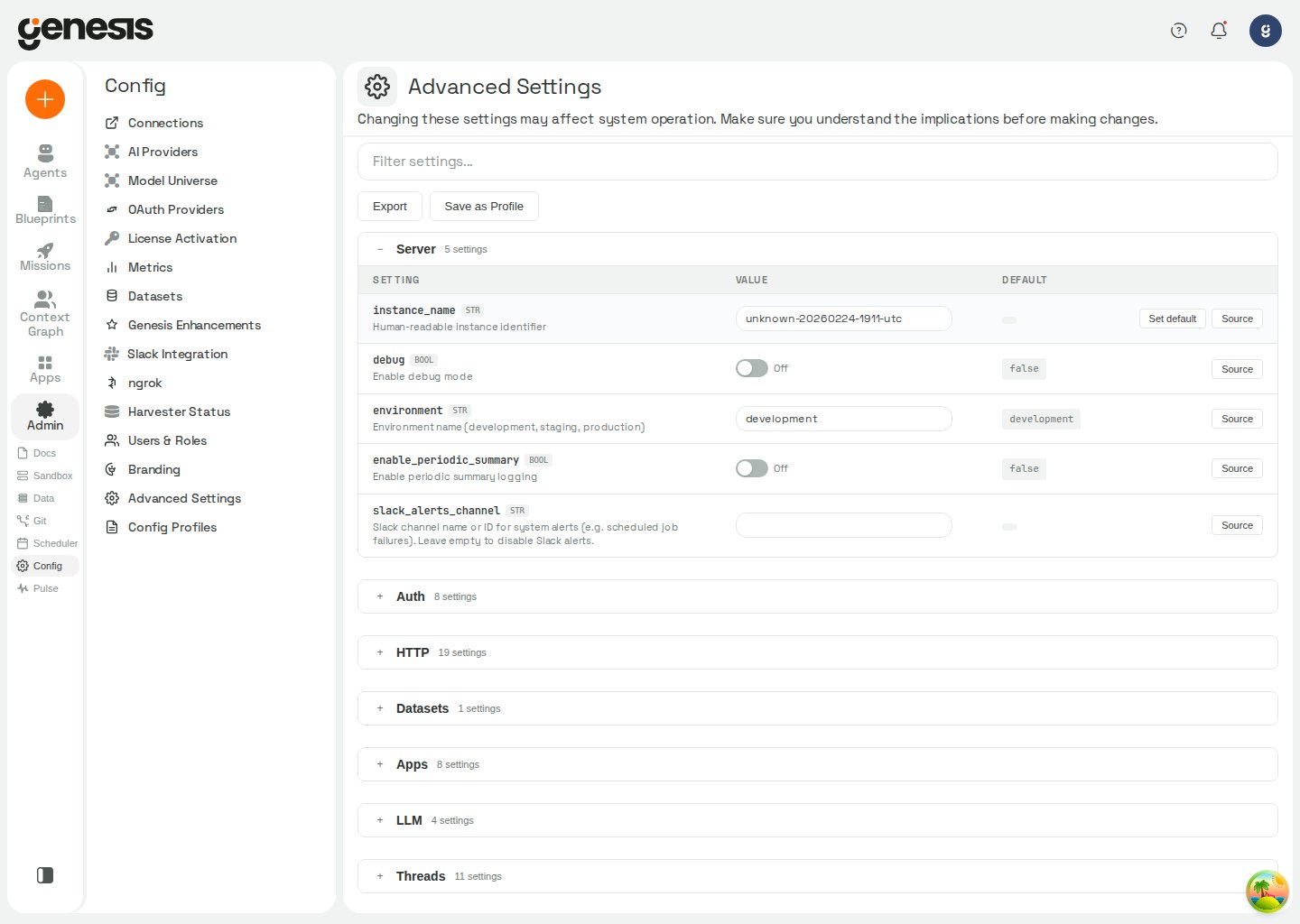
Config path format
Schema field paths use lowercase dot-notation (for examplewiki.librarian_enabled, providers.openai.connection.api_key). Genesis
normalizes path lookups to lowercase — mixed-case spellings such as
Server.Debug resolve to the same field as server.debug. The Advanced
Settings UI and APIs always display canonical lowercase paths.
Goal mode limits
These limits apply to blueprint phases running in goal mode. Goal mode is selected by a blueprint run; these settings do not enable it. A goal already running keeps the limits it started with, so changes apply to goals created afterward.
Neither limit ends a goal or caps the amount of work the phase may do. See
thread goal tools
for how goal progress and nudges work.
Genesis Desktop sign-in targets
Genesis Desktop’s laptop-mode sign-in uses the Try Me provisioner and Auth0 tenant configured by these settings. The live Try Me site is the default; a test macOS build sets the test tenant, and shell builds can override the provisioner URL.
When an installed app’s provisioner or Auth0 tenant changes, it asks the person
to sign in again; see Genesis Desktop sign-in behavior.
Genesis Desktop DNS fallback
In Genesis Desktop laptop mode, DNS fallback can keep connections to the LiteLLM proxy and Try Me provisioner working when the computer’s DNS resolver cannot resolve their host names. When enabled, Genesis looks up the name at1.1.1.1
and then 8.8.8.8, and uses the original host name for TLS certificate
verification. DNS answers are reused for their TTL. Private and local names are
not sent to the fallback resolvers. Genesis logs one warning per outage:
system DNS failed for <host>; using fallback resolver.
Genesis Desktop command mode
On Genesis Desktop, an administrator can let agents run bash commands on the person’s computer withrun_local_command. The tool is available only in
laptop mode. A single plain read runs immediately: ls, cat, head, tail,
pwd, grep, find (without -exec or -delete), wc, echo, and read-only
AWS, GitHub, Azure and Git CLI commands. Every other command, including any
command with a pipe, &&, ; or a redirect, waits for the person’s approval in
Action Review, and the approval card shows the exact command. Destructive
commands are flagged on the card, and sign-in commands are handed to the person.
This is off by default, and changing it takes effect on the next agent turn
without a restart.
Commands run with bash in Anthropic’s sandbox-runtime. For the command
approval flow and the sandbox’s file and network access, see
run_local_command.
In Genesis Desktop, command mode is always on and the setting is read-only,
regardless of its stored value. In laptop mode outside Genesis Desktop, an
administrator can change it and the new value takes effect on the next agent
turn. Outside laptop mode, the command tool is not registered and this setting
has no effect.
The earlier
desktop.local_cli_enabled_clis setting is retired; a stored value
is ignored.
Never-compress default skills
Set the maximum number of an agent’s default skills that can be marked Never compress in the agent’s Skills tab. Each flagged skill keeps its full injected text through thread compression and automatic overflow recovery, at the cost of including those tokens on every turn. Setting the limit to0
prevents adding new flags; lowering the limit does not remove flags already
saved. This option is available in Advanced Settings and APP_CONFIG.
Durable dataset snapshot size limit
When durable SQLite storage is enabled, this setting limits the size of each dataset snapshot uploaded to durable storage. An oversized snapshot cannot become active, so the previous snapshot remains active. This setting does not limit snapshots when durable storage is off.Automatic runtime recovery setting
For eligibility and failure details, see Genesis Apps.Catch-all state-file durability sweep
On Databricks Apps withGENESIS_DURABLE_BY_DEFAULT, the catch-all sweep
restores and keeps state files that are not declared to Genesis. The boot budget
limits how long startup spends restoring files; files left for later are restored
by a following sweep pass or on demand when Genesis reads them. Full walks repeat
at the configured interval. Files larger than the configured maximum are recorded
as too large and reported rather than silently dropped. These settings apply when
the catch-all sweep is enabled; the guard and quotas are active at their defaults.
The delete-fraction guard protects tombstones: a
pass that would record deletions for a larger share of a state folder’s kept files
is refused, and the folder stays degraded until an administrator confirms the
deletes. The guard does not cover repository whiteouts, so tracked working-tree
deletions may replace kept edits without confirmation. Quota limits record files
past the configured byte limit as over quota.
Hosted authentication
Use hosted authentication when an installation receives signed identity assertions from the Genesis hosted identity broker. Setauth.enabled to
true and auth.provider to hosted. Hosted mode requires the same JWT
verification settings as the other JWT-backed providers — auth.issuer,
auth.audience, and auth.jwks_url — plus an exact tenant and installation
binding. For hosted authentication, auth.issuer must be exactly
urn:genesis:hosted-access:gateway:h1, and auth.jwks_url must be an
independently pinned HTTPS JWKS URL.
When hosted mode is enabled, a verified assertion is not enough to create an
application session: the subject must have an active explicit identity link for
the configured tenant and installation. Use the hosted identity lifecycle
endpoints documented in the API Reference
to create or revoke those links. Hosted configuration validation fails when any
required setting is empty or when the assertion contract or topology is not the
supported value.
Proxy authentication sign-out
For deployments using an authenticating proxy, enable authentication withauth.enabled and set auth.provider to proxy, then configure
auth.proxy_sign_out_url to show Sign out in the web client header and send
the browser to the proxy’s sign-out endpoint. This setting is used only with
auth.provider set to proxy.
Leave it empty to keep Sign out hidden when the deployment has no app session
to end behind the proxy. Set the value to an absolute http:// or https:// URL,
or to a path on this host beginning with a single /; other values are ignored. An optional
?rd=<url> query parameter can return the browser to a destination after sign-out.
Databricks App test service principals
For automated test identities on a Databricks App, a Genesis administrator can list workspace service-principal application IDs inauth.databricks_app_test_service_principals. It is an empty list by default,
so this sign-in option is disabled until configured, and has no effect outside
a Databricks App. See Databricks App test identities
for the sign-in and role restrictions.
Group-to-role mapping
Administrators can map external groups to Genesis roles at Settings → Advanced. The mapping is empty by default, so no group-based roles are assigned unless configured.
Genesis reads group names from OIDC claims or proxy headers at sign-in. For a
Databricks App user, it uses the workspace’s SCIM response; listed Databricks App
test service principals are never granted roles through this mapping. A user gets
the mapped role while in a mapped group and loses it after leaving the group, at
their next sign-in. A person signing in to a Databricks App keeps
admin while no
other usable administrator exists. When set,
GENESIS_GROUP_ROLE_MAPPING_FILE or GENESIS_GROUP_ROLE_MAPPING takes precedence
over auth.group_role_mapping.
Connection finder
Use theconnection_finder section to control how Genesis matches a pasted
provider URL or host to visible saved connections during chat and agent tool
execution.
The finder only considers connections visible and usable by the requesting user and agent. Only one warning-free exact resource match is eligible for an agent-led read-only or idempotent call; lower-confidence or ambiguous matches require the user to choose.
A row is treated as modified (and shows Set default) when an operator
or API call has explicitly stored a value for that path, when the effective
value differs from the schema
default, or while a staged edit or reset is
pending. That includes overrides that happen to match the schema default —
Genesis still treats them as explicit choices until reset. At startup Genesis
scaffolds every schema field as a NULL row in APP_CONFIG; those scaffold
rows are not considered explicit choices and do not mark the field as modified.
What the page supports
- filtering settings by keyword,
- browsing grouped config sections,
- editing customer-visible settings,
- applying or discarding pending changes,
- running the thread archive job immediately from the Archive section using the currently saved settings,
- cleaning up invalid bot-thread directories from the Invalid bot directories section,
- deleting all bundled demo data from the Maintenance section,
- exporting configuration,
- saving reusable profiles,
- choosing which optional sidebar items appear under UI Complexity.
UI Complexity
The UI Complexity section lets each operator choose which optional main-sidebar items to show. Toggles are stored in browserlocalStorage per device — they are not server-wide settings.
Agents, Blueprints, Config, Context Graph, and Apps are always visible and cannot be hidden. Enable all restores every hideable item. Work is enabled by default and contains Missions as a tab. Set
GENESIS_SHOW_WORK=false to turn Work off and give Missions its own sidebar entry. UI Complexity only controls whether an enabled Work entry appears in the sidebar.
Browser tools
Genesis Desktop (laptop mode) includes a Browser tools section under Settings → Advanced. It shows whether the downloadable browser tools are installed, installing, outdated, or failed, and reports download progress when available. Choose Install to download them, or Remove to delete the downloaded driver and browser. The firstbrowser_open also starts the one-time download
when needed; see Browser Tools for how to
use the browser while installation is in progress.
Genesis Desktop diagnostics
Genesis Desktop (laptop mode) also shows a Diagnostics section under Settings → Advanced. It explains what diagnostic logs the trial version sends; this section is informational and has no setting to change. For the diagnostics preview, consent, and upload behavior, see Genesis Desktop diagnostics.Web dashboard chrome
The web dashboard uses Genesis Desktop-style chrome by default. Its thin top bar has the setup, MCP, help, and notification controls; the Genesis mark sits at the top of the left rail, with the account menu at its foot. The rail, thread list, and content panels tile edge to edge. A deployment showing a custom Branding logo keeps its taller header. The desktop app always uses its own chrome. Setfeatures.unified_chrome to false to restore the previous web layout,
with rounded floating panels under the full-width header. This bool defaults
to true and can be configured in Advanced Settings or through
PUT /api/config/advanced/value. GENESIS_UNIFIED_CHROME supplies a default
only while this setting is unset; an explicitly configured value takes
precedence. The frontend bootstrap response exposes the setting as
unified_chrome; see Genesis API — Frontend bootstrap config.
Prover workspace visibility
The Estate (Prover) workspace is shown by default. Thefeatures.show_estate
setting is a bool with a default of true; it controls the top-level Prover
navigation, not access to the estate routes. To hide the workspace, set
features.show_estate to false through Advanced Settings or
PUT /api/config/advanced/value. You can also set
GENESIS__FEATURES__SHOW_ESTATE=false to force it off and lock the Advanced
Settings toggle. The former Prover-specific GENESIS_SHOW_ESTATE variable is
retired and is no longer read.
Action Review visibility
The Action Review page is shown by default. Thefeatures.show_action_review
setting is a bool with a default of true; while it is true, the web client
shows the Action Review entry in the sidebar and mobile navigation, offers Action
Review as a default homepage, and serves the /action-review page. Hide it
through Advanced Settings or PUT /api/config/advanced/value. You can also set
GENESIS__FEATURES__SHOW_ACTION_REVIEW=false to force it off and lock the Advanced
Settings toggle. The setting controls the web client only: governed actions such as
CRM merges still require human review, and their in-chat approval cards still appear.
Agent Review settings
Use the Agent Review section to enable the analysis and advisory grading surfaces shown in Pulse Monitoring. Agent Review is off by default, and grading requires the master switch as well as its own switch:
See Pulse Monitoring for the disabled-state
behavior and the link back to this section from Agent Scorecard and Agent
Learning.
Mission Value settings
Mission Value manual duration baselines are managed from the dedicated Pulse → Mission Value editor, not from the generic Advanced Settings sections or setup-apply endpoints. The editor replaces the complete versioned baseline table and is available to users withaccess_config_panel. See
Pulse Monitoring for the reporting view.
Set
GENESIS__MISSION_VALUE__MANUAL_BASELINES to provide an environment
override. While that override is set, the Mission Value editor refuses changes
because the environment value has higher precedence. The mission_value
section is omitted from Advanced Settings and cannot be applied through generic
partial configuration.
Organization health fix
Use the Organization Health section to control whether the built-inGenesisAuditor agent may propose fixes. The read-side audit is available by default;
this setting controls only whether GenesisAuditor may propose a fix, and whether a
person may apply one, in Action Review.
Fixes are not enabled by default. GenesisAuditor never changes anything itself: a
user must explicitly ask it for a fix, the fix waits in Action Review, and a person who
may manage the target applies it. Applying re-checks the caller identity, the target,
the current doctrine, the skill corpus and the target’s state, and writes only if the
target has not changed since the proposal. Switching the setting back to
silent
also stops pending fixes from being applied. See the
GenesisAuditor tool reference
for parameters and refusal behavior.
When to use it
Use Advanced Settings when the value you want to change is not already exposed by a more specific setup page, or when you need to review broader configuration sections side by side.Reset to defaults
Each modified non-secret row shows a Set default action. Choosing it stages a reset and previews the effective default; the button hides while that reset is already pending. Set default works like other Advanced Settings edits — click Apply to persist. On apply, staged resets are sent toPOST /api/config/advanced/reset, which deletes the stored value for the
path so the field returns to “never explicitly set” and resolves through the
normal config priority chain again — a field’s default_env_var when that
environment variable is set, the schema default otherwise. Genesis does not
write the schema default back into the database through the batch update endpoint;
doing so would record an explicit operator choice that permanently outranks
default_env_var. When a single Apply mixes value changes and resets,
Genesis applies ordinary updates first and runs resets only after those succeed.
Discard cancels staged resets as well as staged value edits. If you manually
change a field after clicking Set default, the staged reset for that path
becomes an ordinary value update instead.
The reset request is refused outright (nothing is deleted) when any path
is:
- not a schema field (for example connection definitions or profile metadata
rows that live in
APP_CONFIGbut are not Advanced Settings fields), - a secret field (
is_secret: truein the schema) — use/api/config/secret-fields/...instead, - locked by a
GENESIS__*runtime override (the same guard as value updates).
reset_paths (paths whose stored value
was deleted) and env_default_paths (subset whose restored value came from a
default_env_var, not the schema default). When env_default_paths is
non-empty, the message notes that those fields were restored from environment
defaults rather than schema defaults. For the env-backed leaf restoration
behavior, see the Advanced settings reset endpoint.
Secret-valued settings
Fields marked as secrets in the config schema accept reference strings (secret_*, env_*, ${VAR}, aws_*, gcp_*) instead of pasting raw
credentials. Plain text you enter is migrated once into the Genesis secret
store; references are stored as-is and resolved when the value is read. See
External Secrets for syntax, including
environment-variable references that track live env changes without a Genesis
restart.
Unlike non-secret fields, secret schema fields do not read default_env_var
on every config snapshot. An unset secret field resolves to its default managed
secret reference (secret_<path>), which is empty until a value is stored
there. On each main-server startup (after database migrations), Genesis captures
the default_env_var value from the environment into that managed secret when
the field has no GENESIS__ override, no explicit APP_CONFIG value, and no
existing managed secret at secret_<path>. Capture is idempotent and
never clobbers a prior capture or an operator-set value. After capture, the
credential is a first-class managed secret — rotatable through Config →
Secrets or Advanced Settings. Rotating only the deployment env var after
capture has no effect; update the managed secret instead. Capture is
best-effort: failures are logged and do not block startup (for example when the
secret store is unavailable on first boot).
Admin audit log
Saving or resetting settings through this page writes rows toADMIN_AUDIT_LOG. Genesis records the config path, the value’s Python type,
and the change source (ui in details; table source defaults to api) —
never the new secret or configuration value. Bulk saves emit one
advanced_config.updated event per changed path; Reset to defaults emits
advanced_config.reset with the list of paths reset.
Browse these events from Config → Admin Audit Log or
GET /api/admin/audit-log. See
RBAC Practical Guide → Admin audit log
for the full table schema, REST parameters, and query examples.
RBAC defaults
Use therbac section to control default behavior for newly created custom
roles.
These settings only seed the dashboard Create Role modal. Programmatic role
creation through
POST /api/rbac/create_role is unaffected because the
explicit permissions list still wins.
Guardrail settings
Use theguardrails section to tune customer-visible safety limits.
The repetition_guard settings apply only to repeated user messages in the
same thread. They do not control agent messages or repeated tool calls; agent
tool-call loop detection is handled by a separate internal guard.
Thread archive settings
Use thearchive section to configure automatic retention exports for inactive
threads. Genesis validates the selected archive connection against the
authenticated admin before saving or running the job, then reuses those saved
settings to verify remote archive objects before it removes local thread data.
For AWS archives,
archive.threads.connection_name shows the AWS connections visible to the current admin, and archive.threads.bucket can suggest S3 bucket names from the selected connection while still allowing manual entry.
Each archived object is a canonical ZIP bundle that contains the thread’s
stored source files and any uploaded files for that thread. When available,
Genesis also adds message_log.csv to that bundle.
After saving those settings, expand Archive and select Run thread archive now to execute the job immediately. The button is disabled while there are pending Archive edits, always uses the saved values, and still respects GENESIS_THREAD_ARCHIVE_DRY_RUN when that environment variable is enabled.
If an earlier run already uploaded the archive but did not finish local cleanup,
later scheduled or manual runs verify the existing remote bundle and complete
cleanup instead of rebuilding the archive.
Thread archival uses file-backed thread storage and is not supported when the
Postgres thread-storage engine is selected. Scheduled runs skip archival in
that mode, and the manual run endpoint rejects the request.
Thread snapshot cache
For the Postgres thread-storage engine,threads.storage.snapshot_cache_mb
sets the per-process memory budget, in MB, for recently read thread snapshot
documents. It avoids fetching the full snapshot row again for each short-lived
write-path open. Entries do not expire; the setting only bounds memory. Set it
to 0 to disable the cache. Genesis reads this setting at every insert, so a
change takes effect without a restart.
Thread search index build settings
Use this setting to bound memory growth while the thread-service worker builds the search index. The limit is active by default; when the build reaches it, Genesis releases memory and indexes one thread at a time until usage is back under the limit. Set it to0 to disable the bound.
Agent review settings
Use theagent_review section to control review analysis. Explicit message
feedback remains available when analysis is disabled; see Genesis API —
Expectation-met message feedback endpoints.
Action Review settings
Use theaction_review section to control the default-on cleanup sweep for the
Action Review ledger. The sweep materializes expired proposals and reconciles
stale claims; expiry remains enforced by the decision and claim predicates.
Estatechar store settings
Useestate_char.store to control storage for estate comparison and disposition-package
work. This option affects only a Snowflake metadata database.
Interrupted Flow copy target checks
Usejobs.flow_interrupted_copy_target_check to control the background check
that records what an interrupted Flow copy step currently holds in its external
target after a restart. The check runs only while qualifying interrupted steps
are waiting; it does not change their status or populate rows_written.
Foundry copy evidence recording
Genesis records each Foundry copy filed under a migration project on itslanded goal, whether or not the copy was cited in chat. The recording job
checks once a minute. Set jobs.project_evidence_recorder.enabled to false
to pause it; filed copies wait and are recorded when it resumes. The setting
takes effect at the next restart or when the job is resumed from Pulse. While
idle, the job costs one indexed metadata read per minute; each copy check can
start the copy’s SQL warehouse. See checked project records
for the recorded verdicts and retry behavior.
Managed skill release checks
Usejobs.managed_skill_release_poll to check enabled managed skill sources for
new release tags. Findings appear on the source’s Managed Sources row. The
check runs only when skill revision tracking is enabled. Each pass makes one
request to each enabled skill source’s Git host.
For a Fixed release source, a newer release is flagged without changing the
source; a moved or deleted pinned tag raises an alert. A Follow latest
source upgrades to the newest release as an audited system change, subject to
the same production policy as an administrator’s change. Enabling or disabling
the job takes effect at the next restart, or when the job is resumed from Pulse;
interval changes take effect at the next restart.
Managed source automatic sync
Usejobs.managed_source_auto_sync to schedule syncs for managed sources that
an administrator has opted in to with Sync automatically on Config →
Managed Sources. The job checks each opted-in source’s Git host for changes to
its tags, tracked branch, or default branch, then runs the same sync as the
source’s Sync action when it detects a change. Sources without the switch
are not contacted. The scheduled job is enabled by default, but no sources are
automatically synced until they are opted in. Changes to enabled take effect
at the next restart or when the job is resumed from Pulse; interval changes take
effect at the next restart.
Agent room settings
Use therooms and jobs.room_sweep sections to configure shared rooms for
development agents. The room sweep drains buffered room messages into the room
thread after the running turn is idle; it is enabled by default.
See Genesis API — Agent rooms endpoints
for the room routes, message fields, polling cursor, and participant behavior.
Invalid bot directories
Users withmanage_all_threads (or the built-in admin role) see an Invalid
bot directories section on the Advanced Settings page. Other roles do not see
the section.
The helper text explains that Genesis moves invalid directories under the bot
store to a safe archive location. Clean up now opens a confirmation dialog.
Genesis quarantines stray, orphaned, or wrong-case bot folders under
{STORAGE_PATH}/threads that do not match the bot registry:
- Wrong-case directory names are renamed to the registry’s canonical
bot_id. - Orphan directories (no matching registered bot) are moved to a reversible
graveyard at
{STORAGE_PATH}/graveyardafter a grace period with no writes. - When both a canonical directory and a variant hold threads, Genesis merges non-colliding threads into the canonical bot and graveyards the colliding remainder for manual reconciliation.
POST /api/bot-directories/cleanup with no request
body. On success, the UI reports how many directories were moved (executed),
and may also note conflicts (ambiguous directories left untouched) or
skipped_recent (orphans still inside the grace window).
Genesis also reconciles bot directories automatically: a mutating pass at startup
(while thread storage is quiescent) and a read-only detection sweep every 24
hours on live servers. Disable the scheduled sweep with
GENESIS_RUN_BOT_DIR_CLEANUP_JOBS=false.
Delete all demo data
Users withmanage_all_connections (or the built-in admin role) see a
Maintenance section with Delete all demo data. The button is hidden for
other roles.
The confirmation dialog lists the bundled demo connection identifiers Genesis
targets:
baseball_sqliteformula_1_sqlitehcls_demo_1_sourcescredit_card_sqliteasset_mgmt_sqlitelab_source_data
POST /api/admin/demo-data/purge.
Genesis hides each bundled demo legacy database connection from discovery lists,
persists the connection IDs in Twin storage as a tombstone
(demo_evictions.json), and asks Twin to evict that connection’s demo graph and
search entries. The action does not hard-delete registry rows.
After a successful purge, tombstoned demos stay hidden and are not re-created on
restart — including when optional seed flags such as LOAD_BASEBALL_DB,
LOAD_FORMULA1_DB, LOAD_CREDIT_CARD_DB, LOAD_ASSET_MGMT_DB, or
LOAD_LAB_SOURCE_DATA_DB are true. Connection registry seeding, SQLite
startup preparation, Twin ensure_demo_entries(), and the HCLS demo loader all
consult the same tombstone.
On success, Genesis reports how many connections were targeted and how many Twin
entries were evicted. If connection hide succeeds but Twin eviction reports
errors, Genesis still finishes with a partial-success warning — demos may
continue to appear in semantic search until Twin is reachable and eviction
completes.
Bundled demo connections cannot be deleted from Config -> Connections. If
an agent or API call attempts a hard delete, Genesis returns an error directing
operators to this action or to POST /api/admin/demo-data/purge.
Slots queue timeout
Use theslots section to control how long queued chat turns wait for
execution capacity before Genesis times them out.
If
GENESIS_CHAT_QUEUE_TIMEOUT is set, Genesis treats that legacy environment
variable as an override for the saved slots.chat_queue_timeout_seconds
setting.
Connector resolved-connection cache
Use theconnectors section when estate characterization or other high-volume
query workloads repeatedly resolve the same saved connection (secret decrypt,
RBAC checks, connection-string build, and Databricks service-principal OAuth
mint).
Snowflake connection routing
Outpost routing
Outposts let Genesis reach private hosts through a customer-run process that dials out to Genesis. Manage Outposts and the feature switch in Config → Outposts; these settings are also available in Advanced Settings. See Genesis Outposts for setup and security.In-product spec author (estate_char.spec_author)
Use the estate_char.spec_author section to tune the spec-author surfaces.
The section covers two different consumers, and the split matters when you are
sizing a knob: escalation_mode, interpretation_policy, authoring_tooling,
poll_seconds and max_turn_seconds govern
the spec-author seat (POST /api/estate/spec-conformance/author-seat),
while compile_timeout_seconds, chunk_retry_bound and author_concurrency
govern the reading consult’s author call
(POST /api/estate/spec-conformance/consult-reading) — raising
compile_timeout_seconds will not lengthen a seat turn. Values are read at
call time; schema min / max bounds are enforced on save.
Prover API wait ceiling
The Prover remains asynchronous and returns a run handle immediately. A caller of a run-creating route can optionally providewait_seconds instead of polling; this setting
limits how long that request may hold its connection. It is read at call time. When the
limit is reached, the route returns the same handle with HTTP 202 and the run continues.
Estate readiness preflight (estate_char.preflight)
Use these settings for the readiness run that follows estate registration or an
explicit preflight request. Values are read at call time.
Comparison migration-envelope settings
Use these settings when the Prover registers a system comparison. The automatic envelope is a platform-only grade that keeps the comparison replayable before a specification is authored; it is not a substitute for grading an attached specification.Prover behavioral and drill harness settings
Use theseestate_char settings when running the Prover’s behavioral bench,
self-drill, or standalone stimulus acceptance driver. The settings are read at
call time. Drill credentials are not read from environment variables: set the
connection-id fields to registered PostgreSQL connections in Connections.
If a required connection-id field is empty, the corresponding drill refuses to
guess a local server and fails with no drill connection configured.
Behavioral bench
The behavioral bench mutates and restores rows on both databases, so point it at a throwaway drill server.drill_connection_id names the registered connection;
the other fields select the clone pair and evidence behavior.
dbt Cloud-to-BigQuery runtime
Use these settings to enable the Prover’s isolated dbt Cloud pipeline runtime. The runtime allocates run-owned BigQuery and GCS resources, qualifies separate lifecycle, runner, and grader identities, and removes the resources after the dbt Cloud run reaches a proven terminal state. Credential values stay in Genesis Connections; these settings contain only connection references, expected identities, dataset names, and bounded runtime controls. Values marked as read at call time do not require a backend restart.
Set the two connection-reference fields to registered Genesis Connections and keep
their service-account credentials there. Runtime composition fails closed when a
reference, principal, control dataset, or comparison-arm dataset is empty or when
the configured identities and dataset boundaries do not qualify. The cleanup
owner remains separately controllable so operators can recover abandoned resources
even when execution is disabled.
Self-drill
The self-drill creates and drops throwaway clone databases, so its registered PostgreSQL connection must point to a disposable drill server and its role must haveCREATEDB.
Databricks runtime
Databricks spec drills are disabled by default. Setestate_char.self_drill.databricks_enabled to true and configure both scratch
catalogs and estate_char.self_drill.databricks_connection_id to admit Databricks
estates through the spec-drill endpoint and Eve. If the flag is on while any of those
settings are unset, the endpoint refuses the request and names the missing settings.
The drill connection below is separate from the estate’s own connection;
estate_char.self_drill.connection_id above remains the PostgreSQL connection.
Configure two pre-made, disposable Unity Catalog scratch catalogs. For the data,
the runtime drops and recreates only their raw and marts schemas; it also
creates and drops a drill_lease schema in the base catalog to serialize runs. It
does not create or drop catalogs. The drill principal needs the permissions to
create and drop these schemas and to create, load, and query their tables; limit
its access to these two catalogs. Catalog names must be at most 255 characters,
use lower-case letters, digits, and underscores, start with a letter, include
sd as a standalone underscore-separated word, and differ from each other. Only
one Databricks drill may run at a time. If a drill crashes and leaves the lease
behind, or teardown cannot safely release it, an operator can drop that schema after
confirming no drill is running. For the Databricks run summary’s kept-lease field, see
the spec-drill API reference. Databricks drills
cannot keep a clone for later inspection because every run reuses these catalogs.
Standalone stimulus driver
In-product Prover Adjudicator (estate_char.adjudicator)
Use the estate_char.adjudicator section to control how the built-in
Prover Adjudicator’s verdicts take effect after it triages a completed comparison. The
setting is read when adjudication starts; it does not change an already-running
proceeding.
Prover Consult ruling application (estate_char.consult)
The built-in Prover Consult agent records a ruling against the open finding it
was asked to measure. Use this setting to control whether an accepted supporting
ruling only informs the caller or also seeds the estate ruling library. The value
is read when the consult request applies its result; a human can approve or decline an
actionable recorded ruling — through its Action Review request when an agent or a service
asked for it — and an agent ruling never licenses a finding by itself.
LLM streaming timeouts
Use thellm section when long-running streaming calls need a higher
pre-first-token wait budget or a longer mid-stream idle budget between chunks.
llm.stream_read_timeout_seconds is the transport-level read guard while
waiting for the stream to start. The stream-open wall-clock limit uses an
explicit llm.stream_open_timeout_seconds when configured; otherwise it
defaults to desktop.llm_stream_open_timeout_seconds in Desktop laptop mode
and llm.call_timeout_seconds on hosted or SPCS servers. It does not replace
the general non-streaming llm.call_timeout_seconds limit used for shorter
utility calls.
When the stream goes idle after the first chunk,
llm.active_stream_idle_timeout_seconds is the primary guard. Separate retry
limits may also apply (llm.active_stream_timeout_max_retries and related
settings). If those retries are exhausted, Genesis posts a Connection Lost
notice in the thread with retry guidance. The chat Stop control is polled
independently of these idle limits, so a user stop request during a silent
stall is honored within a few seconds instead of waiting for the idle-timeout
window to expire.
llm.stream_no_progress_timeout_seconds is an independent bound for an open
stream that keeps delivering chunks without advancing the answer. It ends the
turn with provider_stream_stalled rather than retrying the stalled stream, and
posts a The model stopped responding notice that includes the elapsed
no-progress bound and the output received so far. The default is 900.0
seconds; raise it when a large prompt needs more cold-start time, or lower it
to end provider stalls sooner.
LiteLLM Proxy model universe refresh
Use thellm section to tune how often Genesis re-discovers models from a
configured LiteLLM Proxy when a model-picking screen opens (Change Models,
the Embeddings model step, or the new-connection models step). The picker
reads the saved Model Universe; this setting bounds how often the proxy itself
is polled to keep that snapshot current.
Provider engine overrides
Use thellm section when a chat provider should route through a different
execution engine than the built-in provider→engine map. OpenAI, Azure OpenAI,
and Databricks use the LiteLLM engine in the built-in map; Cortex uses
the Cortex engine. The custom OpenAI chat engine has been retired. A saved
openai engine override is warned about and ignored, so the provider uses its
built-in engine. Reading it leaves saved provider, model, and tier settings unchanged.
The OpenAI provider and SDK-backed image and speech features remain available.
Example in
genesis-config.yaml:
llm.engine_overrides. For OpenAI,
Azure OpenAI, and Databricks, Genesis always resolves credentials from the saved provider
connection at call time (not from ambient OpenAI env vars), prefixes model or
deployment names with azure/ or databricks/ for LiteLLM calls, and applies
the provider-specific stream-fallback and tool-schema rules documented below.
Azure OpenAI stream fallback
Use theproviders.azureopenai.settings section for Azure OpenAI stream-fallback
tuning on the LiteLLM engine path.
Genesis measures the timeout from stream open, not from the initial HTTP
handshake. A tool-only completion that emits tool-call deltas counts as alive and
does not trigger the retry. Token usage is recorded once on the successful
non-streaming retry (or on fallback failure), not twice.
Example in
genesis-config.yaml:
Databricks stream fallback
Use theproviders.databricks.settings section for Databricks stream-fallback
tuning on the LiteLLM engine path.
Genesis measures the timeout from stream open, not from the initial HTTP
handshake. A tool-only completion that emits tool-call deltas counts as alive and
does not trigger the retry.
For OAuth-mode Databricks, optional service-principal fallback for no-user
auxiliary calls is configured at
providers.databricks.connection.oauth.m2m_connection_name in
genesis-config.yaml (a service_principal Databricks connection name). The
AI Providers UI configures the per-user OAuth connection; set the M2M
connection in config files when background jobs need Model Serving access without
an authenticated user.
Example in genesis-config.yaml:
LLM transient error retries
Use thellm section to tune how Genesis retries transient provider failures
during streaming chat (for example a mid-flight Bedrock or LiteLLM Proxy
connection drop) before surfacing an error to the user.
Pressing Stop during a retry backoff cancels the pending retry, so Genesis ends
the turn without sending another provider request.
Genesis retries only when the current turn has not yet produced user-visible
output — non-empty streamed assistant text or assembled tool calls. A drop after
only a non-content keepalive chunk (no visible text or tool calls yet) is
retried automatically; a drop after the user has already seen partial content is
not re-issued, to avoid duplicate replies. Brief gateway blips from LiteLLM
Proxy or other LiteLLM-backed routes that return HTTP
500 or 502 before
any user-visible output are classified the same way and consume a retry attempt
rather than surfacing immediately.
A provider payload that explicitly marks a failure as retryable is treated the
same way even when LiteLLM exposes it as a 400-class error. This includes
AWS Bedrock internalServerException responses with retryable: true; an
explicit retryable: false remains non-retryable.
On a connection-class error, Genesis discards any trivial partial from that
attempt before re-invoking the model. When retries are exhausted, Genesis posts
a Connection Lost notice in the thread: progress from earlier turns is
preserved, and the message steers you to retry or to ask for smaller artifacts
per response so each step stays within the provider’s streaming limit. Technical
details from the provider are included beneath that guidance.
For diagnosis, retry warnings and final LLM-call failure logs include a failure
kind and a bounded exception-chain description. This distinguishes causes such
as DNS resolution, refused connections, TLS failures, and timeouts that a generic
Connection error. message can hide; key- and token-shaped values in exception
messages are redacted.
Rate limits use a separate bounded recovery window configured by
llm.rate_limit_recovery_seconds, rather than the general transient retry
count. Genesis waits with capped backoff and jitter between fresh provider
requests, using a provider Retry-After value when available. For Databricks,
the recovery path can also use a retry_after value in the provider’s JSON error
body when standard headers are absent. Recovery stops when the window expires,
when the turn has already produced user-visible output, or when the user stops
the turn. Set the value to 0 to surface the rate-limit error without another
request.
For an active blueprint phase, an exhausted provider rate limit is treated as a
terminal failure for that turn. Genesis persists the rate-limit error in the
mission thread, marks the current blueprint phase Stuck, and stops the
completion loop instead of waiting for the mission watchdog timeout. Review
provider quota and retry or resume the mission after limits clear.
Failures that already have more specific messaging are not reclassified as a
mid-stream drop — for example Bedrock event-stream checksum mismatches, SPCS
external-access setup issues, or model access / authorization denials still use
their dedicated error paths (including the red AI provider error notice
when configuration is at fault). Outside SPCS, a local DNS lookup failure or
missing route can use the connection retry budget above; in SPCS, configure the
required External Access Integration instead of waiting for retries.
Model pricing overrides
Use thellm section’s llm.pricing field to set per-model LLM price
overrides that Genesis uses for thread cost estimates, budget enforcement,
and other token-cost surfaces. Overrides are stored in the app config system
(APP_CONFIG) and ship in genesis-config.yaml or config profiles like other
settings.
Example value (as shown in the Advanced Settings JSON editor):
llm.pricing in
genesis-config.yaml (nested under the llm section as a mapping, not a JSON
string). Example:
llm.pricing (this setting) → LiteLLM
catalog → Genesis hardcoded gap-fill → derived cache prices → flat default
pricing.
Cost accounting
Cost accounting runs on every install. Use these settings to control cost recording and rollups;features.cost_accounting is retained only to validate
older saved configurations and has no effect. The canonical projection is
consumed by the protected genesis_cost_usage_cube_v1 dataset.
The rollup job runs every
300 seconds by default on every install. The
retention job runs daily by default and keeps the cost cube for 90 days; it is
the fallback owner whenever the rollup job is not registered and active.
Refresh the Cost & Usage dataset to materialize the projection.
The Cost & Usage dataset projection also includes
provider usage from auxiliary or background LLM calls that do not represent a
conversation turn. These facts retain usage_category, usage_subcategory,
and invocation_origin so Cost & Usage consumers can distinguish system work
from conversation activity. A synthesized service-thread label remains
available for traceability but is classified as system work, not as a real
conversation thread; the values appear after the next dataset refresh. For a
scheduled job’s real thread, thread-title generation is attributed to the run
captured when that work was queued rather than to a separate thread activity.
Launchpad’s adaptive guided-start completions use
usage_category=launchpad_guide and usage_subcategory=next_step; these fields
appear after the next Cost & Usage dataset refresh.
Genesis also records successful requests to non-token metered services as
cost facts: image generation, text-to-speech, web search, web scraping, web
crawling, Snowflake Cortex Search, Snowflake Cortex Agent, and Databricks or
Snowflake document parsing. These are llm_call rows with
usage_kind=metered_service_request; they count as calls and chat turns, but
Genesis does not estimate the provider’s charge. Successful requests appear in
Pulse Costs automatically. The Cost & Usage dataset projection exposes the
usage_kind field after its next refresh; see the API reference.
Dict fields in the UI: schema fields with type: dict (including
llm.pricing) render as a monospace JSON textarea with pretty-printed
formatting. Genesis validates JSON on edit; invalid JSON blocks save until
corrected. Environment-variable locks still apply when a field is bound to
default_env_var.
For targeted API or profile updates without replacing the full config, use
POST /api/config/setup/apply-partial with only the llm.pricing path you need.
See Config Profiles.
OCR volume
Configuretools.ocr.databricks_volume_path when the Databricks method of the
ocr tool needs a Unity Catalog volume for ai_parse_document uploads. Set a
volume root in the form /Volumes/<catalog>/<schema>/<volume>; subpaths are
refused. The Databricks connection used for OCR needs READ VOLUME and
WRITE VOLUME. Each OCR call uses its own genesis_ocr/ subpath and attempts
to delete its upload after parsing.
Set the value in Advanced Settings or as
GENESIS__TOOLS__OCR__DATABRICKS_VOLUME_PATH in a Databricks App’s app.yaml
env. For the Databricks App connection requirement, see
Databricks App OCR setup.
Unity Catalog Pages authoring
Set this path in Advanced Settings or use
GENESIS__TOOLS__DATABRICKS__UNITY_CATALOG_PAGES_ENABLED=true in the Genesis
environment. For usage guidance, see Unity Catalog Pages.
Tool output governor
Use thetools.output_governor section to cap oversized tool results before
Genesis carries them forward into later model turns. General-purpose and Python
tool outputs now default to 32768 bytes (32 KB), down from the older
98304 byte (96 KB) budget.
Blueprint phase transitions (
enter_phase, exit_phase, proceed_to_next_phase
on _blueprint_tool) are exempt from the governor so injected mission documents
arrive whole; reclamation is handled at the next phase entry (see
Injected documents and mission file preview).
Re-reading a governor-spilled copy under truncated_tool_outputs/ uses the
default inline budget (not the relaxed file-read budget), so agents should page
with start_line / end_line instead of loading the spill file whole.
Tool query cancellation
Use thetools.cancellation section to bound the work Genesis performs when a
user stops a tool call. For database queries that expose a cancellation
primitive, Genesis asks the server to stop the active statement; these settings
limit how long the stop path waits for those abort requests.
These defaults apply to the stop path only; they do not set a query execution
timeout. Server-side cancellation is enabled by default for agent-facing
database queries.
Tool worker ceiling
Each agent tool call runs on its own worker thread so it can be stopped while it runs. A stopped call’s worker keeps its thread until the tool returns, sotools.execution bounds how many workers may be alive at once. The default
tools.execution.max_tool_worker_threads value of 20 matches the shared
20-thread executor, so the limit is reached when abandoned workers accumulate,
not during ordinary load.
Child process supervisor
In a Databricks App, Genesis checks persistent MCP servers (scheduler and lineage) and the Slack worker for process exits and respawns eligible children. The job is registered only in a Databricks App, when it is enabled and its interval is positive. Outside a Databricks App, this setting does not change the existing child-process recovery behavior.dbt safety settings
Use thedbt.safety section to tune dbt_action safety guards.
See DBT Action Tools for how trusted
projects interact with the tool’s safety warnings. Trusted status bypasses the
request/response judges; it does not grant access to ambient server variables.
Demo mode settings
Use thedemo section on Try Me and other ephemeral demo deployments. Demo behavior is inert when demo.enabled is false (the production default), except for the historically named demo.staff_* identity signals and explicit demo.restrict_to_staff access gate, which apply on every authenticated instance.
Configure them in Advanced Settings, genesis-config.yaml, or via
DEMO_* environment variables (provisioner-injected on cold-provisioned
instances). Legacy IS_DEMO is still honored as a bootstrap fallback for
demo.enabled.
At startup, Genesis loads file-backed values into APP_CONFIG and runs the
env↔config bridge: non-secret fields with default_env_var are exported into
the process environment unless that variable is already set; secret fields with
default_env_var are captured from the environment into their default managed
secrets when unset (see Secret-valued settings).
List-typed fields such as
demo.staff_email_domains are exported as JSON arrays (for example
["genesiscomputing.com","genesiscomputing.io"]) so they round-trip through
config casting. When setting list env vars manually, use a JSON array or a
comma-separated string — both parse correctly.
Genesis Staff resolution
Genesis resolves Genesis Staff (is_staff) for each authenticated visitor on every instance using two independent signals (OR):
- Verified email domain — the JWT must include
email_verified: true, and the normalized email must end with@<domain>for one ofdemo.staff_email_domains. - JWT claim (optional) — a JMESPath expression at
demo.staff_jwt_claim_pathwhose stringified value equalsdemo.staff_jwt_claim_value(case-insensitive). Use this for IdP-specific staff markers when email domain alone is insufficient.
features.presenter_controls_enabled: true. demo.restrict_to_staff can additionally deny non-staff users on any authenticated instance.
Demo access gate
Genesis appliesdemo.restrict_to_staff after staff resolution on HTTP and
WebSocket traffic, regardless of demo.enabled:
demo.restrict_to_staff— deny non-staff visitors. Browsers receive HTTP303to/demo-access-denied(a static page that clears cached Auth0 SPA tokens before IdP logout so SSO does not silently re-login the blocked account). API clients receive HTTP403witherror: "demo_access_denied". WebSocket connections close with code1008.demo.single_user_only— when demo mode is enabled, allow only the recorded owner and Genesis Staff. Ifdemo.owner_subis set, the caller’s token subject must match it; otherwise the caller must have a verified email matchingdemo.owner_email. If no owner is recorded, only Genesis Staff are admitted. Other non-staff callers are denied with the same transport behavior.
demo.single_user_only is a no-op when demo.enabled is false.
User-delegated PATs and app tokens pass through the same staff gate. Process/internal service tokens and capability-scoped app tokens owned by system_default_user remain system-identity exceptions.
Delegated tokens re-evaluate staff status from the persisted user identity. Verified staff email domains work for PATs and app tokens; a staff signal available only in a non-persisted custom JWT claim cannot be re-proven without the JWT and therefore fails closed.
The provisioner enables this flow on hosted Try Me instances; it is off by
default elsewhere. If the key is lost, the next owner sign-in fetches a
replacement. See Hosted Genesis AI endpoints
for how hosted mode restricts AI providers and exposes the shared credit meter,
along with the status and activation API.
Trusted demo relaxation flags
Whendemo.enabled is true, Genesis applies several safety limits on Try Me
and other ephemeral demos (token budget, model tier, agent-slot concurrency,
local-SQLite-only database connections, and remote Git operations). For trusted
internal or partner instances, operators can lift individual limits without
turning off demo mode. Each flag defaults to false; set it to true only on
instances you trust with the relaxed behavior. Being Genesis Staff does not
enable these relaxations — they are config-only.
Other demo limits (
demo.token_budget_usd, demo.max_cwa_concurrency,
demo.sales_url) are documented in Chat and Threads
and the API Reference (GET /api/config/demo-mode).
Launchpad setup checklist
Use thelaunchpad section to control the guided onboarding checklist on
Launchpad, the Finish setup header pill, and the connect banners on
Data Explorer and Git Browser. Completion is derived from backend
state per user — the web client does not store checklist progress except for
tour seen/completed and dismissal preferences in browser storage.
Default
launchpad.checklist_items:
kind values:
The web client reads checklist state from
GET /api/launchpad/checklist and
invalidates that query after connection create/delete and Bitbucket credential
saves. See Chat and Threads — Launchpad
for end-user behavior.
Launchpad feature flags
Use thefeatures section to show or hide gated Launchpad journeys and related
UI. These flags default to false and are intended for Genesis-internal demo
deployments. The exception is features.show_secrets_panel, which defaults to
true: set it to false to hide Secrets from the Config sidebar.
When enabled, Config → Upgrades lets operators pause upgrades, choose an
upgrade policy, and set the weekly maintenance window (day, local start time,
time zone, duration, and maximum graceful drain). Operators can also require a
customer scan and set its result deadline. When a release is offered, the page
shows its status and running version; it presents approval actions when approval
is required and accepts a pass or fail scan result when a scan is pending. The
management agent must report since the app started before settings can be saved
or release actions submitted. See the managed-upgrades API reference
for the endpoint details.
Example
genesis-config.yaml fragment (also present in the Helm chart’s
genesis-config-example.yaml under UI Features):
show_client_file_onboarding_journey from
GET /api/config/frontend. See
Genesis API — Frontend bootstrap config.
Managed skill revision tracking
Documentation settings
Use thedocs section to control where in-app documentation links open. The
web client reads use_internal_docs from GET /api/config/frontend.
Hosted Mintlify cutover checklist
The hosted docs site is public, and in-app links open its pages directly. The steps below apply only if Mintlify JWT authentication is enabled for the site: Mintlify then sends an unauthenticated visitor to the Genesis/docs-login page, which creates the session. Complete every item before enabling it:
The supported hosted-docs rollout scope is interactive Auth0 human sessions and
identity-aware proxy deployments that supply a trusted email identity. Generic
OIDC and Snowflake deployments must retain internal docs; machine, delegated,
system, and auth-disabled sessions cannot create hosted sessions. This integration
alone does not demonstrate the Help, changelog, direct-bookmark, session-expiry,
or fallback journeys against a configured Mintlify tenant.
The /docs-login page owns cancellation when its route changes or unmounts,
and offers an explicit retry action after failure.
These eligibility restrictions are specific to hosted docs. Existing approval
and adjudication actions retain the canonical authority policy. Docs evaluates
the live authenticator provider independently of the persisted user provider,
so an older Auth0 label cannot admit a generic OIDC token.
- Confirm the Mintlify account has Enterprise JWT authentication enabled for the
docs.genesiscomputing.comcustom domain. Follow Mintlify’s authentication setup. - In Mintlify admin, register
https://<your-genesis-origin>/docs-loginas the Genesis login URL. Mintlify generates the signing key pair; store the private key it issues asMINTLIFY_JWT_PRIVATE_KEY. Confirm the callback contract is exactlyhttps://docs.genesiscomputing.com/login/jwt-callback, with the originally requested docs path encoded in theredirectquery parameter and the short-lived JWT in the fragment. - Assign a named security/platform owner for fleet key custody, rotation, deployment-secret updates, and workload rollout. A rotated environment-backed key is visible only after the workload receives the updated environment.
- In a controlled deployment with hosted mode enabled, test as a real authenticated human. Smoke Help, a changelog link, a direct hosted-docs bookmark, and re-authentication after an expired Mintlify session. Confirm each lands on its requested hosted page, and that a failed
/docs-loginsession request falls back to the internal docs. Only then enable authentication for the fleet.
genesisConfig examples, see Deploying Genesis - Local Kubernetes → Documentation links.
Document-index settings
Use thedocument_index section to control how long document-index statistics
may remain cached between invalidations. This setting affects statistics such as
file counts and creation dates returned with index listings; index names are
maintained separately by the document manager.
Talend settings
Use thetalend section to point Genesis at a Talend Open Studio project and
built job artifacts so talend_tools can list, describe, and run jobs. Unlike
Airflow or Matillion, Talend does not use Config -> Connections — all paths
live here (or in equivalent environment variables).
describe_talend_job always reads local .item files and needs
talend.project_path even when talend.runner_url is set. See
Talend setup and Talend Tools.
Team Wiki / Librarian settings
Use thewiki section to control Team Wiki writes, the Librarian background
extraction pipeline, and operator-only wiki inspection tools. All paths in this
section require the built-in admin role (or equivalent) to change through
Advanced Settings or the advanced config APIs; non-admins receive HTTP 403.
On first startup after upgrade, Genesis runs the aa007_wiki_flags migration:
when a legacy environment variable was set to a truthy value and the matching
AppConfig path is still unset, Genesis copies that value into APP_CONFIG once.
New installs use the schema defaults below until an operator enables the
settings. The wiki UI visibility flag show_wiki on GET /api/config/frontend
still comes from WIKI_ENABLED (not AppConfig).
Librarian extraction model picker
Thewiki.extractor_model row is a dropdown (not free text) that lists LLM models from your deployment’s active main LLM provider (the one in effect for model calls, as reported by the LLM providers overview). Genesis qualifies each option with the prefix for that provider (for example litellm_proxy/, bedrock/, anthropic/, cortex/, openai/, databricks/, or gemini/) so the Librarian can call it. An existing value set via env, migration, or a model later removed from the catalog stays selectable so it is never silently dropped, but saving a value whose provider is not the active one is refused.
Team Wiki storage and startup recovery
Team Wiki learnings and Librarian state live in an internal SQLite database,wiki.db, separate from connection SQLite files under Config → Connections.
On every startup, before the Librarian or read-side wiki overlay opens the
database, Genesis runs an offline integrity check on
wiki.db:
- Healthy database — Genesis refreshes a validated local snapshot next to
the database file (
wiki.db.backup.<timestamp>). Genesis keeps the three newest snapshots and prunes older ones. - Corrupt database with a valid snapshot — Genesis restores from the newest
valid backup candidate (snapshots or prior
.corrupted.*copies in the same directory). - Corrupt database with no valid snapshot — Genesis moves the corrupt
wiki.dbfile (and any-wal/-shmsidecars) intoforensics/startup-restore-active-<timestamp>/under the wiki storage directory and lets the wiki subsystem create a freshwiki.dbon next open.
wiki.db because the database is recreatable.
The primary Genesis metadata database uses a separate fail-closed restore
path — Genesis refuses to start when a suspicious file has backup candidates
that all fail validation, rather than quarantining and re-creating metadata.
Genesis metadata database startup recovery
On SQLite-backed deployments (SNOWFLAKE_METADATA=FALSE), the metadata database
defaults to genesis.db (override with SQLITE_DB_PATH). Genesis runs
file-level recovery before opening any application connection — the same
startup ordering used for SQLAlchemy metadata mode with Alembic.
Pre-engine recovery behavior for the metadata file:
- Healthy file — no action.
- Missing file — skip recovery; bootstrap creates the schema on first connect.
- Suspicious file with a valid backup — Genesis restores from the newest validated backup candidate.
- Suspicious file with backup candidates that all fail validation — startup fails closed.
- Suspicious file with no backup candidates — Genesis leaves the file in place for bootstrap to populate (typical fresh-install edge case).
SNOWFLAKE_METADATA=TRUE) does not run this path against
a local genesis.db; control tables live in Snowflake instead. In SQLAlchemy
metadata mode, Alembic owns schema and genesis_app seeds bot rows instead;
the legacy SQLite/Snowflake bootstrap path is skipped. Stored query-result
behavior in this mode is documented under Stored query-result endpoints.
During legacy Snowflake metadata startup, a schema-wide table listing is only
used to confirm tables it found. If the listing fails, is truncated, or omits a
table, Genesis checks that table directly before creating it. If that check
cannot determine whether the table exists, Genesis leaves it untouched rather
than recreating it; a required table’s check error can still stop startup.
Startup recovery is logged (for example, wiki.db recovery: healthy … or
wiki.db recovery: RESTORED …). A wiki recovery failure is logged but does not
block server boot.
Include
bot_storage/wiki/ (or your WIKI_STORAGE_PATH / GENESIS_WIKI_DB
location) in volume backups when Team Wiki learnings must survive a restore.
The local wiki.db.backup.* snapshots are a last-resort on-disk recovery
pool; they are not a substitute for backing up the wiki storage directory.Genesis Enhancements — Cursor Agent launcher
Thegenesis_enhancements.cursor_agent section controls the Cursor launcher:
enhancement-report Cursor actions, genesis_enhancement_action with
START_CURSOR_AGENT / GET_CURSOR_AGENT_STATUS, and the coding lane only when
genesis_enhancements.coding_agent.backend selects cursor.
Local adapter runs still require
CURSOR_AGENT_RUNNER_COMMAND in the runtime
environment. See Support and Enhancements — Software Factory.
Provider-neutral coding-agent backend
Thegenesis_enhancements.coding_agent section selects the backend used for
new coding-agent dispatches. Changing backend takes effect on the next
dispatch; runs already in flight continue to refresh through the backend that
started them. The default is sandbox_claude, which runs coding tasks in a
dedicated Docker container or Kubernetes pod. Configure and enable
genesis_enhancements.coding_agent.sandbox_claude before dispatching; selecting
the backend does not enable it. An explicitly configured backend remains in use.
genesis_enhancements.coding_agent.sandbox_claude.enabled controls coding tasks
independently of sandbox_runner.enabled, which controls the chat sandbox engine.
See Cursor and Claude Code coding backends
for connection setup and backend-specific behavior.
Sandbox thread runner (prototype)
The sandbox thread runner is an optional, gated alternative to the in-process Genesis harness: flagged chat threads run Claude Code headless inside a per-thread Docker container while Genesis remains the GUI, transcript store, and governed tool/credential provider. Withsandbox_runner.enabled off (the schema
default), no sandbox containers start and message dispatch is unchanged.
Use the sandbox_runner section in Advanced Settings, genesis-config.yaml,
or the advanced config APIs. All paths in this section require the built-in admin
role (or equivalent); non-admins do not see these fields on read routes and
receive HTTP 403 on write or reset. Each field keeps its GENESIS_SANDBOX_RUNNER_*
env var as an opt-in default; Genesis exports admin values into those env vars at
startup via the config→env bridge, so a server restart applies Advanced Settings
changes. A stored admin value takes precedence over the corresponding
GENESIS_SANDBOX_RUNNER_* default environment variable after startup. Set the
matching GENESIS__SANDBOX_RUNNER__<FIELD> override to force and lock a value instead.
|
sandbox_runner.cpu_request | str | 100m | GENESIS_SANDBOX_RUNNER_CPU_REQUEST | CPU reserved for each sandbox, as a Kubernetes quantity (100m = a tenth of a core). Kubernetes deducts a request from the node whether or not it is used, and these containers are idle between turns (measured: ~1MiB and one process while idle, since the agent is spawned per turn and exits), so a small request keeps them densely packed. Too small is not free either: it is the floor that survives eviction when a node comes under pressure. Blank leaves the CPU request unset. Ignored by the Docker runtime, which has no scheduler to reserve against. Applies to sandboxes created after the change; an existing one keeps its current bounds until it is reaped (reap_idle_seconds), because replacing a live sandbox would kill whatever its agent is in the middle of. |
| sandbox_runner.cpu_limit | str | 2 | GENESIS_SANDBOX_RUNNER_CPU_LIMIT | Hard CPU ceiling for each sandbox, as a Kubernetes quantity (2 = two cores). A limit costs nothing until it is reached, so it can be generous; exceeding it throttles the container rather than killing it. Blank leaves CPU uncapped, which lets one agent burst across every core on the host or node. Applied as --cpus under the Docker runtime. Applies to sandboxes created after the change; an existing one keeps its current bounds until it is reaped (reap_idle_seconds), because replacing a live sandbox would kill whatever its agent is in the middle of. |
| sandbox_runner.memory_request | str | 256Mi | GENESIS_SANDBOX_RUNNER_MEMORY_REQUEST | Memory reserved for each sandbox, as a Kubernetes quantity. Same trade-off as cpu_request: reserved whether used or not, so keep it near the idle footprint plus headroom rather than near the peak. Under the Docker runtime this becomes --memory-reservation, a soft limit that applies only when the host is under memory pressure. Blank leaves the memory request unset. Applies to sandboxes created after the change; an existing one keeps its current bounds until it is reaped (reap_idle_seconds), because replacing a live sandbox would kill whatever its agent is in the middle of. |
| sandbox_runner.memory_limit | str | 2Gi | GENESIS_SANDBOX_RUNNER_MEMORY_LIMIT | Hard memory ceiling for each sandbox, as a Kubernetes quantity. This is the load-bearing bound: memory cannot be throttled, only reclaimed by killing something, so without it a runaway agent drives the host or node into memory pressure and takes neighbours down with it. Exceeding it OOM-kills the sandbox alone, which is the containment we want. A trivial turn was measured at ~140MiB peak, but real data work goes well above that, so raise this rather than leaving it blank. Applied as --memory under the Docker runtime. Applies to sandboxes created after the change; an existing one keeps its current bounds until it is reaped (reap_idle_seconds), because replacing a live sandbox would kill whatever its agent is in the middle of. |
| sandbox_runner.runtime | str | docker | GENESIS_SANDBOX_RUNNER_RUNTIME | Execution backend: docker (the default, for local development or hosts exposing a Docker daemon) or kubernetes (one in-cluster Pod per thread). Unrecognized values fall back to docker. Managed clusters such as GKE Autopilot, which do not expose a Docker socket to workloads, must use kubernetes. |
| sandbox_runner.k8s_namespace | str | genesis-sandbox | GENESIS_SANDBOX_RUNNER_K8S_NAMESPACE | Kubernetes only: namespace for per-thread sandbox Pods. A dedicated namespace isolates the runner from the backend namespace and can carry its own ResourceQuota. |
| sandbox_runner.k8s_runtime_class | str | "" | GENESIS_SANDBOX_RUNNER_K8S_RUNTIME_CLASS | Kubernetes only: runtimeClassName for sandbox Pods, such as gvisor. Blank uses the cluster default; if the requested runtime class is unavailable, preflight degrades. |
| sandbox_runner.k8s_service_account | str | "" | GENESIS_SANDBOX_RUNNER_K8S_SERVICE_ACCOUNT | Kubernetes only: service account for sandbox Pods. Blank uses the namespace default. Sandbox Pods do not need Kubernetes API access. |
| sandbox_runner.k8s_storage_class | str | "" | GENESIS_SANDBOX_RUNNER_K8S_STORAGE_CLASS | Kubernetes only: storage class for each thread’s home PVC. Blank uses the cluster default. |
| sandbox_runner.k8s_home_volume_size | str | 2Gi | GENESIS_SANDBOX_RUNNER_K8S_HOME_VOLUME_SIZE | Kubernetes only: size of each thread’s home PersistentVolumeClaim, expressed as a Kubernetes quantity such as 2Gi. |
| sandbox_runner.k8s_pod_ready_timeout_seconds | float | 420.0 | GENESIS_SANDBOX_RUNNER_K8S_POD_READY_TIMEOUT_SECONDS | Kubernetes only: maximum seconds to wait for a sandbox Pod to become Ready before the turn fails. The 420.0-second default accommodates measured 169–187-second cold starts when GKE Autopilot provisions a gVisor node; terminal Pod failures are reported immediately. |
| sandbox_runner.backend_service | str | genesis | GENESIS_SANDBOX_RUNNER_BACKEND_SERVICE | Kubernetes only: backend Service name used to build the in-cluster callback URL for the LLM proxy and MCP. It replaces Docker’s host.docker.internal address. |
The sandbox runner uses the Genesis metadata store for session-token persistence
across backend restarts; Snowflake-metadata deployments must meet the Snowflake
metadata prerequisite.
Per-thread override: When sandbox_runner.enabled is true, send a chat
message with metadata.runner set to claude_code_sandbox (WebSocket
send_message metadata or REST message metadata) to route one thread without
adding the bot to sandbox_runner.bot_ids. Follow-up turns on a marked thread
route automatically while the feature stays enabled.
Requirements: With the default sandbox_runner.runtime: docker, the Genesis
process must access a Docker daemon and the sandbox image must be built before first
use — see Genesis on Docker — Sandbox Claude Code runner image.
With sandbox_runner.runtime: kubernetes, apply the platform resources and grant the
backend permission to manage runner Pods and per-thread PVCs; see Deploying the Genesis
Sandbox Runner on GKE. Genesis preflights the
configured runtime before offering the Claude Code engine. If it is unavailable, the
engine picker stays hidden and a routed turn falls back to the normal Genesis harness.
Direct CLI terminal
The direct CLI terminal gives an authorized user a private workspace container running Claude Code. The user attaches a real terminal from a laptop client, such as thescripts/genesis_cli_terminal.py client or genesis login, over the standard
Genesis port; the browser UI does not provide a terminal. Admins can manage the
resulting workspaces from the Pulse → CLI Workspaces tab, which requires
view_sandboxes. The feature is disabled by default and requires both
cli_terminal.enabled and the use_cli_terminal permission on one of the user’s
roles. Because this is a genuine shell and Claude Code runs with permission prompts
disabled, grant the permission deliberately. See RBAC in Genesis
and the CLI terminal WebSocket
reference for access and connection details.
The terminal client gets its OAuth coordinates from the public
/api/config/cli-login bootstrap. To use a separate public/native OAuth app for
genesis login, configure the following auth setting; leave it empty to reuse
the browser SPA client configured by auth.client_id. The app must allow the
CLI’s loopback callback (http://localhost:PORT/callback).
Use the
cli_terminal section in Advanced Settings, genesis-config.yaml, or the
advanced config APIs. These settings are environment-backed leaves, so an admin change
is re-exported to its GENESIS_CLI_TERMINAL_* environment variable without requiring a
restart when the refresh succeeds. An explicit environment variable takes precedence.
When
cli_terminal.runtime is kubernetes and cli_terminal.image has no
registry host, the CLI Terminal section displays an advisory warning that
Kubernetes resolves the image against Docker Hub. Set cli_terminal.image to
the full path in your registry; the warning does not block use, since some
clusters rewrite image names. Docker runtime does not show this warning.
In a Databricks App, Docker workspaces are unavailable because the App has no
Docker daemon. Set cli_terminal.runtime to kubernetes to offer the CLI
Workspaces surface there. With the default docker runtime, the dashboard
hides that surface and direct WebSocket clients receive an error explaining
that Kubernetes is required.
Ticket automation settings
Use theticket_automation section to control how Slack, Microsoft Teams, and Google Chat
conversations become rows on the Requests page.
Paths in this section require the built-in admin role (or equivalent) to change
through Advanced Settings or the advanced config APIs.