> ## Documentation Index
> Fetch the complete documentation index at: https://docs.genesiscomputing.com/llms.txt
> Use this file to discover all available pages before exploring further.
# Genesis Apps
> Build, deploy, and manage interactive Python web applications directly from agent conversations.
## Overview
Genesis Apps are interactive Python web applications that Genesis Agents build, deploy,
and serve entirely within the platform. Describe what you need in a chat conversation —
a dashboard, a data tool, a slide deck — and the agent scaffolds the code, installs
dependencies, starts the process, and embeds the running app right in the conversation.
Each app runs in an isolated workspace with its own Python virtual environment, is
reverse-proxied through the Genesis backend, and requires no external hosting or
infrastructure.
Genesis applies a uniform app security baseline when files are written and when an
app is started or restarted. App code can read and write files inside its app
workspace and call Genesis APIs with its app token, but it cannot enumerate host
filesystem roots, read system paths such as `/etc` or `/Users`, dump environment
variables, launch subprocesses, load native libraries, or dynamically execute local
source files.
Pure UI apps are supported. Calculators, games, forms, and other no-data apps do
not need datasets, `/api/query`, `/api/datasets/*`, or `GENESIS_APP_TOKEN` unless
they actually call Genesis APIs. Dash dashboards that are intentionally no-data
can clear first-start review with explicit no-data attestation, runtime health,
and rendered content evidence; data-backed dashboards still require data-readiness
evidence.
Genesis SDK v1 does not replace the Genesis Apps runtime contract. App code
should continue using `GENESIS_API_BASE_URL`, `GENESIS_APP_TOKEN`, and the
existing app scaffold helpers rather than `Genesis.from_environment()`.
***
## The Apps Library
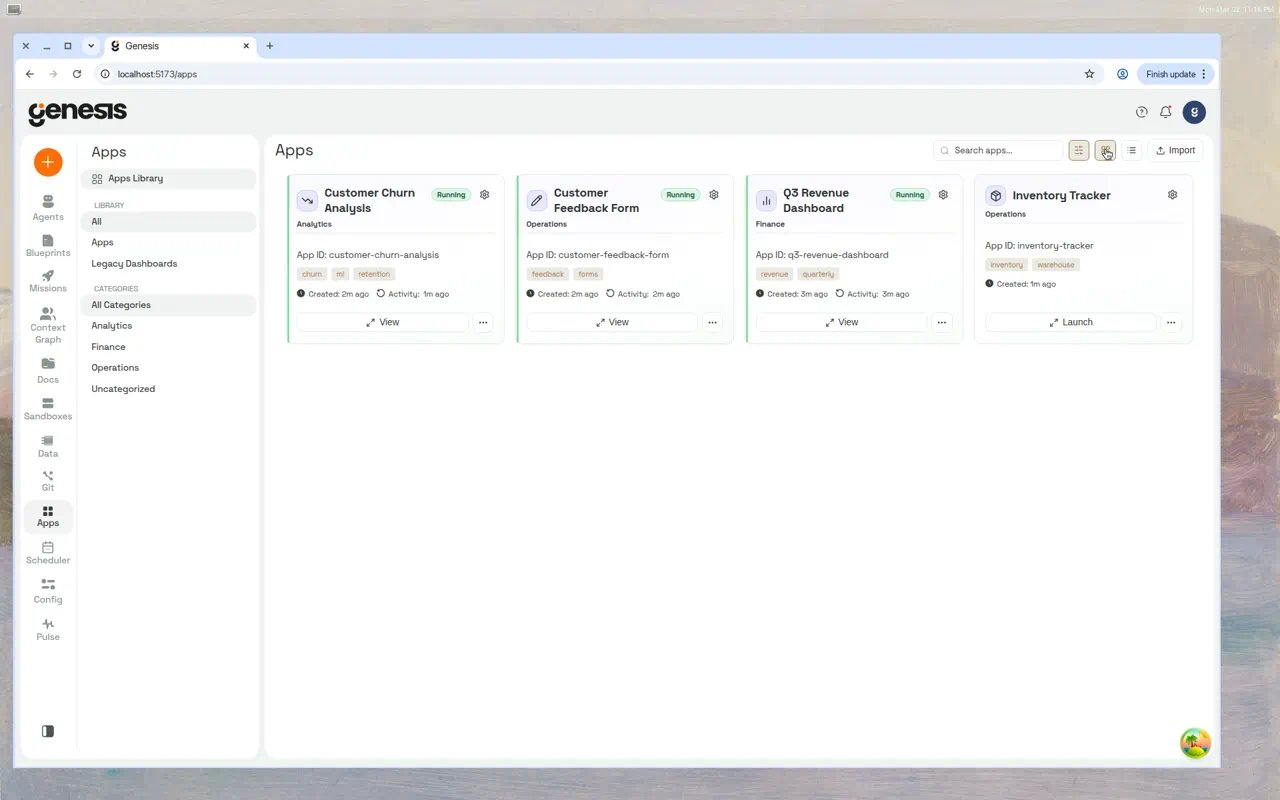
The **Apps Library** is the central hub for discovering, launching, and managing all your
apps. Navigate to it by clicking **Apps** in the left sidebar.
 ### Library sidebar
The inner sidebar on the Apps page provides quick filters:
| Filter | Shows |
| - | - |
| **All** | Every item — apps and legacy dashboards combined. |
| **Apps** | Only Genesis Apps. |
| **Legacy Dashboards** | Older SQL-based dashboards created before the Apps feature. |
Below the filters, the **Categories** section lists user-defined groupings such as
"Finance" or "Operations." Click a category to narrow the grid. The default category
for new apps is **Uncategorized**.
### Toolbar
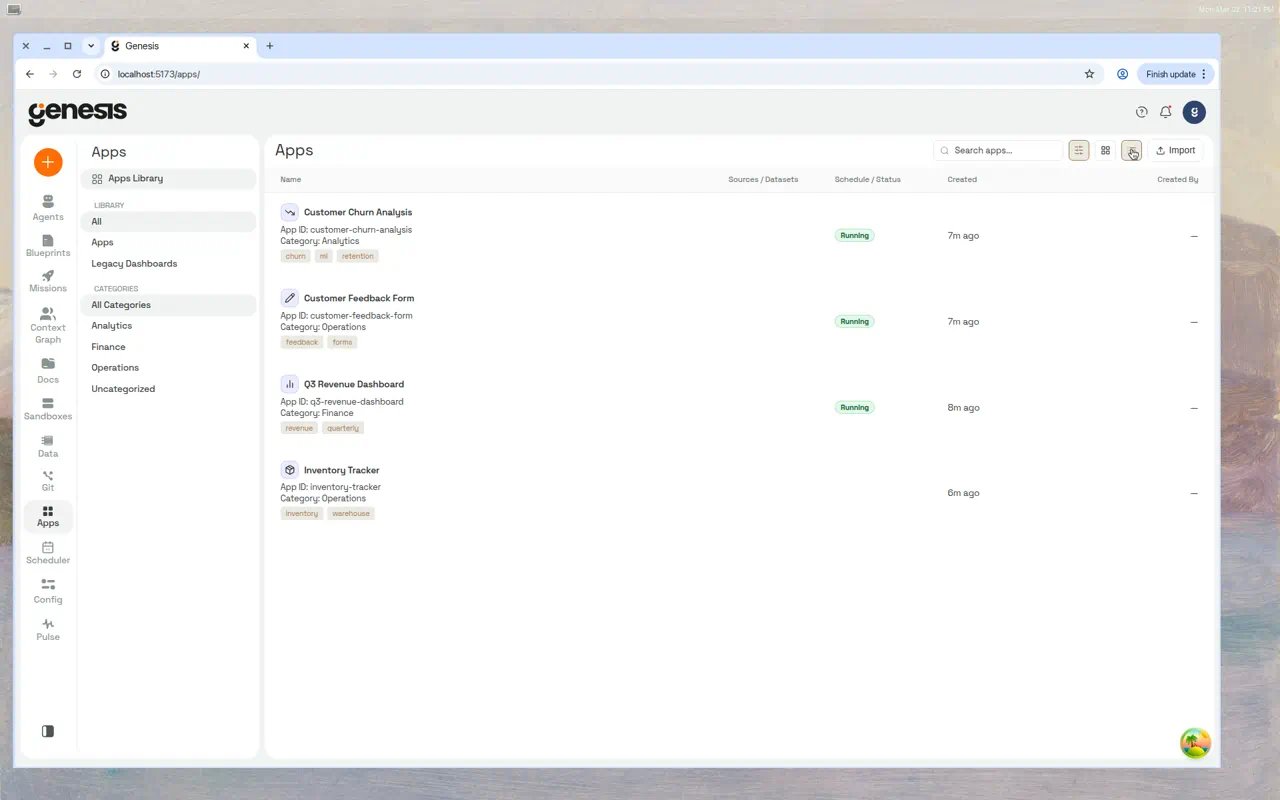
The toolbar across the top of the content area provides:
* **Search** — filter apps by name, category, or tag.
* **View toggle** — switch between compact table view, card grid view, and list view.
* **Import** — upload a ZIP archive exported from another Genesis instance.
* **Manage Sources** — open a modal (branch icon in the toolbar when the **Apps** filter is active) to register Git repositories that supply Apps to this instance (requires `manage_apps`). Hidden when `VITE_ENABLE_REMOTE_ARTIFACT_REGISTRY=false`.
### Library sidebar
The inner sidebar on the Apps page provides quick filters:
| Filter | Shows |
| - | - |
| **All** | Every item — apps and legacy dashboards combined. |
| **Apps** | Only Genesis Apps. |
| **Legacy Dashboards** | Older SQL-based dashboards created before the Apps feature. |
Below the filters, the **Categories** section lists user-defined groupings such as
"Finance" or "Operations." Click a category to narrow the grid. The default category
for new apps is **Uncategorized**.
### Toolbar
The toolbar across the top of the content area provides:
* **Search** — filter apps by name, category, or tag.
* **View toggle** — switch between compact table view, card grid view, and list view.
* **Import** — upload a ZIP archive exported from another Genesis instance.
* **Manage Sources** — open a modal (branch icon in the toolbar when the **Apps** filter is active) to register Git repositories that supply Apps to this instance (requires `manage_apps`). Hidden when `VITE_ENABLE_REMOTE_ARTIFACT_REGISTRY=false`.
 ### Category filtering
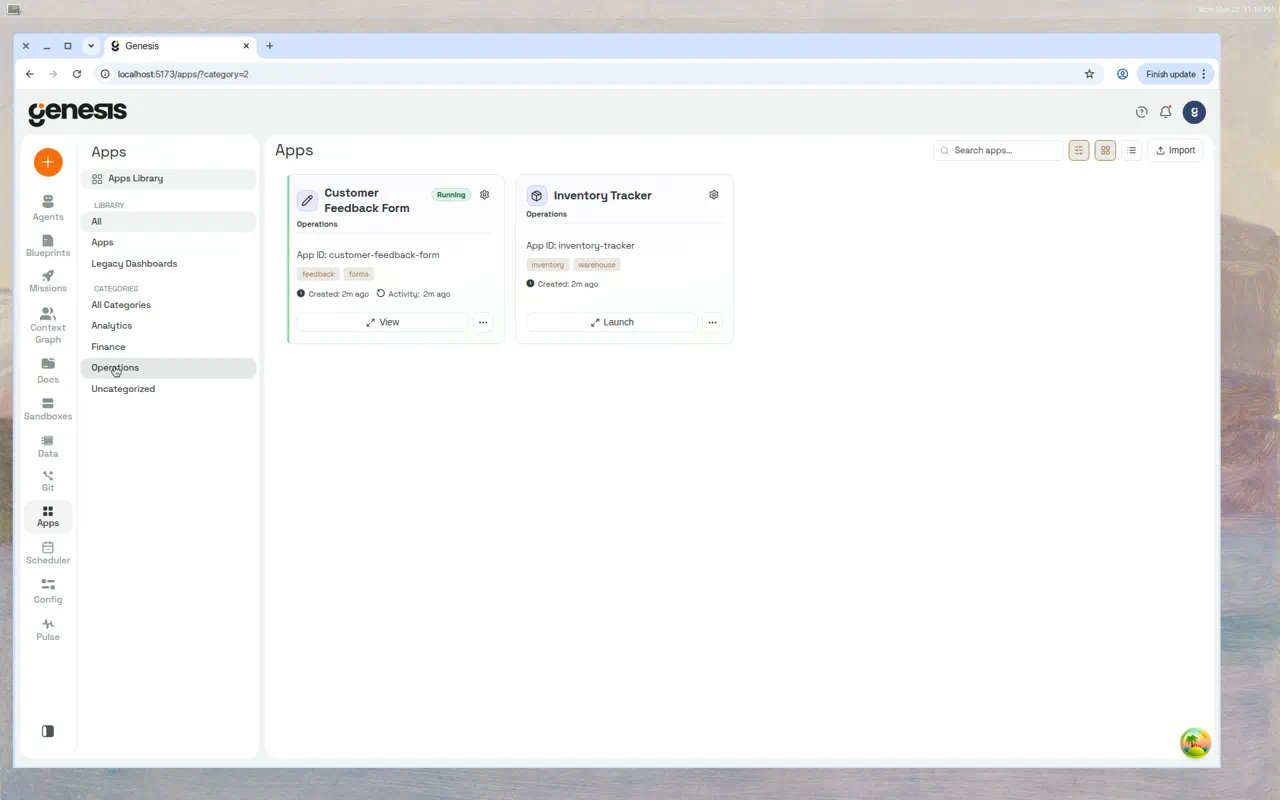
Click any category in the sidebar to filter the library. For example, filtering to
**Operations** shows only the Customer Feedback Form and Inventory Tracker:
### Category filtering
Click any category in the sidebar to filter the library. For example, filtering to
**Operations** shows only the Customer Feedback Form and Inventory Tracker:
 ### Sorting and grouping
In table and list views you can sort by name, created date, last activity, category, or
tags. You can also sort or group by **Project**, filter by **All Projects** or **No
Project**, and filter to show only **Running** or **Not Running** apps. Projects are
organizational groupings shared with Flows, Missions, and chats; see [Projects](/docs/User-Guide/Projects).
### Launch targets
An app can expose both a local runtime and a remote deployment at the same time. Cards and
table rows show separate local and remote status summaries when both targets exist.
The primary **Launch / View** action opens the most relevant target for the current state.
Use the ▾ chevron to choose explicitly between the local app, the Working Draft for
versioned apps, and any deployed Remote target available to you.
***
## Creating an app
### From chat
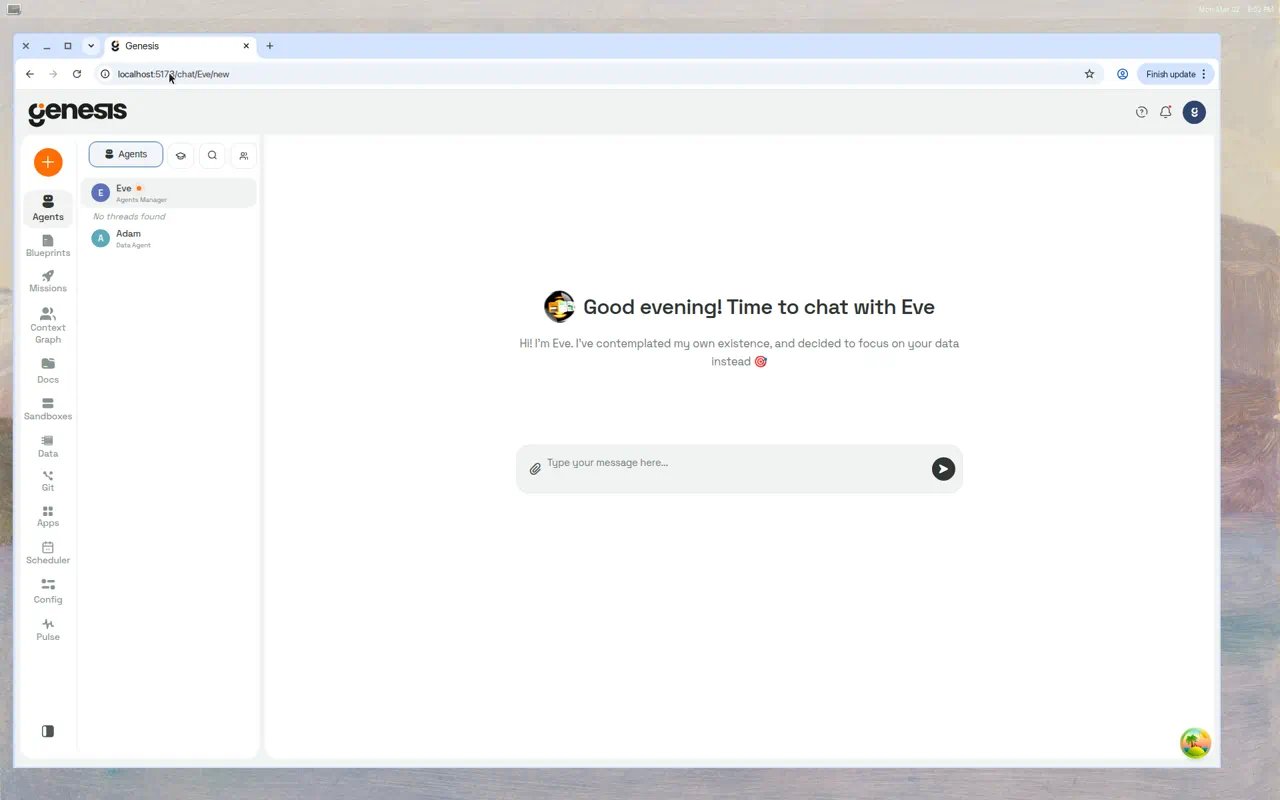
The most natural way to create an app is through conversation. Open a chat with an
agent — for example, **Eve** — and describe what you need.
### Sorting and grouping
In table and list views you can sort by name, created date, last activity, category, or
tags. You can also sort or group by **Project**, filter by **All Projects** or **No
Project**, and filter to show only **Running** or **Not Running** apps. Projects are
organizational groupings shared with Flows, Missions, and chats; see [Projects](/docs/User-Guide/Projects).
### Launch targets
An app can expose both a local runtime and a remote deployment at the same time. Cards and
table rows show separate local and remote status summaries when both targets exist.
The primary **Launch / View** action opens the most relevant target for the current state.
Use the ▾ chevron to choose explicitly between the local app, the Working Draft for
versioned apps, and any deployed Remote target available to you.
***
## Creating an app
### From chat
The most natural way to create an app is through conversation. Open a chat with an
agent — for example, **Eve** — and describe what you need.
 **Example prompts:**
* *"Build me a Dash dashboard showing monthly revenue by region from
ANALYTICS\_DB.PUBLIC.SALES\_SUMMARY."*
* *"Create a presentation deck summarizing our Q4 results with charts."*
* *"I need a simple Flask form to collect feedback from the team."*
The agent will:
1. Choose the right template based on your description.
2. Scaffold the app — writing `app.py`, `requirements.txt`, and any supporting files.
3. Register and start the app.
4. Embed it directly in the chat thread as an interactive iframe.
You can then interact with the app inline, expand it to full-screen, or ask the agent
to make changes.
For dashboard-style apps, the agent should not stop at the first working render.
Run `REVIEW` with `include_visual_description=true` and `verify_data=true`,
compare the rendered KPIs, grid columns, filters, chart labels, units, and time
range against your request or `REQUIREMENTS.md`, then fix any gaps and repeat the
audit. Limit this loop to 3 audit cycles. The final handoff should include the
deployed URL, screenshot artifact, verification evidence, the runtime env vars
used (at minimum `GENESIS_API_BASE_URL` and `GENESIS_REFRESH_SECONDS`), and any
remaining known gaps.
For data-backed dashboards, the first meaningful `START` / `RESTART` stays
gated until the agent records a valid `ATTEST_CHECKLIST` submission and one
clean `REVIEW`. Demo/sample dashboards can use sample mode, but
`source_choice`, `grain`, and `dataset_strategy` still require typed
evidence. For additive KPI dashboards, grain proof must come from either a
fresh exact structural profile (`grain_check` / `raw_vs_dedup`) or inline
`query_result` evidence with `total_rows` and `distinct_entities` aligned to
the grain decision.
### From the API
Create an app programmatically:
```bash theme={null}
curl -X POST http:///api/apps \
-H "Content-Type: application/json" \
-d '{
"app_id": "revenue-dashboard",
"runtime_type": "dash_dashboard",
"emoji": "📊",
"ttl_seconds": 3600,
"thread_id": ""
}'
```
#### Create request fields
| Field | Type | Default | Description |
| - | - | - | - |
| `app_id` | string or null | Auto-generated | Stable identifier. Lowercase alphanumeric + hyphens, max 64 chars. |
| `runtime_type` | string | `"python_template"` | Template to use: `python_template`, `dash_dashboard`, or `presentation_deck`. |
| `emoji` | string or null | null | Emoji icon shown in the library and chat embeds (max 16 chars). |
| `ttl_seconds` | integer or null | `3600` | Inactivity timeout in seconds (300–86400, the same bounds as an update). `null` = never auto-stop. |
| `embed_mode` | string | `"auto"` | Inline embed rendering: `auto`, `responsive`, or `scaled`. |
| `fullscreen_mode` | string | `"auto"` | Full-screen modal rendering: `auto`, `responsive`, `contain`, or `cover`. |
| `replace_existing` | boolean | `false` | If true, stops and removes any existing app with the same ID before creating. |
| `thread_id` | string or null | null | Chat thread to associate the app with. |
When an existing app belongs to another thread or has saved versions, tool-based
`replace_existing=true` requires explicit confirmation. Prefer editing the existing
app with `WRITE_FILE`/`RESTART`; only replace when the user has asked to wipe and
recreate that app ID.
Agents can unregister scratch apps with `apps_action(action="DELETE", app_id="...")`
or `DELETE_APP`. This soft-deletes by default: the app disappears from the Apps
Library, but source files remain on disk for recovery and audit. Use
`delete_workspace=true` only when the user explicitly wants those files removed.
***
## App templates
When creating an app, Genesis selects a template that provides the right scaffolding.
Five built-in templates are available:
### Dash Dashboard
**Runtime type:** `dash_dashboard`
Uses [Plotly Dash](https://dash.plotly.com/) with AG Grid. The scaffolded app includes
KPI cards, date and category filters, interactive charts, and a data grid — all wired to
fetch data through the Genesis API.
KPI cards are data-driven: when a dataset is bound, labels and values are derived from
the dataset itself (row count plus up to three numeric totals or distinct counts from
real column names) instead of hardcoded demo metrics such as "Total Customers" or
"Total Revenue". Currency-style formatting applies when column names suggest money
(for example, columns containing `revenue`, `amount`, or `sales`). Before data loads,
the UI shows neutral "Metric 1"–"Metric 4" placeholders.
**Dependencies:** `dash==2.18.2`, `plotly==5.24.1`, `pandas==2.2.3`, `requests==2.32.3`,
`dash-ag-grid==31.2.0`
**Default display modes:** `embed_mode: scaled`, `fullscreen_mode: contain`
Dash apps can keep using supported jsDelivr Bootstrap and Bootswatch URLs in
`external_stylesheets`. Genesis rewrites those supported remote stylesheets to
local app-served assets at start time, so shipped dashboards continue to render
in network-restricted deployments. Other custom remote stylesheet URLs are left
unchanged and still load from their original source.
For Flask and static HTML apps behind the Genesis proxy, asset paths must remain
proxy-safe. Avoid absolute `/static/...` links because they can escape
`/api/apps//proxy/`; prefer `./static/file.js`, Flask `url_for`, or a
server-injected `MICROAPP_BASE_PATH` URL. Capture diagnostics report failed
CSS/JS/image/font subresources when a page body renders but assets fail to load.
### Flask Basic
**Runtime type:** `python_template` (template name: `flask_basic`)
A minimal Flask app with proxy-safe routing, a health check at `/healthz`, and
server-side `genesis_llm_call(...)` / `genesis_llm_direct(...)` helpers for
app-scoped LLM calls (same contract as Dash). Organizational branding support
is included.
**Dependencies:** `flask`
### Flask CRUD Inbox
**Runtime type:** `python_template` (template name: `flask_scaffold`)
A full-featured Flask app with local SQLite storage, status tracking (new → triaged →
in progress → done → archived), JSON import/export, and a connectivity check endpoint.
Designed for ops management workflows.
**Dependencies:** `flask`
### Presentation Deck
**Runtime type:** `presentation_deck`
Renders narrated slide decks from a `presentation_deck.json` file. Features an animated
splash screen, slide-by-slide navigation, and optional text-to-speech narration via
OpenAI TTS. Supports live mode where the agent can update slides in real time.
**Dependencies:** Standard library only (optional OpenAI TTS)
In `presentation_deck.json`, use `t` for visible slide title, `s` for visible
subtitle/body HTML, and `n` for narration. Export and publish validation reject
slides that keep visible text only in alias fields such as `title`, `subtitle`,
`body`, `body_text`, `bullets`, `left_content`, `right_content`, or
`two_column`. A slide without text still needs visible `img`, `plotly`, `py`, or
staged `label`/`sub` content.
### Dataset Benchmark
**Runtime type:** `python_template` (template name: `dash_benchmark_query_vs_datasets`)
A diagnostic tool that compares latency between direct `/api/query` calls and the
Datasets SSRM API. Useful for optimizing data access patterns in production apps.
**Dependencies:** `dash`, `requests`
You can list all available scaffold templates by asking an agent:
*"What app templates are available?"* — the agent calls `apps_action(action="TEMPLATES")`
and returns the full list with descriptions and aliases.
***
## App lifecycle
### States
Every app progresses through these states:
| State | Description |
| - | - |
| `created` | Workspace exists but the app has never been started. |
| `starting` | Virtual environment is being created and dependencies are being installed. |
| `running` | The app process is live, its recorded internal port on `127.0.0.1` is reachable, and the proxy can forward requests. |
| `stopped` | Gracefully stopped — manually, by the agent, by inactivity timeout, or because Genesis restarted. Restarted apps may start automatically when restart recovery is enabled. |
| `crashed` | The process exited unexpectedly, or a stale `running` record was reconciled because the runtime port is no longer reachable (for example after a server restart). Check logs for the error. |
| `error` | A configuration or startup error prevented the app from launching. |
### Starting
When you start an app (or an agent starts it for you), the system:
1. Assigns a free port on `127.0.0.1`.
2. Creates a Python virtual environment in the workspace (if one doesn't exist).
3. Installs dependencies from `requirements.txt`.
4. Launches `app.py` as an isolated process.
5. Waits up to 6 seconds for the process to bind to its port.
6. Sets the status to `running` if the port is open, or `crashed` if the process exited.
`GET /api/apps/{app_id}/status` and versioned runtime status checks keep `running`
records honest: for `running`, Genesis verifies both that the stored PID still
exists and that the recorded internal port is reachable on `127.0.0.1` (0.25 s
timeout). PID alone is not sufficient — after a server or container restart,
recycled PIDs can make a dead runtime look alive while the port is gone. The
`starting` state still checks PID only because the runtime may not have bound
its port yet.
If the Apps Library refuses a **Start** or **Restart**, the toast includes both the
refusal reason and any actionable guidance returned by the server. Follow that
guidance before retrying; depending on the blocker, it can identify the file or
setup that needs repair, such as repairing or recreating a missing dataset.
### Stopping
Stopping sends `SIGTERM` to the process group. If the process doesn't exit within
2 seconds, `SIGKILL` is sent. The app's status becomes `stopped`.
### Restarting
Restart stops the app, then starts it again. This reloads all code changes and
reinstalls any modified dependencies.
After a successful restart, Genesis invalidates the Apps Library list cache so
the app's status and metadata are refreshed on the next library load.
### Starting after a Genesis restart
By default, Genesis starts apps that were running when the server stopped again
in the background, up to three at a time, once the server is back up. Control
this with `apps.autostart_after_restart` (`bool`, default: `true`). Set it to
`false` to leave every app stopped after a restart until someone starts it.
Apps stopped by a user, their inactivity timeout or maximum lifetime, or a crash
stay stopped; a versioned app whose running runtime crashed is started again.
If an automatic start fails, Genesis leaves the app stopped and shows why in its
status; it does not retry that failed start after the next restart. For the
Databricks App's environment-variable override, see [Genesis on Databricks](/docs/deployments/Databricks/Genesis-On-Databricks#genesis-as-a-databricks-app).
### Inactivity timeout
Apps automatically stop after a period of inactivity (no HTTP requests through the
proxy). The default timeout is **60 minutes** (`ttl_seconds: 3600`). The timer resets
every time the app receives a request.
Set `ttl_seconds` to `null` to disable auto-stop for always-on apps.
***
## Embedding apps in chat
Agents embed running apps in chat messages using a fenced code block:
````
```app revenue-dashboard
```
````
The chat UI renders the app as an interactive iframe with a header bar showing the app
name, status indicator, dataset count, and action buttons (reload, full-screen, open in
new tab). For **versioned** apps with a promoted production version, users with **edit**
or **manage** permission also see an **App version source** dropdown to switch between
**Production** (labeled with the current version number, for example `Production · v2`)
and **Working Draft**.
If the app is not running when the message is viewed, a placeholder appears with a
**Start** button.
To embed the working draft directly (instead of production), the agent can include the
`--working-copy` flag in the fenced block:
````
```app revenue-dashboard --working-copy
```
````
For versioned apps, **Reload** refreshes whichever version source is currently selected
in the dropdown. It does not reset the embed back to production. If you are viewing
**Production** or a deployed **Remote** target, unpublished **Working Draft** edits stay
invisible until you switch the dropdown to **Working Draft** (and reload). After you
confirm draft changes, publish them by promoting a saved version to production or
redeploying the remote target.
### Display modes
| Embed mode | Inline behavior |
| - | - |
| `auto` | Platform selects: `scaled` for Dash dashboards, `responsive` for others. |
| `responsive` | Fills available width; height adjusts to content. |
| `scaled` | Renders at a fixed desktop viewport (1280px) and scales down to fit. |
| Fullscreen mode | Modal behavior |
| - | - |
| `auto` | Platform selects: `contain` for Dash dashboards, `responsive` for others. |
| `responsive` | Fills the entire modal. |
| `contain` | Desktop viewport centered in the modal with padding. |
| `cover` | Desktop viewport stretched to fill the modal. |
### Full-screen view
Clicking the expand icon (or clicking the app card in the library) opens the app in a
full-screen view:
**Example prompts:**
* *"Build me a Dash dashboard showing monthly revenue by region from
ANALYTICS\_DB.PUBLIC.SALES\_SUMMARY."*
* *"Create a presentation deck summarizing our Q4 results with charts."*
* *"I need a simple Flask form to collect feedback from the team."*
The agent will:
1. Choose the right template based on your description.
2. Scaffold the app — writing `app.py`, `requirements.txt`, and any supporting files.
3. Register and start the app.
4. Embed it directly in the chat thread as an interactive iframe.
You can then interact with the app inline, expand it to full-screen, or ask the agent
to make changes.
For dashboard-style apps, the agent should not stop at the first working render.
Run `REVIEW` with `include_visual_description=true` and `verify_data=true`,
compare the rendered KPIs, grid columns, filters, chart labels, units, and time
range against your request or `REQUIREMENTS.md`, then fix any gaps and repeat the
audit. Limit this loop to 3 audit cycles. The final handoff should include the
deployed URL, screenshot artifact, verification evidence, the runtime env vars
used (at minimum `GENESIS_API_BASE_URL` and `GENESIS_REFRESH_SECONDS`), and any
remaining known gaps.
For data-backed dashboards, the first meaningful `START` / `RESTART` stays
gated until the agent records a valid `ATTEST_CHECKLIST` submission and one
clean `REVIEW`. Demo/sample dashboards can use sample mode, but
`source_choice`, `grain`, and `dataset_strategy` still require typed
evidence. For additive KPI dashboards, grain proof must come from either a
fresh exact structural profile (`grain_check` / `raw_vs_dedup`) or inline
`query_result` evidence with `total_rows` and `distinct_entities` aligned to
the grain decision.
### From the API
Create an app programmatically:
```bash theme={null}
curl -X POST http:///api/apps \
-H "Content-Type: application/json" \
-d '{
"app_id": "revenue-dashboard",
"runtime_type": "dash_dashboard",
"emoji": "📊",
"ttl_seconds": 3600,
"thread_id": ""
}'
```
#### Create request fields
| Field | Type | Default | Description |
| - | - | - | - |
| `app_id` | string or null | Auto-generated | Stable identifier. Lowercase alphanumeric + hyphens, max 64 chars. |
| `runtime_type` | string | `"python_template"` | Template to use: `python_template`, `dash_dashboard`, or `presentation_deck`. |
| `emoji` | string or null | null | Emoji icon shown in the library and chat embeds (max 16 chars). |
| `ttl_seconds` | integer or null | `3600` | Inactivity timeout in seconds (300–86400, the same bounds as an update). `null` = never auto-stop. |
| `embed_mode` | string | `"auto"` | Inline embed rendering: `auto`, `responsive`, or `scaled`. |
| `fullscreen_mode` | string | `"auto"` | Full-screen modal rendering: `auto`, `responsive`, `contain`, or `cover`. |
| `replace_existing` | boolean | `false` | If true, stops and removes any existing app with the same ID before creating. |
| `thread_id` | string or null | null | Chat thread to associate the app with. |
When an existing app belongs to another thread or has saved versions, tool-based
`replace_existing=true` requires explicit confirmation. Prefer editing the existing
app with `WRITE_FILE`/`RESTART`; only replace when the user has asked to wipe and
recreate that app ID.
Agents can unregister scratch apps with `apps_action(action="DELETE", app_id="...")`
or `DELETE_APP`. This soft-deletes by default: the app disappears from the Apps
Library, but source files remain on disk for recovery and audit. Use
`delete_workspace=true` only when the user explicitly wants those files removed.
***
## App templates
When creating an app, Genesis selects a template that provides the right scaffolding.
Five built-in templates are available:
### Dash Dashboard
**Runtime type:** `dash_dashboard`
Uses [Plotly Dash](https://dash.plotly.com/) with AG Grid. The scaffolded app includes
KPI cards, date and category filters, interactive charts, and a data grid — all wired to
fetch data through the Genesis API.
KPI cards are data-driven: when a dataset is bound, labels and values are derived from
the dataset itself (row count plus up to three numeric totals or distinct counts from
real column names) instead of hardcoded demo metrics such as "Total Customers" or
"Total Revenue". Currency-style formatting applies when column names suggest money
(for example, columns containing `revenue`, `amount`, or `sales`). Before data loads,
the UI shows neutral "Metric 1"–"Metric 4" placeholders.
**Dependencies:** `dash==2.18.2`, `plotly==5.24.1`, `pandas==2.2.3`, `requests==2.32.3`,
`dash-ag-grid==31.2.0`
**Default display modes:** `embed_mode: scaled`, `fullscreen_mode: contain`
Dash apps can keep using supported jsDelivr Bootstrap and Bootswatch URLs in
`external_stylesheets`. Genesis rewrites those supported remote stylesheets to
local app-served assets at start time, so shipped dashboards continue to render
in network-restricted deployments. Other custom remote stylesheet URLs are left
unchanged and still load from their original source.
For Flask and static HTML apps behind the Genesis proxy, asset paths must remain
proxy-safe. Avoid absolute `/static/...` links because they can escape
`/api/apps//proxy/`; prefer `./static/file.js`, Flask `url_for`, or a
server-injected `MICROAPP_BASE_PATH` URL. Capture diagnostics report failed
CSS/JS/image/font subresources when a page body renders but assets fail to load.
### Flask Basic
**Runtime type:** `python_template` (template name: `flask_basic`)
A minimal Flask app with proxy-safe routing, a health check at `/healthz`, and
server-side `genesis_llm_call(...)` / `genesis_llm_direct(...)` helpers for
app-scoped LLM calls (same contract as Dash). Organizational branding support
is included.
**Dependencies:** `flask`
### Flask CRUD Inbox
**Runtime type:** `python_template` (template name: `flask_scaffold`)
A full-featured Flask app with local SQLite storage, status tracking (new → triaged →
in progress → done → archived), JSON import/export, and a connectivity check endpoint.
Designed for ops management workflows.
**Dependencies:** `flask`
### Presentation Deck
**Runtime type:** `presentation_deck`
Renders narrated slide decks from a `presentation_deck.json` file. Features an animated
splash screen, slide-by-slide navigation, and optional text-to-speech narration via
OpenAI TTS. Supports live mode where the agent can update slides in real time.
**Dependencies:** Standard library only (optional OpenAI TTS)
In `presentation_deck.json`, use `t` for visible slide title, `s` for visible
subtitle/body HTML, and `n` for narration. Export and publish validation reject
slides that keep visible text only in alias fields such as `title`, `subtitle`,
`body`, `body_text`, `bullets`, `left_content`, `right_content`, or
`two_column`. A slide without text still needs visible `img`, `plotly`, `py`, or
staged `label`/`sub` content.
### Dataset Benchmark
**Runtime type:** `python_template` (template name: `dash_benchmark_query_vs_datasets`)
A diagnostic tool that compares latency between direct `/api/query` calls and the
Datasets SSRM API. Useful for optimizing data access patterns in production apps.
**Dependencies:** `dash`, `requests`
You can list all available scaffold templates by asking an agent:
*"What app templates are available?"* — the agent calls `apps_action(action="TEMPLATES")`
and returns the full list with descriptions and aliases.
***
## App lifecycle
### States
Every app progresses through these states:
| State | Description |
| - | - |
| `created` | Workspace exists but the app has never been started. |
| `starting` | Virtual environment is being created and dependencies are being installed. |
| `running` | The app process is live, its recorded internal port on `127.0.0.1` is reachable, and the proxy can forward requests. |
| `stopped` | Gracefully stopped — manually, by the agent, by inactivity timeout, or because Genesis restarted. Restarted apps may start automatically when restart recovery is enabled. |
| `crashed` | The process exited unexpectedly, or a stale `running` record was reconciled because the runtime port is no longer reachable (for example after a server restart). Check logs for the error. |
| `error` | A configuration or startup error prevented the app from launching. |
### Starting
When you start an app (or an agent starts it for you), the system:
1. Assigns a free port on `127.0.0.1`.
2. Creates a Python virtual environment in the workspace (if one doesn't exist).
3. Installs dependencies from `requirements.txt`.
4. Launches `app.py` as an isolated process.
5. Waits up to 6 seconds for the process to bind to its port.
6. Sets the status to `running` if the port is open, or `crashed` if the process exited.
`GET /api/apps/{app_id}/status` and versioned runtime status checks keep `running`
records honest: for `running`, Genesis verifies both that the stored PID still
exists and that the recorded internal port is reachable on `127.0.0.1` (0.25 s
timeout). PID alone is not sufficient — after a server or container restart,
recycled PIDs can make a dead runtime look alive while the port is gone. The
`starting` state still checks PID only because the runtime may not have bound
its port yet.
If the Apps Library refuses a **Start** or **Restart**, the toast includes both the
refusal reason and any actionable guidance returned by the server. Follow that
guidance before retrying; depending on the blocker, it can identify the file or
setup that needs repair, such as repairing or recreating a missing dataset.
### Stopping
Stopping sends `SIGTERM` to the process group. If the process doesn't exit within
2 seconds, `SIGKILL` is sent. The app's status becomes `stopped`.
### Restarting
Restart stops the app, then starts it again. This reloads all code changes and
reinstalls any modified dependencies.
After a successful restart, Genesis invalidates the Apps Library list cache so
the app's status and metadata are refreshed on the next library load.
### Starting after a Genesis restart
By default, Genesis starts apps that were running when the server stopped again
in the background, up to three at a time, once the server is back up. Control
this with `apps.autostart_after_restart` (`bool`, default: `true`). Set it to
`false` to leave every app stopped after a restart until someone starts it.
Apps stopped by a user, their inactivity timeout or maximum lifetime, or a crash
stay stopped; a versioned app whose running runtime crashed is started again.
If an automatic start fails, Genesis leaves the app stopped and shows why in its
status; it does not retry that failed start after the next restart. For the
Databricks App's environment-variable override, see [Genesis on Databricks](/docs/deployments/Databricks/Genesis-On-Databricks#genesis-as-a-databricks-app).
### Inactivity timeout
Apps automatically stop after a period of inactivity (no HTTP requests through the
proxy). The default timeout is **60 minutes** (`ttl_seconds: 3600`). The timer resets
every time the app receives a request.
Set `ttl_seconds` to `null` to disable auto-stop for always-on apps.
***
## Embedding apps in chat
Agents embed running apps in chat messages using a fenced code block:
````
```app revenue-dashboard
```
````
The chat UI renders the app as an interactive iframe with a header bar showing the app
name, status indicator, dataset count, and action buttons (reload, full-screen, open in
new tab). For **versioned** apps with a promoted production version, users with **edit**
or **manage** permission also see an **App version source** dropdown to switch between
**Production** (labeled with the current version number, for example `Production · v2`)
and **Working Draft**.
If the app is not running when the message is viewed, a placeholder appears with a
**Start** button.
To embed the working draft directly (instead of production), the agent can include the
`--working-copy` flag in the fenced block:
````
```app revenue-dashboard --working-copy
```
````
For versioned apps, **Reload** refreshes whichever version source is currently selected
in the dropdown. It does not reset the embed back to production. If you are viewing
**Production** or a deployed **Remote** target, unpublished **Working Draft** edits stay
invisible until you switch the dropdown to **Working Draft** (and reload). After you
confirm draft changes, publish them by promoting a saved version to production or
redeploying the remote target.
### Display modes
| Embed mode | Inline behavior |
| - | - |
| `auto` | Platform selects: `scaled` for Dash dashboards, `responsive` for others. |
| `responsive` | Fills available width; height adjusts to content. |
| `scaled` | Renders at a fixed desktop viewport (1280px) and scales down to fit. |
| Fullscreen mode | Modal behavior |
| - | - |
| `auto` | Platform selects: `contain` for Dash dashboards, `responsive` for others. |
| `responsive` | Fills the entire modal. |
| `contain` | Desktop viewport centered in the modal with padding. |
| `cover` | Desktop viewport stretched to fill the modal. |
### Full-screen view
Clicking the expand icon (or clicking the app card in the library) opens the app in a
full-screen view:
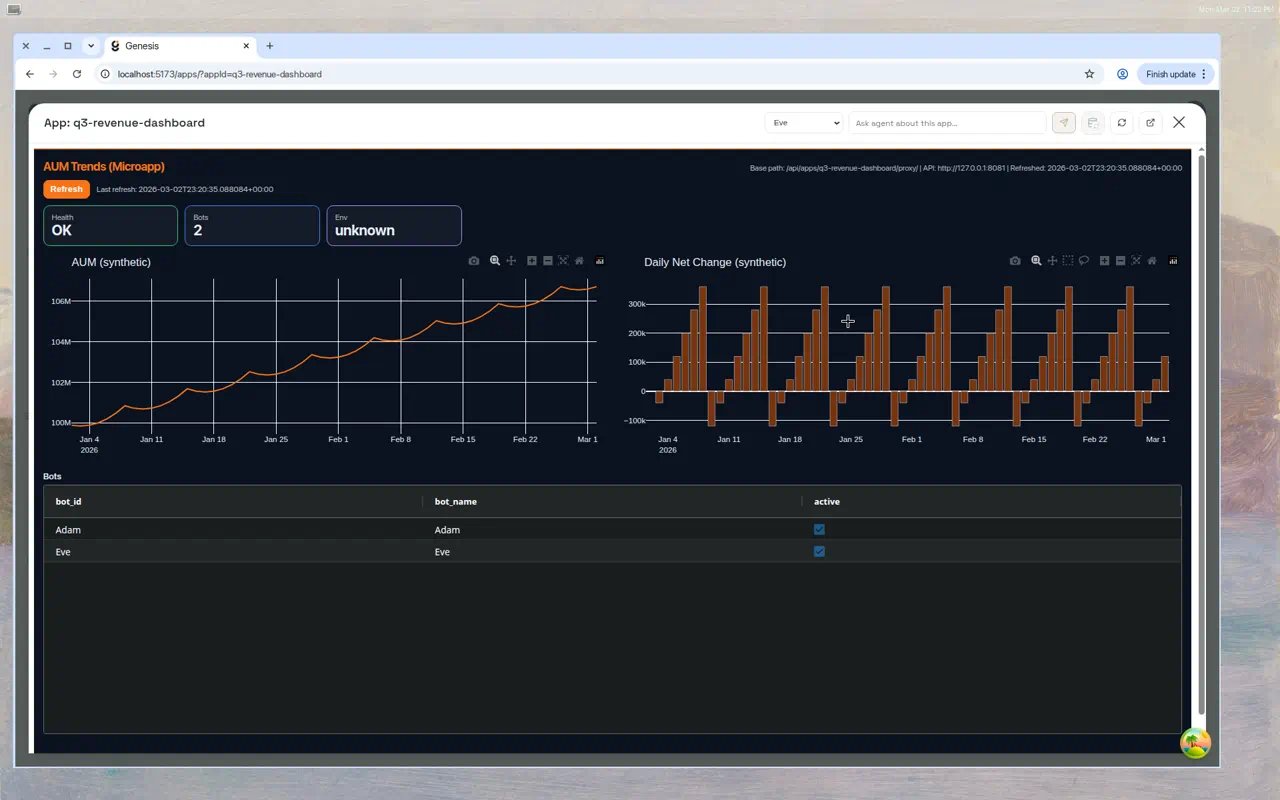 The full-screen view includes:
* The same **App version source** dropdown as inline chat embeds (for versioned apps
when you have edit or manage permission).
* Action buttons: reload, dataset refresh, schedule, open in new tab, open in Git.
* A **Chat** toggle that opens a resizable side panel with the conversation thread —
you can ask the agent to make changes while viewing the app.
Use **Open in new tab** to get a full-screen app URL you can share. On deployments
using Auth0 or OIDC, a recipient who is not signed in is sent through sign-in and
returned to the app; they still need their own app view access. The link does not
share your session or access grants.
***
## Dataset bindings
Apps can query Snowflake data through the **Datasets API**, a fast cached layer that
serves pre-materialized SQLite snapshots. This avoids hitting Snowflake on every page
load and is the recommended approach for data-heavy dashboards.
The full-screen view includes:
* The same **App version source** dropdown as inline chat embeds (for versioned apps
when you have edit or manage permission).
* Action buttons: reload, dataset refresh, schedule, open in new tab, open in Git.
* A **Chat** toggle that opens a resizable side panel with the conversation thread —
you can ask the agent to make changes while viewing the app.
Use **Open in new tab** to get a full-screen app URL you can share. On deployments
using Auth0 or OIDC, a recipient who is not signed in is sent through sign-in and
returned to the app; they still need their own app view access. The link does not
share your session or access grants.
***
## Dataset bindings
Apps can query Snowflake data through the **Datasets API**, a fast cached layer that
serves pre-materialized SQLite snapshots. This avoids hitting Snowflake on every page
load and is the recommended approach for data-heavy dashboards.
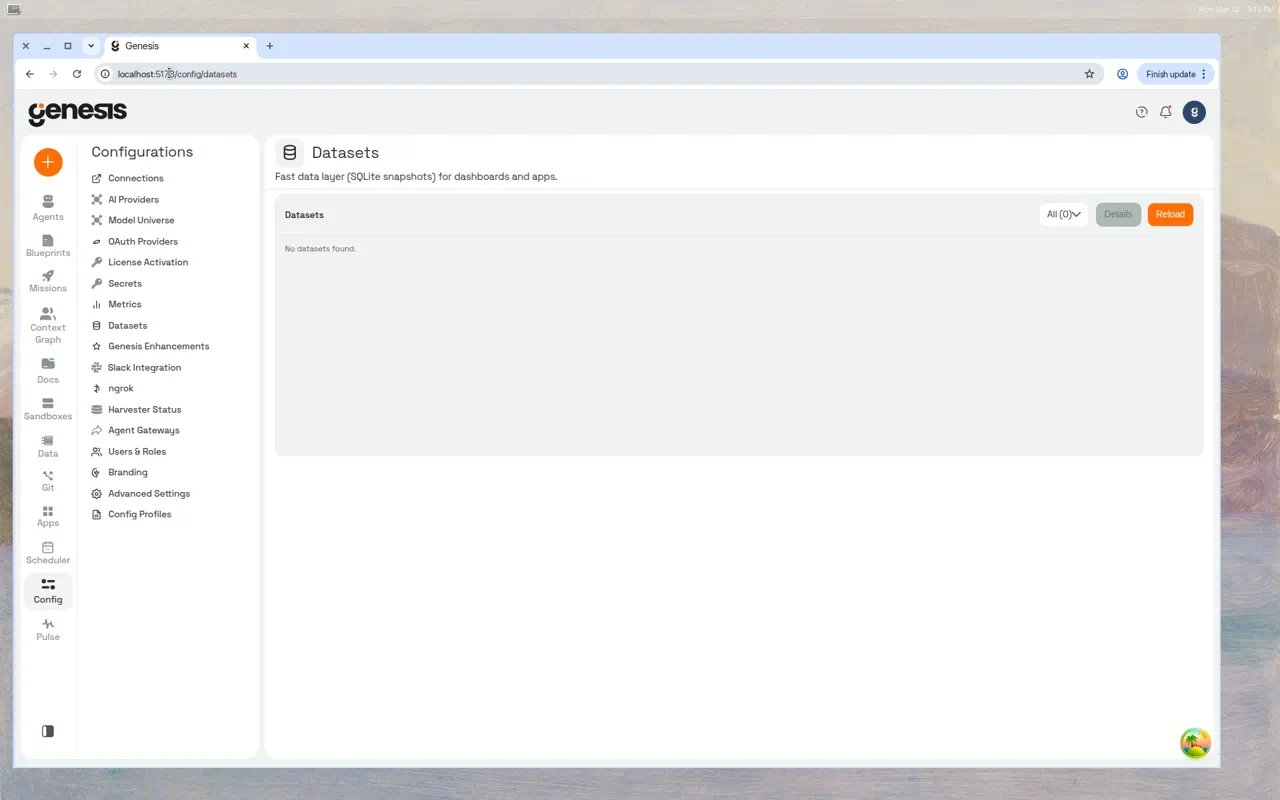 ### Binding a dataset to an app
1. **Create a dataset** using the Datasets page under **Config → Datasets**, or ask the
agent: *"Create a dataset from ANALYTICS\_DB.PUBLIC.SALES\_SUMMARY."*
2. **Add a `genesis_datasets.json` file** to the app's workspace:
```json theme={null}
{
"dataset_ids": ["dataset-abc-123"],
"actions": ["read", "ssrm"]
}
```
Supported actions: `read` (fetch rows), `ssrm` (AG Grid Server-Side Row Model).
`connection_ids` is optional. When provided as an array of connection IDs in
`genesis_datasets.json`, `/api/query` requests made with `GENESIS_APP_TOKEN` are
limited to those connections. If `connection_ids` is omitted or empty, Genesis
falls back to the delegated user's normal connection permissions.
3. **Restart the app** so it picks up the binding and receives a fresh `GENESIS_APP_TOKEN`.
Genesis preflights `genesis_datasets.json` on `START` and `RESTART`. If the
bindings file is invalid, a bound dataset has been deleted, or the app's
startup identity can no longer read one of the bound datasets, startup is
blocked until you repair the binding. API responses surface this as
`validation.missing_dataset_ids` and `validation.forbidden_dataset_ids` when
available.
### Querying data from app code
On startup, Genesis injects credentials into the app's environment. Use them to call the
Datasets API:
```python theme={null}
import os
import requests
API_BASE = os.environ["GENESIS_API_BASE_URL"]
TOKEN = os.environ["GENESIS_APP_TOKEN"]
response = requests.post(
f"{API_BASE}/api/datasets/{dataset_id}/tables/{table}/rows",
headers={"X-Genesis-App-Token": TOKEN},
json={"limit": 1000, "offset": 0}
)
data = response.json()
```
The API supports pagination up to 10,000 rows per request via `limit` and `offset`.
When an app has dataset bindings, proxied browser requests can also reach the
app with an incoming `X-Genesis-App-Token` header that Genesis minted for the
current viewer. Use that request header when a request handler needs the
active viewer's dataset or `/api/query` scope. Keep using
`GENESIS_APP_TOKEN` for startup work, background jobs, or other app-originated
API calls outside a viewer request.
### App token lifetime and refresh
Two different tokens travel under the `X-Genesis-App-Token` header, and they
have very different lifetimes:
| Token | Where it comes from | Lifetime | Identity |
| - | - | - | - |
| `GENESIS_APP_TOKEN` environment variable | Minted once when the app process starts | **6 hours** | The app's creator |
| Header on a proxied browser request | Minted per request by the proxy | **60 seconds** | The current viewer |
The environment token is reissued **on every process start** — an explicit
START, a RESTART, and an autostart after an idle-TTL stop all mint a fresh one.
Nothing reissues it while a process keeps running, so an app that stays up
longer than six hours will see `401` on Genesis API calls unless it refreshes.
Two ways to refresh without a restart:
* **Automatic.** Genesis patches `requests` and `urllib` inside the app process
so calls to `GENESIS_API_BASE_URL` swap in a fresh token roughly ten minutes
before the current one expires. This needs no app code, applies to every app
regardless of runtime type or versioning mode, and reaches already-deployed
apps on their next restart. Set
`GENESIS_RUNTIME_APP_TOKEN_AUTO_ROTATE_ENABLED=false` to turn it off.
* **Explicit.** `POST /api/apps/{app_id}/app-token/rotate`, sending the current
token, returns a fresh one. The endpoint accepts a token that has been expired
for less than 48 hours — exactly 48 hours is already outside the window — so a
worker that has already started failing can still recover. The new token lasts
6 hours by default; pass `ttl_seconds` to choose another value between 300 and
86400\.
Do not set `max_lifetime_seconds: -1` to keep a long-lived app from expiring.
Pinning the app alive removes the idle-stop/autostart cycle that reissues the
token, which turns an intermittent failure into a permanent one.
### Diagnosing a data-layer auth failure
An app whose token has been refused does not crash — it catches the `401`,
renders empty, and still answers its viewer with HTTP 200. Two signals separate
that from a genuine data problem:
* `STATUS` reports `health: "degraded"` while a refusal is recent, alongside a
`last_api_error` object naming the method, path, status code and how many
times it happened. `status` stays `running`, because the process really is.
* `LOGS` carries a `[GENESIS_APP_API]` line for each refused outbound call —
method, path, status code and elapsed time — written by the app process
itself. Successful calls are logged at INFO, so they appear only when the app
configures logging of its own.
A refusal caused by the *credential* — an expired or rejected token — clears
when the app is next started and issued a fresh one. A refusal caused by *scope*
— a live token calling an endpoint outside the app-token contract — deliberately
does not: the same scoped token is refused again on the next start, so it stays
until the capability contract or the call site changes.
### Refreshing dataset snapshots
Dataset snapshots are point-in-time copies. To pick up new data:
* Click the **refresh** icon on the app card or full-screen header.
* Call `POST /api/apps/{app_id}/datasets/refresh` to refresh all bound datasets.
* Call `POST /api/apps/{app_id}/datasets/{dataset_id}/refresh` for a single dataset.
* Schedule automatic refreshes from the full-screen view.
***
## Environment variables
Every running app receives these environment variables:
| Variable | Value |
| - | - |
| `MICROAPP_HOST` | `127.0.0.1` — the app must bind to this address. |
| `MICROAPP_PORT` | Dynamically assigned port — the app must listen here. |
| `MICROAPP_BASE_PATH` | Proxy prefix. Local apps use `/api/apps//proxy/`; remote deployments use `/api/apps//remote/proxy/`. |
| `MICROAPP_WORKSPACE` | Absolute path to the app's workspace directory. |
| `MICROAPP_SOURCE_DIR` | Path to source files (may differ from workspace in SPCS). |
| `MICROAPP_RUNTIME_DIR` | Path to the runtime overlay directory. |
| `MICROAPP_STATE_DIR` | Persistent state directory that survives restarts. |
| `GENESIS_API_BASE_URL` | Base URL for Genesis API calls from the app. |
| `GENESIS_API_APP_LLM_URL` | App-scoped orchestrated chat endpoint: `POST /api/apps//llm/call`. |
| `GENESIS_API_APP_LLM_DIRECT_URL` | App-scoped direct completion endpoint: `POST /api/apps//llm/direct`. |
| `GENESIS_APP_TOKEN` | Auth token for app-originated Genesis API calls at startup or in background work — send as `X-Genesis-App-Token` header. Minted with a 6-hour TTL at every process start; see [App token lifetime and refresh](#app-token-lifetime-and-refresh). Proxied browser requests can separately receive a viewer-scoped `X-Genesis-App-Token` header when dataset bindings are enabled. |
| `GENESIS_DATASET_IDS_JSON` | JSON array of bound dataset IDs. |
| `GENESIS_DATASET_ACTIONS_JSON` | JSON array of permitted actions. |
Official Genesis scaffolds may also read a small set of documented helper vars such as
`GENESIS_CONNECTION_ID`, `GENESIS_LLM_BOT_ID`, `GENESIS_LLM_MODEL_TIER`,
`GENESIS_LLM_PROVIDER`, `GENESIS_DATASET_TARGET_TYPE`, `GENESIS_DATASET_TARGET_NAME`,
`GENESIS_DEBUG_DATA_PREVIEW`, and `GENESIS_DEBUG_DATA_PREVIEW_ROWS`. Apps should treat
those as optional build/runtime helpers, not as a way to reach platform secrets or
undocumented host configuration.
The app server token reaches only a fixed set of platform API routes. At
authoring or start-up time, call `GET /api/apps/{app_id}/capabilities` (with
`X-Genesis-App-Token` or any authenticated session) to fetch the current
manifest instead of guessing paths. The response includes `version` (bump when
entries change), `capabilities` (`route`, advisory `methods`, and
`description` for each allowed path), and `uncovered_route_guidance` for APIs
outside the list. Path-level enforcement ignores `methods`; anything not in the
manifest is refused on server-side calls.
When an app needs model output, call the app-scoped Genesis routes with
`X-Genesis-App-Token`: `POST /api/apps/{app_id}/llm/call` for orchestrated chat
turns or `POST /api/apps/{app_id}/llm/direct` for one-shot base completions.
Official Dash and **Flask Basic** scaffolds expose `genesis_llm_call(...)` and
`genesis_llm_direct(...)`; omit `model_tier` and `provider` to inherit the app
authoring-thread defaults when available.
### Forward vs side-channel model output
Use **forward** LLM calls when structured model output is the next input —
classification labels, extracted fields, or JSON that a later route, query, or
UI state must parse. Return that output in the HTTP response body or persist it
where the product path reads it back.
Use **side-channel** calls when the model text is enrichment only — summaries,
rationale blurbs, or optional columns that no branch requires. Keep navigation,
security, and core control flow in ordinary code so the pipeline still succeeds
if enrichment is missing.
Never call Genesis LLM routes from browser JavaScript; proxy through your app
server with `GENESIS_APP_TOKEN`. For `/llm/direct`, put JSON instructions in
`prompt` and parse the `response` string — this route has no `response_format`
body field. A `422` response usually means request validation failed (empty
`prompt`, invalid `model_tier`, or `timeout_seconds` outside `5`–`600`).
**Never hard-code ports.** Always bind to `MICROAPP_HOST`:`MICROAPP_PORT`.
**Handle the proxy prefix:**
* **Dash apps:** Set both `requests_pathname_prefix` and `routes_pathname_prefix` to
the value of `MICROAPP_BASE_PATH`.
* **Flask apps:** Mount your Blueprint at `url_prefix=MICROAPP_BASE_PATH.rstrip('/')`.
Failing to handle the prefix causes 404 errors on all app routes.
### Security isolation
Apps run with a sanitized environment. The following categories of parent environment
variables are **stripped** before the app process starts: `OPENAI_*`, `ANTHROPIC_*`,
`AWS_SECRET*`, `AZURE_*`, `LITELLM_*`, `SNOWFLAKE_*`, and others.
`GENESIS_APP_TOKEN` is app-scoped rather than a browser session token. For remote app
deployments, Genesis mints it with the delegated runtime user identity so supported
app API calls continue to work when platform auth is enabled. Apps should use
`GENESIS_APP_TOKEN` for all API access rather than attempting direct database
connections.
When the Genesis server runs as root, each app is launched under a dedicated Linux user
(`microapp_`) with `ulimit` constraints (1024 open files, 256 processes) and
`umask 077` for workspace isolation.
***
## Metadata and organization
Each app has metadata that controls how it appears in the library.
| Field | Type | Constraints | Description |
| - | - | - | - |
| `title` (alias `display_name`) | string | Max 128 chars | Human-readable title. Send either key; sending both with different values is refused. |
| `emoji` | string | Max 16 chars | Icon shown alongside the title. |
| `category_id` / `category_name` | int / string | Max 128 chars | Library grouping. New categories are created on first use. |
| `tags` | list of strings | — | Free-form labels for search and filtering. |
| `project_id` | string or null | — | Organizational Project assignment. Projects group related Apps without changing their tags. Set it with `PATCH /api/apps/{app_id}/project`, not the metadata endpoint. |
| `published` | boolean | — | `true` = visible in library. `false` = draft (owner-only). |
| `thumbnail_hidden` | boolean | — | When true, hides the screenshot thumbnail. |
| `embed_mode` | string | `auto`, `responsive`, `scaled` | Controls inline embed rendering. |
| `fullscreen_mode` | string | `auto`, `responsive`, `contain`, `cover` | Controls full-screen modal rendering. |
| `ttl_seconds` | integer or null | 300–86400 | Idle time before the app is stopped automatically. `null` means never auto-stop; leaving it out keeps the current value. The agent tool's `UPDATE_RUNTIME_TTL` takes the same bounds, with `-1` for never. |
Update metadata via `PATCH /api/apps/{app_id}/metadata` or through the **Edit Metadata**
modal. The endpoint accepts `title` (or `display_name`), `emoji`, `thumbnail_hidden`,
`category_id`, `category_name` (or the deprecated `category`), `tags`, `embed_mode`,
`fullscreen_mode`, `published` and `ttl_seconds`. Any other field returns **422** naming
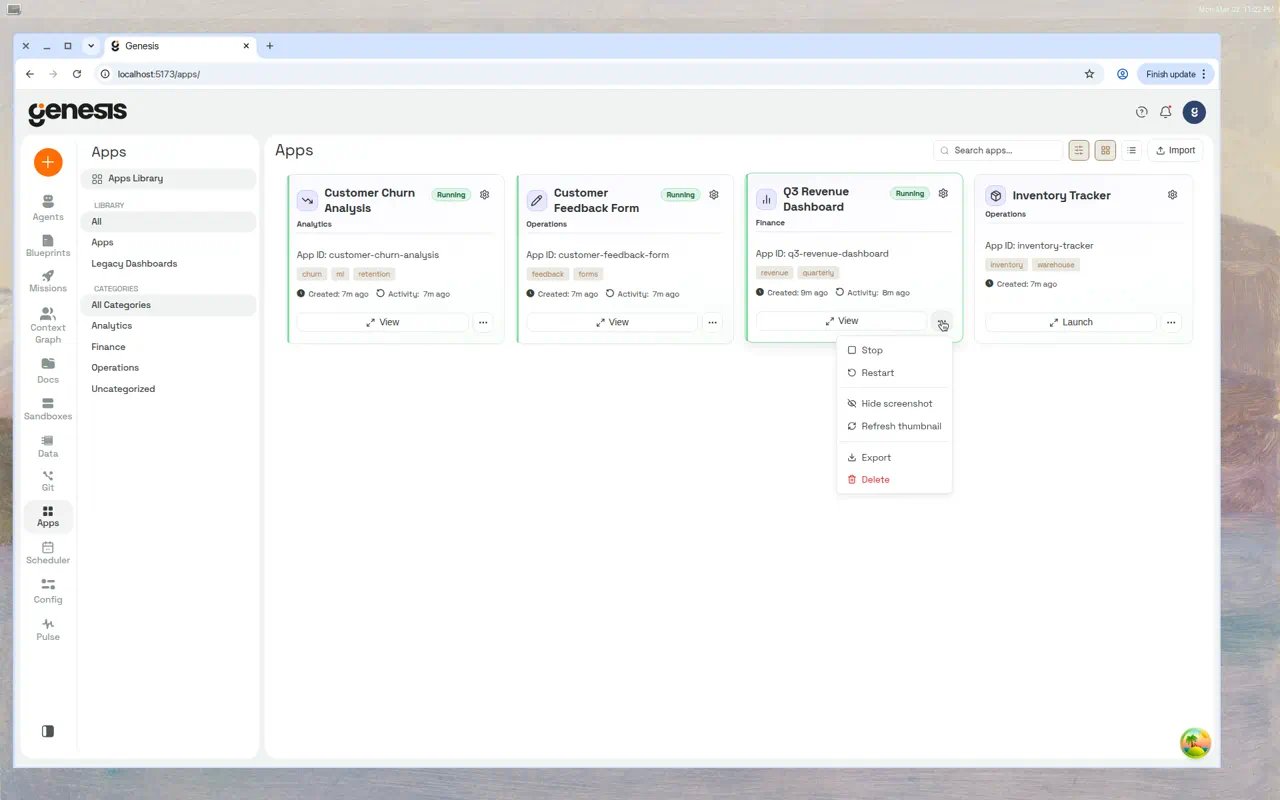
it and listing the accepted ones, and nothing in that request is changed. Click the three-dot menu (⋮) on any app card to access all management actions:
Users with App manage permission can assign or clear the organizational Project from
the Edit Metadata modal. Use `PATCH /api/apps/{app_id}/project` for the API form of
that action; see [Projects](/docs/User-Guide/Projects) for the shared grouping model.
### Binding a dataset to an app
1. **Create a dataset** using the Datasets page under **Config → Datasets**, or ask the
agent: *"Create a dataset from ANALYTICS\_DB.PUBLIC.SALES\_SUMMARY."*
2. **Add a `genesis_datasets.json` file** to the app's workspace:
```json theme={null}
{
"dataset_ids": ["dataset-abc-123"],
"actions": ["read", "ssrm"]
}
```
Supported actions: `read` (fetch rows), `ssrm` (AG Grid Server-Side Row Model).
`connection_ids` is optional. When provided as an array of connection IDs in
`genesis_datasets.json`, `/api/query` requests made with `GENESIS_APP_TOKEN` are
limited to those connections. If `connection_ids` is omitted or empty, Genesis
falls back to the delegated user's normal connection permissions.
3. **Restart the app** so it picks up the binding and receives a fresh `GENESIS_APP_TOKEN`.
Genesis preflights `genesis_datasets.json` on `START` and `RESTART`. If the
bindings file is invalid, a bound dataset has been deleted, or the app's
startup identity can no longer read one of the bound datasets, startup is
blocked until you repair the binding. API responses surface this as
`validation.missing_dataset_ids` and `validation.forbidden_dataset_ids` when
available.
### Querying data from app code
On startup, Genesis injects credentials into the app's environment. Use them to call the
Datasets API:
```python theme={null}
import os
import requests
API_BASE = os.environ["GENESIS_API_BASE_URL"]
TOKEN = os.environ["GENESIS_APP_TOKEN"]
response = requests.post(
f"{API_BASE}/api/datasets/{dataset_id}/tables/{table}/rows",
headers={"X-Genesis-App-Token": TOKEN},
json={"limit": 1000, "offset": 0}
)
data = response.json()
```
The API supports pagination up to 10,000 rows per request via `limit` and `offset`.
When an app has dataset bindings, proxied browser requests can also reach the
app with an incoming `X-Genesis-App-Token` header that Genesis minted for the
current viewer. Use that request header when a request handler needs the
active viewer's dataset or `/api/query` scope. Keep using
`GENESIS_APP_TOKEN` for startup work, background jobs, or other app-originated
API calls outside a viewer request.
### App token lifetime and refresh
Two different tokens travel under the `X-Genesis-App-Token` header, and they
have very different lifetimes:
| Token | Where it comes from | Lifetime | Identity |
| - | - | - | - |
| `GENESIS_APP_TOKEN` environment variable | Minted once when the app process starts | **6 hours** | The app's creator |
| Header on a proxied browser request | Minted per request by the proxy | **60 seconds** | The current viewer |
The environment token is reissued **on every process start** — an explicit
START, a RESTART, and an autostart after an idle-TTL stop all mint a fresh one.
Nothing reissues it while a process keeps running, so an app that stays up
longer than six hours will see `401` on Genesis API calls unless it refreshes.
Two ways to refresh without a restart:
* **Automatic.** Genesis patches `requests` and `urllib` inside the app process
so calls to `GENESIS_API_BASE_URL` swap in a fresh token roughly ten minutes
before the current one expires. This needs no app code, applies to every app
regardless of runtime type or versioning mode, and reaches already-deployed
apps on their next restart. Set
`GENESIS_RUNTIME_APP_TOKEN_AUTO_ROTATE_ENABLED=false` to turn it off.
* **Explicit.** `POST /api/apps/{app_id}/app-token/rotate`, sending the current
token, returns a fresh one. The endpoint accepts a token that has been expired
for less than 48 hours — exactly 48 hours is already outside the window — so a
worker that has already started failing can still recover. The new token lasts
6 hours by default; pass `ttl_seconds` to choose another value between 300 and
86400\.
Do not set `max_lifetime_seconds: -1` to keep a long-lived app from expiring.
Pinning the app alive removes the idle-stop/autostart cycle that reissues the
token, which turns an intermittent failure into a permanent one.
### Diagnosing a data-layer auth failure
An app whose token has been refused does not crash — it catches the `401`,
renders empty, and still answers its viewer with HTTP 200. Two signals separate
that from a genuine data problem:
* `STATUS` reports `health: "degraded"` while a refusal is recent, alongside a
`last_api_error` object naming the method, path, status code and how many
times it happened. `status` stays `running`, because the process really is.
* `LOGS` carries a `[GENESIS_APP_API]` line for each refused outbound call —
method, path, status code and elapsed time — written by the app process
itself. Successful calls are logged at INFO, so they appear only when the app
configures logging of its own.
A refusal caused by the *credential* — an expired or rejected token — clears
when the app is next started and issued a fresh one. A refusal caused by *scope*
— a live token calling an endpoint outside the app-token contract — deliberately
does not: the same scoped token is refused again on the next start, so it stays
until the capability contract or the call site changes.
### Refreshing dataset snapshots
Dataset snapshots are point-in-time copies. To pick up new data:
* Click the **refresh** icon on the app card or full-screen header.
* Call `POST /api/apps/{app_id}/datasets/refresh` to refresh all bound datasets.
* Call `POST /api/apps/{app_id}/datasets/{dataset_id}/refresh` for a single dataset.
* Schedule automatic refreshes from the full-screen view.
***
## Environment variables
Every running app receives these environment variables:
| Variable | Value |
| - | - |
| `MICROAPP_HOST` | `127.0.0.1` — the app must bind to this address. |
| `MICROAPP_PORT` | Dynamically assigned port — the app must listen here. |
| `MICROAPP_BASE_PATH` | Proxy prefix. Local apps use `/api/apps//proxy/`; remote deployments use `/api/apps//remote/proxy/`. |
| `MICROAPP_WORKSPACE` | Absolute path to the app's workspace directory. |
| `MICROAPP_SOURCE_DIR` | Path to source files (may differ from workspace in SPCS). |
| `MICROAPP_RUNTIME_DIR` | Path to the runtime overlay directory. |
| `MICROAPP_STATE_DIR` | Persistent state directory that survives restarts. |
| `GENESIS_API_BASE_URL` | Base URL for Genesis API calls from the app. |
| `GENESIS_API_APP_LLM_URL` | App-scoped orchestrated chat endpoint: `POST /api/apps//llm/call`. |
| `GENESIS_API_APP_LLM_DIRECT_URL` | App-scoped direct completion endpoint: `POST /api/apps//llm/direct`. |
| `GENESIS_APP_TOKEN` | Auth token for app-originated Genesis API calls at startup or in background work — send as `X-Genesis-App-Token` header. Minted with a 6-hour TTL at every process start; see [App token lifetime and refresh](#app-token-lifetime-and-refresh). Proxied browser requests can separately receive a viewer-scoped `X-Genesis-App-Token` header when dataset bindings are enabled. |
| `GENESIS_DATASET_IDS_JSON` | JSON array of bound dataset IDs. |
| `GENESIS_DATASET_ACTIONS_JSON` | JSON array of permitted actions. |
Official Genesis scaffolds may also read a small set of documented helper vars such as
`GENESIS_CONNECTION_ID`, `GENESIS_LLM_BOT_ID`, `GENESIS_LLM_MODEL_TIER`,
`GENESIS_LLM_PROVIDER`, `GENESIS_DATASET_TARGET_TYPE`, `GENESIS_DATASET_TARGET_NAME`,
`GENESIS_DEBUG_DATA_PREVIEW`, and `GENESIS_DEBUG_DATA_PREVIEW_ROWS`. Apps should treat
those as optional build/runtime helpers, not as a way to reach platform secrets or
undocumented host configuration.
The app server token reaches only a fixed set of platform API routes. At
authoring or start-up time, call `GET /api/apps/{app_id}/capabilities` (with
`X-Genesis-App-Token` or any authenticated session) to fetch the current
manifest instead of guessing paths. The response includes `version` (bump when
entries change), `capabilities` (`route`, advisory `methods`, and
`description` for each allowed path), and `uncovered_route_guidance` for APIs
outside the list. Path-level enforcement ignores `methods`; anything not in the
manifest is refused on server-side calls.
When an app needs model output, call the app-scoped Genesis routes with
`X-Genesis-App-Token`: `POST /api/apps/{app_id}/llm/call` for orchestrated chat
turns or `POST /api/apps/{app_id}/llm/direct` for one-shot base completions.
Official Dash and **Flask Basic** scaffolds expose `genesis_llm_call(...)` and
`genesis_llm_direct(...)`; omit `model_tier` and `provider` to inherit the app
authoring-thread defaults when available.
### Forward vs side-channel model output
Use **forward** LLM calls when structured model output is the next input —
classification labels, extracted fields, or JSON that a later route, query, or
UI state must parse. Return that output in the HTTP response body or persist it
where the product path reads it back.
Use **side-channel** calls when the model text is enrichment only — summaries,
rationale blurbs, or optional columns that no branch requires. Keep navigation,
security, and core control flow in ordinary code so the pipeline still succeeds
if enrichment is missing.
Never call Genesis LLM routes from browser JavaScript; proxy through your app
server with `GENESIS_APP_TOKEN`. For `/llm/direct`, put JSON instructions in
`prompt` and parse the `response` string — this route has no `response_format`
body field. A `422` response usually means request validation failed (empty
`prompt`, invalid `model_tier`, or `timeout_seconds` outside `5`–`600`).
**Never hard-code ports.** Always bind to `MICROAPP_HOST`:`MICROAPP_PORT`.
**Handle the proxy prefix:**
* **Dash apps:** Set both `requests_pathname_prefix` and `routes_pathname_prefix` to
the value of `MICROAPP_BASE_PATH`.
* **Flask apps:** Mount your Blueprint at `url_prefix=MICROAPP_BASE_PATH.rstrip('/')`.
Failing to handle the prefix causes 404 errors on all app routes.
### Security isolation
Apps run with a sanitized environment. The following categories of parent environment
variables are **stripped** before the app process starts: `OPENAI_*`, `ANTHROPIC_*`,
`AWS_SECRET*`, `AZURE_*`, `LITELLM_*`, `SNOWFLAKE_*`, and others.
`GENESIS_APP_TOKEN` is app-scoped rather than a browser session token. For remote app
deployments, Genesis mints it with the delegated runtime user identity so supported
app API calls continue to work when platform auth is enabled. Apps should use
`GENESIS_APP_TOKEN` for all API access rather than attempting direct database
connections.
When the Genesis server runs as root, each app is launched under a dedicated Linux user
(`microapp_`) with `ulimit` constraints (1024 open files, 256 processes) and
`umask 077` for workspace isolation.
***
## Metadata and organization
Each app has metadata that controls how it appears in the library.
| Field | Type | Constraints | Description |
| - | - | - | - |
| `title` (alias `display_name`) | string | Max 128 chars | Human-readable title. Send either key; sending both with different values is refused. |
| `emoji` | string | Max 16 chars | Icon shown alongside the title. |
| `category_id` / `category_name` | int / string | Max 128 chars | Library grouping. New categories are created on first use. |
| `tags` | list of strings | — | Free-form labels for search and filtering. |
| `project_id` | string or null | — | Organizational Project assignment. Projects group related Apps without changing their tags. Set it with `PATCH /api/apps/{app_id}/project`, not the metadata endpoint. |
| `published` | boolean | — | `true` = visible in library. `false` = draft (owner-only). |
| `thumbnail_hidden` | boolean | — | When true, hides the screenshot thumbnail. |
| `embed_mode` | string | `auto`, `responsive`, `scaled` | Controls inline embed rendering. |
| `fullscreen_mode` | string | `auto`, `responsive`, `contain`, `cover` | Controls full-screen modal rendering. |
| `ttl_seconds` | integer or null | 300–86400 | Idle time before the app is stopped automatically. `null` means never auto-stop; leaving it out keeps the current value. The agent tool's `UPDATE_RUNTIME_TTL` takes the same bounds, with `-1` for never. |
Update metadata via `PATCH /api/apps/{app_id}/metadata` or through the **Edit Metadata**
modal. The endpoint accepts `title` (or `display_name`), `emoji`, `thumbnail_hidden`,
`category_id`, `category_name` (or the deprecated `category`), `tags`, `embed_mode`,
`fullscreen_mode`, `published` and `ttl_seconds`. Any other field returns **422** naming
it and listing the accepted ones, and nothing in that request is changed. Click the three-dot menu (⋮) on any app card to access all management actions:
Users with App manage permission can assign or clear the organizational Project from
the Edit Metadata modal. Use `PATCH /api/apps/{app_id}/project` for the API form of
that action; see [Projects](/docs/User-Guide/Projects) for the shared grouping model.
 ### Published vs. draft
| State | Behavior |
| - | - |
| **Published** (`published: true`) | Appears in the Apps Library for all users with view permission. This is the default. |
| **Draft** (`published: false`) | Hidden from the library. Only the owner can see it. Still accessible via direct link for RBAC-authorized users. |
When someone opens a direct HTML link to an app they cannot `view`, Genesis
returns a friendly access-denied page instead of the app content. Non-HTML
requests and API clients still receive the underlying `401` or `403` response.
***
## Import and export
### Importing
Click **Import** in the Apps Library toolbar to open the import dialog:
### Published vs. draft
| State | Behavior |
| - | - |
| **Published** (`published: true`) | Appears in the Apps Library for all users with view permission. This is the default. |
| **Draft** (`published: false`) | Hidden from the library. Only the owner can see it. Still accessible via direct link for RBAC-authorized users. |
When someone opens a direct HTML link to an app they cannot `view`, Genesis
returns a friendly access-denied page instead of the app content. Non-HTML
requests and API clients still receive the underlying `401` or `403` response.
***
## Import and export
### Importing
Click **Import** in the Apps Library toolbar to open the import dialog:
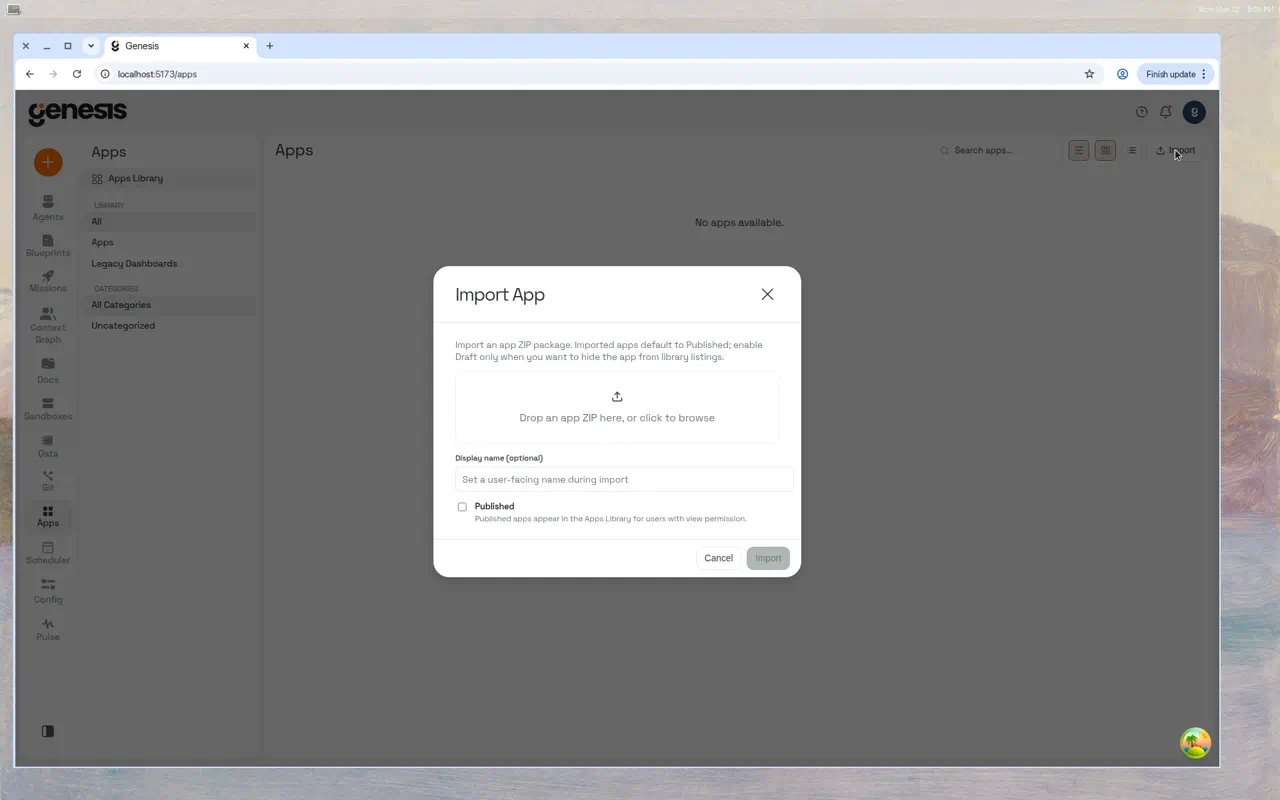 1. Drag and drop a `.zip` file (or click to browse).
2. Optionally set a **Display name**.
3. Choose **Published** (visible in library) or leave unchecked for Draft.
4. Click **Import**.
Genesis validates the archive, checks for app ID collisions (suggesting an alternative
ID when needed), and previews **connection** dependencies declared in the export
manifest. When connections are missing on this instance, the modal lists each slot
with a dropdown of local bind candidates. You can **Map all & import** after every
slot has a target, or **Proceed with unresolved** to import in **degraded** mode
(the app lands as a draft and the library card shows a **Missing dependencies**
panel with **Bind to local** actions).
You can also validate before importing:
When authentication is enabled, `POST /api/apps/import/validate` requires the
`manage_skills` permission.
```bash theme={null}
# Validate (returns unresolved_dependencies + available_connections when present)
curl -X POST /api/apps/import/validate -F "file=@my-app.zip"
# Import with connection remapping (source_mapping is a JSON object: slot_id -> connection target)
curl -X POST "/api/apps/import?published=true&display_name=My+App" \
-F "file=@my-app.zip" \
-F 'source_mapping={"@snowflake.ops":"snowflake.local"}' \
-F "proceed_unresolved=false"
# Import degraded when bindings are not ready yet
curl -X POST "/api/apps/import" \
-F "file=@my-app.zip" \
-F "proceed_unresolved=true"
```
| Import field | In | Type | Default | Description |
| - | - | - | - | - |
| `file` | multipart form-data | file | — | GenesisApp ZIP archive (required). |
| `published` | query | boolean | `true` | `true` = published; `false` = draft. When `proceed_unresolved=true` and connection slots remain unmapped, Genesis forces draft regardless of this flag. |
| `display_name` | query | string | — | Optional display name (max 128 chars). |
| `thread_id` | query | string | `imported` | Workspace thread folder for the imported files. |
| `source_mapping` | form or query | JSON object | `{}` | Maps exported connection **slot\_id** values to local connection targets (for example `snowflake.prod` → `snowflake.local`). |
| `proceed_unresolved` | form or query | boolean | `false` | When `true`, import even if connection slots are still unmapped; the app is created degraded and `unresolved_dependencies` is returned. When `false`, unmapped slots return `success: false` with a mapping error. |
Validation and import responses can include `unresolved_dependencies` (per-slot
status, kind, slot\_id, fallback\_name) and, on validate only, `available_connections`
(local bind candidates with `target`, `name`, `type`, `kind`, `is_default`).
### Exporting
From the app card's action menu, click **Export**. This downloads a ZIP containing the
full workspace — `app.py`, `requirements.txt`, configuration files, and any other assets.
For safety, the export includes only files that resolve under the real workspace root;
symlinked workspace roots are rejected and symlinked children are skipped.
***
## Access control
When authentication is enabled, apps use role-based access control (RBAC).
| Privilege | Allows |
| - | - |
| `view` | See and interact with the running app (production version for versioned apps). |
| `refresh` | Everything in view, plus restart and refresh data. |
| `edit` | Everything in refresh, plus modify the working draft, save/restore versions, and access App History. |
| `manage` | Everything in edit, plus promote versions to production, delete, change metadata, and manage access grants. |
The creator is automatically assigned all privileges. New apps created with auth enabled
are **owner-only by default** (`rbac_initialized: true`).
Manage access from the app card's three-dot menu → **Manage Access**, or via API:
```bash theme={null}
# Grant view access to a role
curl -X POST /api/apps/{app_id}/access/grant \
-H "Content-Type: application/json" \
-d '{"role_names": ["analysts"], "privileges": ["view"]}'
# Revoke access
curl -X POST /api/apps/{app_id}/access/revoke \
-H "Content-Type: application/json" \
-d '{"role_names": ["analysts"], "privileges": ["view"]}'
# List current grants
curl /api/apps/{app_id}/access
```
***
## Git-backed vs Genesis-versioned apps
Managed apps synced from a Git repository are **git-backed**: Genesis treats the
remote repo as the source of truth. The Apps Library shows a green **git-backed**
badge on those cards. **Genesis-versioned** apps (badge in gray) use the in-product
versioning workflow below.
| Mode | Badge | Where edits land | Version UI in dashboard |
| - | - | - | - |
| **git-backed** | `git-backed` | Managed Git workspace (Edit / Push to GitLab) | Hidden — no promote, revert, discard, or **Use versioned publishing** until you fork |
| **genesis-versioned** | `genesis-versioned` | Working draft + saved versions | Full App History, promote, restore, discard |
Click the badge on a card to open a short explainer. For git-backed apps, choose
**Fork to standalone** from the **⋯** menu or the badge explainer (**Fork to standalone →**).
Genesis opens a modal to confirm the new standalone app ID (defaults to `-standalone`).
The same flow is available via `POST /api/apps/{app_id}/fork` with body
`{"new_name":""}`. Requires `manage` on the source app, the `create_app`
permission (or admin), and `CREATE_APP` on the API. `new_name` must not collide with an
existing app or a git-backed registry name.
An app cannot be both git-backed and genesis-versioned. `apps_action` versioning
calls (`ENABLE_VERSIONING`, `CREATE_VERSION`, `PROMOTE_VERSION`, and related actions)
return an error on git-backed apps — fork to standalone first.
When a git-backed or degraded import still has unbound connection slots, the library
card shows **Missing dependencies** with **Bind to local** (same binding ledger as
[Multi-Instance Skill, Flow & App Sync](/docs/Blueprint/Multi-Instance-Skill-Flow-Sync)).
Editing a git-backed app in the managed workspace shows a one-time per-app session
warning that local edits diverge from Git until you export or discard.
For agent Git constraints in this deployment, see
[Git Action Tools](/docs/Genbot-Toolkit/Git-Action-Tools).
## Versioned publishing
Versioned publishing gives **genesis-versioned** apps a safe **edit → preview → approve → promote** workflow.
Production users always see a stable, pinned version while editors iterate on a shared
working draft. All versioning operations are available from both the dashboard UI and
agent tooling (`apps_action`). Git-backed apps must be forked to standalone before
enabling this workflow.
### Concepts
| Term | Meaning |
| - | - |
| **Production version** | The pinned saved version served to all viewers at `/api/apps//proxy/`. |
| **Working Draft** | A shared, editable copy of the app files. Changes here do not affect production until promoted. |
| **Saved version** | An immutable snapshot of the working draft at a point in time (v1, v2, …). |
| **Promote** | Set a saved version as the new production version. |
| **Restore** | Overwrite the working draft with a saved version's files. |
| **Discard** | Reset the working draft to match its baseline version (undo uncommitted edits). |
### How it works
```mermaid theme={null}
graph TB
A["Agent / User"] -->|"edit (WRITE_FILE)"| B["Working Draft"]
B -->|save| C["Saved Version (v3)"]
C -->|promote| D["Production (pinned v3)"]
E["Saved Version (any vN)"] -->|restore| B
D -.->|"viewers see this"| F["User Browser"]
```
* **Viewers** always see the production version.
* **Editors** can preview the working draft without affecting production.
* **Managers** can promote versions and manage access.
### Enabling versioning
Open the **Apps** page, click the **⋯** menu on an app card, and select
**Use versioned publishing**. The current app files are snapshotted as
**Version 1** and automatically promoted to production.
```
apps_action(action="ENABLE_VERSIONING", app_id="my-app")
```
Optional: `note` (description for v1), `assign_production` (default `true`).
### The versioning lifecycle
**Agents do not auto-publish.** After editing and previewing the working draft, an
agent stops and reports the preview URL. It calls `CREATE_VERSION` or
`PROMOTE_VERSION` only when you explicitly ask to save or publish (for example,
"publish it", "make it live", or "save and publish"). Positive feedback such as
"looks good" is not treated as authorization to promote. Use **App History** in the
Apps UI when you prefer to save or promote yourself.
**Edit and preview** (you or an agent):
Use any file-writing action — the working draft is the default target:
```
apps_action(action="WRITE_FILE", app_id="my-app", path="app.py", content="...")
```
Start the working draft runtime (separate from production):
```
apps_action(action="START", app_id="my-app",
run_source="working_copy",
auto_capture_after_restart=true)
```
The draft runs at `/api/apps//working-copy/proxy/` and does not affect
the production version at `/api/apps//proxy/`.
**Save and publish** (user-initiated — **App History**, an explicit chat request, or
`apps_action` when you direct the agent):
Snapshot the current working draft from **App History** (**Save as new version**)
or ask the agent:
```
apps_action(action="CREATE_VERSION", app_id="my-app",
note="Added dark mode toggle")
```
Promote from **App History** or ask the agent:
```
apps_action(action="PROMOTE_VERSION", app_id="my-app",
version_id="",
restart_after_promote=true,
note="Approved by QA")
```
Promote an older saved version to instantly restore a previous state (UI or agent,
when you explicitly request rollback):
```
apps_action(action="PROMOTE_VERSION", app_id="my-app",
version_id="",
restart_after_promote=true)
```
### Dashboard UI
#### Apps page
1. Drag and drop a `.zip` file (or click to browse).
2. Optionally set a **Display name**.
3. Choose **Published** (visible in library) or leave unchecked for Draft.
4. Click **Import**.
Genesis validates the archive, checks for app ID collisions (suggesting an alternative
ID when needed), and previews **connection** dependencies declared in the export
manifest. When connections are missing on this instance, the modal lists each slot
with a dropdown of local bind candidates. You can **Map all & import** after every
slot has a target, or **Proceed with unresolved** to import in **degraded** mode
(the app lands as a draft and the library card shows a **Missing dependencies**
panel with **Bind to local** actions).
You can also validate before importing:
When authentication is enabled, `POST /api/apps/import/validate` requires the
`manage_skills` permission.
```bash theme={null}
# Validate (returns unresolved_dependencies + available_connections when present)
curl -X POST /api/apps/import/validate -F "file=@my-app.zip"
# Import with connection remapping (source_mapping is a JSON object: slot_id -> connection target)
curl -X POST "/api/apps/import?published=true&display_name=My+App" \
-F "file=@my-app.zip" \
-F 'source_mapping={"@snowflake.ops":"snowflake.local"}' \
-F "proceed_unresolved=false"
# Import degraded when bindings are not ready yet
curl -X POST "/api/apps/import" \
-F "file=@my-app.zip" \
-F "proceed_unresolved=true"
```
| Import field | In | Type | Default | Description |
| - | - | - | - | - |
| `file` | multipart form-data | file | — | GenesisApp ZIP archive (required). |
| `published` | query | boolean | `true` | `true` = published; `false` = draft. When `proceed_unresolved=true` and connection slots remain unmapped, Genesis forces draft regardless of this flag. |
| `display_name` | query | string | — | Optional display name (max 128 chars). |
| `thread_id` | query | string | `imported` | Workspace thread folder for the imported files. |
| `source_mapping` | form or query | JSON object | `{}` | Maps exported connection **slot\_id** values to local connection targets (for example `snowflake.prod` → `snowflake.local`). |
| `proceed_unresolved` | form or query | boolean | `false` | When `true`, import even if connection slots are still unmapped; the app is created degraded and `unresolved_dependencies` is returned. When `false`, unmapped slots return `success: false` with a mapping error. |
Validation and import responses can include `unresolved_dependencies` (per-slot
status, kind, slot\_id, fallback\_name) and, on validate only, `available_connections`
(local bind candidates with `target`, `name`, `type`, `kind`, `is_default`).
### Exporting
From the app card's action menu, click **Export**. This downloads a ZIP containing the
full workspace — `app.py`, `requirements.txt`, configuration files, and any other assets.
For safety, the export includes only files that resolve under the real workspace root;
symlinked workspace roots are rejected and symlinked children are skipped.
***
## Access control
When authentication is enabled, apps use role-based access control (RBAC).
| Privilege | Allows |
| - | - |
| `view` | See and interact with the running app (production version for versioned apps). |
| `refresh` | Everything in view, plus restart and refresh data. |
| `edit` | Everything in refresh, plus modify the working draft, save/restore versions, and access App History. |
| `manage` | Everything in edit, plus promote versions to production, delete, change metadata, and manage access grants. |
The creator is automatically assigned all privileges. New apps created with auth enabled
are **owner-only by default** (`rbac_initialized: true`).
Manage access from the app card's three-dot menu → **Manage Access**, or via API:
```bash theme={null}
# Grant view access to a role
curl -X POST /api/apps/{app_id}/access/grant \
-H "Content-Type: application/json" \
-d '{"role_names": ["analysts"], "privileges": ["view"]}'
# Revoke access
curl -X POST /api/apps/{app_id}/access/revoke \
-H "Content-Type: application/json" \
-d '{"role_names": ["analysts"], "privileges": ["view"]}'
# List current grants
curl /api/apps/{app_id}/access
```
***
## Git-backed vs Genesis-versioned apps
Managed apps synced from a Git repository are **git-backed**: Genesis treats the
remote repo as the source of truth. The Apps Library shows a green **git-backed**
badge on those cards. **Genesis-versioned** apps (badge in gray) use the in-product
versioning workflow below.
| Mode | Badge | Where edits land | Version UI in dashboard |
| - | - | - | - |
| **git-backed** | `git-backed` | Managed Git workspace (Edit / Push to GitLab) | Hidden — no promote, revert, discard, or **Use versioned publishing** until you fork |
| **genesis-versioned** | `genesis-versioned` | Working draft + saved versions | Full App History, promote, restore, discard |
Click the badge on a card to open a short explainer. For git-backed apps, choose
**Fork to standalone** from the **⋯** menu or the badge explainer (**Fork to standalone →**).
Genesis opens a modal to confirm the new standalone app ID (defaults to `-standalone`).
The same flow is available via `POST /api/apps/{app_id}/fork` with body
`{"new_name":""}`. Requires `manage` on the source app, the `create_app`
permission (or admin), and `CREATE_APP` on the API. `new_name` must not collide with an
existing app or a git-backed registry name.
An app cannot be both git-backed and genesis-versioned. `apps_action` versioning
calls (`ENABLE_VERSIONING`, `CREATE_VERSION`, `PROMOTE_VERSION`, and related actions)
return an error on git-backed apps — fork to standalone first.
When a git-backed or degraded import still has unbound connection slots, the library
card shows **Missing dependencies** with **Bind to local** (same binding ledger as
[Multi-Instance Skill, Flow & App Sync](/docs/Blueprint/Multi-Instance-Skill-Flow-Sync)).
Editing a git-backed app in the managed workspace shows a one-time per-app session
warning that local edits diverge from Git until you export or discard.
For agent Git constraints in this deployment, see
[Git Action Tools](/docs/Genbot-Toolkit/Git-Action-Tools).
## Versioned publishing
Versioned publishing gives **genesis-versioned** apps a safe **edit → preview → approve → promote** workflow.
Production users always see a stable, pinned version while editors iterate on a shared
working draft. All versioning operations are available from both the dashboard UI and
agent tooling (`apps_action`). Git-backed apps must be forked to standalone before
enabling this workflow.
### Concepts
| Term | Meaning |
| - | - |
| **Production version** | The pinned saved version served to all viewers at `/api/apps//proxy/`. |
| **Working Draft** | A shared, editable copy of the app files. Changes here do not affect production until promoted. |
| **Saved version** | An immutable snapshot of the working draft at a point in time (v1, v2, …). |
| **Promote** | Set a saved version as the new production version. |
| **Restore** | Overwrite the working draft with a saved version's files. |
| **Discard** | Reset the working draft to match its baseline version (undo uncommitted edits). |
### How it works
```mermaid theme={null}
graph TB
A["Agent / User"] -->|"edit (WRITE_FILE)"| B["Working Draft"]
B -->|save| C["Saved Version (v3)"]
C -->|promote| D["Production (pinned v3)"]
E["Saved Version (any vN)"] -->|restore| B
D -.->|"viewers see this"| F["User Browser"]
```
* **Viewers** always see the production version.
* **Editors** can preview the working draft without affecting production.
* **Managers** can promote versions and manage access.
### Enabling versioning
Open the **Apps** page, click the **⋯** menu on an app card, and select
**Use versioned publishing**. The current app files are snapshotted as
**Version 1** and automatically promoted to production.
```
apps_action(action="ENABLE_VERSIONING", app_id="my-app")
```
Optional: `note` (description for v1), `assign_production` (default `true`).
### The versioning lifecycle
**Agents do not auto-publish.** After editing and previewing the working draft, an
agent stops and reports the preview URL. It calls `CREATE_VERSION` or
`PROMOTE_VERSION` only when you explicitly ask to save or publish (for example,
"publish it", "make it live", or "save and publish"). Positive feedback such as
"looks good" is not treated as authorization to promote. Use **App History** in the
Apps UI when you prefer to save or promote yourself.
**Edit and preview** (you or an agent):
Use any file-writing action — the working draft is the default target:
```
apps_action(action="WRITE_FILE", app_id="my-app", path="app.py", content="...")
```
Start the working draft runtime (separate from production):
```
apps_action(action="START", app_id="my-app",
run_source="working_copy",
auto_capture_after_restart=true)
```
The draft runs at `/api/apps//working-copy/proxy/` and does not affect
the production version at `/api/apps//proxy/`.
**Save and publish** (user-initiated — **App History**, an explicit chat request, or
`apps_action` when you direct the agent):
Snapshot the current working draft from **App History** (**Save as new version**)
or ask the agent:
```
apps_action(action="CREATE_VERSION", app_id="my-app",
note="Added dark mode toggle")
```
Promote from **App History** or ask the agent:
```
apps_action(action="PROMOTE_VERSION", app_id="my-app",
version_id="",
restart_after_promote=true,
note="Approved by QA")
```
Promote an older saved version to instantly restore a previous state (UI or agent,
when you explicitly request rollback):
```
apps_action(action="PROMOTE_VERSION", app_id="my-app",
version_id="",
restart_after_promote=true)
```
### Dashboard UI
#### Apps page
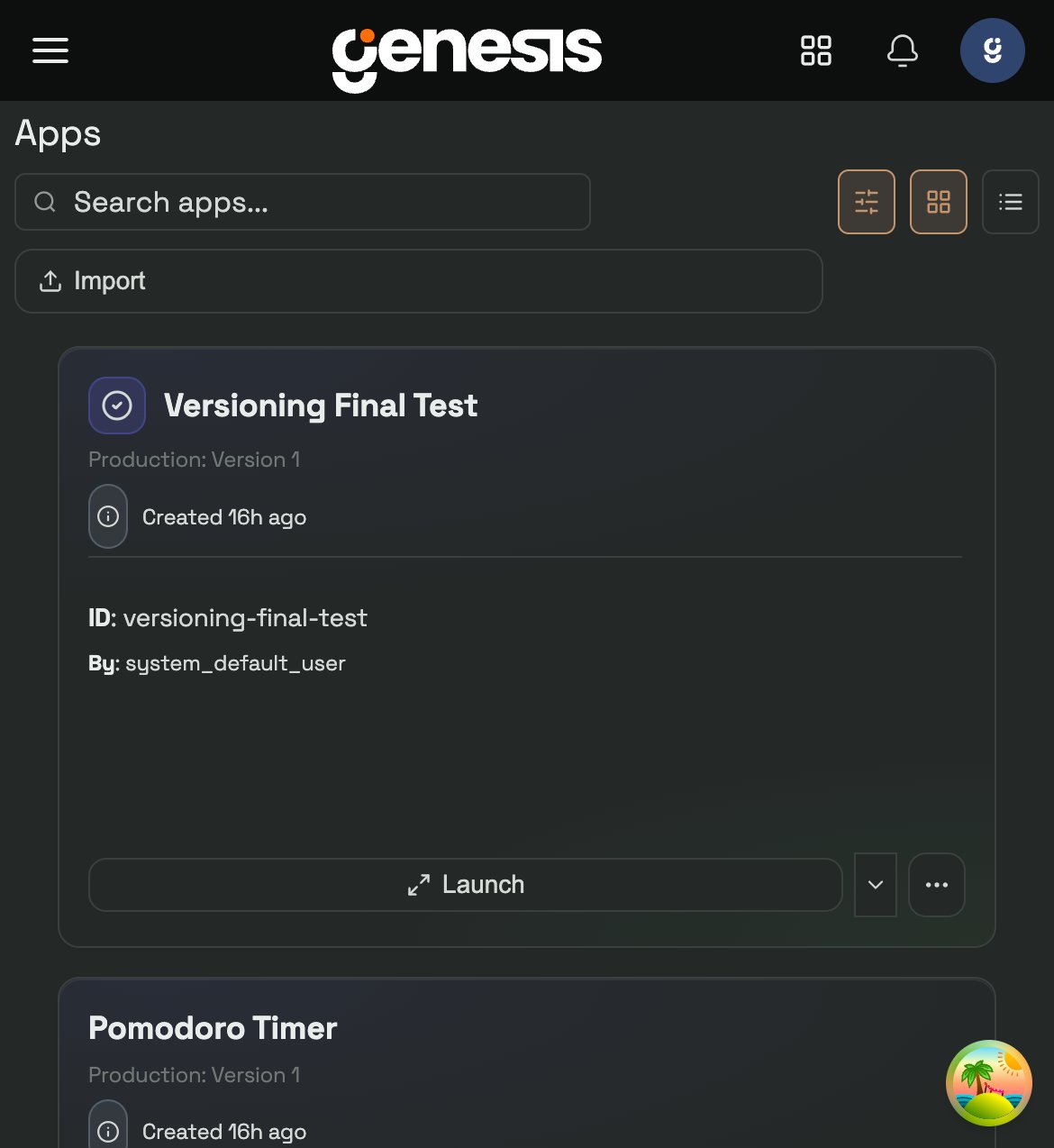 Versioned app cards show a **Production: Version N** badge. The primary
**Launch / Open** action uses the best available target for the current runtime
state. Click the ▾ chevron to choose between Production, Working Draft, and any
deployed Remote target available to you.
#### Context menu
Versioned app cards show a **Production: Version N** badge. The primary
**Launch / Open** action uses the best available target for the current runtime
state. Click the ▾ chevron to choose between Production, Working Draft, and any
deployed Remote target available to you.
#### Context menu
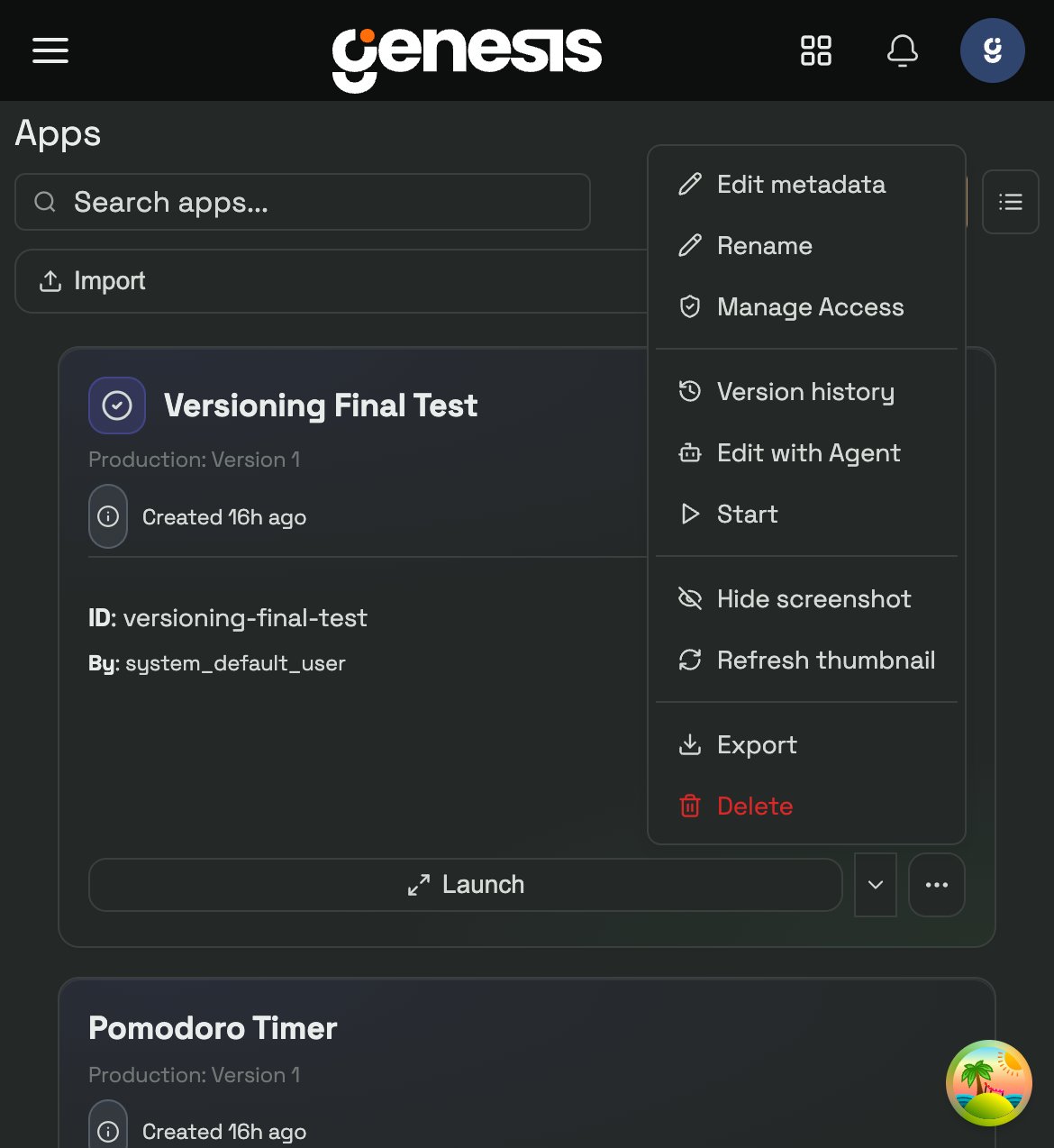 The **⋯** menu on versioned apps includes:
* **App History** — opens the unified history modal for saved versions and checkpoints.
* **Edit with Agent** — opens a chat with an agent, pre-seeded with app context. On versioned apps, agent file edits always apply to the **Working Draft**.
* **Start / Stop** — control the production runtime.
* Standard actions (Export, Delete, etc.).
#### App History modal
The **⋯** menu on versioned apps includes:
* **App History** — opens the unified history modal for saved versions and checkpoints.
* **Edit with Agent** — opens a chat with an agent, pre-seeded with app context. On versioned apps, agent file edits always apply to the **Working Draft**.
* **Start / Stop** — control the production runtime.
* Standard actions (Export, Delete, etc.).
#### App History modal
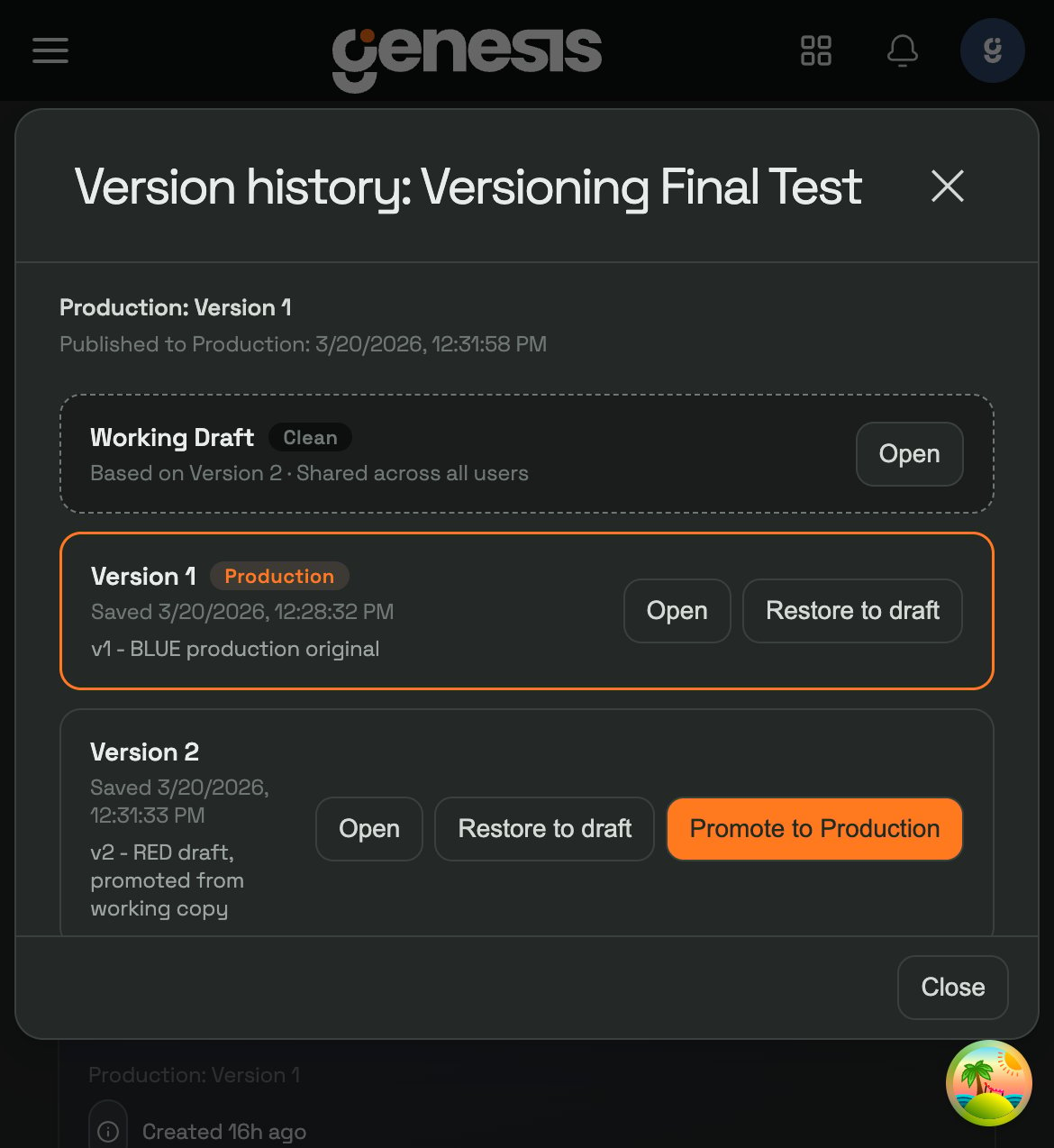 The App History modal (accessed via ⋯ → **App History**) shows:
* **Working Draft** — with Clean/Dirty status plus **Discard changes** and **Save as new version** when the draft has unsaved edits.
* **Saved versions** — each with Open and Promote actions, plus **Restore to draft** for the current production version. The live version is marked with a **Production** badge.
* **Per-version checkpoints** — file-change checkpoints are grouped beneath their parent saved version as dot releases such as `v2.1`, making it easier to restore a specific checkpoint without promoting a full saved version.
If Undo or Restore succeeds but its automatic app restart is refused, the warning
includes the restart refusal reason. The Undo or Restore remains successful; address
the reported blocker before starting or restarting the app again.
#### App viewer
When you open a versioned app from the **Apps Library** in full-screen, a
**version selector** dropdown appears in the header. Switch between Production,
Working Draft, and any saved version without leaving the viewer. Only visible to
users with edit or manage permission.
Chat embeds (inline and expanded from a thread) use a simplified **App version
source** control with **Production** (for example `Production · v2`) and
**Working Draft** only. See
[Embedding apps in chat](#embedding-apps-in-chat) for reload behavior and the
`--working-copy` embed syntax.
If the app also has a deployed Remote target, a separate target switcher lets
you jump between local and remote destinations without leaving the viewer. When
the remote backend publishes a public URL, **Open in new tab** can offer both
**Open via Proxy** and **Open Direct URL**; internal-only cluster URLs stay
proxy-only.
For versioned apps, **Reload** in any embed or viewer refreshes the target you
are currently viewing. If you are pinned to **Production** or a deployed
**Remote** target, unpublished **Working Draft** edits remain invisible until you
switch the view back to **Working Draft**. After you confirm those draft changes,
publish them by promoting a saved version to production or redeploying the remote
target.
### Versioning and access control
Versioning actions are gated by the same RBAC privileges:
| Permission | Versioning capabilities |
| - | - |
| **view** | See and use the production version only. No draft access, no App History. |
| **refresh** | Same as view, plus restart and refresh data. |
| **edit** | Full App History, save/restore versions, preview working draft, and version selector in embeds and viewer. |
| **manage** | Everything in edit, plus **promote versions to production** and manage access. |
***
## Remote deployment targets
Genesis Apps can keep a local runtime and a remote deployment side by side. The
Apps Library shows separate local and remote summaries on cards and table rows
so you can see where the app is currently running.
### Deploying from the Apps Library
Open the **⋯** menu on an app card and choose **Deploy Remote**. The deploy
dialog lets you:
* choose a backend: Docker, EKS, or Railway,
* reuse saved `target_env` and `security_profile` profiles,
* deploy **Production** or a specific saved version for versioned apps,
* supply backend-specific overrides as JSON when you need to go beyond the
saved profile defaults.
For EKS deployments, Genesis now defaults `service_type` to `LoadBalancer` so
the remote app gets a browser-reachable URL. Set `service_type: "ClusterIP"`
only when you intentionally want an internal-only cluster address.
After a remote deployment exists, the same menu adds **View Deployment
Details**, **Restart Remote**, **Redeploy Remote**, and **Remove Remote**. The
details modal shows the backend, deployed target, health, URL, and persisted
deployment config.
Every remote target also gets a stable Genesis proxy URL at
`/api/apps//remote/proxy/`, even when the backend also exposes a direct
public URL.
Remote deploy, redeploy, and restart all require acknowledging identity
delegation. Genesis mints the remote container's `GENESIS_APP_TOKEN` using
the caller's delegated identity and dataset/query permissions for the
requested token TTL.
***
## Workspace and files
Each app has an isolated workspace directory containing its source code and dependencies.
### Typical workspace structure
```
workspace/
├── app.py # Main entry point (required)
├── requirements.txt # Python dependencies
├── genesis_datasets.json # Dataset bindings (optional)
├── genesis_branding.json # Org branding manifest (auto-generated)
├── .genesis_microapp_meta.json # Scaffold metadata (auto-generated)
├── .venv/ # Python virtual environment (auto-created)
└── ... (additional assets)
```
### File API
| Method | Endpoint | Description |
| - | - | - |
| `GET` | `/api/apps/{app_id}/files` | List all workspace files. |
| `GET` | `/api/apps/{app_id}/files/read?path=app.py` | Read a file. |
| `POST` | `/api/apps/{app_id}/files/write` | Write or update a file. |
Text files use the supported source extensions `.py`, `.json`, `.txt`, `.md`, `.css`,
`.html`, `.js`, `.yml`, and `.yaml`. The `apps_action` tool also supports binary `.png`
and `.pdf` writes using base64 content; PDFs must start with `%PDF-` and be no larger
than 2 MiB. Path traversal is blocked.
Text writes are scanned before they are persisted, and `START` / `RESTART`
rescans the full workspace. Genesis blocks code that tries to probe host
filesystem roots, read undocumented environment variables, launch subprocesses,
load native libraries, or dynamically execute other local source files.
After editing files, **restart** the app to pick up code changes.
***
## Thumbnails
The platform captures screenshots of running apps to display as thumbnail previews in
the library grid.
| Endpoint | Description |
| - | - |
| `POST /api/apps/{app_id}/thumbnail/capture` | Queue a thumbnail capture (timeout: 3–45s). |
| `GET /api/apps/{app_id}/thumbnail` | Retrieve the PNG thumbnail (max 480px wide). |
| `GET /api/apps/{app_id}/thumbnail/status` | Check capture status (`enabled`, `in_flight`, `exists`). |
At most 2 thumbnails are captured concurrently. Results are cached for 5 minutes.
For versioned apps, a thumbnail capture is allowed when either the production
runtime or a working-copy runtime slot is running. The app does not need its main
`MicroappRecord` status to be `running` for the capture to proceed.
Thumbnails can be hidden per-app (`thumbnail_hidden: true`). The feature can be disabled
globally via the `apps.thumbnails_enabled` configuration key.
Thumbnail capture also requires Chromium. In a Databricks App deployment that
does not include a browser, the apps list reports `thumbnails_enabled: false`
and capture requests return the reason instead of queuing a background job.
The `apps.thumbnails_enabled` setting remains enabled by default elsewhere;
turning it off returns `thumbnails disabled` regardless of browser availability.
***
## Configuration
### Dependency management
Control how Python packages are installed for app virtual environments. Set these via
`Config → Advanced Settings` or the `app_config` table.
| Setting | Options | Default |
| - | - | - |
| `apps.dependencies.mode` | `online` — install from PyPI. `mirror` — use a PyPI mirror (requires `index_url`). `wheelhouse` — install from local wheel files (requires `wheelhouse_path`). `disabled` — skip installation entirely. | `online` |
| `apps.dependencies.index_url` | Custom PyPI index URL. | (none) |
| `apps.dependencies.extra_index_urls` | Additional PyPI indexes (comma-separated). | (none) |
| `apps.dependencies.wheelhouse_path` | Path to a local directory containing `.whl` files. | (none) |
| `apps.dependencies.trusted_hosts` | Trusted hosts for pip (skips TLS verification). | (none) |
| `apps.dependencies.use_system_site_packages` | If true, the venv can access system-installed packages. | `false` |
### Environment variables
| Variable | Description |
| - | - |
| `GENESIS_APPS_ROOT` | Override the default storage directory for all app workspaces. |
***
## Debugging
### Logs
Retrieve logs via `GET /api/apps/{app_id}/logs` or ask the agent: *"Show me the logs for
my dashboard."*
| Query parameter | Default | Description |
| - | - | - |
| `tail_lines` | `200` | Number of log lines to return. |
| `since_last_start` | `false` | If true, only returns logs since the last `=== MICROAPP START ===` marker. |
Logs capture both stdout and stderr from the app process, including startup output,
request logs, and error tracebacks. They remain available after the app stops or crashes.
### Runtime info
`GET /api/apps/{app_id}/runtime-info` returns the Python version, installed packages,
workspace paths, and injected environment variables (secrets are redacted).
### Verify
`POST /api/apps/{app_id}/verify` checks whether the app is reachable through the proxy
and returns pass/fail for each check.
When `verify_data=true`, VERIFY now requires positive data-readiness evidence before it
reports success. A Dash callback `200` without an app marker, bound dataset readiness,
or other populated runtime evidence is treated as inconclusive, not as proof that the
dashboard is populated.
For presentation decks, capture and `REVIEW` similarly treat the app as populated only
after it reaches a real content slide. Splash/loading/replay states, empty slides, and
render errors are reported separately so blank captures are easier to diagnose.
### Common issues
| Symptom | Cause | Fix |
| - | - | - |
| App stuck in `starting` | Dependency installation failed or is slow. | Check logs for pip errors. Verify network access to PyPI. |
| 404 on app routes | Proxy prefix not handled in app code. | Dash: set `requests_pathname_prefix` to `MICROAPP_BASE_PATH`. Flask: use `url_prefix`. |
| Data not loading | Missing token or dataset binding. | Add `genesis_datasets.json` and restart. Verify `GENESIS_APP_TOKEN` is set. |
| App renders but every value is empty or zero | The app token was refused, so reads returned nothing. | Check `STATUS` for `health: "degraded"` and `last_api_error`, and `LOGS` for `[GENESIS_APP_API]` lines. RESTART to reissue the token. |
| Start blocked because the dataset underneath this app is missing | `genesis_datasets.json` points to a deleted dataset, an unreadable bindings file, or a dataset the startup identity can no longer read. | Repair or recreate the dataset, update `genesis_datasets.json` if needed, then restart. Check the API `validation` payload for `missing_dataset_ids` or `forbidden_dataset_ids` when present. |
| First start or `REVIEW` is blocked for a data-backed dashboard | The `dashboard_readiness_v2` attestation is missing, stale, or its evidence shape is still invalid. Sample mode still blocks on `source_choice`, `grain`, and `dataset_strategy`. | Have the agent rerun `ATTEST_CHECKLIST`, ideally once with `dry_run=true`. Use `compact_item_errors`, `corrected_minimal_examples` / `corrected_example_items`, and `attempted_attestation_context` to fix the next submission. For additive KPI dashboards, supply either a fresh exact `grain_check` / `raw_vs_dedup` profile or inline `query_result` rows with `total_rows` and `distinct_entities` that match the grain decision. |
| Presentation export or `REVIEW` says a slide is empty | The current slide has no visible content, or visible text was stored only outside `t`/`s` | Move visible text into `t`/`s`, narration into `n`, or add `img`, `plotly`, `py`, or staged content before retrying. |
| App stops unexpectedly | Inactivity timeout reached. | Access the app to reset the timer, or set `ttl_seconds: null`. |
| App shows `stopped` after a Genesis restart | Automatic restart is disabled, or its automatic start failed. | Check `apps.autostart_after_restart` and the app's status error. Start it from the Apps Library or call `POST /api/apps/{app_id}/start`; see [Starting after a Genesis restart](#starting-after-a-genesis-restart). |
| Proxy returns `503` with "runtime is restarting after a server restart" | The proxy found a stale `running` record whose local port is dead (common right after a Genesis restart). | Reload the app in the browser. HTML navigations receive the activation page and restart automatically; XHR and API clients should reload once the runtime is back. |
| Proxy returns `504` with "GenesisApp timed out while responding" | The local runtime accepted the connection but did not finish within the proxy timeout. | Retry the request. Genesis does not treat this as a crash. |
| `crashed` status | Unhandled exception in app code, or a stale runtime reconciled because the port is unreachable. | Check logs for the traceback or port-unreachable summary, fix if needed, and open or restart the app. |
| Start blocked by GenesisApp security policy | The app tried to reach outside its workspace or use blocked host, subprocess, native-library, or dynamic local-code behavior. The same policy can block a text file write before it is saved. | Rewrite the app so it stays inside its workspace and calls Genesis through `GENESIS_API_BASE_URL` plus `GENESIS_APP_TOKEN`, then retry the write or start. |
| `address already in use` | Previous process didn't release the port. | Stop the app, wait a few seconds, then start again. |
| Narration clips disappear after restart | Audio was generated in the runtime layer but not persisted back to source storage | Fix `MICROAPP_SOURCE_DIR` write access, regenerate narration, and confirm clips land under `presentation_audio/`. |
| `DEV_QUERY_PREFLIGHT` returns `query_health: "unknown"` | Preflight could not resolve a concrete `connection_id` from the current app code. It now inspects scaffold helpers, direct `/api/query` JSON payloads, and `DEFAULT_CONNECTION_ID`, so `unknown` usually means the connection is still runtime-driven or otherwise not literal. | Provide `preflight_connection_id` (and optionally `preflight_query`) or make the connection literal in code before treating it as a live-query failure. |
| VERIFY says data is inconclusive | Dash callbacks ran, but Genesis could not confirm data readiness from app log markers, bound dataset snapshots/rows, or populated capture evidence. | For dataset-backed dashboards, bind and refresh `genesis_datasets.json` so an active snapshot has rows. For live-query dashboards, keep a marker such as `[GENESIS_QUERY_OK]` after rows load. You can also rerun CAPTURE/REVIEW once async callbacks finish so populated charts, AG Grid rows, or non-zero KPI values are observable. |
| `/api/query` returns 403 | Requested connection is outside the app token's `connection_ids` allow-list. | Add the connection ID to `genesis_datasets.json` and restart, or query an allowed connection. |
| Server-side API call returns 403 mentioning app token authorization | The route is outside the app server token contract. | Call `GET /api/apps/{app_id}/capabilities` and use only listed routes from the app server. For other Genesis APIs, call from the app's front-end with the signed-in user's session (`fetch` with `credentials: 'include'`). |
| `/api/query` returns 422 | Requested more than 10,000 rows. | Use `max_rows` ≤ 10000 or switch to Datasets pagination. |
***
## Full API reference
### Core operations
| Method | Path | Description |
| - | - | - |
| `GET` | `/api/apps` | List all apps with metadata, target summaries, and thumbnail status. |
| `POST` | `/api/apps` | Create a new app. |
| `GET` | `/api/apps/{app_id}` | Get app details, including local and remote target metadata. |
| `GET` | `/api/apps/{app_id}/status` | Get current local status plus `targets` and `remote_deployment` summaries (cached 2s). |
| `POST` | `/api/apps/{app_id}/start` | Start the app. The request body is optional; omitting it uses the start defaults. |
| `POST` | `/api/apps/{app_id}/stop` | Stop the app. |
| `POST` | `/api/apps/{app_id}/restart` | Restart (reload code + deps). The request body is optional; omitting it uses the start defaults. |
| `DELETE` | `/api/apps/{app_id}` | Delete the app. Pass `?delete_workspace=true` to remove files. |
| `POST` | `/api/apps/{app_id}/verify` | Health-check the running app through the proxy. |
`POST /api/apps/{app_id}/start` and `POST /api/apps/{app_id}/restart` can
return `success: false` with a `validation` payload when dataset-binding
preflight blocks launch. That payload can include `missing_dataset_ids`,
`forbidden_dataset_ids`, and per-dataset validation errors.
If you omit `delete_workspace=true`, Genesis preserves the workspace files but
treats that workspace as intentionally deleted. This prevents background
repair from silently re-registering the app after a restart. Creating a new
app in the same workspace clears that deleted marker so the files can be
reused.
When a previously running app is no longer active because the Genesis server
restarted, status reconciliation uses port reachability (not PID alone).
Versioned runtime slots report `status: stopped` and
`stop_reason: server_restart` until they start again. For automatic restart
behavior and its setting, see [Starting after a Genesis restart](#starting-after-a-genesis-restart).
### Remote deployment
| Method | Path | Description |
| - | - | - |
| `POST` | `/api/apps/{app_id}/deploy` | Deploy the app to a remote backend. The request body includes `backend`, `backend_options`, `target_kind`, `version_id`, `token_ttl_seconds`, and `acknowledge_identity_delegation`. |
| `GET` | `/api/apps/{app_id}/remote/status` | Return persisted `remote_deployment` metadata plus live backend status and health. |
| `POST` | `/api/apps/{app_id}/remote/restart` | Re-deploy the current remote target and mint a fresh delegated app token. |
| `POST` | `/api/apps/{app_id}/undeploy` | Tear down the remote deployment and clear persisted remote metadata. |
For versioned apps, remote deployments can target `production` or one saved
`version`. When `target_kind` is `version`, `version_id` is required. Working
Drafts stay local-only.
`GET /api/apps`, `GET /api/apps/{app_id}`, and `GET /api/apps/{app_id}/status`
can now include `remote_deployment` plus a `targets` object with `local` and
`remote` summaries. Each target summary can include `proxy_url`, `target_kind`,
`target_identifier`, `target_label`, backend and URL metadata, and version
details when available.
### Metadata
| Method | Path | Description |
| - | - | - |
| `PATCH` | `/api/apps/{app_id}/metadata` | Update title, emoji, category, tags, published, display modes, and idle TTL (`ttl_seconds`). |
| `POST` | `/api/apps/{app_id}/rename` | Set the display name (max 128 chars). |
| `GET` | `/api/apps/categories` | List all categories. |
### Access control
| Method | Path | Description |
| - | - | - |
| `GET` | `/api/apps/{app_id}/access` | List role access grants. |
| `POST` | `/api/apps/{app_id}/access/grant` | Grant privileges to roles. |
| `POST` | `/api/apps/{app_id}/access/revoke` | Revoke privileges from roles. |
### App server token
| Method | Path | Description |
| - | - | - |
| `GET` | `/api/apps/{app_id}/capabilities` | Return which platform API routes this app's server token may call (`version`, `capabilities`, `uncovered_route_guidance`). The contract is identical for every app; `app_id` is not resolved. |
| `POST` | `/api/apps/{app_id}/app-token/rotate` | Mint a new app token using the current (or recently expired) app token. |
### Datasets
| Method | Path | Description |
| - | - | - |
| `GET` | `/api/apps/{app_id}/dataset-bindings` | List bound datasets and actions. |
| `POST` | `/api/apps/dataset-bindings-batch` | Batch query bindings for up to 200 apps. |
| `POST` | `/api/apps/{app_id}/datasets/{dataset_id}/refresh` | Refresh a single dataset snapshot. |
| `POST` | `/api/apps/{app_id}/datasets/refresh` | Refresh all bound datasets. |
### Import and export
| Method | Path | Description |
| - | - | - |
| `POST` | `/api/apps/import/validate` | Validate a ZIP archive (structure, ID collisions, connection dependency preview). Requires `manage_skills` when authentication is enabled. Response can include `unresolved_dependencies` and `available_connections`. |
| `POST` | `/api/apps/import` | Import an app from ZIP. Query params: `published`, `display_name`, `thread_id`. Form fields: `source_mapping` (JSON object), `proceed_unresolved` (boolean). Response can include `unresolved_dependencies`. |
| `POST` | `/api/apps/{app_id}/fork` | Fork a git-backed app to a new standalone genesis-versioned app. Body: `{"new_name":""}` (required). Requires `CREATE_APP` and `manage` on the source. |
| `POST` | `/api/apps/{app_id}/export-to-managed/preview` | Preview files that would be copied when pushing a standalone app into a managed Apps source. Requires `manage_git` and `manage` on the app. |
| `POST` | `/api/apps/{app_id}/export-to-managed/commit` | Export a standalone app bundle into a managed repo and open an MR/PR. Body: `source_id` or `repo_id` (one required), optional `title`, `body`, `commit_message` (strings; whitespace-only values are treated as omitted). Requires `manage_git` and `manage` on the app. |
| `GET` | `/api/apps/{app_id}/export` | Download the app as a ZIP archive. |
### Files, logs, and runtime
| Method | Path | Description |
| - | - | - |
| `GET` | `/api/apps/{app_id}/files` | List workspace files. |
| `GET` | `/api/apps/{app_id}/files/read?path=...` | Read a file. |
| `POST` | `/api/apps/{app_id}/files/write` | Write a file (allowed extensions only). |
| `GET` | `/api/apps/{app_id}/logs` | App process logs. Params: `tail_lines`, `since_last_start`. |
| `GET` | `/api/apps/{app_id}/runtime-info` | Python version, packages, env vars. |
### Thumbnails
| Method | Path | Description |
| - | - | - |
| `POST` | `/api/apps/{app_id}/thumbnail/capture` | Queue a thumbnail capture. |
| `GET` | `/api/apps/{app_id}/thumbnail` | Get the PNG thumbnail image. |
| `GET` | `/api/apps/{app_id}/thumbnail/status` | Capture status and metadata. |
### Proxy
| Method | Path | Description |
| - | - | - |
| `GET/POST/PUT/PATCH/DELETE` | `/api/apps/{app_id}/proxy/{path}` | Forward requests to the running app. Auto-starts stopped apps on HTML navigation. |
| `GET/POST/PUT/PATCH/DELETE/OPTIONS/HEAD` | `/api/apps/{app_id}/remote/proxy/{path}` | Forward requests through Genesis to the deployed remote target. |
For HTML browser navigations to a stopped app — or to a stale `running` record
whose local port is unreachable after a server restart — Genesis may first
return a lightweight activation page. That page calls
`POST /api/apps/{app_id}/start` and polls `GET /api/apps/{app_id}/status`
until the runtime reports `running`, then reloads the original proxy URL.
Non-HTML proxy requests to a dead local port return `503` with detail
`GenesisApp runtime is restarting after a server restart. Reload the app to
continue.` A slow but healthy upstream returns `504` with detail
`GenesisApp timed out while responding. Please retry.`
When authentication is enabled, the browser uses the same authenticated
session for the proxy, `start`, and `status` requests. Genesis automatically
retries brief authentication propagation delays before surfacing `401` or
`403`. The same activation pattern applies to
`/api/apps/{app_id}/versions/{version_id}/proxy/` and
`/api/apps/{app_id}/working-copy/proxy/`.
Remote deployments are always available through
`/api/apps/{app_id}/remote/proxy/`. That route forwards to the deployed remote
target and does not auto-start a local runtime. If the backend only exposes a
cluster-internal URL, keep using the Genesis proxy rather than the direct URL.
PDF responses served through the app proxy are downloaded as attachments rather
than rendered inline. Genesis applies this to successful PDF responses labeled
`application/pdf`, and to `.pdf` paths with no content type or a generic binary
content type.
## Sharing apps across instances
Apps can be sourced from a shared Git repository so they propagate to every
Genesis instance through normal pull-request review. The Apps Library page
exposes **Edit** and **Push to GitLab** actions on managed-source apps —
clicking Edit opens an isolated per-user worktree on a feature branch;
clicking Push opens an MR/PR against `main` without ever touching the
release branch directly.
For **genesis-versioned** standalone apps (not already git-backed), operators with
`manage_git` and app-level **manage** can use **⋯ → Push to managed repo**. The wizard
lists Apps managed sources (`scan_types_enabled` includes `apps`), previews the bundle
files that will land in the repo, then collects PR title, PR body, and commit message
(default: `Add app '' to managed repo`) before opening the MR/PR. If no Apps
sources are registered, the modal directs you to **Remote Repos** to add one. The UI
calls `POST /api/apps/{app_id}/export-to-managed/preview` and
`POST /api/apps/{app_id}/export-to-managed/commit` (same semantics as agent
`EXPORT_PREVIEW` / `EXPORT_COMMIT`; agents use `app_management`, which requires
`manage_apps`).
App `metadata.json` can declare connection and flow dependencies via the
optional `requires:` block; the per-instance dependency ledger flips the app
from `degraded` to `ready` once an admin binds each logical ref to a local
connection or flow.
Agents can also drive the same workflows with `app_management`
(`REGISTER_MANAGED_SOURCE`, `SYNC_FROM_REPO`, `PUSH_TO_REPO`, `EXPORT_PREVIEW`,
`EXPORT_COMMIT`; requires `manage_apps`) and `dependency_action` for binding
`requires:` logical refs (requires `manage_git`).
For the operator guide, file format, dependency / binding model, and known
limitations, see
[Multi-Instance Skill, Flow & App Sync](/docs/Blueprint/Multi-Instance-Skill-Flow-Sync).
The App History modal (accessed via ⋯ → **App History**) shows:
* **Working Draft** — with Clean/Dirty status plus **Discard changes** and **Save as new version** when the draft has unsaved edits.
* **Saved versions** — each with Open and Promote actions, plus **Restore to draft** for the current production version. The live version is marked with a **Production** badge.
* **Per-version checkpoints** — file-change checkpoints are grouped beneath their parent saved version as dot releases such as `v2.1`, making it easier to restore a specific checkpoint without promoting a full saved version.
If Undo or Restore succeeds but its automatic app restart is refused, the warning
includes the restart refusal reason. The Undo or Restore remains successful; address
the reported blocker before starting or restarting the app again.
#### App viewer
When you open a versioned app from the **Apps Library** in full-screen, a
**version selector** dropdown appears in the header. Switch between Production,
Working Draft, and any saved version without leaving the viewer. Only visible to
users with edit or manage permission.
Chat embeds (inline and expanded from a thread) use a simplified **App version
source** control with **Production** (for example `Production · v2`) and
**Working Draft** only. See
[Embedding apps in chat](#embedding-apps-in-chat) for reload behavior and the
`--working-copy` embed syntax.
If the app also has a deployed Remote target, a separate target switcher lets
you jump between local and remote destinations without leaving the viewer. When
the remote backend publishes a public URL, **Open in new tab** can offer both
**Open via Proxy** and **Open Direct URL**; internal-only cluster URLs stay
proxy-only.
For versioned apps, **Reload** in any embed or viewer refreshes the target you
are currently viewing. If you are pinned to **Production** or a deployed
**Remote** target, unpublished **Working Draft** edits remain invisible until you
switch the view back to **Working Draft**. After you confirm those draft changes,
publish them by promoting a saved version to production or redeploying the remote
target.
### Versioning and access control
Versioning actions are gated by the same RBAC privileges:
| Permission | Versioning capabilities |
| - | - |
| **view** | See and use the production version only. No draft access, no App History. |
| **refresh** | Same as view, plus restart and refresh data. |
| **edit** | Full App History, save/restore versions, preview working draft, and version selector in embeds and viewer. |
| **manage** | Everything in edit, plus **promote versions to production** and manage access. |
***
## Remote deployment targets
Genesis Apps can keep a local runtime and a remote deployment side by side. The
Apps Library shows separate local and remote summaries on cards and table rows
so you can see where the app is currently running.
### Deploying from the Apps Library
Open the **⋯** menu on an app card and choose **Deploy Remote**. The deploy
dialog lets you:
* choose a backend: Docker, EKS, or Railway,
* reuse saved `target_env` and `security_profile` profiles,
* deploy **Production** or a specific saved version for versioned apps,
* supply backend-specific overrides as JSON when you need to go beyond the
saved profile defaults.
For EKS deployments, Genesis now defaults `service_type` to `LoadBalancer` so
the remote app gets a browser-reachable URL. Set `service_type: "ClusterIP"`
only when you intentionally want an internal-only cluster address.
After a remote deployment exists, the same menu adds **View Deployment
Details**, **Restart Remote**, **Redeploy Remote**, and **Remove Remote**. The
details modal shows the backend, deployed target, health, URL, and persisted
deployment config.
Every remote target also gets a stable Genesis proxy URL at
`/api/apps//remote/proxy/`, even when the backend also exposes a direct
public URL.
Remote deploy, redeploy, and restart all require acknowledging identity
delegation. Genesis mints the remote container's `GENESIS_APP_TOKEN` using
the caller's delegated identity and dataset/query permissions for the
requested token TTL.
***
## Workspace and files
Each app has an isolated workspace directory containing its source code and dependencies.
### Typical workspace structure
```
workspace/
├── app.py # Main entry point (required)
├── requirements.txt # Python dependencies
├── genesis_datasets.json # Dataset bindings (optional)
├── genesis_branding.json # Org branding manifest (auto-generated)
├── .genesis_microapp_meta.json # Scaffold metadata (auto-generated)
├── .venv/ # Python virtual environment (auto-created)
└── ... (additional assets)
```
### File API
| Method | Endpoint | Description |
| - | - | - |
| `GET` | `/api/apps/{app_id}/files` | List all workspace files. |
| `GET` | `/api/apps/{app_id}/files/read?path=app.py` | Read a file. |
| `POST` | `/api/apps/{app_id}/files/write` | Write or update a file. |
Text files use the supported source extensions `.py`, `.json`, `.txt`, `.md`, `.css`,
`.html`, `.js`, `.yml`, and `.yaml`. The `apps_action` tool also supports binary `.png`
and `.pdf` writes using base64 content; PDFs must start with `%PDF-` and be no larger
than 2 MiB. Path traversal is blocked.
Text writes are scanned before they are persisted, and `START` / `RESTART`
rescans the full workspace. Genesis blocks code that tries to probe host
filesystem roots, read undocumented environment variables, launch subprocesses,
load native libraries, or dynamically execute other local source files.
After editing files, **restart** the app to pick up code changes.
***
## Thumbnails
The platform captures screenshots of running apps to display as thumbnail previews in
the library grid.
| Endpoint | Description |
| - | - |
| `POST /api/apps/{app_id}/thumbnail/capture` | Queue a thumbnail capture (timeout: 3–45s). |
| `GET /api/apps/{app_id}/thumbnail` | Retrieve the PNG thumbnail (max 480px wide). |
| `GET /api/apps/{app_id}/thumbnail/status` | Check capture status (`enabled`, `in_flight`, `exists`). |
At most 2 thumbnails are captured concurrently. Results are cached for 5 minutes.
For versioned apps, a thumbnail capture is allowed when either the production
runtime or a working-copy runtime slot is running. The app does not need its main
`MicroappRecord` status to be `running` for the capture to proceed.
Thumbnails can be hidden per-app (`thumbnail_hidden: true`). The feature can be disabled
globally via the `apps.thumbnails_enabled` configuration key.
Thumbnail capture also requires Chromium. In a Databricks App deployment that
does not include a browser, the apps list reports `thumbnails_enabled: false`
and capture requests return the reason instead of queuing a background job.
The `apps.thumbnails_enabled` setting remains enabled by default elsewhere;
turning it off returns `thumbnails disabled` regardless of browser availability.
***
## Configuration
### Dependency management
Control how Python packages are installed for app virtual environments. Set these via
`Config → Advanced Settings` or the `app_config` table.
| Setting | Options | Default |
| - | - | - |
| `apps.dependencies.mode` | `online` — install from PyPI. `mirror` — use a PyPI mirror (requires `index_url`). `wheelhouse` — install from local wheel files (requires `wheelhouse_path`). `disabled` — skip installation entirely. | `online` |
| `apps.dependencies.index_url` | Custom PyPI index URL. | (none) |
| `apps.dependencies.extra_index_urls` | Additional PyPI indexes (comma-separated). | (none) |
| `apps.dependencies.wheelhouse_path` | Path to a local directory containing `.whl` files. | (none) |
| `apps.dependencies.trusted_hosts` | Trusted hosts for pip (skips TLS verification). | (none) |
| `apps.dependencies.use_system_site_packages` | If true, the venv can access system-installed packages. | `false` |
### Environment variables
| Variable | Description |
| - | - |
| `GENESIS_APPS_ROOT` | Override the default storage directory for all app workspaces. |
***
## Debugging
### Logs
Retrieve logs via `GET /api/apps/{app_id}/logs` or ask the agent: *"Show me the logs for
my dashboard."*
| Query parameter | Default | Description |
| - | - | - |
| `tail_lines` | `200` | Number of log lines to return. |
| `since_last_start` | `false` | If true, only returns logs since the last `=== MICROAPP START ===` marker. |
Logs capture both stdout and stderr from the app process, including startup output,
request logs, and error tracebacks. They remain available after the app stops or crashes.
### Runtime info
`GET /api/apps/{app_id}/runtime-info` returns the Python version, installed packages,
workspace paths, and injected environment variables (secrets are redacted).
### Verify
`POST /api/apps/{app_id}/verify` checks whether the app is reachable through the proxy
and returns pass/fail for each check.
When `verify_data=true`, VERIFY now requires positive data-readiness evidence before it
reports success. A Dash callback `200` without an app marker, bound dataset readiness,
or other populated runtime evidence is treated as inconclusive, not as proof that the
dashboard is populated.
For presentation decks, capture and `REVIEW` similarly treat the app as populated only
after it reaches a real content slide. Splash/loading/replay states, empty slides, and
render errors are reported separately so blank captures are easier to diagnose.
### Common issues
| Symptom | Cause | Fix |
| - | - | - |
| App stuck in `starting` | Dependency installation failed or is slow. | Check logs for pip errors. Verify network access to PyPI. |
| 404 on app routes | Proxy prefix not handled in app code. | Dash: set `requests_pathname_prefix` to `MICROAPP_BASE_PATH`. Flask: use `url_prefix`. |
| Data not loading | Missing token or dataset binding. | Add `genesis_datasets.json` and restart. Verify `GENESIS_APP_TOKEN` is set. |
| App renders but every value is empty or zero | The app token was refused, so reads returned nothing. | Check `STATUS` for `health: "degraded"` and `last_api_error`, and `LOGS` for `[GENESIS_APP_API]` lines. RESTART to reissue the token. |
| Start blocked because the dataset underneath this app is missing | `genesis_datasets.json` points to a deleted dataset, an unreadable bindings file, or a dataset the startup identity can no longer read. | Repair or recreate the dataset, update `genesis_datasets.json` if needed, then restart. Check the API `validation` payload for `missing_dataset_ids` or `forbidden_dataset_ids` when present. |
| First start or `REVIEW` is blocked for a data-backed dashboard | The `dashboard_readiness_v2` attestation is missing, stale, or its evidence shape is still invalid. Sample mode still blocks on `source_choice`, `grain`, and `dataset_strategy`. | Have the agent rerun `ATTEST_CHECKLIST`, ideally once with `dry_run=true`. Use `compact_item_errors`, `corrected_minimal_examples` / `corrected_example_items`, and `attempted_attestation_context` to fix the next submission. For additive KPI dashboards, supply either a fresh exact `grain_check` / `raw_vs_dedup` profile or inline `query_result` rows with `total_rows` and `distinct_entities` that match the grain decision. |
| Presentation export or `REVIEW` says a slide is empty | The current slide has no visible content, or visible text was stored only outside `t`/`s` | Move visible text into `t`/`s`, narration into `n`, or add `img`, `plotly`, `py`, or staged content before retrying. |
| App stops unexpectedly | Inactivity timeout reached. | Access the app to reset the timer, or set `ttl_seconds: null`. |
| App shows `stopped` after a Genesis restart | Automatic restart is disabled, or its automatic start failed. | Check `apps.autostart_after_restart` and the app's status error. Start it from the Apps Library or call `POST /api/apps/{app_id}/start`; see [Starting after a Genesis restart](#starting-after-a-genesis-restart). |
| Proxy returns `503` with "runtime is restarting after a server restart" | The proxy found a stale `running` record whose local port is dead (common right after a Genesis restart). | Reload the app in the browser. HTML navigations receive the activation page and restart automatically; XHR and API clients should reload once the runtime is back. |
| Proxy returns `504` with "GenesisApp timed out while responding" | The local runtime accepted the connection but did not finish within the proxy timeout. | Retry the request. Genesis does not treat this as a crash. |
| `crashed` status | Unhandled exception in app code, or a stale runtime reconciled because the port is unreachable. | Check logs for the traceback or port-unreachable summary, fix if needed, and open or restart the app. |
| Start blocked by GenesisApp security policy | The app tried to reach outside its workspace or use blocked host, subprocess, native-library, or dynamic local-code behavior. The same policy can block a text file write before it is saved. | Rewrite the app so it stays inside its workspace and calls Genesis through `GENESIS_API_BASE_URL` plus `GENESIS_APP_TOKEN`, then retry the write or start. |
| `address already in use` | Previous process didn't release the port. | Stop the app, wait a few seconds, then start again. |
| Narration clips disappear after restart | Audio was generated in the runtime layer but not persisted back to source storage | Fix `MICROAPP_SOURCE_DIR` write access, regenerate narration, and confirm clips land under `presentation_audio/`. |
| `DEV_QUERY_PREFLIGHT` returns `query_health: "unknown"` | Preflight could not resolve a concrete `connection_id` from the current app code. It now inspects scaffold helpers, direct `/api/query` JSON payloads, and `DEFAULT_CONNECTION_ID`, so `unknown` usually means the connection is still runtime-driven or otherwise not literal. | Provide `preflight_connection_id` (and optionally `preflight_query`) or make the connection literal in code before treating it as a live-query failure. |
| VERIFY says data is inconclusive | Dash callbacks ran, but Genesis could not confirm data readiness from app log markers, bound dataset snapshots/rows, or populated capture evidence. | For dataset-backed dashboards, bind and refresh `genesis_datasets.json` so an active snapshot has rows. For live-query dashboards, keep a marker such as `[GENESIS_QUERY_OK]` after rows load. You can also rerun CAPTURE/REVIEW once async callbacks finish so populated charts, AG Grid rows, or non-zero KPI values are observable. |
| `/api/query` returns 403 | Requested connection is outside the app token's `connection_ids` allow-list. | Add the connection ID to `genesis_datasets.json` and restart, or query an allowed connection. |
| Server-side API call returns 403 mentioning app token authorization | The route is outside the app server token contract. | Call `GET /api/apps/{app_id}/capabilities` and use only listed routes from the app server. For other Genesis APIs, call from the app's front-end with the signed-in user's session (`fetch` with `credentials: 'include'`). |
| `/api/query` returns 422 | Requested more than 10,000 rows. | Use `max_rows` ≤ 10000 or switch to Datasets pagination. |
***
## Full API reference
### Core operations
| Method | Path | Description |
| - | - | - |
| `GET` | `/api/apps` | List all apps with metadata, target summaries, and thumbnail status. |
| `POST` | `/api/apps` | Create a new app. |
| `GET` | `/api/apps/{app_id}` | Get app details, including local and remote target metadata. |
| `GET` | `/api/apps/{app_id}/status` | Get current local status plus `targets` and `remote_deployment` summaries (cached 2s). |
| `POST` | `/api/apps/{app_id}/start` | Start the app. The request body is optional; omitting it uses the start defaults. |
| `POST` | `/api/apps/{app_id}/stop` | Stop the app. |
| `POST` | `/api/apps/{app_id}/restart` | Restart (reload code + deps). The request body is optional; omitting it uses the start defaults. |
| `DELETE` | `/api/apps/{app_id}` | Delete the app. Pass `?delete_workspace=true` to remove files. |
| `POST` | `/api/apps/{app_id}/verify` | Health-check the running app through the proxy. |
`POST /api/apps/{app_id}/start` and `POST /api/apps/{app_id}/restart` can
return `success: false` with a `validation` payload when dataset-binding
preflight blocks launch. That payload can include `missing_dataset_ids`,
`forbidden_dataset_ids`, and per-dataset validation errors.
If you omit `delete_workspace=true`, Genesis preserves the workspace files but
treats that workspace as intentionally deleted. This prevents background
repair from silently re-registering the app after a restart. Creating a new
app in the same workspace clears that deleted marker so the files can be
reused.
When a previously running app is no longer active because the Genesis server
restarted, status reconciliation uses port reachability (not PID alone).
Versioned runtime slots report `status: stopped` and
`stop_reason: server_restart` until they start again. For automatic restart
behavior and its setting, see [Starting after a Genesis restart](#starting-after-a-genesis-restart).
### Remote deployment
| Method | Path | Description |
| - | - | - |
| `POST` | `/api/apps/{app_id}/deploy` | Deploy the app to a remote backend. The request body includes `backend`, `backend_options`, `target_kind`, `version_id`, `token_ttl_seconds`, and `acknowledge_identity_delegation`. |
| `GET` | `/api/apps/{app_id}/remote/status` | Return persisted `remote_deployment` metadata plus live backend status and health. |
| `POST` | `/api/apps/{app_id}/remote/restart` | Re-deploy the current remote target and mint a fresh delegated app token. |
| `POST` | `/api/apps/{app_id}/undeploy` | Tear down the remote deployment and clear persisted remote metadata. |
For versioned apps, remote deployments can target `production` or one saved
`version`. When `target_kind` is `version`, `version_id` is required. Working
Drafts stay local-only.
`GET /api/apps`, `GET /api/apps/{app_id}`, and `GET /api/apps/{app_id}/status`
can now include `remote_deployment` plus a `targets` object with `local` and
`remote` summaries. Each target summary can include `proxy_url`, `target_kind`,
`target_identifier`, `target_label`, backend and URL metadata, and version
details when available.
### Metadata
| Method | Path | Description |
| - | - | - |
| `PATCH` | `/api/apps/{app_id}/metadata` | Update title, emoji, category, tags, published, display modes, and idle TTL (`ttl_seconds`). |
| `POST` | `/api/apps/{app_id}/rename` | Set the display name (max 128 chars). |
| `GET` | `/api/apps/categories` | List all categories. |
### Access control
| Method | Path | Description |
| - | - | - |
| `GET` | `/api/apps/{app_id}/access` | List role access grants. |
| `POST` | `/api/apps/{app_id}/access/grant` | Grant privileges to roles. |
| `POST` | `/api/apps/{app_id}/access/revoke` | Revoke privileges from roles. |
### App server token
| Method | Path | Description |
| - | - | - |
| `GET` | `/api/apps/{app_id}/capabilities` | Return which platform API routes this app's server token may call (`version`, `capabilities`, `uncovered_route_guidance`). The contract is identical for every app; `app_id` is not resolved. |
| `POST` | `/api/apps/{app_id}/app-token/rotate` | Mint a new app token using the current (or recently expired) app token. |
### Datasets
| Method | Path | Description |
| - | - | - |
| `GET` | `/api/apps/{app_id}/dataset-bindings` | List bound datasets and actions. |
| `POST` | `/api/apps/dataset-bindings-batch` | Batch query bindings for up to 200 apps. |
| `POST` | `/api/apps/{app_id}/datasets/{dataset_id}/refresh` | Refresh a single dataset snapshot. |
| `POST` | `/api/apps/{app_id}/datasets/refresh` | Refresh all bound datasets. |
### Import and export
| Method | Path | Description |
| - | - | - |
| `POST` | `/api/apps/import/validate` | Validate a ZIP archive (structure, ID collisions, connection dependency preview). Requires `manage_skills` when authentication is enabled. Response can include `unresolved_dependencies` and `available_connections`. |
| `POST` | `/api/apps/import` | Import an app from ZIP. Query params: `published`, `display_name`, `thread_id`. Form fields: `source_mapping` (JSON object), `proceed_unresolved` (boolean). Response can include `unresolved_dependencies`. |
| `POST` | `/api/apps/{app_id}/fork` | Fork a git-backed app to a new standalone genesis-versioned app. Body: `{"new_name":""}` (required). Requires `CREATE_APP` and `manage` on the source. |
| `POST` | `/api/apps/{app_id}/export-to-managed/preview` | Preview files that would be copied when pushing a standalone app into a managed Apps source. Requires `manage_git` and `manage` on the app. |
| `POST` | `/api/apps/{app_id}/export-to-managed/commit` | Export a standalone app bundle into a managed repo and open an MR/PR. Body: `source_id` or `repo_id` (one required), optional `title`, `body`, `commit_message` (strings; whitespace-only values are treated as omitted). Requires `manage_git` and `manage` on the app. |
| `GET` | `/api/apps/{app_id}/export` | Download the app as a ZIP archive. |
### Files, logs, and runtime
| Method | Path | Description |
| - | - | - |
| `GET` | `/api/apps/{app_id}/files` | List workspace files. |
| `GET` | `/api/apps/{app_id}/files/read?path=...` | Read a file. |
| `POST` | `/api/apps/{app_id}/files/write` | Write a file (allowed extensions only). |
| `GET` | `/api/apps/{app_id}/logs` | App process logs. Params: `tail_lines`, `since_last_start`. |
| `GET` | `/api/apps/{app_id}/runtime-info` | Python version, packages, env vars. |
### Thumbnails
| Method | Path | Description |
| - | - | - |
| `POST` | `/api/apps/{app_id}/thumbnail/capture` | Queue a thumbnail capture. |
| `GET` | `/api/apps/{app_id}/thumbnail` | Get the PNG thumbnail image. |
| `GET` | `/api/apps/{app_id}/thumbnail/status` | Capture status and metadata. |
### Proxy
| Method | Path | Description |
| - | - | - |
| `GET/POST/PUT/PATCH/DELETE` | `/api/apps/{app_id}/proxy/{path}` | Forward requests to the running app. Auto-starts stopped apps on HTML navigation. |
| `GET/POST/PUT/PATCH/DELETE/OPTIONS/HEAD` | `/api/apps/{app_id}/remote/proxy/{path}` | Forward requests through Genesis to the deployed remote target. |
For HTML browser navigations to a stopped app — or to a stale `running` record
whose local port is unreachable after a server restart — Genesis may first
return a lightweight activation page. That page calls
`POST /api/apps/{app_id}/start` and polls `GET /api/apps/{app_id}/status`
until the runtime reports `running`, then reloads the original proxy URL.
Non-HTML proxy requests to a dead local port return `503` with detail
`GenesisApp runtime is restarting after a server restart. Reload the app to
continue.` A slow but healthy upstream returns `504` with detail
`GenesisApp timed out while responding. Please retry.`
When authentication is enabled, the browser uses the same authenticated
session for the proxy, `start`, and `status` requests. Genesis automatically
retries brief authentication propagation delays before surfacing `401` or
`403`. The same activation pattern applies to
`/api/apps/{app_id}/versions/{version_id}/proxy/` and
`/api/apps/{app_id}/working-copy/proxy/`.
Remote deployments are always available through
`/api/apps/{app_id}/remote/proxy/`. That route forwards to the deployed remote
target and does not auto-start a local runtime. If the backend only exposes a
cluster-internal URL, keep using the Genesis proxy rather than the direct URL.
PDF responses served through the app proxy are downloaded as attachments rather
than rendered inline. Genesis applies this to successful PDF responses labeled
`application/pdf`, and to `.pdf` paths with no content type or a generic binary
content type.
## Sharing apps across instances
Apps can be sourced from a shared Git repository so they propagate to every
Genesis instance through normal pull-request review. The Apps Library page
exposes **Edit** and **Push to GitLab** actions on managed-source apps —
clicking Edit opens an isolated per-user worktree on a feature branch;
clicking Push opens an MR/PR against `main` without ever touching the
release branch directly.
For **genesis-versioned** standalone apps (not already git-backed), operators with
`manage_git` and app-level **manage** can use **⋯ → Push to managed repo**. The wizard
lists Apps managed sources (`scan_types_enabled` includes `apps`), previews the bundle
files that will land in the repo, then collects PR title, PR body, and commit message
(default: `Add app '' to managed repo`) before opening the MR/PR. If no Apps
sources are registered, the modal directs you to **Remote Repos** to add one. The UI
calls `POST /api/apps/{app_id}/export-to-managed/preview` and
`POST /api/apps/{app_id}/export-to-managed/commit` (same semantics as agent
`EXPORT_PREVIEW` / `EXPORT_COMMIT`; agents use `app_management`, which requires
`manage_apps`).
App `metadata.json` can declare connection and flow dependencies via the
optional `requires:` block; the per-instance dependency ledger flips the app
from `degraded` to `ready` once an admin binds each logical ref to a local
connection or flow.
Agents can also drive the same workflows with `app_management`
(`REGISTER_MANAGED_SOURCE`, `SYNC_FROM_REPO`, `PUSH_TO_REPO`, `EXPORT_PREVIEW`,
`EXPORT_COMMIT`; requires `manage_apps`) and `dependency_action` for binding
`requires:` logical refs (requires `manage_git`).
For the operator guide, file format, dependency / binding model, and known
limitations, see
[Multi-Instance Skill, Flow & App Sync](/docs/Blueprint/Multi-Instance-Skill-Flow-Sync).