> ## Documentation Index
> Fetch the complete documentation index at: https://docs.genesiscomputing.com/llms.txt
> Use this file to discover all available pages before exploring further.
# Data Explorer
> Browse connected data sources, inspect schemas and tables, preview rows, run queries, and revisit saved results.
## Overview
**Data Explorer** is the customer-facing workspace for browsing connected databases, inspecting schemas and tables, previewing rows, and working with recent or saved query results.
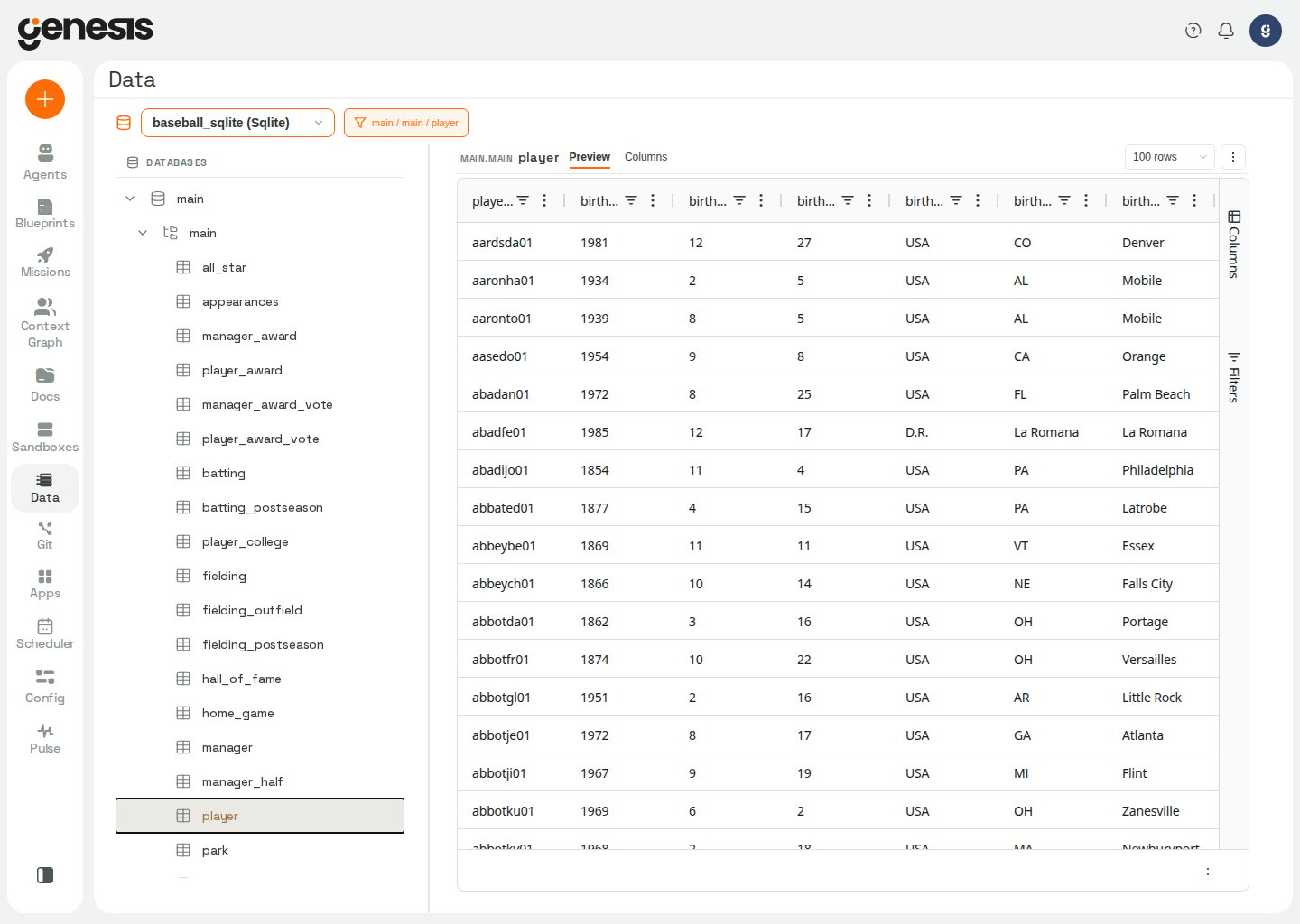 The screenshot above is illustrative. In your deployment, Data Explorer shows
the connected databases and harvested metadata available to you. The
Snowflake sample schemas `BASEBALL` and `FORMULA_1` appear only when an
operator enables `INCLUDE_METADATA_SAMPLES=true`.
## What the page supports
| Capability | Description |
| - | - |
| **Connection browsing** | Open a configured data source and drill into its database, schema, and table structure. |
| **Table preview** | View sample rows before writing a custom query. |
| **Column inspection** | Review available columns and metadata for the selected object. |
| **Saved query results** | Return to recent or bookmarked query outputs. |
| **Deep links** | Share or reopen the exact connection, table, or query-result view. |
| **Migration verification** | Run governed transition-contract checks, review reports, and approve correspondence rules. Open `/data/verify/overview/` directly (for example from a chat deep link); the Data browser does not currently expose a header link into this surface. |
If a deep link names a connection the server no longer lists, Data Explorer
returns to the base `/data` route after the connection list loads.
Some saved results are computed by Genesis from other saved query results,
rather than returned by a SQL statement. Their query text is a description:
the viewer labels it **Computed result**, shows it as plain text, and does not
offer a Run action or SQL lineage to trace. The tabular result remains available
in the query-results viewer.
## Migration verification
Use **Migration verification** when you need to prove a migration moved data intact under a compiled transition contract — or to browse, declare, and compare **frozen estate measurements** — not for everyday table browsing.
Pipeline migrations are reviewed from the migration mission workspace rather
than from the Data Explorer browser. When Launchpad is used to migrate a
pipeline and its data, the workspace shows the immutable source files, the
converted delivery, target execution, Prover verification, task dependencies,
and the requested incremental or replay-without-new-input checks. Select a
file to view only when its bytes still match the approved SHA-256; changed or
unavailable repository copies are not presented as approved evidence. See
[Database migration blueprints](/docs/Blueprint/Blueprint-Library-And-Missions#database-migration-blueprints)
for the Launchpad workflow. The [pipeline migration proof walkthrough](/docs/Genesis-Prover/How-A-Run-Works#pipeline-migration-proofs)
explains how to read the Prover result.
The landing page is **Overview** at `/data/verify/overview/`. Phase-grouped navigation organizes the rest of the surface around the migration lifecycle:
| Phase | Tabs | Routes |
| - | - | - |
| *(home)* | **Overview** | `/data/verify/overview/` |
| **Prepare** | **Baselines**, **Relationships** | `/data/verify/baselines/`, `/data/verify/relationships/` |
| **Check** | **Verification**, **Compare**, **Qualifications** | `/data/verify/`, `/data/verify/compare/`, `/data/verify/qualifications/` |
Every tab is a real route (not in-page state), so deep links, refresh, and long-running measurement runs keep their place. A **Track** phase (deviation ledger) is planned but not yet shipped — the nav omits empty placeholders.
### Overview
The Overview home (`/data/verify/overview/`) answers "where does my migration stand?" before you open any list:
* **Headline tiles** — counts drawn only from lists other tabs already load (verification requests, runs, ratified rules). The latest-run tile shows the verbatim rollup token the backend recorded (`PASS`, `FAIL`, `INDETERMINATE`, `UNVERIFIED`, or the run status). Only a literal `PASS` is coloured green; `INDETERMINATE` is never shown as a pass.
* **Pipeline explainer** — prepare request → compile → execute → measure → qualify → approve, with a human badge on the approval gate.
* **Lifecycle map** — Prepare → Check → Track, matching the phase labels in the nav.
Tiles link into the **Verification** tab; they do not invent figures no list endpoint reports.
### Verification tab
The **Verification** tab under **Check** (`/data/verify/`) has three sections:
1. **Verification requests** — transition objectives agents prepare (for example with `transition_contract_tools`). Each row shows the transition name, source → target estates, object and rule counts, and a **Run verification** button that compiles and executes the contract in one step.
2. **Runs & reports** — recent verification runs with honest verdict chips. The initial list is card-shaped: it loads identity, status, progress, and small summary values without the per-run report documents, so the workspace can show the shell before a run is opened. Select a run to load its per-obligation verdicts, closure ("nothing unexpected") checks, and rendered cutover dossier. A measured empty population appears as `Nothing to check (0 rows)`; if every declared check ends that way, the grade is not verified by checks. See [how a grade reports an empty check](/docs/Genesis-Prover/Agents-And-The-API#when-a-grade-did-not-measure) for how this differs from a failure or a check that could not run. For claims that a sealed check did not test a clause, consult the seal's clause ledger and the grade's unchecked-clause list; a clause's absence from that list alone does not show that it was tested. A rollup of `INDETERMINATE` is never shown as a pass. Obligation rows show row-identity columns when present — single-column keys appear in `key_column`; composite keys use `key_columns`. The `key_source` field distinguishes keys **declared** by the source estate from keys **designated** by a human operator. Data Vault proofs can show generated current-state and link-membership obligations from the sealed target model. When the target looks like a vault but no model was declared, the run detail explains the `undeclared_target_shape` guidance and the readings withheld from published findings; see [Declared Data Vault target shapes](/docs/Genesis-Prover/Overview#declared-data-vault-target-shapes) for what to provide before rerunning.
3. **Correspondence rules** — the rule registry with derived status (`proposed` → `qualified` → `ratified` / `revoked`). Qualified rules with valid test evidence can be **approved** here when you hold the `ratify_transition_contract` permission. The approve modal shows a **provenance ladder** (proposed → qualified → ratified; only ratified is sealed/green) and a **per-fixture verdict table** for the qualification you are signing — one row per edge fixture with its own `PASS`/`FAIL` chip, so the evidence is in front of you rather than a pass count alone.
When compile or execute refuses (missing rule, insufficient read access, no logical key, and so on), Genesis shows the refusal reason and the next step inline — for example a link to review rules. The same guidance appears as an inline chat card (`transition_contract_refusal`) when an agent hits the license gate; chat never signs approvals — that happens only on this page.
### Prepare and Check measurement tabs
**Baselines**, **Relationships**, **Compare**, and **Qualifications** browse frozen records, declarations, comparisons, and qualification reports produced by `measurement_tools` (for example `characterize_and_freeze_estate`). They require **`manage_all_connections`** — stricter than the Verification tab — because frozen records and qualification reports can carry per-column value evidence from customer estates.
| Phase | Tab | Route | What it shows |
| - | - | - | - |
| Prepare | **Baselines** | `/data/verify/baselines/` | Every frozen record in one registry-ordered list. Open a row for coverage, reading guide, and measurement-run links (`/data/verify/baselines/{hash}`, `/data/verify/measurements/{run_id}`). |
| Prepare | **Relationships** | `/data/verify/relationships/` | Stored declarations that license comparisons between two frozen records. **Declare relationship** opens a modal; the server records `declared_by` from your authenticated session, not from the form. |
| Check | **Compare** | `/data/verify/compare/` | Pick a source record, target record, and declaration from lists (hashes are never typed), acknowledge what the declaration licenses, then run a comparison. |
| Check | **Qualifications** | `/data/verify/qualifications/` | Qualification reports and their cleanup state. `cleanup_state` of `null` means no run was found — not that cleanup finished. |
#### Frozen-record provenance (baselines and pickers)
Baselines and every picker (relationship declaration, compare) offer **every frozen record the server returns**, each with a compact provenance tag — not a filtered "safe" subset. Provenance states what was positively established; none of them certify that a record is a genuine estate baseline:
| `provenance` value | Meaning |
| - | - |
| `qualification_scratch_clone` | Positively identified as a deliberately damaged qualification clone. Shown with a prominent warning before any coverage numbers. |
| `qualification_source` | A qualification report names this record as its source (a fact about another artifact, not a safety grade). |
| `named_by_measurement_run` | A measurement run names this record (same — not evidence the record is untainted). |
| `not_established` | Provenance could not be established. May be explained by page-level notices when the run index or clone lookup was truncated — those flags are global facts about the query, not claims about any single row. |
List pages disclose when `total` exceeds `shown`, when `run_index_truncated` is true, and when `provenance_index_complete` is false (a missing scratch-clone badge may be a lookup limit, not proof the record is clean).
#### Declarations and comparisons
A **relationship** (declaration) states how two frozen estates relate, on what evidence, and which schemas or renames it covers. Empty `regions` licenses the **whole estate** and requires an explicit estate-wide acknowledgement in the UI. Grade `unverified` licenses no comparison — covered objects come back indeterminate, and Compare surfaces that warning through to the result.
Compare stays disabled until you acknowledge what the chosen declaration licenses. Read `object_pairing` on the result before the counts: if nothing paired, the counts are not evidence about the two estates.
#### Compare result styling
Comparison counts are an itemized list keyed by the exact classification token the backend returned — the UI performs no arithmetic, summation, or percentage on them. Each row carries a semantic colour and a **solid** or **hatched** texture:
| Texture | Meaning |
| - | - |
| **Solid** | A definite determination (for example values differ, or present on one side only). |
| **Hatched** | Provisional / not admissible at binding grade (for example agreement at disclosed grade, open obligation, or question could not be asked). |
Colour is an outcome signal, separate from the orange brand accent used for navigation and primary actions. **No classification row is green** — agreement at disclosed grade is grey, not success-coloured. The only green on this surface is a binding **`PASS`** verdict on a run report or overview tile, never on a comparison classification.
### Designating row-identity keys
When a `content.identity` obligation is `unverified` because no row key was declared, the run detail shows a **Designate key** action on that obligation. Use it to assert which columns identify rows on the source object.
Key designation is an **assertion**, not a measurement — you are claiming these columns identify a row; neither estate's characterization vouches for it. Genesis probes uniqueness at run time; duplicate keys downgrade the evidence rather than passing silently. Designated keys are disclosed in the cutover dossier as human-asserted identity.
The modal lists every column on the obligation frame. Select one or more columns; **selection order is significant** — it becomes the comparison's sort order. A single column is a simple key; multiple columns form a composite key.
Designation does **not** edit the original verification request. Transition artifacts are immutable, so Genesis creates a **successor objective** that carries the designation alongside the parent. After designating, return to **Verification requests**, find the new objective, and run verification again. You must have `view_connections` and per-connection access to **both** estates named by the objective (source and target).
The **Verification** tab requires `view_connections` (included in the built-in `user` role). The **Baselines**, **Relationships**, **Compare**, and **Qualifications** tabs and all `/api/transition_contract/measure/*` routes require `manage_all_connections` (included in the built-in `admin` role) because they can disclose per-column value evidence from frozen records. Approving a transition correspondence rule requires `ratify_transition_contract` (also in `admin`), authentication enabled, and a configured ratifier signing key (`transition_contract.ratifier_private_key`). See [RBAC in Genesis](/docs/Security-Controls/RBAC-Practical-Guide) and the [transition-contract API](/docs/Genesis-API/API-Reference#transition-contract-endpoints).
## Typical workflow
1. Choose a connection.
2. Expand the database and schema tree.
3. Open a table to view sample rows and columns.
4. Move into query mode when you need a custom result.
5. Refresh, reset, or revisit saved query results later.
## Notes for users
* Data Explorer is best for fast inspection and iterative exploration.
* If a live metadata request reports that a provider sign-in has expired, follow that connection's reauthentication steps and retry. The metadata API returns a sign-in conflict rather than a server failure; see [Connection metadata browsing endpoints](/docs/Genesis-API/API-Reference#connection-metadata-browsing-endpoints).
* When the Launchpad setup checklist is enabled and you have not yet completed
the `database_connection` item, Genesis shows a small connect banner above the
browser with a link to **Config → Connections**. The banner is non-blocking —
you can browse Data Explorer normally while the item is open.
* It works well alongside **Datasets** when you want to turn a useful query or table into a reusable fast-data layer.
* Connection and table lists are permission-aware, so you only see database connections you are allowed to use. Bundled demo connections removed from discovery after **Delete all demo data** in **Config -> Advanced Settings** are also omitted from the default Data Explorer list.
* When you run a custom query, Data Explorer keeps the original SQL you submitted available for review and reuse instead of exposing internal paging wrappers.
* Switching to a different table clears the active custom-query state and related query deep-link text so the new selection opens in a clean table context.
* Deep links use the path `/data/{connection}/{database}/{schema}/{table}`. The `{connection}` segment accepts either the fully qualified `type.name` form (for example `databricks.my_conn`) or the bare name stored for legacy connections (for example `my_conn`). When a link uses `type.name` for a legacy connection, Genesis resolves it to the bare name and updates the browser URL to match.
* Opening a deep link validates against your full authorized connection list, not the active connection-type filter. If a filter would hide the target connection, Genesis switches the filter to **All** so the link can open.
* Genesis matches database, schema, and table segments case-insensitively when opening from a URL, then selects the canonical identifier returned by the connection. This matters for Databricks, where Unity Catalog may report catalog, schema, and table names in a different case than the link you followed.
* **BigQuery** connections browse live metadata through the same tree as other databases. In the UI, the top level is the Google Cloud **project** bound to the connection (shown as the database), the next level lists **datasets** (shown as schemas), and tables and views appear under each dataset. Service-account and user-OAuth BigQuery connections are both supported.
## Automation surface
| Endpoint family | Use |
| - | - |
| `/api/launchpad/checklist` | Return Launchpad setup-checklist items and derived completion for the current user. |
| `/api/config/db-connections` | List only the database connections visible to the current user. |
| `/api/data/connections/...` | Browse databases, schemas, tables, samples, and columns for an authorized connection. |
| `/api/data/query-results...` | Run, page, and refresh query results for an authorized connection. |
| `/api/data-explorer/...` | Back the Data Explorer connection list and table browser using the current user's connection access. |
| `/api/transition_contract/...` | Back the Migration verification **Verification** tab: objectives, runs, contracts, dossiers, compile, execute, key designation, and rule ratification. Browse routes require `view_connections`; key designation additionally requires per-connection access to both estates; ratify requires `ratify_transition_contract`. |
| `/api/transition_contract/measure/...` | Back the measurement tabs (baselines, relationships, compare, qualifications). All routes require `manage_all_connections`, including reads. See [measurement endpoints](/docs/Genesis-API/API-Reference#measurement-endpoints). |
Direct requests to the `/api/data/...` browsing and query-result endpoints return `403 Forbidden` when the current user is not allowed to access the requested connection.
## Related pages
* [Datasets](/docs/Setup/Datasets)
* [Connections](/docs/Setup/Connections)
The screenshot above is illustrative. In your deployment, Data Explorer shows
the connected databases and harvested metadata available to you. The
Snowflake sample schemas `BASEBALL` and `FORMULA_1` appear only when an
operator enables `INCLUDE_METADATA_SAMPLES=true`.
## What the page supports
| Capability | Description |
| - | - |
| **Connection browsing** | Open a configured data source and drill into its database, schema, and table structure. |
| **Table preview** | View sample rows before writing a custom query. |
| **Column inspection** | Review available columns and metadata for the selected object. |
| **Saved query results** | Return to recent or bookmarked query outputs. |
| **Deep links** | Share or reopen the exact connection, table, or query-result view. |
| **Migration verification** | Run governed transition-contract checks, review reports, and approve correspondence rules. Open `/data/verify/overview/` directly (for example from a chat deep link); the Data browser does not currently expose a header link into this surface. |
If a deep link names a connection the server no longer lists, Data Explorer
returns to the base `/data` route after the connection list loads.
Some saved results are computed by Genesis from other saved query results,
rather than returned by a SQL statement. Their query text is a description:
the viewer labels it **Computed result**, shows it as plain text, and does not
offer a Run action or SQL lineage to trace. The tabular result remains available
in the query-results viewer.
## Migration verification
Use **Migration verification** when you need to prove a migration moved data intact under a compiled transition contract — or to browse, declare, and compare **frozen estate measurements** — not for everyday table browsing.
Pipeline migrations are reviewed from the migration mission workspace rather
than from the Data Explorer browser. When Launchpad is used to migrate a
pipeline and its data, the workspace shows the immutable source files, the
converted delivery, target execution, Prover verification, task dependencies,
and the requested incremental or replay-without-new-input checks. Select a
file to view only when its bytes still match the approved SHA-256; changed or
unavailable repository copies are not presented as approved evidence. See
[Database migration blueprints](/docs/Blueprint/Blueprint-Library-And-Missions#database-migration-blueprints)
for the Launchpad workflow. The [pipeline migration proof walkthrough](/docs/Genesis-Prover/How-A-Run-Works#pipeline-migration-proofs)
explains how to read the Prover result.
The landing page is **Overview** at `/data/verify/overview/`. Phase-grouped navigation organizes the rest of the surface around the migration lifecycle:
| Phase | Tabs | Routes |
| - | - | - |
| *(home)* | **Overview** | `/data/verify/overview/` |
| **Prepare** | **Baselines**, **Relationships** | `/data/verify/baselines/`, `/data/verify/relationships/` |
| **Check** | **Verification**, **Compare**, **Qualifications** | `/data/verify/`, `/data/verify/compare/`, `/data/verify/qualifications/` |
Every tab is a real route (not in-page state), so deep links, refresh, and long-running measurement runs keep their place. A **Track** phase (deviation ledger) is planned but not yet shipped — the nav omits empty placeholders.
### Overview
The Overview home (`/data/verify/overview/`) answers "where does my migration stand?" before you open any list:
* **Headline tiles** — counts drawn only from lists other tabs already load (verification requests, runs, ratified rules). The latest-run tile shows the verbatim rollup token the backend recorded (`PASS`, `FAIL`, `INDETERMINATE`, `UNVERIFIED`, or the run status). Only a literal `PASS` is coloured green; `INDETERMINATE` is never shown as a pass.
* **Pipeline explainer** — prepare request → compile → execute → measure → qualify → approve, with a human badge on the approval gate.
* **Lifecycle map** — Prepare → Check → Track, matching the phase labels in the nav.
Tiles link into the **Verification** tab; they do not invent figures no list endpoint reports.
### Verification tab
The **Verification** tab under **Check** (`/data/verify/`) has three sections:
1. **Verification requests** — transition objectives agents prepare (for example with `transition_contract_tools`). Each row shows the transition name, source → target estates, object and rule counts, and a **Run verification** button that compiles and executes the contract in one step.
2. **Runs & reports** — recent verification runs with honest verdict chips. The initial list is card-shaped: it loads identity, status, progress, and small summary values without the per-run report documents, so the workspace can show the shell before a run is opened. Select a run to load its per-obligation verdicts, closure ("nothing unexpected") checks, and rendered cutover dossier. A measured empty population appears as `Nothing to check (0 rows)`; if every declared check ends that way, the grade is not verified by checks. See [how a grade reports an empty check](/docs/Genesis-Prover/Agents-And-The-API#when-a-grade-did-not-measure) for how this differs from a failure or a check that could not run. For claims that a sealed check did not test a clause, consult the seal's clause ledger and the grade's unchecked-clause list; a clause's absence from that list alone does not show that it was tested. A rollup of `INDETERMINATE` is never shown as a pass. Obligation rows show row-identity columns when present — single-column keys appear in `key_column`; composite keys use `key_columns`. The `key_source` field distinguishes keys **declared** by the source estate from keys **designated** by a human operator. Data Vault proofs can show generated current-state and link-membership obligations from the sealed target model. When the target looks like a vault but no model was declared, the run detail explains the `undeclared_target_shape` guidance and the readings withheld from published findings; see [Declared Data Vault target shapes](/docs/Genesis-Prover/Overview#declared-data-vault-target-shapes) for what to provide before rerunning.
3. **Correspondence rules** — the rule registry with derived status (`proposed` → `qualified` → `ratified` / `revoked`). Qualified rules with valid test evidence can be **approved** here when you hold the `ratify_transition_contract` permission. The approve modal shows a **provenance ladder** (proposed → qualified → ratified; only ratified is sealed/green) and a **per-fixture verdict table** for the qualification you are signing — one row per edge fixture with its own `PASS`/`FAIL` chip, so the evidence is in front of you rather than a pass count alone.
When compile or execute refuses (missing rule, insufficient read access, no logical key, and so on), Genesis shows the refusal reason and the next step inline — for example a link to review rules. The same guidance appears as an inline chat card (`transition_contract_refusal`) when an agent hits the license gate; chat never signs approvals — that happens only on this page.
### Prepare and Check measurement tabs
**Baselines**, **Relationships**, **Compare**, and **Qualifications** browse frozen records, declarations, comparisons, and qualification reports produced by `measurement_tools` (for example `characterize_and_freeze_estate`). They require **`manage_all_connections`** — stricter than the Verification tab — because frozen records and qualification reports can carry per-column value evidence from customer estates.
| Phase | Tab | Route | What it shows |
| - | - | - | - |
| Prepare | **Baselines** | `/data/verify/baselines/` | Every frozen record in one registry-ordered list. Open a row for coverage, reading guide, and measurement-run links (`/data/verify/baselines/{hash}`, `/data/verify/measurements/{run_id}`). |
| Prepare | **Relationships** | `/data/verify/relationships/` | Stored declarations that license comparisons between two frozen records. **Declare relationship** opens a modal; the server records `declared_by` from your authenticated session, not from the form. |
| Check | **Compare** | `/data/verify/compare/` | Pick a source record, target record, and declaration from lists (hashes are never typed), acknowledge what the declaration licenses, then run a comparison. |
| Check | **Qualifications** | `/data/verify/qualifications/` | Qualification reports and their cleanup state. `cleanup_state` of `null` means no run was found — not that cleanup finished. |
#### Frozen-record provenance (baselines and pickers)
Baselines and every picker (relationship declaration, compare) offer **every frozen record the server returns**, each with a compact provenance tag — not a filtered "safe" subset. Provenance states what was positively established; none of them certify that a record is a genuine estate baseline:
| `provenance` value | Meaning |
| - | - |
| `qualification_scratch_clone` | Positively identified as a deliberately damaged qualification clone. Shown with a prominent warning before any coverage numbers. |
| `qualification_source` | A qualification report names this record as its source (a fact about another artifact, not a safety grade). |
| `named_by_measurement_run` | A measurement run names this record (same — not evidence the record is untainted). |
| `not_established` | Provenance could not be established. May be explained by page-level notices when the run index or clone lookup was truncated — those flags are global facts about the query, not claims about any single row. |
List pages disclose when `total` exceeds `shown`, when `run_index_truncated` is true, and when `provenance_index_complete` is false (a missing scratch-clone badge may be a lookup limit, not proof the record is clean).
#### Declarations and comparisons
A **relationship** (declaration) states how two frozen estates relate, on what evidence, and which schemas or renames it covers. Empty `regions` licenses the **whole estate** and requires an explicit estate-wide acknowledgement in the UI. Grade `unverified` licenses no comparison — covered objects come back indeterminate, and Compare surfaces that warning through to the result.
Compare stays disabled until you acknowledge what the chosen declaration licenses. Read `object_pairing` on the result before the counts: if nothing paired, the counts are not evidence about the two estates.
#### Compare result styling
Comparison counts are an itemized list keyed by the exact classification token the backend returned — the UI performs no arithmetic, summation, or percentage on them. Each row carries a semantic colour and a **solid** or **hatched** texture:
| Texture | Meaning |
| - | - |
| **Solid** | A definite determination (for example values differ, or present on one side only). |
| **Hatched** | Provisional / not admissible at binding grade (for example agreement at disclosed grade, open obligation, or question could not be asked). |
Colour is an outcome signal, separate from the orange brand accent used for navigation and primary actions. **No classification row is green** — agreement at disclosed grade is grey, not success-coloured. The only green on this surface is a binding **`PASS`** verdict on a run report or overview tile, never on a comparison classification.
### Designating row-identity keys
When a `content.identity` obligation is `unverified` because no row key was declared, the run detail shows a **Designate key** action on that obligation. Use it to assert which columns identify rows on the source object.
Key designation is an **assertion**, not a measurement — you are claiming these columns identify a row; neither estate's characterization vouches for it. Genesis probes uniqueness at run time; duplicate keys downgrade the evidence rather than passing silently. Designated keys are disclosed in the cutover dossier as human-asserted identity.
The modal lists every column on the obligation frame. Select one or more columns; **selection order is significant** — it becomes the comparison's sort order. A single column is a simple key; multiple columns form a composite key.
Designation does **not** edit the original verification request. Transition artifacts are immutable, so Genesis creates a **successor objective** that carries the designation alongside the parent. After designating, return to **Verification requests**, find the new objective, and run verification again. You must have `view_connections` and per-connection access to **both** estates named by the objective (source and target).
The **Verification** tab requires `view_connections` (included in the built-in `user` role). The **Baselines**, **Relationships**, **Compare**, and **Qualifications** tabs and all `/api/transition_contract/measure/*` routes require `manage_all_connections` (included in the built-in `admin` role) because they can disclose per-column value evidence from frozen records. Approving a transition correspondence rule requires `ratify_transition_contract` (also in `admin`), authentication enabled, and a configured ratifier signing key (`transition_contract.ratifier_private_key`). See [RBAC in Genesis](/docs/Security-Controls/RBAC-Practical-Guide) and the [transition-contract API](/docs/Genesis-API/API-Reference#transition-contract-endpoints).
## Typical workflow
1. Choose a connection.
2. Expand the database and schema tree.
3. Open a table to view sample rows and columns.
4. Move into query mode when you need a custom result.
5. Refresh, reset, or revisit saved query results later.
## Notes for users
* Data Explorer is best for fast inspection and iterative exploration.
* If a live metadata request reports that a provider sign-in has expired, follow that connection's reauthentication steps and retry. The metadata API returns a sign-in conflict rather than a server failure; see [Connection metadata browsing endpoints](/docs/Genesis-API/API-Reference#connection-metadata-browsing-endpoints).
* When the Launchpad setup checklist is enabled and you have not yet completed
the `database_connection` item, Genesis shows a small connect banner above the
browser with a link to **Config → Connections**. The banner is non-blocking —
you can browse Data Explorer normally while the item is open.
* It works well alongside **Datasets** when you want to turn a useful query or table into a reusable fast-data layer.
* Connection and table lists are permission-aware, so you only see database connections you are allowed to use. Bundled demo connections removed from discovery after **Delete all demo data** in **Config -> Advanced Settings** are also omitted from the default Data Explorer list.
* When you run a custom query, Data Explorer keeps the original SQL you submitted available for review and reuse instead of exposing internal paging wrappers.
* Switching to a different table clears the active custom-query state and related query deep-link text so the new selection opens in a clean table context.
* Deep links use the path `/data/{connection}/{database}/{schema}/{table}`. The `{connection}` segment accepts either the fully qualified `type.name` form (for example `databricks.my_conn`) or the bare name stored for legacy connections (for example `my_conn`). When a link uses `type.name` for a legacy connection, Genesis resolves it to the bare name and updates the browser URL to match.
* Opening a deep link validates against your full authorized connection list, not the active connection-type filter. If a filter would hide the target connection, Genesis switches the filter to **All** so the link can open.
* Genesis matches database, schema, and table segments case-insensitively when opening from a URL, then selects the canonical identifier returned by the connection. This matters for Databricks, where Unity Catalog may report catalog, schema, and table names in a different case than the link you followed.
* **BigQuery** connections browse live metadata through the same tree as other databases. In the UI, the top level is the Google Cloud **project** bound to the connection (shown as the database), the next level lists **datasets** (shown as schemas), and tables and views appear under each dataset. Service-account and user-OAuth BigQuery connections are both supported.
## Automation surface
| Endpoint family | Use |
| - | - |
| `/api/launchpad/checklist` | Return Launchpad setup-checklist items and derived completion for the current user. |
| `/api/config/db-connections` | List only the database connections visible to the current user. |
| `/api/data/connections/...` | Browse databases, schemas, tables, samples, and columns for an authorized connection. |
| `/api/data/query-results...` | Run, page, and refresh query results for an authorized connection. |
| `/api/data-explorer/...` | Back the Data Explorer connection list and table browser using the current user's connection access. |
| `/api/transition_contract/...` | Back the Migration verification **Verification** tab: objectives, runs, contracts, dossiers, compile, execute, key designation, and rule ratification. Browse routes require `view_connections`; key designation additionally requires per-connection access to both estates; ratify requires `ratify_transition_contract`. |
| `/api/transition_contract/measure/...` | Back the measurement tabs (baselines, relationships, compare, qualifications). All routes require `manage_all_connections`, including reads. See [measurement endpoints](/docs/Genesis-API/API-Reference#measurement-endpoints). |
Direct requests to the `/api/data/...` browsing and query-result endpoints return `403 Forbidden` when the current user is not allowed to access the requested connection.
## Related pages
* [Datasets](/docs/Setup/Datasets)
* [Connections](/docs/Setup/Connections)