> ## Documentation Index
> Fetch the complete documentation index at: https://docs.genesiscomputing.com/llms.txt
> Use this file to discover all available pages before exploring further.
# Users and Roles
> Administer users, roles, and agent access in Genesis, with companion workspace-wide policy controls for onboarding, tool restrictions, and defaults.
## Overview
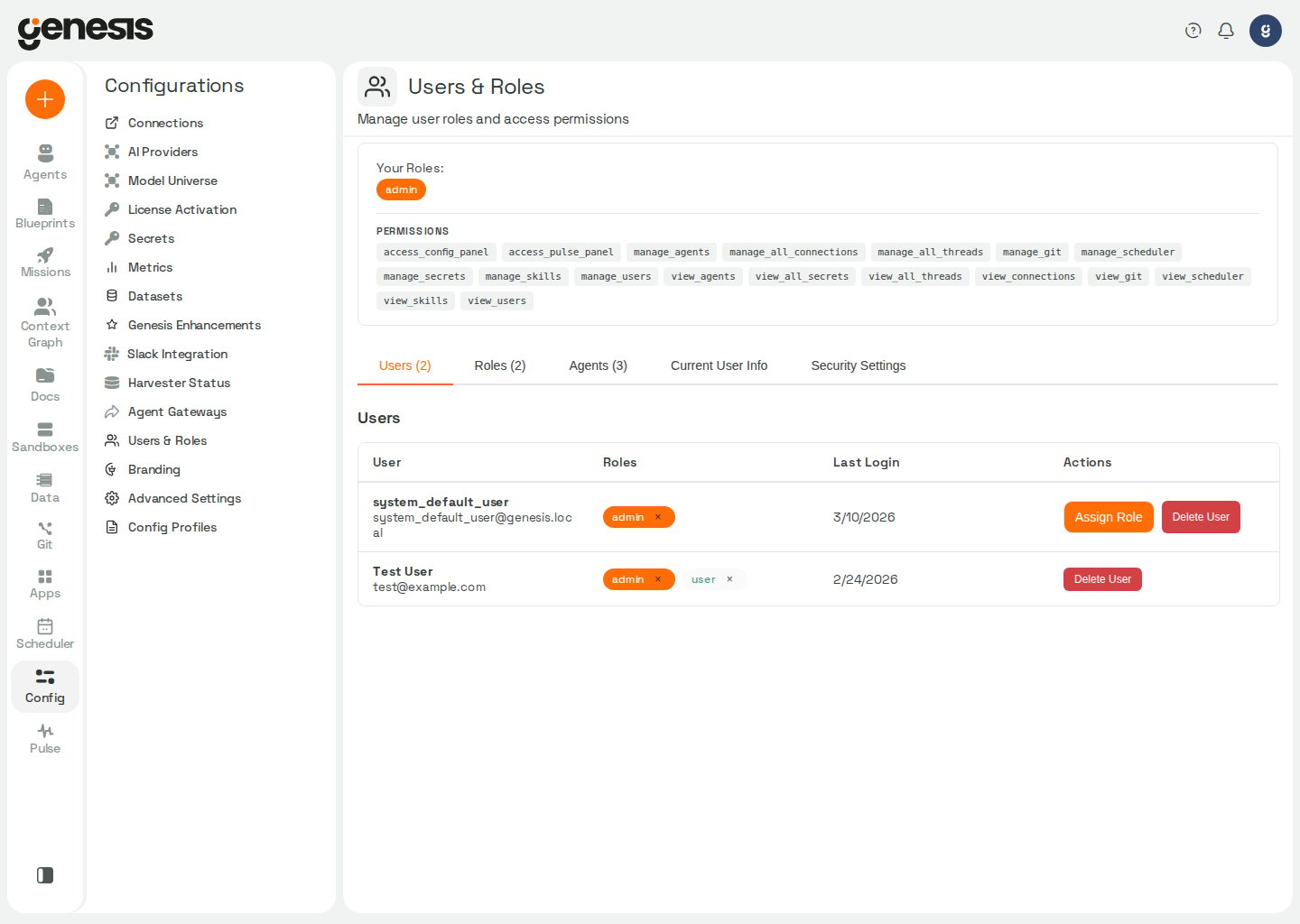
The **Users and Roles** page is the main RBAC administration workspace in
Genesis. It focuses on user management, role design, and agent access. Use the
companion [Workspace Policies](/docs/Setup/Workspace-Policies) page for
workspace-wide tool controls, onboarding behavior, and default thread
visibility.
 ## Main tabs
| Tab | Purpose |
| - | - |
| **Users** | Assign and revoke roles, review onboarding status, inspect access queue items, and remove users. |
| **Roles** | Create custom roles and manage permissions, dashboards, agents, secrets, and tool access. |
| **Access Preview** | Simulate one or more non-admin roles (or a user's role set) without changing your real account or persisted RBAC state. |
| **Agents** | Assign roles to agents. |
| **Current User Info** | Review the authenticated user's current roles and permissions. |
The separate [Workspace Policies](/docs/Setup/Workspace-Policies) page handles
workspace-wide tool permissions, onboarding settings, and default thread
visibility.
The access-denied screen for **Config → Users** lists the administrators a user
can contact for elevated access. It lists people only: the built-in System User
and service identities are left out. Genesis has no self-service admin-key
claim option. When no administrator can sign in, see
[RBAC Practical Guide — Establishing or recovering an administrator](/docs/Security-Controls/RBAC-Practical-Guide#establishing-or-recovering-an-administrator).
## Users tab row actions
On the **Users** tab, each row ends with an actions menu (⋮). Open it to use
per-user administration actions. If no actions apply to a row, the cell shows
**—**.
| Action | When it appears |
| - | - |
| **Assign Role** | You can edit roles for the user and at least one role is available to assign. |
| **Preview Access** | You have permission to manage users. Loads that user's roles into **Access Preview** (`admin` is excluded from the selection). |
| **Reset Onboarding** | You can manage users and the row is not the system user, `system@genesis.local`, or your own account. |
| **View Memory** | You can manage users. |
| **Delete User** | Same mutability rules as **Reset Onboarding**. |
## Typical admin workflows
* assign a role to a user,
* create a custom role,
* grant agent access to a role,
* set default roles for new users,
* resolve unmet access requests,
* reset onboarding for a user,
* preview the app as another role set before changing assignments.
When a role edit would leave no **active** agent holding `manage_agents`,
Genesis refuses the change — for example deactivating that agent, revoking its
carrying role, removing `manage_agents` from the role, or deleting the role.
Grant `manage_agents` to another active agent first, then repeat the change.
See [RBAC Practical Guide → Agents](/docs/Security-Controls/RBAC-Practical-Guide#agents).
## Access Preview (admins)
Access Preview lets an **admin** browse Genesis with the permissions of one or
more **non-admin** roles without assigning those roles to their account or
mutating Casbin state. Your signed-in identity remains the audit actor for
actions you take while preview is active.
Open **Config → Users & Roles → Access Preview**, or from the **Users** tab open
a row's actions menu (⋮) and choose **Preview Access** to load that user's roles
into the preview selection (`admin` is always excluded). The preview tab
provides:
* **Search roles or users** — filter roles by name or description, or find
users by display name, email, or user ID.
* **Roles** — toggle individual roles into the preview selection.
* **Matching users** — pick a user to copy that user's assigned roles into the
selection (up to eight matches when searching; users with only the built-in
`admin` role are omitted).
* **Start Preview**, **Clear Selection**, and **Exit Preview** — start applies
preview roles to subsequent UI and API requests; exit restores your normal
admin view.
While preview is active, the tab label shows **Access Preview (active)**, the
page banner lists the preview label and role set, and the top navigation bar
shows **Exit Preview** with the active label. Genesis cannot preview the
built-in `admin` role; it is excluded from selection and from user-based
preview loads.
## SCIM-managed users
If your deployment provisions users through inbound SCIM, the **Users** tab
labels those rows as `Managed by SCIM`. When a provisioned record is inactive,
Genesis shows `Managed by SCIM (inactive)`.
For SCIM-managed users, the **Users** tab does not offer manual role add or
revoke controls. Update the user's IdP group membership and the SCIM
group-to-role mapping instead of editing the Genesis role badges directly.
## Role editor workflow
From the **Roles** tab, select **+ Create Role** or open an existing role to use the tabbed role editor. The editor includes **Basic Info**, **Permissions**, **Agent Access**, **Apps**, **Secret Access**, and **Tool Access**.
On the **Permissions** tab, each permission shows a plain-language description
under its name. When Genesis has longer scope notes — what is included or
excluded, or which sibling permission covers the rest — a **?** icon appears
next to the description; hover or keyboard-focus it to read the tooltip. The
same text is available from `GET /api/rbac/permissions` as `description`
(short line) and `extended_description` (tooltip, when present). Permissions
without a server-side description fall back to readable text derived from the
permission name instead of showing "No description".
Use **Agent Access** to choose which workspace agents the role can interact
with as part of the same create or edit flow. The list includes assignable
agents for the workspace and omits internal system agents.
**Connection profiles** are ordinary custom roles that grant one or more saved
connections (via each connection's **Roles with Access** bindings). They are
reusable across agents: assign a profile role to an agent from **Agents →**
**\[agent] → Data Access**, or manage the role's connection grants here in the
**Roles** tab. Built-in roles such as `user` and `admin` cannot be used as
profile roles. An agent may hold multiple profile roles; its connection access
is the union. Removing every profile leaves the agent inheriting each
connection type's default. See [Agents Center and Skills — Data Access](/docs/User-Guide/Agents-Center-And-Skills).
Use **Apps** to review and assign dashboard and Genesis App access as part of
the same role flow. When tagged microapps are present, the editor shows those
tags on each app row and adds **Bulk apply by app tag**, which lets you choose
one tag plus one access level (`view`, `refresh`, `edit`, or `manage`) and
apply that grant to every matching tagged app before you save the role.
The **Permissions** tab lists `manage_repos` (**Manage unified Git-backed
sources for skills, flows, apps, blueprints, agent definitions, role
definitions, and document indexes (Knowledge Base feeds)**). Grant it to
operators who should use
**Config → Managed Sources** or **Document Indexes → Sync from Git** to register
one remote repository with multiple `scan_types_enabled` values (for example
skills and document feeds from the same `repo_id`) instead of creating separate
per-library sources. The page requires `access_config_panel` as well. Holders
of `manage_repos` can also call the legacy `/api/skills/repositories`,
`/api/flows/repositories`, `/api/apps/repositories`, and `/api/blueprints/repositories`
routes; deleting a multi-type source must use
`DELETE /api/managed-sources/{source_id}`. Removing an enabled scan type from an
existing source is not supported — delete the source and recreate it with the
desired `scan_types_enabled`. A source that includes `roles` also requires
`manage_users` to create or update it, or to apply its role preview. Role
definitions live under `roles//role.yaml` (or `role.yml`): Git can
define a role's permissions and resource access, but cannot assign users to
roles or define built-in roles.
On first boot after upgrade, Genesis grants
`manage_repos` to the built-in `admin` role and to custom roles that already
have all of `manage_skills`, `manage_flows`, `manage_apps`, and `manage_git`
(one-time backfill).
When a managed source includes `agents` in `scan_types_enabled`, Genesis also
requires `manage_agents` for create, update, delete, sync, artifact listing,
per-agent enablement, and applying Git-backed agent definitions to the instance.
Grant both permissions to operators who should register agent manifests from Git
through **Config → Managed Sources** or ask Eve to publish a local agent through
`agent_management` after reviewing its portable export preview.
Sync discovers `agent.yaml` / `agent.yml` files under `agents_root`; the first
sync previews create/update/disable actions, and a follow-up sync with
`apply_agent_changes` applies the reviewed plan.
The **Permissions** tab also includes a dedicated **PAT connections** group
with five category-scoped permissions:
* `access_pat_connections_databases` (`Databases`)
* `access_pat_connections_git` (`Git & Code`)
* `access_pat_connections_cloud` (`Cloud & Storage`)
* `access_pat_connections_pipelines` (`Data Pipelines`)
* `access_pat_connections_tools` (`Dev Tools`)
These control whether the role can create, update, or test saved connections
that use PAT-class credentials such as `pat`, `api_token`, or `api_key` for
connectors in each category. When you create a new role, Genesis seeds those
defaults from `rbac.default_pat_capability_for_new_roles.databases`,
`.git`, `.cloud`, `.pipelines`, and `.tools` in
[Advanced Settings](/docs/Setup/Advanced-Settings).
The **Roles** tab also includes **Default Roles for New Users**. Use it to
choose which roles are automatically assigned when new users sign up or log in
for the first time. The list includes the built-in `admin` role: when its box
is checked, every new user becomes an administrator. Uncheck it and select
**Save Changes** to keep new users off `admin`. Saving keeps every role you
did not uncheck, including `admin`.
When the admin UI has not saved a default-role list yet, Genesis falls back to
`rbac.default_roles` in `genesis-config.yaml` (see
[Advanced Settings → RBAC defaults](/docs/Setup/Advanced-Settings#rbac-defaults)),
then to the built-in `DEFAULT_NEW_USER_ROLES` constant, whose default is
`["admin", "user"]` — so on an unconfigured deployment every new user is an
administrator, and the `admin` box starts checked. To keep new users off
`admin`, uncheck it and save, or set `rbac.default_roles` explicitly (for
example `["user"]`, or `[]` to assign no roles); an explicit value always wins
over the built-in default.
A saved list that cannot be read is not treated as "not saved". If reading it
fails when a user is created, Genesis assigns that user no roles instead of
falling back to the defaults above, so a deployment that saved a non-admin list
never hands out `admin` during a database outage. The role-less user gets the
default roles from the startup backfill after the next restart, or from an
administrator.
Genesis keeps the configuration aligned with the current role list. If an older
saved default-role list still references a role that no longer exists, Genesis
ignores that stale entry. If you want to delete a role that is currently
configured as a default for new users, first remove it from
**Roles → Default Roles for New Users**.
## Workspace policies
Use the separate [Workspace Policies](/docs/Setup/Workspace-Policies) page for
system-wide defaults and overrides that sit above or alongside normal
role-based access:
| Area | What it does |
| - | - |
| **Tool Permissions** | Globally allow or block high-risk tools and coding-agent tools for all users and agents. |
| **Onboarding** | Configure onboarding flow toggles plus required and optional onboarding topics. |
| **Workspace Defaults** | Set the default visibility model applied to newly created threads. |
When either Tool Permissions control is blocked, the affected tools stay
unavailable even if a role would otherwise allow them.
### Combining user and agent role decisions
A tool call in a chat is checked against the user's role and against the agent's
role. By default Genesis allows the call when **either** role grants the tool, so
a user whose role does not include a tool can still reach it through an agent
whose role does.
Two settings in the `security` configuration section change that:
| Setting | Default | Effect |
| - | - | - |
| `security.tool_auth_mode` | `union` | `intersection` requires that both the user's role and the agent's role grant the tool. |
| `security.force_double_key_on_connections` | `false` | `true` makes every saved connection behave as if `require_double_key` were on for access and credential resolution. Two provider capability checks keep reading each connection's stored flag; see the full model. |
The two are independent: one governs tools, the other connections, and neither
overrides the other. Set them as environment variables (`SECURITY_TOOL_AUTH_MODE`,
`SECURITY_FORCE_DOUBLE_KEY_ON_CONNECTIONS`) or in **Config → Advanced Settings**. A run with
no user context is authorized against the agent's role alone in either mode. See
[Security Controls → Layer 2](/docs/Security-Controls/Genesis-Agent-Security-Controls#layer-2-rbac-tool-usage-control-primary-access-control)
for the full model.
`require_double_key` on an individual connection governs access to that
connection — both principals must pass secret-level access checks, both to
resolve its credentials and for it to be visible at all. It does not affect tool
authorization. A request carrying only an agent and no
user is treated differently by the connection boundaries — see [What double key
means when only one principal is
present](/docs/Security-Controls/Genesis-Agent-Security-Controls#what-double-key-means-when-only-one-principal-is-present).
## Admin audit log
Every successful mutation on this page (user and role lifecycle, role
assignment matrices, bot-role mappings, and default roles for new users) writes
a row to the `ADMIN_AUDIT_LOG` metadata table. Rows include the acting admin's
user ID and email, the target resource, a JSON `details` payload, and
`source=api`. Advanced-config edits from other setup pages use the same table
with `target_type=advanced_config`; see [Advanced Settings](/docs/Setup/Advanced-Settings).
SQLite metadata audit rows follow the isolated-write behavior described in
[SQLite audit writes](/docs/Integrations/Data%20Sources/SQLite/SQLite#sqlite-audit-writes).
Browse recorded events without direct metadata-table access from **Config →
Admin Audit Log** (filters, row detail, and CSV export) or
`GET /api/admin/audit-log`. For action names, column definitions, example SQL,
and how chat-based `rbac_action` writes differ (`source=bot`), see
[RBAC Practical Guide → Admin audit log](/docs/Security-Controls/RBAC-Practical-Guide#admin-audit-log).
## Automation surface
| Endpoint family | Use |
| - | - |
| `/api/rbac/users` and `/api/rbac/roles` | Manage users and roles. |
| `/api/rbac/permissions` | List permission names with short descriptions and optional extended tooltip text for the role editor. |
| `/api/rbac/connection-profiles` | List reusable connection profile roles for the agent-editor picker. |
| `/api/rbac/agents/{bot_id}/connection-access` | Read an agent's role-derived connection access. |
| `/api/rbac/agents/{bot_id}/connection-profile` | Create or update a profile role and assign it to an agent. |
| `/api/rbac/bots` | Review and assign bot-role mappings. |
| `/api/rbac/settings/...` | Set default roles and, from Workspace Policies, thread visibility. |
| `/api/rbac/high-risk-tools/...` | Control high-risk tool restrictions surfaced on Workspace Policies. |
| `/api/rbac/coding-agent-tools/...` | Control coding-agent tool restrictions surfaced on Workspace Policies. |
| `/api/config/advanced/...` | Read and update onboarding settings surfaced on Workspace Policies. |
## Related pages
* [Workspace Policies](/docs/Setup/Workspace-Policies)
* [RBAC Practical Guide](/docs/Security-Controls/RBAC-Practical-Guide)
* [Agents Center and Skills](/docs/User-Guide/Agents-Center-And-Skills)
## Main tabs
| Tab | Purpose |
| - | - |
| **Users** | Assign and revoke roles, review onboarding status, inspect access queue items, and remove users. |
| **Roles** | Create custom roles and manage permissions, dashboards, agents, secrets, and tool access. |
| **Access Preview** | Simulate one or more non-admin roles (or a user's role set) without changing your real account or persisted RBAC state. |
| **Agents** | Assign roles to agents. |
| **Current User Info** | Review the authenticated user's current roles and permissions. |
The separate [Workspace Policies](/docs/Setup/Workspace-Policies) page handles
workspace-wide tool permissions, onboarding settings, and default thread
visibility.
The access-denied screen for **Config → Users** lists the administrators a user
can contact for elevated access. It lists people only: the built-in System User
and service identities are left out. Genesis has no self-service admin-key
claim option. When no administrator can sign in, see
[RBAC Practical Guide — Establishing or recovering an administrator](/docs/Security-Controls/RBAC-Practical-Guide#establishing-or-recovering-an-administrator).
## Users tab row actions
On the **Users** tab, each row ends with an actions menu (⋮). Open it to use
per-user administration actions. If no actions apply to a row, the cell shows
**—**.
| Action | When it appears |
| - | - |
| **Assign Role** | You can edit roles for the user and at least one role is available to assign. |
| **Preview Access** | You have permission to manage users. Loads that user's roles into **Access Preview** (`admin` is excluded from the selection). |
| **Reset Onboarding** | You can manage users and the row is not the system user, `system@genesis.local`, or your own account. |
| **View Memory** | You can manage users. |
| **Delete User** | Same mutability rules as **Reset Onboarding**. |
## Typical admin workflows
* assign a role to a user,
* create a custom role,
* grant agent access to a role,
* set default roles for new users,
* resolve unmet access requests,
* reset onboarding for a user,
* preview the app as another role set before changing assignments.
When a role edit would leave no **active** agent holding `manage_agents`,
Genesis refuses the change — for example deactivating that agent, revoking its
carrying role, removing `manage_agents` from the role, or deleting the role.
Grant `manage_agents` to another active agent first, then repeat the change.
See [RBAC Practical Guide → Agents](/docs/Security-Controls/RBAC-Practical-Guide#agents).
## Access Preview (admins)
Access Preview lets an **admin** browse Genesis with the permissions of one or
more **non-admin** roles without assigning those roles to their account or
mutating Casbin state. Your signed-in identity remains the audit actor for
actions you take while preview is active.
Open **Config → Users & Roles → Access Preview**, or from the **Users** tab open
a row's actions menu (⋮) and choose **Preview Access** to load that user's roles
into the preview selection (`admin` is always excluded). The preview tab
provides:
* **Search roles or users** — filter roles by name or description, or find
users by display name, email, or user ID.
* **Roles** — toggle individual roles into the preview selection.
* **Matching users** — pick a user to copy that user's assigned roles into the
selection (up to eight matches when searching; users with only the built-in
`admin` role are omitted).
* **Start Preview**, **Clear Selection**, and **Exit Preview** — start applies
preview roles to subsequent UI and API requests; exit restores your normal
admin view.
While preview is active, the tab label shows **Access Preview (active)**, the
page banner lists the preview label and role set, and the top navigation bar
shows **Exit Preview** with the active label. Genesis cannot preview the
built-in `admin` role; it is excluded from selection and from user-based
preview loads.
## SCIM-managed users
If your deployment provisions users through inbound SCIM, the **Users** tab
labels those rows as `Managed by SCIM`. When a provisioned record is inactive,
Genesis shows `Managed by SCIM (inactive)`.
For SCIM-managed users, the **Users** tab does not offer manual role add or
revoke controls. Update the user's IdP group membership and the SCIM
group-to-role mapping instead of editing the Genesis role badges directly.
## Role editor workflow
From the **Roles** tab, select **+ Create Role** or open an existing role to use the tabbed role editor. The editor includes **Basic Info**, **Permissions**, **Agent Access**, **Apps**, **Secret Access**, and **Tool Access**.
On the **Permissions** tab, each permission shows a plain-language description
under its name. When Genesis has longer scope notes — what is included or
excluded, or which sibling permission covers the rest — a **?** icon appears
next to the description; hover or keyboard-focus it to read the tooltip. The
same text is available from `GET /api/rbac/permissions` as `description`
(short line) and `extended_description` (tooltip, when present). Permissions
without a server-side description fall back to readable text derived from the
permission name instead of showing "No description".
Use **Agent Access** to choose which workspace agents the role can interact
with as part of the same create or edit flow. The list includes assignable
agents for the workspace and omits internal system agents.
**Connection profiles** are ordinary custom roles that grant one or more saved
connections (via each connection's **Roles with Access** bindings). They are
reusable across agents: assign a profile role to an agent from **Agents →**
**\[agent] → Data Access**, or manage the role's connection grants here in the
**Roles** tab. Built-in roles such as `user` and `admin` cannot be used as
profile roles. An agent may hold multiple profile roles; its connection access
is the union. Removing every profile leaves the agent inheriting each
connection type's default. See [Agents Center and Skills — Data Access](/docs/User-Guide/Agents-Center-And-Skills).
Use **Apps** to review and assign dashboard and Genesis App access as part of
the same role flow. When tagged microapps are present, the editor shows those
tags on each app row and adds **Bulk apply by app tag**, which lets you choose
one tag plus one access level (`view`, `refresh`, `edit`, or `manage`) and
apply that grant to every matching tagged app before you save the role.
The **Permissions** tab lists `manage_repos` (**Manage unified Git-backed
sources for skills, flows, apps, blueprints, agent definitions, role
definitions, and document indexes (Knowledge Base feeds)**). Grant it to
operators who should use
**Config → Managed Sources** or **Document Indexes → Sync from Git** to register
one remote repository with multiple `scan_types_enabled` values (for example
skills and document feeds from the same `repo_id`) instead of creating separate
per-library sources. The page requires `access_config_panel` as well. Holders
of `manage_repos` can also call the legacy `/api/skills/repositories`,
`/api/flows/repositories`, `/api/apps/repositories`, and `/api/blueprints/repositories`
routes; deleting a multi-type source must use
`DELETE /api/managed-sources/{source_id}`. Removing an enabled scan type from an
existing source is not supported — delete the source and recreate it with the
desired `scan_types_enabled`. A source that includes `roles` also requires
`manage_users` to create or update it, or to apply its role preview. Role
definitions live under `roles//role.yaml` (or `role.yml`): Git can
define a role's permissions and resource access, but cannot assign users to
roles or define built-in roles.
On first boot after upgrade, Genesis grants
`manage_repos` to the built-in `admin` role and to custom roles that already
have all of `manage_skills`, `manage_flows`, `manage_apps`, and `manage_git`
(one-time backfill).
When a managed source includes `agents` in `scan_types_enabled`, Genesis also
requires `manage_agents` for create, update, delete, sync, artifact listing,
per-agent enablement, and applying Git-backed agent definitions to the instance.
Grant both permissions to operators who should register agent manifests from Git
through **Config → Managed Sources** or ask Eve to publish a local agent through
`agent_management` after reviewing its portable export preview.
Sync discovers `agent.yaml` / `agent.yml` files under `agents_root`; the first
sync previews create/update/disable actions, and a follow-up sync with
`apply_agent_changes` applies the reviewed plan.
The **Permissions** tab also includes a dedicated **PAT connections** group
with five category-scoped permissions:
* `access_pat_connections_databases` (`Databases`)
* `access_pat_connections_git` (`Git & Code`)
* `access_pat_connections_cloud` (`Cloud & Storage`)
* `access_pat_connections_pipelines` (`Data Pipelines`)
* `access_pat_connections_tools` (`Dev Tools`)
These control whether the role can create, update, or test saved connections
that use PAT-class credentials such as `pat`, `api_token`, or `api_key` for
connectors in each category. When you create a new role, Genesis seeds those
defaults from `rbac.default_pat_capability_for_new_roles.databases`,
`.git`, `.cloud`, `.pipelines`, and `.tools` in
[Advanced Settings](/docs/Setup/Advanced-Settings).
The **Roles** tab also includes **Default Roles for New Users**. Use it to
choose which roles are automatically assigned when new users sign up or log in
for the first time. The list includes the built-in `admin` role: when its box
is checked, every new user becomes an administrator. Uncheck it and select
**Save Changes** to keep new users off `admin`. Saving keeps every role you
did not uncheck, including `admin`.
When the admin UI has not saved a default-role list yet, Genesis falls back to
`rbac.default_roles` in `genesis-config.yaml` (see
[Advanced Settings → RBAC defaults](/docs/Setup/Advanced-Settings#rbac-defaults)),
then to the built-in `DEFAULT_NEW_USER_ROLES` constant, whose default is
`["admin", "user"]` — so on an unconfigured deployment every new user is an
administrator, and the `admin` box starts checked. To keep new users off
`admin`, uncheck it and save, or set `rbac.default_roles` explicitly (for
example `["user"]`, or `[]` to assign no roles); an explicit value always wins
over the built-in default.
A saved list that cannot be read is not treated as "not saved". If reading it
fails when a user is created, Genesis assigns that user no roles instead of
falling back to the defaults above, so a deployment that saved a non-admin list
never hands out `admin` during a database outage. The role-less user gets the
default roles from the startup backfill after the next restart, or from an
administrator.
Genesis keeps the configuration aligned with the current role list. If an older
saved default-role list still references a role that no longer exists, Genesis
ignores that stale entry. If you want to delete a role that is currently
configured as a default for new users, first remove it from
**Roles → Default Roles for New Users**.
## Workspace policies
Use the separate [Workspace Policies](/docs/Setup/Workspace-Policies) page for
system-wide defaults and overrides that sit above or alongside normal
role-based access:
| Area | What it does |
| - | - |
| **Tool Permissions** | Globally allow or block high-risk tools and coding-agent tools for all users and agents. |
| **Onboarding** | Configure onboarding flow toggles plus required and optional onboarding topics. |
| **Workspace Defaults** | Set the default visibility model applied to newly created threads. |
When either Tool Permissions control is blocked, the affected tools stay
unavailable even if a role would otherwise allow them.
### Combining user and agent role decisions
A tool call in a chat is checked against the user's role and against the agent's
role. By default Genesis allows the call when **either** role grants the tool, so
a user whose role does not include a tool can still reach it through an agent
whose role does.
Two settings in the `security` configuration section change that:
| Setting | Default | Effect |
| - | - | - |
| `security.tool_auth_mode` | `union` | `intersection` requires that both the user's role and the agent's role grant the tool. |
| `security.force_double_key_on_connections` | `false` | `true` makes every saved connection behave as if `require_double_key` were on for access and credential resolution. Two provider capability checks keep reading each connection's stored flag; see the full model. |
The two are independent: one governs tools, the other connections, and neither
overrides the other. Set them as environment variables (`SECURITY_TOOL_AUTH_MODE`,
`SECURITY_FORCE_DOUBLE_KEY_ON_CONNECTIONS`) or in **Config → Advanced Settings**. A run with
no user context is authorized against the agent's role alone in either mode. See
[Security Controls → Layer 2](/docs/Security-Controls/Genesis-Agent-Security-Controls#layer-2-rbac-tool-usage-control-primary-access-control)
for the full model.
`require_double_key` on an individual connection governs access to that
connection — both principals must pass secret-level access checks, both to
resolve its credentials and for it to be visible at all. It does not affect tool
authorization. A request carrying only an agent and no
user is treated differently by the connection boundaries — see [What double key
means when only one principal is
present](/docs/Security-Controls/Genesis-Agent-Security-Controls#what-double-key-means-when-only-one-principal-is-present).
## Admin audit log
Every successful mutation on this page (user and role lifecycle, role
assignment matrices, bot-role mappings, and default roles for new users) writes
a row to the `ADMIN_AUDIT_LOG` metadata table. Rows include the acting admin's
user ID and email, the target resource, a JSON `details` payload, and
`source=api`. Advanced-config edits from other setup pages use the same table
with `target_type=advanced_config`; see [Advanced Settings](/docs/Setup/Advanced-Settings).
SQLite metadata audit rows follow the isolated-write behavior described in
[SQLite audit writes](/docs/Integrations/Data%20Sources/SQLite/SQLite#sqlite-audit-writes).
Browse recorded events without direct metadata-table access from **Config →
Admin Audit Log** (filters, row detail, and CSV export) or
`GET /api/admin/audit-log`. For action names, column definitions, example SQL,
and how chat-based `rbac_action` writes differ (`source=bot`), see
[RBAC Practical Guide → Admin audit log](/docs/Security-Controls/RBAC-Practical-Guide#admin-audit-log).
## Automation surface
| Endpoint family | Use |
| - | - |
| `/api/rbac/users` and `/api/rbac/roles` | Manage users and roles. |
| `/api/rbac/permissions` | List permission names with short descriptions and optional extended tooltip text for the role editor. |
| `/api/rbac/connection-profiles` | List reusable connection profile roles for the agent-editor picker. |
| `/api/rbac/agents/{bot_id}/connection-access` | Read an agent's role-derived connection access. |
| `/api/rbac/agents/{bot_id}/connection-profile` | Create or update a profile role and assign it to an agent. |
| `/api/rbac/bots` | Review and assign bot-role mappings. |
| `/api/rbac/settings/...` | Set default roles and, from Workspace Policies, thread visibility. |
| `/api/rbac/high-risk-tools/...` | Control high-risk tool restrictions surfaced on Workspace Policies. |
| `/api/rbac/coding-agent-tools/...` | Control coding-agent tool restrictions surfaced on Workspace Policies. |
| `/api/config/advanced/...` | Read and update onboarding settings surfaced on Workspace Policies. |
## Related pages
* [Workspace Policies](/docs/Setup/Workspace-Policies)
* [RBAC Practical Guide](/docs/Security-Controls/RBAC-Practical-Guide)
* [Agents Center and Skills](/docs/User-Guide/Agents-Center-And-Skills)