_ENABLED` environment variables and the
`GENESIS__PROVIDERS____CONFIGURED` override are retired. The one-time
`aa017_provider_admission` migration carries an explicitly stored
`providers.
.configured: false` value to `providers.
.admission: deny`. The
stored marker itself is kept for rollback to v1.19.95; readiness in the newer
version never reads it. Retention does not expire by calendar date. A separate
release must explicitly retire these markers after the supported rollback
window closes.
This compatibility preserves providers configured before the upgrade, with
unchanged provider settings and deployment inputs. It does not synchronize
providers added, enabled, disabled, or deleted on the newer version back to the
old marker. Those changes require recovery after rollback; in particular, a
provider disabled on the newer version can appear enabled again on v1.19.95.
Keep a pre-upgrade configuration/database backup when changes during the
upgrade window may need to be reversed. This marker compatibility alone does
not guarantee rollback across unrelated database schema migrations.
The **Embeddings** tab and the **Beta** AI Providers hero card also show an
embedding health notice. It reports whether Digital Twin has verified that the
configured provider and model can actually embed; the provider and model fields
alone only show recorded configuration. The notice carries Twin's explanation
for `working`, `not working`, or `not yet verified`. When no embedding client is
configured, it shows **Embeddings are not configured** instead of the neutral
`Embedding status unknown` state; configure an embedding provider and model before
expecting semantic search to work. If Twin cannot provide a verdict for a configured
client, it shows `Embedding status unknown` rather than treating the recorded
configuration as proof that embeddings work. For the status values and diagnostic
reason, see [Lineage Tools](/docs/Genbot-Toolkit/Lineage-Tools#get_index_stats).
On the **Beta** page (`/config/ai-providers/`), the same work is organized as:
| Area | Purpose |
| - | - |
| **Hero card** | Shows the active chat or embedding provider, its tier assignments (chat) or embedding model, and quick actions such as **Change Models** and **Test**. |
| **Connected list** | Other providers that are configured, partially set up, or have environment credentials detected. Rows show a setup-stage badge and **Continue setup →** when more steps remain. |
| **New connection** drawer | Guided wizard: pick provider → configure → secrets (when required) → SPCS External Access steps (when applicable) → test → models → done. The **Models** step can configure both chat tier assignments and an embedding model when the provider supports embeddings. |
A provider denied by policy but with no saved credentials or configuration is
not treated as a connection: it stays available in the **New connection** picker
and does not appear in the **Connected list**. A `disabled` setup stage alone
does not add a provider to the list; configured providers and providers with
saved credentials remain visible there with the **Disabled** badge.
Beta setup stages (shown as badges on connection rows):
| Stage | Meaning |
| - | - |
| `disabled` | Provider admission is denied; its connection settings are retained. |
| `active` | Provider is active for chat or embeddings and has assigned models. |
| `needs_eai` | Credentials are saved but the Genesis External Access Integration is not yet assigned in SPCS. |
| `needs_models` | Provider is configured but chat tier or embedding model assignments are still missing. |
| `ready` | Provider is fully configured with models but not yet set active. |
| `env_detected` | Genesis detected provider credentials in the environment but has not saved them yet. For **LiteLLM Proxy**, this requires a complete bootstrap proxy configuration (base URL plus auth for the selected `auth_mechanism`) whose base URL is still supplied only by `LITELLM_PROXY_API_BASE` (`default_env_var`) — not when the URL is already saved in `APP_CONFIG`. |
| `not_configured` | Provider has not been set up. On the **Beta** page, a provider marked active in `APP_CONFIG` but missing required credentials (for example **LiteLLM Proxy** with only a base URL) also reports `not_configured`. |
When authentication is enabled, the page stays in a loading state until
`/api/rbac/me/permissions` resolves. Admins should not see a blank page on
first navigation after login while permissions are still loading.
## Typical workflow
1. Open **Config -> AI Providers**.
2. Review the currently configured provider.
3. Use **Connect** for a new provider or **Change Models** for an existing provider.
4. Set a default provider when multiple options are available.
5. Open the **Embeddings** tab (`/config/llm-providers/?tab=embeddings` on **Stable**, or `/config/ai-providers/?tab=embeddings` on **Beta**) when search and indexing should use a different provider or model than chat.
6. On the **Embeddings** tab, pick a configured provider tile, choose an embedding model from the searchable dropdown, and save. Saving a preference for a provider that is not active leaves the current embedding unchanged and does not reindex; if no active embedding identity exists, first-save adoption may establish one without reindexing an older embedding space. Changing the model for the active provider, or choosing **Set Active for Embeddings** on a different provider, asks you to confirm before applying the change. After confirmation, Genesis points document indexes to the new model-specific Chroma collection and starts a **full** background re-embed of documents from prior collections. Until that completes, indexes that exist only in a prior collection appear in **Config → Documents** with a **Needs reindex** badge.
In the Beta **New connection** drawer, non-Azure providers use separate test
steps: **Test Connection** validates the provider, then **Test Models** validates
each selected Premier, Main, and Fast chat model with a live call; when an
embedding model is configured for an embedding-capable provider, that model is
tested too. The **Next**
button remains available if a test has not passed, so testing is optional. If the
selected model assignments cannot load, the drawer reports the loading error and
offers a retry. Azure keeps model selection before its combined
provider-and-model test because the provider must be named before its model can
be resolved. When the drawer opens from the **Embeddings** context, choose the
embedding model first; **Test Connection** then tests that selected embedding
model. In **Select Chat Models**, use the **Test** button beside a tier to check
its currently selected model. Changing a tier selection clears its previous test
result. If you interacted with the models and try to leave while any shown tier
is unverified or failing, the drawer asks whether to leave; opening the step and
closing it without changing anything does not trigger the prompt.
For **LiteLLM Proxy**, an ordinary reconfiguration or credential rotation keeps
the existing chat-tier assignments. When a configured proxy has no assigned model,
choose **Continue setup** from its connection row to explicitly discover models
and initialize the assignments. On SPCS, the first save can preserve the provider
credentials while External Access is pending; after **Approve External Access**,
use **Continue setup** to run the access check and model setup again. A successful
access check with an empty catalog is reported as a save result rather than as a
credential failure. The first successful save also records the backing connection
with the authentication mode selected for the provider; OAuth settings do not
require a follow-up save to persist.
LiteLLM Proxy **Test Connection** resolves secret references in submitted
credentials and reports categorized causes for common failures. See the [connection
test response details](/docs/Genesis-API/API-Reference#litellm-proxy-connection-test-response).
In **Change Models** on the **Chat** tab, the model pickers for chat assignments
are searchable. Search matches both the model display name and the technical
model identifier. For **LiteLLM Proxy**, search also matches the underlying
model name when the proxy exposes one (for example
`global.anthropic.claude-opus-4-8` behind a deployment alias). See
[LiteLLM Proxy model selection](#litellm-proxy-model-selection) below.
On the **Embeddings** tab, the model dropdown labels show each model's display
name while values use the technical model identifier; search matches both. The
overview summary may show the active embedding model by display name. **Save**
(or **Set default** / **Switch to …**) stays disabled until you change the
active provider or pick a different model than the one currently in effect.
If you save chat-model assignments for a provider before its credentials are
configured, Genesis persists the assignments and **Inherited Chat Tier**
without switching the runtime to that provider. After you finish the provider
setup and activate it, Genesis uses the saved assignments.
On the **Beta** page, **Set Active** for chat calls
`POST /api/config/llm-providers/{provider}/activate` with `force: true`. It
switches the active chat provider only — it does **not** call
`PUT /api/config/models/main/assignments` with `use_defaults: true`, which
would reset saved tier overrides back to Genesis defaults. On the **New
connection** wizard **Done** step, **Set Active** for chat and embeddings
checks the activation response: when `success` is `false`, Genesis shows an
error toast with the API `message` (or a fallback) instead of a success toast.
**Same-engine provider switches.** **OpenAI**, **Azure OpenAI**, **Databricks**, and
`litellm_*` providers (including **LiteLLM Proxy**) share the LiteLLM
engine. When you **Set Active** or save a provider configuration that changes
`llm.active_provider`, Genesis syncs runtime model assignments from the
active provider's saved **Change Models** tiers and clears stale
process-global LiteLLM state left by the previous provider — for example
`LITELLM_MODEL`, `LITELLM_FAST_MODEL`, `LITELLM_PREMIER_MODEL`, and the
LiteLLM SDK `api_base` override. It does **not** delete `LITELLM_PROXY_*`
bootstrap env vars; those remain the deployment-default source for unset
AppConfig fields. **Set Active** on composite providers (`litellm_*`,
including **LiteLLM Proxy**) activates the already-saved configuration
without rewriting endpoint or auth from the activation request. **LiteLLM
Proxy** chat, embedding, and discovery paths resolve `proxy_api_base` from
`providers.litellm_proxy.connection.base_url` in AppConfig on each call
(explicit DB/UI or file-backed values beat legacy `LITELLM_PROXY_API_BASE`),
so switching to or from **LiteLLM Proxy** serves the saved proxy without a
server restart. For unpinned LiteLLM turns with a named provider, later model
calls use that provider's current main, fast, and frontier assignments when
they can be read, including changes made after the turn starts.
Whether a provider is configured is computed on every read from its effective parameters and secrets; Genesis never writes a configured marker and readiness never reads one. A partial save — for example a **Workspace URL** without a token, or a LiteLLM Proxy **Base URL** without auth — persists the values, and the provider reports the missing parameters until they are supplied.
A successful provider save sets `providers..admission` to `auto` and, when no chat provider is selected and exactly one eligible provider remains, selects it. This includes saving only the API key of a secret-only provider (OpenAI, Anthropic, Gemini) through the secret fields API, and it re-admits a provider an operator had denied. Replacing a credential that is already saved runs a connection test first and keeps the old credential if the test fails; a first-time key is saved without a test.
On the **Beta** page, secret-only providers call two endpoints after the **Secrets** step saves: `POST /api/config/llm-providers/mark-configured`, which re-admits the provider and adopts it for embeddings when no embedding pair is saved, and `POST /api/config/llm-providers/{provider}/ensure-endpoints`, which registers the provider's egress hosts in `CUSTOM_ENDPOINTS` — saving only an API key does not register them. **LiteLLM Proxy** is not secret-only: a successful `POST` or `PUT /api/config/llm-providers/litellm-proxy` admits it in the save finalize step (after syncing or removing the OAuth backing connection). If endpoint registration fails, Genesis reports a warning but still advances the wizard — retry from **Continue setup →** or call the endpoint again before **Approve External Access** on SPCS.
**Credential rotation and failed saves.** When you save or rotate provider
credentials with **Test Connection** enabled (the default on provider cards),
Genesis runs the connection test as part of the save. If the test fails,
Genesis rolls back to the previously saved credential and any runtime env
state the save touched — the invalid key is not left in place. For **Snowflake
Cortex**, the save-time test validates the PAT and account you submitted, not
the previously exported runtime credential on Cortex-active installs. This
applies to **OpenAI**, **Azure OpenAI**, **Snowflake Cortex**, **Databricks**,
**LiteLLM Proxy**, and **Other Providers** (Anthropic, Bedrock, Gemini, and
related LiteLLM routes). Partial saves of non-secret fields (for example a **Workspace
URL** without a token) are unchanged: values persist, but the provider stays
unmarked until required credentials are present. Overwriting a provider API
key through **Config → Secrets** or Advanced Settings
(`providers..connection.*` secret fields) uses the same guard when a
credential is already configured; first-time entry is not guarded because
there is nothing to restore.
**Runtime updates.** After a successful provider save, model-assignment save,
or provider API-key change, Genesis applies the provider, model, and credential
changes to the running process immediately. New chat, embedding, and other
provider operations use the updated runtime state without a server restart.
Failed or rolled-back saves leave the previous runtime state in place.
In Snowflake Native App / SPCS deployments, some provider cards show extra
outbound-access steps such as **Approve External Access** and
**Assign to Genesis**. The **Approve External Access** control opens the
Snowflake console in a new browser tab. After you trigger those actions from
the page, Genesis rechecks the assignment immediately so the provider card
can move forward as soon as Snowflake confirms the change. Assignment
verifies the live `GENESISAPP_SERVICE_SERVICE` binding; a
recorded-but-not-attached state is reported as failure instead of success.
## Configuring a provider through the config API
Container and Kubernetes deployments configure their LLM provider **after** the
container is up, through the same endpoints this page's UI calls. There is no
provider environment variable to set at launch: the provider, its credential and
its model assignments are `APP_CONFIG` state, and they persist across every
restart once saved. (For IaC-managed deployments, a mounted `genesis-config.yaml`
writes the same `APP_CONFIG` paths — see
[Infrastructure-managed deployments](#infrastructure-managed-deployments) below.)
| Step | Call | Purpose |
| - | - | - |
| 1 | `POST /api/config/llm-providers/` | Create the provider's connection and credential |
| 2 | `POST /api/config/llm-providers//activate` | Make it the active chat provider |
| 3 | `PUT /api/config/models/main/assignments` | Assign models to the chat tiers |
The URL segment in step 1 is the **provider card**; the segment in step 2, and the
`provider` field in step 3, is the **llm type**. They are not the same strings:
| Provider | Card (step 1) | llm type (steps 2 and 3) |
| - | - | - |
| OpenAI | `openai` | `openai` |
| Azure OpenAI | `azure` | `azureopenai` |
| Snowflake Cortex | `cortex` | `cortex` |
| Databricks | `databricks` | `databricks` |
| LiteLLM Proxy | `litellm-proxy` | `litellm_proxy` |
| AWS Bedrock | `other` (body `"provider": "bedrock"`) | `litellm_bedrock` |
| Anthropic | `other` (body `"provider": "anthropic"`) | `litellm_anthropic` |
| Google Gemini | `other` (body `"provider": "gemini"`) | `litellm_gemini` |
Use `POST` to create — it validates the provider's complete field set — and `PUT` on
the same path to change one field later. `POST` refuses a provider that already
exists and tells you to use the update endpoint; that refusal is the signal to
switch to `PUT`. A `PUT` against an unconfigured provider stores a partial
configuration that fails at request time instead.
Put credentials in a request-body file, never on the command line: process
arguments are visible to every process on the host and land in shell history. Every
one of these endpoints requires the `access_config_panel` permission. LiteLLM
Proxy creation and updates also require admin access; updates additionally
require `manage_secrets` because an update may stage managed-secret changes. On a
deployment with authentication enabled each call carries a bearer token — supply
it through a curl config file rather than an argument, for the same reason.
```bash theme={null}
umask 077
set -o pipefail # json.tool must not mask a failed curl
GENESIS_URL=https://
BODY=$(mktemp "${TMPDIR:-/tmp}/genesis-llm-body.XXXXXX.json")
CURL_CONFIG=$(mktemp "${TMPDIR:-/tmp}/genesis-curl.XXXXXX")
trap 'rm -f "$BODY" "$CURL_CONFIG"' EXIT
chmod 600 "$BODY" "$CURL_CONFIG"
# Bearer token for a user holding access_config_panel. read -rs keeps it out of
# shell history; omit these two lines and --config only when auth is disabled.
read -rsp 'Genesis access token: ' GENESIS_TOKEN && echo
printf 'header = "Authorization: Bearer %s"\n' "$GENESIS_TOKEN" > "$CURL_CONFIG"
unset GENESIS_TOKEN
cat > "$BODY" <<'JSON'
{"api_key": "", "test_connection": true}
JSON
curl -sS --fail-with-body --config "$CURL_CONFIG" \
-X POST -H 'Content-Type: application/json' --data @"$BODY" \
"$GENESIS_URL/api/config/llm-providers/openai" | python3 -m json.tool
curl -sS --fail-with-body --config "$CURL_CONFIG" \
-X POST -H 'Content-Type: application/json' -d '{"force": true}' \
"$GENESIS_URL/api/config/llm-providers/openai/activate" | python3 -m json.tool
curl -sS --fail-with-body --config "$CURL_CONFIG" \
-X PUT -H 'Content-Type: application/json' \
-d '{"provider": "openai", "use_defaults": true, "activate_provider": true}' \
"$GENESIS_URL/api/config/models/main/assignments" | python3 -m json.tool
```
**Read each response before running the next call.** `--fail-with-body` stops on an
HTTP error, but these routes also answer `200` with `success: false` — most often
*"Configuration for … already exists. Use configure endpoint to update and enable
it."* Repeat that first call as a `PUT` when you see it; do not run the activation
or assignment call until the step before it reported `success: true`.
Confirm the result with
`GET /api/config/llm-providers/llm/health`, whose
`data.health.components.llm_config_manager.current_llm` names the active llm type.
That is a configuration check, not a model call: it reports green on a saved key the
provider rejects, on a model id that does not exist, and on an endpoint nothing can
reach. Send one real chat message on a fresh thread before treating the deployment
as ready.
**Footnote on `default_env_var` seeding.** Some schema fields carry a
`default_env_var` binding, and the bootstrap layer picks that variable up only
while nothing is stored for the field (secrets are captured once at startup,
no-clobber). This supports local, image and IaC bootstrap. Values saved through
the UI, config API or config file outrank these defaults; changing an env seed
does not replace a saved field. For Bedrock,
`AWS_BEDROCK_REGION` is read once per process for
`providers.litellm_bedrock.connection.default_endpoint.aws_region`, and an
explicitly stored value—including an empty value—takes precedence.
## Infrastructure-managed deployments
For Helm-based deployments, you can also bootstrap provider settings from a
separate `genesis-config.yaml` file instead of placing provider credentials
directly in Helm values.
The shipped `genesis-config-example.yaml` covers `openai`, `azureopenai`,
`databricks`, `litellm_anthropic`, `litellm_bedrock`, `litellm_gemini`,
`litellm_proxy` (API key, static headers, or OAuth), and `voyage`.
```yaml theme={null}
providers:
litellm_bedrock:
connection:
auth_mode: "api_key" # or "iam_role" for IRSA (no stored creds)
api_key:
aws_bearer_token: "aws_prod/genesis#bedrock_bearer_token"
default_endpoint:
aws_region: "us-east-1"
models:
default_chat: "global.anthropic.claude-sonnet-4-6"
embedding_model: "bedrock/amazon.titan-embed-text-v2:0"
llm:
active_provider: "litellm_bedrock"
embedding:
active_provider: "litellm_bedrock"
active_model: "bedrock/amazon.titan-embed-text-v2:0"
```
For IRSA-based auth without stored credentials, set `auth_mode: "iam_role"` and
omit `api_key`; boto3 uses the pod's IRSA role automatically.
For a LiteLLM Proxy that uses OAuth instead of a static proxy API key, configure
the provider and OAuth ownership policy in the same file. Secret-valued fields
accept `aws_*` / `gcp_*` / `vault_*` / `secret_*` / `env_*` references (see
[External Secrets](/docs/Setup/External-Secrets)).
```yaml theme={null}
providers:
litellm_proxy:
connection:
auth_mode: "oauth"
transport: "auto" # or "openai" / "anthropic" to pin one route; see Wire Transport below
base_url: "https://litellm-proxy.internal.example.com"
oauth:
authorization_url: "https://auth.example.com/oauth/authorize"
token_url: "https://auth.example.com/oauth/token"
client_id: "genesis-litellm-proxy"
client_secret: "aws_prod/genesis-llm#litellm_proxy_oauth_client_secret"
token_endpoint_auth_method: "client_secret_post"
scopes: "openid profile email offline_access"
custom_header_descriptors:
- field_key: "oauth_header_x_ally_tenant"
header_name: "X-Ally-Tenant"
required: true
description: "Tenant header required by the proxy"
applies_to: "both"
- field_key: "oauth_header_x_api_key"
header_name: "X-Api-Key"
required: true
is_secret: true
applies_to: "downstream"
service_account_header_values:
oauth_header_x_ally_tenant: "tenant-123"
oauth_header_x_api_key: "aws_prod/genesis-llm#litellm_proxy_header_secret"
settings:
oauth_credential_policy: "service_account"
allow_user_oauth_fallback_for_non_interactive: false
llm:
active_provider: "litellm_proxy"
```
For service-account OAuth header values in config files, prefer
`service_account_header_values` — a YAML mapping keyed by each descriptor's
`field_key`. When both are set, the dict takes precedence over
`service_account_header_values_json`. Each value can be a plain string or a
secret reference (`aws_*`, `gcp_*`, `vault_*`, `secret_*`, `env_*`); when the matching
descriptor has `is_secret: true`, Genesis resolves the reference through the
encrypted secret store at runtime. You can still supply the whole mapping as
`service_account_header_values_json` — either a JSON string or a secret
reference to a stored JSON blob (see
[External Secrets](/docs/Setup/External-Secrets)), for example
`{"oauth_header_x_ally_tenant":"tenant-123"}`. Use
`settings.oauth_credential_policy: "per_user_oauth"` for interactive
per-user browser grants. Use `"service_account"` for scheduled or other
non-interactive workloads that cannot complete a browser grant.
Header values may also be keyed by a descriptor's header name or its normalized
alias: for `X-Ally-Tenant`, these include `x-ally-tenant` and `x_ally_tenant`.
Key matching is case-insensitive, and Genesis stores the value under the
descriptor's `field_key`. A submitted key that matches no descriptor is rejected.
When adding or changing descriptors, use the actual HTTP header name in
`header_name`, not a generated field key such as `oauth_header_x_ally_tenant`; a
malformed descriptor is refused when saved.
For Helm- or env-only bootstrap, legacy `LITELLM_PROXY_*` variables are wired as
`default_env_var` defaults in the schema — for example `LITELLM_PROXY_TRANSPORT`
(`providers.litellm_proxy.connection.transport`),
`LITELLM_PROXY_OAUTH_CREDENTIAL_POLICY`
(`providers.litellm_proxy.settings.oauth_credential_policy`),
`LITELLM_PROXY_ALLOW_USER_OAUTH_FALLBACK_FOR_NON_INTERACTIVE`
(`providers.litellm_proxy.settings.allow_user_oauth_fallback_for_non_interactive`),
and `LITELLM_PROXY_OAUTH_CUSTOM_HEADER_DESCRIPTORS_JSON`
(`providers.litellm_proxy.connection.oauth.custom_header_descriptors`). They
seed unset fields at startup; values saved in **AI Providers**, **Advanced
Settings**, or `genesis-config.yaml` always win over a leftover env var. Set
`LITELLM_PROXY_OAUTH_CUSTOM_HEADER_DESCRIPTORS_JSON` to a JSON array when
bootstrapping descriptors without `genesis-config.yaml`. In `service_account`
mode, Genesis sends descriptor values with `applies_to` `token_exchange` on the
OAuth token request, forwards `downstream` headers during client-credentials token
acquisition, and sends `downstream` headers on proxy `/models` discovery, background
model-catalog loading, and runtime proxy calls. Saved service-account
header values persist in provider metadata as `oauth_service_account_header_values`
(when supplied as a dict) or `oauth_service_account_header_values_json`.
Status reads also return `oauth_service_account_header_value_keys` — the configured
`field_key` list without secret values — so **Reconfigure** can show *A saved shared
value already exists for this header* even when the backing LiteLLM Proxy connection
no longer exposes shared defaults in `locator.user_oauth_fields`. At runtime, Genesis
resolves values from provider metadata first, then `connection.locator.user_oauth_fields`,
then `connection.user_oauth_fields`. For descriptor definitions, Genesis uses the
resolved LiteLLM Proxy admin snapshot from `APP_CONFIG` (saved UI/DB,
`genesis-config.yaml`, and unset-field `default_env_var` bootstrap) first; when
that list normalizes to empty, it falls back to `oauth_custom_header_descriptors`
on the shared backing LiteLLM Proxy connection (`litellm_proxy.shared`).
Descriptors marked `required: true` must have a
non-empty value for the applicable `applies_to` scope or Genesis raises a validation
error before calling the proxy. If a saved shared service-account configuration
has a malformed descriptor or a missing required value, the LiteLLM Proxy status
panel in **AI Providers** reports the issue. Correct descriptors in Advanced
Settings at `providers.litellm_proxy.connection.oauth.custom_header_descriptors`,
or provide the required value in the service-account header values setting.
Pass the file to Helm with `--set-file genesisConfig.content=genesis-config.yaml`,
or set `genesisConfig.existingConfigMap` to a pre-created ConfigMap.
Secret fields in this file accept the same `aws_*` / `gcp_*` / `vault_*` /
`secret_*` / `env_*` reference syntax documented in [External Secrets](/docs/Setup/External-Secrets). On every
startup, Genesis re-evaluates the mounted file (via `GENESIS_CONFIG_FILE` or the
saved profile path) before auto-populating missing schema fields. If the profile
path or file hash changed, Genesis performs a **section-scoped** update into
`APP_CONFIG`: only top-level sections present in the file are cleared and
rewritten; omitted sections keep their current database values. The clear and
rewrite for each touched section is **atomic** — a failed apply rolls back so
fields such as `llm.active_provider` are not left unset mid-restart. If startup
apply fails, Genesis leaves profile metadata unchanged and retries on the next
restart (see [Config Profiles — Startup loading](/docs/Setup/Config-Profiles#startup-loading)).
Connections
named in a file `connection` section merge per-connection (file entries
override, others survive). If the profile is unchanged, it fills only missing
paths and preserves existing values. Genesis then runs the env↔config bridge: non-secret
fields with `default_env_var` are exported to legacy environment-variable
consumers unless the variable is already set; secret fields with
`default_env_var` are captured from the environment into their default managed
secrets when unset. See [Config Profiles — Startup loading](/docs/Setup/Config-Profiles#startup-loading)
and [Advanced Settings — Secret-valued settings](/docs/Setup/Advanced-Settings#secret-valued-settings)
for the full priority, capture, and reload rules.
External secret references (`aws_*`, `gcp_*`, `vault_*`) stored on LLM provider
secret fields are preserved through the App Config → legacy runtime config
bridge and resolved by `resolve_secret()` at read time. Genesis-managed
`secret_*` references are emitted only when the backing secret exists; external
refs are always emitted because they resolve outside the Genesis `SECRETS`
table.
Provider credentials, per-provider model assignments, and the active chat and
embedding selections are persisted in `APP_CONFIG` under `providers.*`,
`llm.active_provider`, `embedding.active_provider`, and `embedding.active_model`.
On upgrade, Genesis runs startup migrations that copy any remaining legacy
`EXT_SERVICE_CONFIG` LLM namespaces into those AppConfig paths
(`aa009_ext_service_llm_migration`); source rows are left in place until a later
cleanup phase. A follow-up heal migration (`aa010_ext_service_llm_reapply`)
re-applies provider values whose AppConfig targets were overwritten by bootstrap
NULL-scaffold overlap on prior releases (only default-sourced NULL rows are
touched). A one-time Snowflake heal migration (`aa011_cortex_active_override_heal`)
restores `llm.active_provider` when a pre-fix startup bug forced it to `cortex`
over a still-configured legacy `model_config.main_provider` in
`EXT_SERVICE_CONFIG`. Provider parameter sufficiency is never stored: it is
recomputed on every read from connection fields, their `default_env_var`, and
managed secrets. A provider admission migration (`aa017_provider_admission`)
carries only an explicit legacy `providers..configured: false` into
`providers.
.admission = deny` and keeps the stored marker for rollback until
a release explicitly retires it; newer readiness reads ignore it. A Cortex embedding default migration (`aa013_cortex_embedding_default_pin`)
pins unset Cortex deployments to `embedding.active_model = e5-base-v2` (and sets
`embedding.active_provider = cortex` when it was only inferred from
`llm.active_provider`) so catalog-order changes cannot silently re-point
document indexes to a different model-specific collection. The migration is a
no-op when `embedding.active_model` is already set explicitly. When no complete
provider remains after the heal, Genesis logs a loud warning. The
`aa015_legacy_provider_namespace_heal` migration also carries non-secret values
from the pre-Variant-A provider sections (for example,
`litellm_bedrock.connection.default_endpoint.aws_region`) into the canonical
`providers.
.*` paths when those canonical fields are unset. It is fill-only and
does not copy secret-typed fields; re-enter a provider credential on the **AI
Providers** page when it predates the provider namespace move. The follow-up
`aa016_incomplete_provider_marker_revalidation` migration rechecks any
`configured` marker carried by aa015. The next state read defaults to Cortex only
on a Cortex-capable host; otherwise no provider is
promoted, and an operator must activate one. Upgrades that ship
these migrations together heal automatically on the next restart when
`EXT_SERVICE_CONFIG` source rows still exist — no manual re-entry of
credentials is required. Startup migrations run in alphabetical order
after bootstrap completes and are serialized against schema auto-population; if an
earlier migration in the chain fails, later migrations (including the LLM
backfill steps) do not run until the failure is fixed and Genesis restarts. When
that happens, Genesis logs
`STARTUP MIGRATION CHAIN HALTED` at CRITICAL severity with the failed migration
name and every blocked migration — search Pulse Live Logs or server logs for
that string.
Treat the file as the canonical source for IaC-managed deployments. Normal pod
restarts with an unchanged mounted file preserve later UI changes, but a Helm
upgrade or ConfigMap change that updates the file content triggers a full
reload on the next startup.
## Provider-specific notes
In Genesis Desktop (laptop mode), the Cortex provider can use a saved Snowflake
connection instead of separately entered credentials. This stores
`providers.cortex.connection.auth_method: "connection"` (schema default `""`)
and `providers.cortex.connection.connection_name` (schema default `""`; the
connection name without the `snowflake.` prefix). The connection supplies the
account and authentication at call time; its credentials are not copied into
Cortex configuration. On Genesis Desktop, saving a LiteLLM Proxy while Genesis
AI is configured prompts for confirmation because the personal proxy replaces
the Genesis AI provider slot.
**Snowflake active provider precedence.** On Snowflake Native App / SPCS hosts,
`llm.active_provider` in `APP_CONFIG` is authoritative: a configured non-Cortex
provider (for example `litellm_bedrock` or `litellm_proxy`) stays active across
restarts and is not overwritten by `CORTEX_MODE` or native Cortex availability.
Genesis registers Cortex as a selectable provider whenever it is available, but
activates it only when no chat provider is active yet — the zero-config default
for fresh installs. `CORTEX_OVERRIDE` no longer affects state reads (legacy
execution layers may still honor it until their cleanup). After startup migrations run, Genesis invalidates the AppConfig
snapshot and LLM overview caches so **AI Providers** reflects the restored
active provider immediately instead of serving a stale cortex-only view until
cache expiry.
**Removed LiteLLM providers.** LiteLLM Mistral (`litellm_mistral`) and LiteLLM
Cerebras (`litellm_cerebras`) are no longer available in **AI Providers**. On
the next startup, Genesis clears `llm.active_provider` when its resolved value
is one of those providers or their former bare aliases (`mistral` or
`cerebras`), and clears their saved configured markers. Genesis does not select
a replacement automatically: reselect and configure a provider in **Config →
AI Providers**. If `GENESIS__LLM__ACTIVE_PROVIDER` still names one of the
removed providers, unset that environment override first because it takes
precedence over `APP_CONFIG`. When no provider remains, Genesis falls back to
Cortex only on a Cortex-capable host; otherwise, no provider is activated.
* **OpenAI** requires an API key on the provider card before Genesis marks the provider configured. Genesis routes OpenAI chat through the LiteLLM engine. The custom OpenAI chat engine has been retired: a saved `openai` engine override is warned about and ignored, without rewriting provider or model settings (see [Provider engine overrides](/docs/Setup/Advanced-Settings#provider-engine-overrides)). OpenAI remains a supported provider, and SDK-backed image and speech features remain available. When the runtime service name is `litellm_openai`, Genesis resolves its embedding configuration and API key from the same `providers.openai` schema. **Change Models** assignments persist under `providers.openai.models.*` in `APP_CONFIG` — `default_chat`, `fast_model`, `premier_model`, `supervisor`, `harvester`, and `knowledge_server` — and each field's `default_env_var` chain (`OPENAI_MODEL_NAME`, `OPENAI_MODEL_SUPERVISOR`, `OPENAI_FAST_MODEL_NAME`, and related vars) still applies when that assignment is unset. Chat tier getters (`get_current_model`, `fast_model_name`, `smart_model_name`, `frontier_model_name`) read the live assignment on each call instead of trusting a per-adapter snapshot from session dispatch, so **Change Models** updates take effect on the next turn without a server restart; during early bootstrap or when config is unavailable, getters fall back to the instance snapshot or env. Genesis prefixes model ids with `openai/` for LiteLLM calls, strips unsupported top-level JSON Schema combinators (`anyOf`, `oneOf`, `allOf`) from tool parameters before sending the request, and does not build a separate raw OpenAI client. Each call supplies explicit `api_key` and `api_base` to LiteLLM (`providers.openai.connection.base_url` when configured — env: `OPENAI_BASE_URL` / `OPENAI_API_BASE` — otherwise `https://api.openai.com/v1`); a missing resolved API key fails fast instead of falling back to ambient `OPENAI_API_KEY`, and the pinned `api_base` prevents process-global LiteLLM Proxy state from capturing direct OpenAI chat or embedding calls when LiteLLM Proxy is configured for chat. Model tier precedence for auxiliary work is unchanged: fast-tier and `thread_title` work resolve `fast_model` first, then `supervisor` or `default_chat`; other supervisor work prefers `supervisor`, then `default_chat`. Genesis no longer substitutes hardcoded `gpt-5-mini` or `gpt-5-nano` for fast or titling work based on the main model family — set the fast tier explicitly in **Change Models**.
* **Snowflake Cortex** can be saved and tested without extra credentials when Genesis is already running in a Snowflake-native runtime (Native App / SPCS) with Cortex available — credential fields are hidden on the form, and **Save Configuration** / **Test Connection** use native runtime credentials instead. In other deployments, choose **Authentication Method**: `Personal Access Token (PAT)` (default), `Key Pair (JWT)`, or `Connection` (Genesis Desktop / laptop mode only). For `Connection`, choose an existing Snowflake connection on the Cortex form's **Use Snowflake Cortex with `snowflake.`** panel; Genesis verifies that Cortex responds, then stores the connection reference rather than copying its credentials. Every Cortex call uses that connection's account and its saved authentication (Snowflake OAuth, key pair, or PAT). An identity-provider Snowflake connection requires a browser OAuth sign-in when you choose it. To use a connection for chat and embeddings, select **Use with embeddings**; choosing chat only leaves the current embedding provider unchanged. In PAT mode, enter **Account URL** and **Personal Access Token**. When you supply a PAT or change the account host, **Test Connection** and save-time validation exercise that submitted credential and host — not a previously working exported runtime PAT. The connection form has no model field; Genesis persists a model in provider metadata only when you pass `model` explicitly (for example through the API or **Change Models**). A fresh install does not pin catalog or env defaults into stored config — runtime defaults from `CORTEX_MODEL` still apply through the schema `default_env_var` chain when no saved assignment exists. In key-pair mode, enter **Snowflake Account** (`ORGID-ACCTID` or full host such as `myorg-myacct.snowflakecomputing.com`), **Snowflake User**, **Private Key** (PEM text), and optional **Private Key Passphrase** for encrypted keys; **Account URL** is optional because Genesis can derive the REST host from **Snowflake Account**. When credential fields are shown, the Cortex card also exposes **Embedding Method**: `REST API` (default) calls the Cortex REST embedding endpoint using the saved PAT or a short-lived JWT from the key pair; `SQL (Direct Snowflake)` opens a direct Snowflake connection and runs `SNOWFLAKE.CORTEX.EMBED_TEXT_768` (requires **Snowflake User**; **Warehouse** and **Role** are optional; SQL auth uses the PAT as password or key-pair JWT via `SNOWFLAKE_JWT`). In Snowflake Native App / SPCS runtimes, document and thread embeddings always use the SQL path via the deployment's Snowflake session regardless of this setting. When Snowflake Cortex is the active embedding provider on the **Embeddings** tab, Genesis syncs `EMBEDDING_PROVIDER`, `EMBEDDING_MODEL`, and `CORTEX_EMBEDDING_MODEL` from the saved selection during environment sync. Genesis applies the `e5-base-v2` default for `CORTEX_EMBEDDING_MODEL` only when that variable is not already set in the environment. For auxiliary Cortex calls, **Change Models** assignments are the primary source: main chat work resolves `default_chat`; fast-tier helper work and thread titling resolve `fast_model`, then `default_chat`; when no assignment resolves, the model of the Cortex connection applies. These calls never read a model environment variable directly, but `default_chat` and `fast_model` still resolve through the schema `default_env_var` chain (`CORTEX_MODEL`, `CORTEX_FAST_MODEL_NAME`) when nothing is explicitly saved. V6 thread-summary routing follows the same assignment-first precedence as compression so chat and summary paths stay aligned.
If Snowflake refuses a Cortex model because of Model RBAC, **Test Connection** shows a
multiline remediation instead of classifying the failure as invalid credentials. The
message includes the Snowflake error code (`399217` for SQL or `003001` for REST), the
missing application role, and the `ACCOUNTADMIN` commands needed to grant access; long
diagnostics can be expanded with **Show more**. The same remediation is returned when a
chat request is refused. For the account-side grants, see [Resolve Cortex Model RBAC
refusals](/docs/Integrations/Data%20Sources/Snowflake/Snowflake#resolve-cortex-model-rbac-refusals).
* **Azure OpenAI** requires **Endpoint URL**, **API Key**, **API Version** (schema default `2025-04-01-preview`), and a configured chat deployment on the provider card. **Change Models** assignments store Azure deployment names (not OpenAI SKU ids). Genesis routes all Azure OpenAI chat, embedding, connection-test, and auxiliary tool paths through the LiteLLM engine with per-call credentials from the saved `providers.azureopenai` connection — there is no separate native Azure OpenAI client path. **Test Connection** sends a LiteLLM completion using the saved endpoint, API key, API version, and deployment name; blank fields fail fast instead of falling back to ambient `AZURE_*` environment variables. If the selected deployment is not found, create a deployment with that name in Azure AI Foundry or choose an existing deployment in **Change Chat Models**. For GPT-5.4-and-later or GPT-6 models, Genesis raises an older dated API version to `2025-03-01-preview`, the minimum version that serves Azure's Responses API; a version already at or after that date, or a non-date version such as `preview` or `latest`, is left unchanged. This also applies when an opaque deployment name is mapped to its canonical model with `providers.azureopenai.settings.deployment_base_models`. Genesis prefixes deployment names with `azure/` for LiteLLM calls, strips unsupported top-level JSON Schema combinators (`anyOf`, `oneOf`, `allOf`) from tool parameters before sending the request, and can automatically retry a hung streamed turn once in non-streaming mode when `providers.azureopenai.settings.stream_fallback` is `true` (default). Tune the first-token wait with `providers.azureopenai.settings.stream_fallback_timeout` (default `8.0` seconds). See [Azure OpenAI stream fallback](/docs/Setup/Advanced-Settings#azure-openai-stream-fallback).
* **Databricks** supports saved `pat` (default) and `oauth` modes, plus deployment-selected `app_identity`. PAT requires **Workspace URL** and **Personal Access Token**. `oauth` reuses an existing Databricks `user_oauth` connection from [Connections](/docs/Setup/Connections); **Databricks OAuth Connection** is required, **Workspace URL** is optional, and Genesis derives `https:///serving-endpoints` when it is blank. Interactive OAuth calls use the acting user's grant; background or no-user auxiliary calls can use a **Service Principal (OAuth M2M)** connection configured at `providers.databricks.connection.oauth.m2m_connection_name` in `genesis-config.yaml` (see [External Secrets](/docs/Setup/External-Secrets)). Inside a Databricks App, PAT-based model calls and PAT-mode settings saves or tests are refused; use `oauth` or the App identity instead. OAuth-backed calls and tests use the signed-in user's grant. Set `providers.databricks.connection.auth_mode` to `app_identity` only when Genesis runs as a Databricks App. Every call, with or without a user, then uses an access token for the App's service principal, minted from the App runtime's `DATABRICKS_HOST`, `DATABRICKS_CLIENT_ID`, and `DATABRICKS_CLIENT_SECRET`; those values must be present, and the serving endpoint must be in the same workspace. Genesis reuses a cached token until it has less than 30 minutes remaining, then exchanges credentials for a new token; concurrent calls share an in-flight exchange. Missing credentials or a workspace mismatch fail the call without falling back to a PAT, user token, or ambient `DATABRICKS_*` environment variable. The AI Providers card identifies this as **Databricks App identity** and refuses PAT or OAuth setting saves while this mode is active; change the deployment configuration to switch modes. The Databricks App deployment example is documented in [Deploying Genesis on Databricks — Private full Genesis App pilot](/docs/deployments/Databricks/Genesis-On-Databricks#private-full-genesis-app-pilot). **Test Connection** exercises a LiteLLM completion using the credential selected by the active mode. Genesis routes Databricks chat, embeddings, connection tests, auxiliary tool, and `image_analysis` paths through LiteLLM with explicit per-call credentials. The shipped assignments include `databricks-claude-opus-5-5` for `default_chat`, `premier_model`, `supervisor`, `harvester`, and `knowledge_server`, and `databricks-claude-haiku-4-5` for `fast_model`; assignments can be changed in **Change Models**. `databricks-claude-opus-5` stays selectable. On restart, an existing install moves a role to `databricks-claude-opus-5-5` only when that role is still managed by Genesis defaults; a role you chose keeps its model, and Genesis logs a `Default-model upgrade declined` warning naming it. To take the new defaults, open **Change Chat Models**, choose **Use Genesis defaults**, and save. To avoid provider rejections of mid-conversation system messages, Genesis sends non-leading system messages as user messages in Databricks requests; their order and context are preserved, and the stored thread history keeps its original roles. Fast-tier work and `thread_title` use `fast_model` first, then `supervisor`, then `default_chat`. Genesis prefixes serving endpoint names with `databricks/`, strips unsupported top-level JSON Schema combinators from tool parameters, and can retry a hung streamed turn in non-streaming mode when `providers.databricks.settings.stream_fallback` is `true` (default `false`). Tune its first-token wait with `providers.databricks.settings.stream_fallback_timeout` (default `2.0` seconds); see [Databricks stream fallback](/docs/Setup/Advanced-Settings#databricks-stream-fallback). Databricks streaming usage metadata includes cached input counters for **Thread Cost Analysis**. Per-user OAuth auth failures show an inline re-authorization card in chat; PAT and service-principal failures are treated as configuration errors.
* **Other Providers** is the catalog label for the generic LiteLLM integration (`litellm`). Use it to connect Anthropic, Bedrock, Google Gemini, and other LiteLLM-backed vendors. Claude Opus 5.5 is the shipped `default_chat` and `premier_model` for Anthropic (`anthropic/claude-opus-5-5`) and Bedrock (`global.anthropic.claude-opus-5-5`); the shipped `fast_model` is Claude Haiku 4.5 (`anthropic/claude-haiku-4-5` and `global.anthropic.claude-haiku-4-5-20251001-v1:0`). Claude Opus 5 stays selectable, and any assignment can be changed in **Change Models**. Named variants such as **Google Gemini** (`litellm_gemini`) still show their provider-specific title in the configured-provider grid once saved.
* **Google Gemini** uses the model selected in the provider form for **Test Connection**. In the new-connection flow, Genesis prefers the `fast_model` assignment, then `default_chat`, then the first available model; if no model is supplied, it falls back to the provider's catalog `fast_model`, currently `gemini/gemini-3.5-flash-lite`. The shipped `litellm_gemini` fast-model default is `gemini/gemini-3.5-flash-lite`, and you can change the assignment in **Change Models**.
* **AWS Bedrock** supports both the default AWS runtime endpoint and Bedrock-compatible custom endpoints. **Change Models** chat tier assignments persist model identifiers exactly as AWS writes them (for example `global.anthropic.claude-sonnet-4-6`, including cross-region prefixes such as `us.` or `global.`). At runtime Genesis adds the `bedrock/` prefix for LiteLLM routing on all chat, embedding, connection-test, and auxiliary paths; the step is idempotent when a value already includes `bedrock/`. For custom endpoints in `API Key / Bearer Token` mode, admins can choose `Authorization: Bearer`, `x-api-key`, or a custom header name, optionally strip AWS cross-region prefixes (`us.`, `eu.`, `apac.`, `global.`) from model IDs before proxy requests, choose the Bedrock chat API mode (`invoke` or `converse`; the form's labels are localized, and route behavior is described in [Bedrock configuration request fields](/docs/Genesis-API/API-Reference#bedrock-configuration-request-fields)), enable `Fake Stream` to chunk non-streaming `/converse` responses for proxies that do not support `/converse-stream`, disable TLS verification with `Skip SSL Verify` for self-signed certificates, and supply `Extra Headers` as a JSON object for additional upstream headers, or leave it blank when no extra headers are needed. Enter only the custom header name, not a full `Header: value` pair. IAM role authentication is available only for the default AWS Bedrock endpoint; custom endpoints require `API Key / Bearer Token`. **Test Connection** now probes the selected route mode: `Invoke` targets `/model/{modelId}/invoke` with an Anthropic-style body, while `Converse` targets `/model/{modelId}/converse` with the Bedrock Converse body. When `custom_auth_header` is a non-bearer header such as `x-api-key`, Genesis adds a structurally valid SigV4 `Authorization` header plus the selected custom header so API Gateway-based Bedrock proxies can validate the request. For that header mode, Genesis routes the saved API key through an internal carrier (`GENESIS_BEDROCK_CUSTOM_HEADER_KEY`) instead of `AWS_BEARER_TOKEN_BEDROCK` so LiteLLM never emits `Authorization: Bearer` on the wire. The same routing is applied after config exports from `genesis-config.yaml`, across restarts, and for background paths that share the chat Bedrock config — including long-thread compression (V6) worker subprocesses, Bedrock embedding calls, and Digital Twin LLM scans. Custom endpoints may leave `aws_region` blank; Genesis normalizes an empty region to `us-east-1` as a placeholder because the custom endpoint URL overrides routing. Some proxies return `403` for the lightweight test model even though the endpoint is reachable; Genesis surfaces that as a warning so you can save and verify with a real request. For the default endpoint, `aws_account_id` is optional; the form may prefill it from `AWS_ACCOUNT_ID`, `AWS_ROLE_ARN`, or an STS caller-identity lookup, but you do not need to enter it to save the provider. See [Bedrock configuration request fields](/docs/Genesis-API/API-Reference#bedrock-configuration-request-fields) for its connection-test behavior. Genesis persists these custom-endpoint runtime options in App Config so the same proxy behavior is restored after config reloads and restarts. For cold-start streaming turns, Genesis lets the full `llm.stream_read_timeout_seconds` budget apply on the wire instead of inheriting LiteLLM's older `600` second Bedrock streaming ceiling. Mid-stream idle gaps (after the first chunk) are governed separately by `llm.active_stream_idle_timeout_seconds`, which also sets the Bedrock httpx read budget. Both default to `900.0` seconds and can be tuned in [Advanced Settings](/docs/Setup/Advanced-Settings#llm-streaming-timeouts).
* If the default AWS Bedrock endpoint is selected and `providers.litellm_bedrock.connection.default_endpoint.aws_region` is missing, Genesis uses the schema default `us-east-1`; set the field explicitly when a different AWS region is required. Custom Bedrock-compatible endpoints do not require this AWS region. For custom endpoints, `AWS_BEDROCK_RUNTIME_ENDPOINT` and `AWS_BEDROCK_AUTH_HEADER` seed `providers.litellm_bedrock.connection.custom_endpoint.url` and `providers.litellm_bedrock.connection.custom_endpoint.auth_header`; both fields default to `""`. Genesis reads these deployment inputs once per process, keeps them in AppConfig across runtime projection and reloads, and gives an explicit stored value—including an empty value—precedence.
* **LiteLLM Proxy** supports four authentication mechanisms: `api_key` (default), `static_headers`, `oauth`, and `none`. Use `none` when the upstream gateway identifies callers by network identity instead of application credentials — Genesis sends no `Authorization` header on proxy requests. The **Wire Transport** selector (`transport`, default `auto`) controls the chat API shape. Leave it on `auto` to route Anthropic-family models through native Anthropic `/v1/messages` and other models through OpenAI-compatible `/chat/completions`. Caching occurs on both routes, but whether your gateway shares one upstream cache across routes and how much usage detail it reports are properties of that gateway, so check the stats panel after a change rather than assuming. On both the Genesis lab proxy and the Railway proxy, streamed OpenAI-route calls returned full `prompt_tokens` and both cache counters, and extended thinking behaved the same on both routes; an earlier measurement on a different proxy build saw zero cache counters and under-reported `prompt_tokens`. On the Anthropic route, LiteLLM sends the credential as `x-api-key` unless it is an OAuth credential (which Genesis sends as `Authorization: Bearer`) or carries Anthropic's own `sk-ant-oat` prefix. Pin `openai` if your gateway has no Anthropic endpoint, or if it authenticates only on `Authorization` while you use an API key or static headers. Pin `anthropic` only when the gateway has no OpenAI-compatible endpoint, such as Tailscale Aperture. Set `connection.transport` in `genesis-config.yaml` or `LITELLM_PROXY_TRANSPORT` when bootstrapping an unset transport field. Tests connectivity and discovers models through the proxy `/models` endpoint; with `auto`, **Test Connection** resolves the route from the configured or discovered model family and probes `/messages` for Anthropic-family candidates. When a proxy canonicalizes that route with an HTTP redirect, Genesis follows up to two same-origin hops only when the redirect target path ends in `/models` or `/models/`; cross-origin redirects and redirects to login or other non-`/models` paths are refused so authentication headers are not forwarded to another host. In Helm- or env-backed deployments where usable proxy settings are present in the
resolved `APP_CONFIG` snapshot (from `genesis-config.yaml`, saved UI/DB, or unset-field
`LITELLM_PROXY_*` bootstrap), the **AI Providers** overview shows a **LiteLLM Proxy** card (with endpoint and masked credential preview) instead of the generic **Other Providers** row when runtime proxy config is present. The LiteLLM Proxy status API merges those runtime settings into the **Reconfigure** payload so **OAuth Custom Header Descriptors** and masked service-account header markers appear even when UI metadata alone is sparse. Reopening **Reconfigure** preserves saved descriptors when the status response omits `oauth_custom_header_descriptors`, falls back to the backing LiteLLM Proxy connection copy when the field is present but normalizes to an empty array, and preserves service-account header presence via `oauth_service_account_header_value_keys` when connection shared defaults are unavailable. **Save** and **Reconfigure** merge partial service-account shared-header submissions with existing saved values — omitted or masked header fields keep their prior value, and removing a descriptor from **OAuth Custom Header Descriptors** prunes its stored value. **Test Connection** uses the same effective descriptor list (including that fallback) and, in `service_account` OAuth mode, applies `token_exchange` headers on the token request, forwards `downstream` headers during client-credentials token acquisition, and sends `downstream` headers on the `/models` probe. Genesis supports the standard OpenAI-compatible response shape `{"data": [{"id": "..."}]}` and also temporarily accepts the Ally-specific shape `{"data": {"Items": [{"model_id": "..."}]}}`. When the proxy includes `model_type`, Genesis uses it to separate chat and embedding models; otherwise it falls back to the model identifier heuristic. Genesis normalizes proxy model identifiers by stripping transport prefixes `litellm_proxy/` and `proxy/` before saving assignments, populating Model Universe, and showing picker values; at runtime it adds the `litellm_proxy/` prefix back for all LiteLLM library
calls — chat, embeddings (document indexes and Digital Twin semantic indexing), long-thread compression (V6), and other auxiliary paths. For `static_headers` and OAuth modes, resolved downstream headers are sent as `extra_headers` on these embedding calls as well as on chat. When `transport` is `anthropic`, OAuth credentials are also sent as `Authorization: Bearer ` so an Anthropic-compatible proxy can authenticate the request through its bearer transport. For admin model discovery, when `auth_mechanism` is `oauth` but OAuth client settings are incomplete, or when `static_headers` configuration is missing or invalid, Genesis falls back to API-key discovery headers when a proxy API key is configured
(including via `default_env_var` bootstrap). OAuth ownership is controlled by `oauth_credential_policy`: `per_user_oauth` (interactive browser grants per user), `service_account` (admin-managed client-credentials grant for non-interactive runs), or `per_user_oauth_with_service_fallback`. When the effective policy is `per_user_oauth`, Genesis skips admin-side service-account `/models` discovery on save and test because runtime calls use each user's browser grant. When LiteLLM Proxy is configured for per-user OAuth, Genesis resolves the request in the acting user context so the correct user-scoped token is used. At runtime, OAuth custom header descriptors use the resolved LiteLLM Proxy admin
snapshot first and fall back to the shared backing LiteLLM Proxy connection (`litellm_proxy.shared`) when that list is empty after normalization. For OAuth-backed LiteLLM Proxy modes, if the provider rejects a cached token, Genesis clears the cached OAuth token and retries the request once automatically before surfacing an authentication error. For API-key-backed LiteLLM Proxy mode, if the provider rejects the saved key during runtime, Genesis reloads the saved proxy credentials and retries once automatically before surfacing an authentication error. A later successful proxy call clears the transient validation error state. In Helm-managed deployments, bootstrap OAuth settings from `genesis-config.yaml` as shown in the infrastructure-managed section above; runtime LiteLLM Proxy admin config is snapshot-first from the resolved `APP_CONFIG` provider paths (`providers.litellm_proxy.*`) — explicit DB/UI or file-backed values always beat legacy `LITELLM_PROXY_*` env vars, which only seed unset fields via `default_env_var` / secret capture at startup.
In the Beta **AI Providers** form, enter service-account header values alongside their OAuth custom-header descriptors on **Configure**; leave a value blank to keep its saved value. The OAuth credential policy is displayed read-only on this form and is managed through `providers.litellm_proxy.settings.oauth_credential_policy` (default `per_user_oauth`). The **Shared Service Account** status row is **Unused** with `per_user_oauth`; with `service_account` or `per_user_oauth_with_service_fallback`, it is **Ready** only when the proxy base URL, token URL, client ID, and client secret are set, every required OAuth header has a value, and the server reports no saved-header issue. Otherwise it shows **Needs setup**, displaying the server's header issue when one is returned.
The selected **Wire Transport** is saved as
`providers.litellm_proxy.connection.transport`; saving the provider in the UI
no longer replaces that selection with `LITELLM_PROXY_TRANSPORT`. That
environment variable bootstraps an unset transport field.
**Wire Transport** applies to multi-turn chat turns only. One-shot utility
completions — including structured-output helpers such as the **Create Mission**
blueprint recommendation wizard, `create_blueprint` thread-based blueprint
generation (`CREATE_BLUEPRINT_FROM_THREADS`), auto-titling, and thread
compression summaries — stay on the OpenAI-compatible proxy protocol even when
Wire Transport is `anthropic`. The native Anthropic transport preserves prompt
caching for chat but does not enforce `response_format`; routing utility calls
through the OpenAI-compatible path keeps structured JSON outputs reliable.
If you're setting up Databricks in OAuth mode and do not yet have a saved
Databricks connection, Genesis keeps **Config -> Connections** available so
you can create and authorize that connection before returning to
**AI Providers**.
For LiteLLM-backed chat calls, Genesis normalizes usage metadata into the
standard fields `prompt_tokens`, `completion_tokens`, `total_tokens`,
`cache_read_input_tokens`, `cache_creation_input_tokens`, and
`cached_tokens` even when upstream providers report cache usage through
different LiteLLM response shapes. When LiteLLM exposes trace identifiers,
Genesis also records `provider_request_id` and `provider_session_id`; for
LiteLLM Proxy calls, metadata can additionally include `execution_origin`.
Anthropic-style prompt caching is **enabled by default**. App Config stores
the setting as `providers.litellm_anthropic.cache` (default `true`) and
exports it to `ANTHROPIC_CACHE` at startup unless that environment variable
is already set. On startup, Genesis repairs legacy installations where that App
Config row was persisted as `false` with default schema provenance; an
explicit operator choice to disable caching (`false` from the UI,
`genesis-config.yaml`, or a pre-set `ANTHROPIC_CACHE` env var) is preserved.
Caching continues to work for direct Claude routes and now also stays enabled
for Claude-compatible proxy routes such as `LiteLLM Proxy` when
`ANTHROPIC_CACHE=true`. When LiteLLM Proxy **Wire Transport** is `anthropic`,
Genesis aligns prompt-cache markers with the native `/v1/messages` wire path.
The `ANTHROPIC_CACHE_PROXY_HEURISTIC`,
`ANTHROPIC_CACHE_CHECKPOINT_MODE`, and `ANTHROPIC_CACHE_CHECKPOINT_ROLLING_ANCHOR`
settings each default to `true`; the proxy heuristic lets Genesis still emit
cache intent when the provider path is proxy-mediated but the resolved model or
provider is Claude-compatible. When `ANTHROPIC_CACHE_CHECKPOINT_MODE=true`,
Genesis marks the head system prompt, the deterministic cache-checkpoint
message, and either (a) a rolling deep-history anchor a few messages behind the
newest user turn on long threads, or (b) the latest user message on short threads
with no deep history yet. Set `ANTHROPIC_CACHE_CHECKPOINT_ROLLING_ANCHOR=false`
to revert to the legacy behavior that marked only the latest user turn as the
deep breakpoint. The rolling anchor keeps the cached prefix stable across turns
because per-turn date/time context is appended to the newest user message at the
LLM-call boundary, not injected into the system prompt. In provider-request
exports, those `cache_control` markers stay attached to `messages[*].content[]`
blocks so copied JSON and `curl` payloads match Anthropic-compatible chat APIs
more closely.
Databricks chat rate-limit recovery can also use a provider `retry_after` value
from the JSON error body when a standard `Retry-After` header is absent. Configure
the shared recovery window in [Advanced Settings](/docs/Setup/Advanced-Settings#llm-transient-error-retries).
In chat, provider rate-limit waits appear in the completion overlay with a retry
countdown and attempt number; see [Chat and Threads](/docs/User-Guide/Chat-And-Threads).
### Output-token defaults for LiteLLM-managed models
For providers that run through the LiteLLM runtime, Genesis injects a
model-aware `max_tokens` value on chat turns whenever the request does not
already include one. The same injection applies to Claude models on LiteLLM
`simple_completion` utility paths — including structured-output helpers such as
`create_blueprint` thread analysis, auto-titling, compression summaries, and
blind spec-author compiles — when those callers do not set `max_tokens`. If the
caller explicitly sets `max_tokens`, Genesis preserves that value (long-output
utility callers such as the spec author use this to avoid truncating large JSON
even when a frontier model is not yet listed in the table below).
| Technical model identifier match | Default `max_tokens` |
| - | - |
| `claude-opus-5-5`, `claude-opus-5`, `claude-fable-5`, `claude-opus-4-8`, `claude-opus-4-7`, `claude-opus-4-6`, `gpt-5.5`, `gpt-5.4`, `gpt-5.2` | `64000` |
| `claude-sonnet-5`, `claude-opus-4-5`, `claude-sonnet-4-7`, `claude-sonnet-4-6`, `claude-sonnet-4-5`, `claude-haiku-4-5`, `gpt-5` | `32000` |
| `gpt-6.1-sol`, `gpt-6-astra`, `gpt-6-luna` | `128000` |
| `gemini-3.8-flash`, `gemini-3.5-flash-lite` | `65536` |
| `anthropic.claude`, `bedrock/claude`, or any unmatched model | `16384` |
Genesis resolves this budget from the technical model identifier using a
longest-match-first lookup, so a specific match such as `claude-opus-4-7`
wins over family fallbacks such as `anthropic.claude` or `bedrock/claude`.
Claude-5 frontier models (`claude-opus-5-5`, `claude-opus-5`, `claude-fable-5-1`, `claude-fable-5`, `claude-sonnet-5`)
— including `anthropic/` and `global.anthropic.` prefixed wire forms — mirror
the caps of their nearest Claude 4.x tier peers in the table above.
For **Snowflake Cortex**, the `64000` API ceiling is applied to
`claude-opus-5` and `claude-opus-4-8`. Genesis resolves this per-model cap in
both the standard Cortex REST and OpenAI-compatible SDK modes. Cortex model
identifiers containing `llama`, `mistral`, `mixtral`, or `openai-gpt` use an
`8192` output-token cap; other known Cortex models retain their model-specific
caps, and an unrecognized Cortex model falls back to `15000`. The
`providers.cortex.settings.max_output_tokens` setting defaults to `null`; set
it deliberately, or set `CORTEX_MAX_OUTPUT_TOKENS`, to apply one explicit cap
to every Cortex model instead of the per-model table. On thinking-capable
Claude 5 models, `completion_tokens` includes extended thinking tokens, so a
`64000` cap typically yields about 35,000–40,000 visible output tokens; use
chunked writing for larger outputs.
When chat-tier resolution yields a malformed LiteLLM wire model (for example
`bedrock/us.` with no model id after the route prefix), Genesis logs a warning
and treats the tier as unresolved instead of routing the mystery string (which
would silently fall back to the `16384` family default). Fix the underlying
**Change Models** assignment or env-tier variable so the resolved wire model
ends in a full technical identifier.
If a streamed tool call still reaches the output limit, Genesis treats the
turn as truncation when the provider reports a length/max\_tokens finish reason
**or** when `completion_tokens` reaches the configured `max_tokens` cap.
Snowflake Cortex and some other providers can underreport `finish_reason`
(for example `stop` or `tool_calls`) while still consuming the full output
budget. Genesis tags the **last in-flight** tool call—even when its
accumulated arguments are syntactically valid JSON but missing required
fields—instead of repairing partial JSON and surfacing a misleading
required-field validation error. Agents recover by retrying the work in
smaller chunks.
For reproduction or integration tests that need a lower output budget on
LiteLLM-managed chat paths, set `GENESIS_MAX_OUTPUT_TOKENS_OVERRIDE`
to a positive integer. Genesis uses that value for every model's injected
`max_tokens` instead of the per-model defaults in the table above. Invalid
values are logged and ignored.
When a one-shot LiteLLM `simple_completion` utility call — auto-titling,
thread compression summaries, blueprint thread analysis, and similar helpers —
exceeds the model context window, Genesis retries **once** with a truncated
prompt: it keeps the head and tail of the input and elides the middle with a
marker noting how many characters were dropped. If the excerpt still cannot fit
or truncation would not shrink the prompt, Genesis surfaces a typed context-limit
failure (`Context length exceeded. Please reduce the input size.`) instead of
looping. Main multi-turn chat turns use separate trimmer and compression paths;
this recovery applies only to auxiliary `simple_completion` calls.
For LiteLLM-backed and Cortex REST chat calls, `LLM CALL
START`, `LLM CALL END`, and `LLM CALL FAIL` server log lines append a
structured `llm_metrics`
suffix (for example `llm_metrics provider=litellm_bedrock engine=litellm
model=... stream=true duration_ms=... ttft_ms=... prompt_tokens=...
completion_tokens=...`). The human-readable prefix still includes
`finish_reason=` and `max_tokens=` on END lines. Use both
together when correlating provider flips or diagnosing truncated responses:
`finish_reason=length` (or `max_tokens`) means the call hit its output-token
cap. When `completion_tokens` is at or above `max_tokens`, treat the turn as
capped even if `finish_reason` looks normal (for example Cortex `stop` or
`tool_calls`). LiteLLM also normalizes Anthropic's `max_tokens` stop reason
to `length`.
For integration debugging or reproduction, set `GENESIS_CAPTURE_COMPLETIONS=1`
(or `true`, `yes`, or `on`) to capture LLM request payloads to disk. Capture
is disabled by default and has zero overhead when unset. Secrets are redacted
before persistence.
**LiteLLM-backed** chat calls (OpenAI, Azure OpenAI, Databricks, LiteLLM Proxy,
Bedrock, Anthropic, and other LiteLLM routes) write
redacted dumps under `bot_storage/litellm_calls/`:
level-(a) files capture the final call kwargs at the LiteLLM boundary
(`litellm_call_*`), and level-(b) files capture the assembled wire request
body and headers via LiteLLM's pre-API-call hook (`litellm_wire_*`).
Level-(b) capture applies to main sync and async chat turns only — one-shot
probe and retry helper paths record level-(a) only. Known secret keys
(`api_key`, `extra_headers`, AWS credentials, `vertex_credentials`,
`azure_ad_token`) and auth-related header values are replaced with a
redaction placeholder; the `client` object is omitted.
When a LiteLLM-backed provider is active, Genesis does not treat a leftover
`CORTEX_MODEL` environment variable as the LiteLLM default model. Set the
provider's models in **Change Models** (or with
`PUT /api/config/models/main/assignments`) so auxiliary LiteLLM paths fail
clearly when no model is configured rather than silently routing through an
OpenAI placeholder id.
### Claude 5 token pricing
Genesis bundles token-price entries for Claude 5 models so **Thread Cost
Analysis** can use catalog pricing when LiteLLM's remote price map is unavailable,
including in offline or air-gapped deployments. No setting is required. The
entries cover `claude-opus-5-5`, `claude-opus-5`, `claude-sonnet-5`,
`claude-fable-5-1`, and `claude-fable-5` under their bare Anthropic names and
matching `global.anthropic.*` Bedrock IDs, plus the corresponding
`databricks-claude-*` serving endpoint IDs.
Bedrock regional pricing is pinned for `us`, `eu`, `apac`, `au`, and `jp`
profiles of Opus 5-5, Opus 5, and Sonnet 5; `us`, `eu`, `apac`, and `au`
profiles of Fable 5; and `us` and `eu` profiles of Fable 5-1. The `us-gov`
profile is priced for Opus 5-5, Opus 5, Sonnet 5, and Fable 5-1. Other regional
or GovCloud Claude 5 IDs do not fall through to a base-model price.
### GPT-6 token pricing
Genesis includes built-in token-price entries for `gpt-6.1-sol`, `gpt-6-astra`,
and `gpt-6-luna` so **Thread Cost Analysis** can estimate costs when LiteLLM's
remote price map is unavailable, including in offline or air-gapped deployments.
No setting is required. Genesis uses flat rates and does not model OpenAI's
higher rates above 272,000 input tokens (2x input and cache rates, and 1.5x
output rates).
### Temperature parameter allowlist
Genesis gates custom `temperature` on a per-model allowlist in
`config/llm_config.yaml` under `llm_parameter_overrides.temperature_supported_models`.
The shipped default is an empty list, so Genesis omits `temperature` from
provider requests and the model uses its own sampling defaults.
Both the main chat loop and auxiliary LiteLLM `simple_completion` paths (thread
compression, debrief summaries, auto-titling) consult the same allowlist via
`supports_custom_temperature`. A caller may pass `temperature`, but Genesis
forwards it only when the resolved model id is on the list.
Some models — for example Bedrock `global.anthropic.claude-opus-4-7`
— reject or deprecate `temperature` with a `400` error. LiteLLM's
`drop_params` cannot strip it because LiteLLM's static metadata still reports
`temperature` as supported for the family. Keep such models off the allowlist
unless your provider documents explicit support.
Allowlist entries are matched after normalization: Genesis strips the provider
prefix up to the first `/` and lowercases the remainder. To allowlist
`global.anthropic.claude-opus-4-7`, add that AWS-native identifier — not the
bare suffix `claude-opus-4-7` and not a `bedrock/` wire-form prefix.
```yaml theme={null}
llm_parameter_overrides:
temperature_supported_models:
- global.anthropic.claude-opus-4-7
```
### Reasoning effort parameter gating
Genesis forwards the OpenAI `reasoning_effort` request parameter only when the
resolved model accepts it.
**OpenAI**, **Azure OpenAI**, and **Databricks** run on the LiteLLM engine.
For models other than the GPT-6 models listed below, Genesis forwards
`reasoning_effort` only when LiteLLM's capability signals agree for the resolved
model — `supports_reasoning`, a chat `mode` (not Responses), a model-specific
entry in LiteLLM's model map, and `reasoning_effort` in the provider's supported-
parameters list. This keeps Claude and other non-reasoning models from receiving
the parameter. Azure deployments whose wire name is opaque can opt in via
`providers.azureopenai.settings.deployment_base_models`.
For GPT-6, Genesis checks the requested effort against OpenAI's published
per-model levels: `gpt-6.1-sol` and `gpt-6-astra` accept `low`, `medium`, `high`,
`xhigh`, and `max`; `gpt-6-luna` also accepts `none`. `minimal` is not supported
by these models. On an offline installation using LiteLLM's bundled model-price
map, LiteLLM can drop `xhigh` when the map does not declare it, so the model uses
its default effort for that request.
When a caller supplies `reasoning_effort` but the resolved model does not
support it, Genesis omits the parameter from the provider request instead of
forwarding it. Providers such as Databricks reject unsupported kwargs with
`400 reasoning_effort: Extra inputs are not permitted`; dropping the parameter
keeps auxiliary paths (for example compression summaries that pin
`reasoning_effort='low'`) from failing on those models.
### Inherited chat tier
When you open **Change Models** for a configured chat provider, Genesis also lets you set **Inherited Chat Tier**.
This provider-level default can be `Premiere`, `Main`, or `Fast`. Genesis uses it for new and legacy chats whenever neither the agent nor the thread has an explicit tier override.
When you save a main chat model in **Change Models**, Genesis assigns it to
**Supervisor**, **Harvester**, and **Knowledge Server** as well, except for a
role still managed by Genesis defaults, which keeps its own catalog seed. The
shipped main chat defaults are `gpt-6.1-sol` for
`default_models.openai.default_chat`, the `gpt-5.5` deployment name for
`default_models.azureopenai.default_chat`,
`databricks-claude-opus-5-5` for `default_models.databricks.default_chat`,
`claude-opus-5` for `default_models.cortex.default_chat`,
`anthropic/claude-opus-5-5` for `default_models.litellm_anthropic.default_chat`, and
`global.anthropic.claude-opus-5-5` for `default_models.litellm_bedrock.default_chat`.
The Databricks **Supervisor**, **Harvester**, and **Knowledge Server** seeds
therefore resolve to Opus 5.5, and the Cortex ones to Opus 5. The OpenAI catalog seeds `supervisor` and
`premier_model` on `gpt-6.1-sol`, and `fast_model`, `harvester`, and
`knowledge_server` on `gpt-6-luna`. The Azure OpenAI catalog seeds every role
on `gpt-5.5` except `fast_model`, which is `gpt-5-mini`. Genesis applies those
seeds at startup and on **Use Genesis defaults** to every role still managed by
Genesis defaults, so a default-managed OpenAI **Harvester** or **Knowledge
Server** stays on `gpt-6-luna`, and an Azure OpenAI one on `gpt-5.5`, across
saves and restarts. Azure assignments are deployment names: Genesis does not
replace a stored Azure deployment with a catalog seed when provider settings are
saved or defaults are reapplied. When an Azure role is empty, its stored main
chat deployment is used before falling back to that role's catalog seed.
The LiteLLM OpenAI provider uses prefixed model identifiers; see [Provider seed
defaults for main assignments](/docs/Genesis-API/API-Reference#provider-seed-defaults-for-main-assignments)
for its shipped `default_chat` and `fast_model` values.
**Inherited Chat Tier** controls which model tier Genesis chooses by default, but it does not directly set the working context budget. Agent Center can apply a per-agent **Context Soft Limit**, and the **Thread Details** drawer can narrow that limit again per thread or first turn. When no soft-limit override is set, Genesis uses the resolved model default and still clamps overrides to stricter environment or legacy ceilings when present.
When that **Thread Details** drawer needs to show the active model for an existing conversation, Genesis can also reuse the most recent assistant-used model and provider for the thread when available, so the model view stays aligned with the last completed response instead of waiting for another turn.
### Model assignment sources
Genesis records how each provider task-type model was chosen in `APP_CONFIG`
under `providers..model_selection_mode.`:
| Source value | Meaning |
| - | - |
| `default` | Genesis-managed — values supplied by an environment-variable or schema default, inferred catalog defaults, or shipped provider defaults. These values are not treated as operator pins; Genesis may update them when defaults evolve or when a provider save reapplies seed defaults. |
| `override` | Operator-managed via **Change Models** (for example **Override Genesis defaults** mode) or an explicit `PUT /api/config/models/main/assignments` with `assignment_sources`. These assignments stay sticky. |
When you re-save a provider connection — for example rotating an API key or
editing endpoint settings — Genesis reapplies packaged default models only for
task types whose source is `default`. Task types you pinned with `override`
keep their saved model ids.
During the one-time LLM defaults migration on upgrade, Genesis reloads the
current `APP_CONFIG` before classifying assignments, resets only
Genesis-managed task types that have concrete provider defaults, and preserves
an explicit `override` when its stored model is present. Providers without
concrete defaults are left unchanged.
When no selection source was recorded for an existing assignment, Genesis treats
the model as default-managed only when it is empty or exactly matches today's
shipped default for that provider and task type. Any other existing model is
treated as an operator override and remains unchanged. Genesis logs these
declined default upgrades at warning level; to use the current shipped model,
re-pin the tier in **Change Chat Models** via **Use Genesis defaults**.
### LiteLLM Proxy model selection
When you save or update a **LiteLLM Proxy** configuration, Genesis discovers
models from the proxy, enriches each alias with metadata from the proxy
`/v2/model/info` catalog when available (underlying model id, token caps, mode,
and capability flags), and **materializes** the result into **Model Universe**
with `source_type: discovered`. Discovered proxy rows appear on
[Model Universe](/docs/Setup/Model-Universe) with their underlying model shown
in the model details dialog when known. Custom operator-added rows remain
authoritative over discovered rows with the same technical name.
On the first save when no chat provider is explicitly active in `APP_CONFIG`,
Genesis auto-activates **LiteLLM Proxy** only when discovery yields usable tier
assignments or you supplied an explicit **Model** on the form. The Snowflake
Cortex zero-config default does not count as an explicit active provider — a
freshly configured proxy can still take over when `llm.active_provider` was
never set. If discovery fails or the proxy advertises no models and you left
**Model** blank, Genesis saves the connection but does not flip the provider
active (avoiding an empty default that would fall back to OpenAI). Re-saving
after **Approve External Access** on SPCS, or after fixing endpoint/credentials,
can activate the proxy once models are reachable. When the API returns a
non-blocking `warning_message`, **AI Providers** surfaces it as a warning toast
after save — for example guidance to approve External Access and save again on
SPCS, or a note that the proxy was saved but not activated.
For LiteLLM Proxy, `providers.litellm_proxy.models.default_chat`,
`providers.litellm_proxy.models.fast_model`, and
`providers.litellm_proxy.models.premier_model` have schema defaults of `null`.
When an environment-selected `default_chat` is present at startup and the
stored `fast_model` or `premier_model` assignment is empty, Genesis fills that
role from the main model. If no fast model is configured and fast-tier work
falls back to `default_chat`, Genesis sends it as a main-tier request rather
than asking the proxy for a missing fast alias. Assign a dedicated model in
**Change Models** when the proxy provides separate fast or premier aliases.
When you open **Change Models** for a configured **LiteLLM Proxy** provider,
Genesis serves the picker from materialized Model Universe entries when present.
Opening **Change Models**, the **Embeddings** model step, or the models step in
the new-connection drawer also triggers
`POST /api/config/model-universe/refresh?provider=litellm_proxy` so models
added to the proxy after the connection was saved appear without re-saving that
connection. Tier assignments are not re-inferred on refresh — only the universe
snapshot is updated. When `/models` discovery fails during save, refresh, or
self-heal materialization, Genesis skips universe updates and preserves any
existing materialized rows; the refresh API reports
`Could not refresh the model list; the saved list is unchanged`. When the
universe is still empty, Genesis idempotently runs
discovery and materialization on that read path so underlying-model badges can
appear without re-saving the provider connection. Before the first successful
materialization, Genesis falls back to live `/models` discovery so the picker is
not empty on first setup. Genesis does not merge recommended-default catalog
entries into these pickers. When no tier assignments are persisted yet, Genesis
read-only infers premiere/main/fast defaults from the materialized universe to
preselect the **Change Models** tiers — this inference never persists or
activates the provider.
In **Override Genesis defaults** mode, each tier (Premiere, Main, Fast) uses an
editable combobox: pick a discovered model from the dropdown or type a custom
proxy model name (for example a deployment alias the proxy accepts but does not
advertise on `/models`). When an underlying model is known, the picker shows a
badge with the resolved backend model id and includes it in search text. In
**Use Genesis defaults** mode, the per-tier inputs are disabled and Genesis
shows the inherited defaults. Tier defaults inferred on save score aliases
together with their underlying model names so generic proxy aliases (for example
`all-team-models`) can still map to the correct Claude or GPT family. Main
takes the Claude version Genesis ships for the Anthropic provider
(`default_models.litellm_anthropic`, currently Claude Opus 5.5), or the newest
Opus the proxy offers; a **Model** you set on the proxy form still decides Main.
Premiere and Fast stay on Main's route — the provider named in front of
`claude` in the alias or its underlying model, such as `bedrock-` or
`snowflake-`. On that route each takes the shipped version (Claude Opus 5.5 for
Premiere, Claude Haiku 4.5 for Fast), else the newest model of the family
there; a Haiku 4.5 offered only through another route does not move Fast off
Main's route. Only when Main's route has no model of the family does Genesis
look at other routes, and with none anywhere the tier falls back to the Main
model.
Genesis surfaces discovery state at the bottom of the modal:
* **Stale selection (yellow):** a saved or typed model is not in the proxy's
current `/models` list. Genesis highlights the row but does not block saving —
the proxy may still serve unlisted models.
* **Empty list (yellow):** the proxy responded successfully but advertised no
models.
* **Discovery error (red):** Genesis could not fetch `/models` (network failure,
HTTP error, or invalid response). The banner includes a one-line error summary
such as `HTTP 503`.
Reopening a model-picking screen inside the throttle window
(`llm.proxy_universe_refresh_interval_seconds`, default `300`) skips the proxy
round-trip and reuses the saved universe. Set the interval to `0` in
[Advanced Settings](/docs/Setup/Advanced-Settings#litellm-proxy-model-universe-refresh)
to re-discover on every open. The UI reloads chat and embedding model lists only
when the refresh reports models were added or removed (`changed: true`).
### LiteLLM Proxy embedding dimensions
When **LiteLLM Proxy** is the active embedding provider on the **Embeddings**
tab, Genesis must resolve each model's `output_vector_size` before creating
document indexes and other vector-backed features. LiteLLM's local model registry
does not include embedding metadata for proxy-routed SKUs, so Genesis applies
built-in dimension mappings for common proxy embedding models:
| Technical model identifier | `output_vector_size` | `embed_batch_size` |
| - | - | - |
| `amazon-titan-embed-text-v1` | `1536` | `25` |
| `amazon.titan-embed-text-v1` | `1536` | `25` |
| `amazon-titan-embed-text-v2` | `1024` | `25` |
| `amazon.titan-embed-text-v2:0` | `1024` | `25` |
| `text-embedding-3-large` | `3072` | `100` |
| `text-embedding-3-small` | `1536` | `100` |
| Any other proxy embedding model | `1536` | `25` |
Genesis matches saved picker values and runtime model names with a
case-insensitive substring lookup against this table, then falls back to the
last row when no specific match is found. If your proxy exposes an embedding
model whose true vector width is not `1536` and the model name is not listed
here, document index creation may fail or allocate the wrong vector width until
Genesis adds an explicit mapping.
Verify the embedding model you select on the **Embeddings** tab appears in the
table above (or is a name that contains one of those identifiers). Proxy
aliases that do not substring-match a known SKU rely on the `1536`-dimension
fallback.
### Embedding model setup in the connection wizard
Providers that expose embedding models in **Change Models** or the **New
connection** wizard include **OpenAI**, **Azure OpenAI**, **Snowflake Cortex**,
**Databricks**, **AWS Bedrock**, **Google Gemini** (`gemini` / `litellm_gemini`),
and **LiteLLM Proxy** (`litellm_proxy`, via live `/models` discovery).
**Anthropic** is chat-only — it has no embedding models and does not show an
embedding picker.
When you open **Change Models** for a provider that is **not** the active
embedding provider, Genesis does not pre-select the globally active embedding
model in that provider's picker — each provider's embedding section reflects
only that provider's saved preference (or starts empty in edit mode).
In **New connection** create mode, Genesis turns the embedding toggle on and
pre-selects the first available embedding model so new providers are ready for
embeddings out of the box. Saving stores the choice as a per-provider preference
at `providers..models.embedding_model`. When no global embedding
identity exists yet and the on-disk document corpus is empty, Genesis may also
adopt that provider/model as the first active embedding through the first-save
adoption rule (see below) — the UI shows a success or warning toast from the
save response's `embedding_adoption` outcome. Otherwise the global active
embedding stays unset until you explicitly **Set Active for Embeddings** on the
**Embeddings** tab (or call `PUT /api/config/models/embeddings/config` with
`activate: true`), and no reindex runs.
When you later activate that provider for embeddings, Genesis uses the saved
`providers..models.embedding_model` before falling back to the packaged
yaml default.
### First-save embedding adoption
When no embedding identity is persisted yet, provider saves that include an
embedding model preference — **Change Models**, the **New connection** wizard,
and `PUT /api/config/models/embeddings/config` with `activate: false` — may
attempt a one-time adoption of that provider/model as the global active
embedding. Genesis only writes the pointer when the on-disk corpus is provably
empty; existing user documents block automatic adoption so Genesis does not
silently point at the wrong embedding space.
Provider-save and embedding save-only responses may include `embedding_adoption`:
| Outcome | UI behavior |
| - | - |
| `adopted` | Success toast — the saved provider/model is now the active embedding. |
| `refused_corpus_present` | Warning toast — adopt manually from **Embeddings** or use corpus recovery (below). |
| `refused_evidence_unreadable` | Warning toast — Genesis could not verify the corpus was empty. |
| `refused_not_eligible` | Warning toast — the saved provider/model cannot be adopted. |
| `refused_save_failed` / `refused_busy` | Warning toast — adoption did not complete; retry after the save finishes. |
| `pointer_already_set` / `override_active` | No toast — an embedding identity is already in effect. |
See [Embedding configuration endpoints](/docs/Genesis-API/API-Reference#embedding-configuration-endpoints) for the full API field reference.
### Recovering stranded document corpora
When document indexes exist on disk but no embedding identity resolves (`unset`
or `incomplete`), the **Embeddings** tab shows a **Recover document corpora**
card below the no-active-embedding message. The card lists on-disk Chroma
collections Genesis found that are not the active embedding space, reconciled
from collection metadata:
| Corpus status | Meaning |
| - | - |
| `proposable` | A complete provider/model identity was recorded and can be adopted. |
| `conflict` | Two complete identities disagree — Genesis shows both and offers no adopt button. |
| `indeterminate` | Only a provider (or directory name) was recorded, never a model — manual setup required. |
| `unreadable` | The collection could not be read — no trustworthy identity to offer. |
For a `proposable` row, **Adopt** calls
`PUT /api/config/models/embeddings/config` with `activate: true` and
`test_before_save: true`, switches the global embedding to that identity, and
starts background re-embedding.
The same card appears on both **Stable** (`/config/llm-providers/`) and **Beta**
(`/config/ai-providers/`) **Embeddings** tabs. Operators can also inspect
corpora through `GET /api/config/models/embeddings/stranded-corpora` — see
[Stranded embedding corpora response](/docs/Genesis-API/API-Reference#stranded-embedding-corpora-response).
### Document indexes and embedding-model changes
Genesis stores document-index embeddings in model-specific Chroma collections
named `{provider}_{sanitized_model}_index`. Listing, search, and the
**Config → Documents** page always use the collection for the active
`embedding.active_provider` and `embedding.active_model`.
When you change the embedding provider or model, Genesis re-points to the new
collection. Indexes that still exist only in a prior model-specific collection
are **not deleted** — they remain on disk — but they are not searchable until
re-embedded. Genesis surfaces them instead of hiding them:
* **Config → Documents** shows a **Needs reindex** badge on affected indexes.
* `GET /api/indexes` and `_document_index` action `GET_INDICES_STATS` include
those indexes with `needs_reindex: true` and the file count from the stranded
collection.
Saving a change on the **Embeddings** tab (or `PUT /api/config/models/embeddings/config`
with `activate: true`) switches the global active embedding and starts
background re-embedding **only when replacing an existing active embedding**.
On first-time embedding setup — when no prior `embedding.active_provider` and
`embedding.active_model` were saved — Genesis skips the reindex because no
documents were indexed under a prior model. When reindexing does run, Genesis
performs a **full** sync from prior `{provider}_*_index` collections for
indexes missing in the active collection (not an incremental skip based on
`last_indexed_at`). Progress is available via
`GET /api/config/models/embeddings/reindexing-status`. To restore indexes
immediately without re-embedding, switch back to the prior embedding model so the
original collection becomes active again. The in-product reindexing status banner
is shown only to users with `access_config_panel`.
For **Snowflake Cortex**, when no explicit `embedding.active_model` is saved,
Genesis resolves the configured yaml default (`e5-base-v2`) before the
recommended-model catalog order. Startup migration
`aa013_cortex_embedding_default_pin` pins existing unset Cortex deployments to
that prior effective default on upgrade.
### Embedding provider validation and coherence
Genesis validates and normalizes embedding configuration at read time, on save,
and once at startup so document indexing does not silently route through the
wrong backend (for example a Cortex-only model through OpenAI on SPCS).
**No OpenAI fallback.** When no complete embedding identity resolves — no saved
`embedding.active_provider` / `embedding.active_model` pair (whether stored or
seeded from `EMBEDDING_PROVIDER` / `EMBEDDING_MODEL`) and no eligible Cortex
mode override — Genesis leaves
embeddings unavailable. It does **not** infer a default OpenAI embedding model
from chat configuration or ambient `OPENAI_API_KEY`. Document-index writes fail
closed with `error_type: "embedding_not_configured"` (or
`provider_not_configured` when a pointer exists but credentials are missing).
For REST document uploads, these errors are returned as HTTP `409` if detected
before the upload is accepted. If the provider becomes unusable after a `202`
acceptance, the background upload instead finishes with `failed`; see
[Manage Document Indexes over REST](/docs/Genesis-API/Document-Index-Endpoints#add-a-document)
for polling and failure details.
Configure embeddings explicitly on the **Embeddings** tab, adopt a stranded corpus
(see [Recovering stranded document corpora](#recovering-stranded-document-corpora)),
or set `embedding.active_provider` / `embedding.active_model` in
`genesis-config.yaml`.
**Provider/model coherence.** `embedding.active_provider` and
`embedding.active_model` (and legacy `EMBEDDING_PROVIDER` / `EMBEDDING_MODEL`
env vars) are read as independent values. A stale or partial write can pair a
Cortex-only catalog model such as `e5-base-v2` with a non-Cortex provider. When
the deployment can serve Cortex embeddings — Snowflake Native App / SPCS, or
Cortex configured with public REST access — Genesis corrects that mismatch to
`provider: cortex` and logs a warning. Only this specific mismatch is
corrected; other provider/model pairs pass through unchanged. Providers with
arbitrary customer-defined model namespaces (`azureopenai`, `litellm_proxy`) are
never auto-corrected — a name that happens to match a Cortex model id is treated
as coincidental, not misconfiguration.
**Save and connection test.** On the **Embeddings** tab (and
`PUT /api/config/models/embeddings/config` with default `test_before_save:
true`), Genesis pre-checks credentials before calling the embedding backend:
single-API-key providers (`openai`, `anthropic`, `gemini`) must
have a saved key or matching env var; `databricks` requires both a saved token
and workspace URL. Missing credentials return a clear error instead of an opaque
connection failure. When `test_before_save` is `false`, a successful save may
still include `details.warning` if the saved embedding provider differs from
`llm.active_provider` and the embedding provider has no configured API key —
embedding calls will fail until credentials are added.
In **Config -> AI Providers**, connection and model tests include an embedding
check only when an embedding model is configured for that provider; they do not
substitute the model that would be selected during activation. The **Embeddings** step
tests the model activation would use. See the [model test API](/docs/Genesis-API/API-Reference)
for request behavior and timeout.
**Startup smoke test.** After syncing embedding configuration at boot, Genesis
runs a one-time embedding connection test (5-second timeout for LiteLLM-routed
providers; the Cortex path does not issue that live call). Failures are logged
at ERROR with a message such as `failed startup smoke test` but do not block
startup. Search [Pulse Live Logs](/docs/User-Guide/Pulse-Monitoring) or server
logs when document indexing fails immediately after a restart.
**Embedding health notice.** The **Embeddings** tab and the **Beta** **AI
Providers** hero card query Digital Twin for its current embedding verdict when
the page opens. The notice does not infer health from a saved provider or model:
`ok` means Twin has observed successful embedding calls, `systemic_failure`
means Twin has observed a persistent failure, and `unverified` means Twin cannot
yet establish either result. If Twin is unavailable, restarting, or has no
embedding client, the notice shows an unknown status. The check is bounded to
5 seconds and does not block the provider and model configuration from loading.
Deliberately choosing a new embedding model (for example moving from
`e5-base-v2` to another Cortex embedding SKU) re-embeds all stranded documents
and incurs embedding cost. Reverting to the prior model restores the original
collection without data loss when the prior collection is still on disk.
### Digital Twin reload behavior
When an embedding provider or embedding model changes, Genesis sends
`RELOAD_EMBEDDING_CONFIG` to Digital Twin so Context Graph and semantic
indexing flows can pick up the new runtime. When **LiteLLM Proxy** is the
active embedding provider, the reload payload includes the resolved `api_base`,
`api_key`, and `extra_headers` from the proxy runtime (for example OAuth
`downstream` custom headers or `static_headers` entries) so Twin-side embedding
calls authenticate the same way as Genesis-side embedding requests.
When Twin's lineage tool is registered, saving provider connection settings
also resends the persisted embedding provider and model. This lets Twin use
credentials or settings that became usable after it started, without a Genesis
restart. Re-saving an unchanged embedding identity also resends it but does not
reindex documents. If Twin is not running yet, it reads the current configuration
when it starts.
When **AWS Bedrock** is the active embedding provider and uses a custom endpoint
with a non-bearer `custom_auth_header`, the reload also carries the resolved
`litellm_kwargs` in `extra`. Twin sends those per-request kwargs with every
embedding call, including the gateway API key required by custom-header
authentication. Default-endpoint, bearer, and IAM Bedrock embedding calls
continue to use AWS environment credentials.
For how Twin receives provider credentials in a Databricks App, see [Genesis as a
Databricks App](/docs/deployments/Databricks/Genesis-On-Databricks#genesis-as-a-databricks-app).
Genesis also resolves the model identifier for Twin before sending the reload.
Providers routed through LiteLLM receive a provider-qualified model name, such as
`databricks/`, so Twin can route embedding calls to the selected backend.
Snowflake Cortex and **LiteLLM Proxy** keep their bare model names because those
backends identify the provider separately.
When the active chat provider or chat model changes, Genesis also sends
`RELOAD_LLM_CONFIG` to Digital Twin so Twin-side LLM flows pick up the active
runtime. This happens after Genesis restores provider state on startup, after
an AI-provider environment sync, and when the main chat assignment changes in
**Change Models**. Twin's scanner does not always use the main chat model:
Genesis resolves the chat model from `llm.twin_scanner_model_tier` (default
`fast`) against the provider's tier assignments and forwards that model
instead. Changing the tier through **Context graph spend** or
`PUT /api/config/models/twin-scanner-tier` persists the setting and re-syncs
Twin immediately without a restart. If the explicit chat assignment is cleared,
Genesis falls back through the same tier resolution path before notifying Twin.
If one of these updates happens while FastAPI is still starting, Genesis uses
`GENESIS_TWIN_STARTUP_NOTIFY_TIMEOUT` as the self-call timeout so startup is
not blocked waiting on a best-effort Twin reload. The startup timeout defaults
to `1` second, and invalid startup values also fall back to `1`. Outside
startup, the Twin notify timeout remains `30` seconds.
## Customer-facing notes
* If **AI Providers** shows configured provider cards but chat or auxiliary LLM
paths report no active provider, search server logs or
[Pulse Live Logs](/docs/User-Guide/Pulse-Monitoring) for
`LLM STATE: no active provider, but` — Genesis flags this degraded state when
`llm.active_provider` was lost while provider credentials remain. Open
**Config → AI Providers**, set the intended provider as default, and save.
* When a chat turn fails because the connected provider rejected the request,
Genesis surfaces an inline provider-error notice in the thread (see
[Chat and Threads → AI provider errors](/docs/User-Guide/Chat-And-Threads#ai-provider-errors)).
Use **Test Connection** on the affected provider card and review credentials,
model assignments, permissions, and quota before retrying the conversation.
* When chat cannot reach a provider, the inline notice names the failure. In
Snowpark Container Services (SPCS), DNS and network failures are reported as
**External Access Not Configured**; check that the provider's External Access
Integration is configured and approved and that the privilege is granted to
the Genesis app. Outside SPCS, a DNS notice means the machine running Genesis
could not resolve the provider host; check its network and VPN. A network-route
notice points to connectivity, VPN, proxy, or firewall issues, while a generic
connection notice also calls out the provider endpoint configured under
**Settings → Configure LLMs**.
* When a provider save or API-key rotation fails **Test Connection**, Genesis
restores the prior working credential automatically. Fix the reported
validation error and save again — chat should keep using the last good key
until a save succeeds. If the error mentions that previous credentials could
not be restored, re-enter the last known-good key manually.
* When document indexing or semantic search fails after a server restart, search
Pulse Live Logs or server logs for `failed startup smoke test`. Genesis validates
the active embedding provider once at boot and logs missing credentials or
connection failures before the first index call. See
[Embedding provider validation and coherence](#embedding-provider-validation-and-coherence).
* When **Azure OpenAI** runs through the LiteLLM engine and a streamed turn
produces no first token within `providers.azureopenai.settings.stream_fallback_timeout`
(default `8.0` seconds), Genesis automatically retries that turn once in
non-streaming mode before surfacing an error. Disable with
`providers.azureopenai.settings.stream_fallback: false` in
[Advanced Settings](/docs/Setup/Advanced-Settings#azure-openai-stream-fallback).
* When **Databricks** runs through the LiteLLM engine and
`providers.databricks.settings.stream_fallback` is `true`, Genesis retries a
streamed turn once in non-streaming mode when no first token arrives within
`providers.databricks.settings.stream_fallback_timeout` (default `2.0`
seconds). Stream fallback is off by default for Databricks — enable it in
[Advanced Settings](/docs/Setup/Advanced-Settings#databricks-stream-fallback)
or `genesis-config.yaml` when your serving endpoint needs it.
* When a streaming turn drops mid-flight because the provider or gateway closed
the connection, or returns a brief HTTP `500`/`502` gateway error (common with
**AWS Bedrock** and **LiteLLM Proxy** routes), Genesis automatically retries up
to `llm.transient_error_retries` times when no user-visible text or tool calls
were produced yet. If retries are exhausted,
Genesis posts a **Connection Lost** notice with retry and smaller-artifact
guidance instead of a raw provider stack trace; earlier thread progress is
preserved. Tune retry count and backoff in
[Advanced Settings → LLM transient error retries](/docs/Setup/Advanced-Settings#llm-transient-error-retries).
Checksum mismatches, access denials, and DNS or external-access failures keep
their existing, more specific error messages.
* If a **LiteLLM** stream closes before producing any text or tool calls, with
no generated completion tokens, Genesis treats it as a dropped connection
instead of completing the turn with an empty answer. When the configured
transient retry budget permits, Genesis requests the stream again at most
once; if that retry also closes empty, Genesis surfaces the **Connection Lost**
notice.
User-stopped turns, responses with generated tokens, and provider finish
reasons such as `length` or `content_filter` are not classified as this empty
close.
* When a **blueprint mission** exhausts `llm.transient_error_retries` on a
provider rate limit (for example **Azure OpenAI**, **OpenAI**,
**Databricks**, or **LiteLLM Proxy** on the LiteLLM engine), Genesis marks
the current phase **Stuck** in Mission Center, posts the rate-limit error in
the mission thread, and stops waiting for the mission timeout watchdog.
Review provider quota in **Config → AI Providers** and resume after limits
clear. Tune retry count in
[Advanced Settings → LLM transient error retries](/docs/Setup/Advanced-Settings#llm-transient-error-retries).
* You can connect one or more providers.
* Chat and embeddings may use different providers.
* Configured chat providers also power guided experiences such as the **Create Mission** blueprint recommendation flow, thread-based blueprint generation (`create_blueprint` / `CREATE_BLUEPRINT_FROM_THREADS`), GenesisApps file-write security review, and other auxiliary utility LLM paths (summaries, auto-titling, compression). These paths raise structured provider failures instead of returning provider error text as if it were model output. When the advisor LLM or another auxiliary call cannot complete, Genesis surfaces a clear failure — for example `503 Service Unavailable` on the blueprint wizard, a blocked `WRITE_FILE` when the GenesisApps security judge is unavailable, or a skipped summary for that cycle — rather than treating the outage as a successful empty result. Retry after **Test Connection** on the affected provider rather than assuming no blueprint fits or that the write was denied on code merits alone.
* When a LiteLLM-backed provider reports `finish_reason=content_filter`, Genesis replaces the streamed chat response with `The upstream safety filter blocked this response.` and discards any tool calls from that response. The same upstream outcome in an auxiliary `simple_completion` call (such as auto-titling, compression, or blueprint analysis) raises a structured `provider_exception` with reason `content_filter` instead of returning filtered or empty model output.
* The available provider list depends on your deployment and enabled integrations.
* For streaming chat responses, Genesis scopes **Stop** to the active chat turn for that user and thread. Genesis honors **Stop** within a few seconds even when the provider stream stalls silently between chunks, not only while tokens are actively arriving. Stopping one in-flight response does not cancel another user's or another thread's concurrent stream when the provider is OpenAI or Azure OpenAI, LiteLLM Proxy, or Snowflake Cortex.
* For Databricks `oauth` chat calls, Genesis resolves the acting user's grant from that turn's context; a concurrent turn does not use the user context of whichever thread ran most recently.
* If a saved provider key or external-secret reference cannot be resolved when the page loads, Genesis still shows the provider card, but the credential field appears blank until you update the stored value.
* For LiteLLM-backed chat, Genesis represents assistant messages with no text content as `null` rather than an empty string. This keeps tool-call-only turns from becoming empty text parts when LiteLLM converts requests for Google Gemini.
* When `Snowflake Cortex`, `AWS Bedrock`, `LiteLLM Proxy`, **OpenAI**, **Azure OpenAI**, or **Databricks** (on the LiteLLM engine) is used for chat, Genesis automatically normalizes unsupported top-level tool-parameter JSON Schema combinators before the request is sent. `Snowflake Cortex` normalizes `anyOf`, `oneOf`, and `allOf` on tool parameters, and also strips unsupported JSON Schema validation keywords from structured JSON output schemas (`response_format` with `json_schema` or `json`), including `maxItems`, `minItems`, `uniqueItems`, `minLength`, `maxLength`, `pattern`, `format`, `minimum`, `maximum`, `exclusiveMinimum`, `exclusiveMaximum`, and `multipleOf`. Cortex Anthropic/Claude models do not accept OpenAI's schema-less `json_object` response format; Genesis omits `response_format` for those models on utility structured-output calls and relies on JSON-only prompts with parse retry instead. `AWS Bedrock` and `LiteLLM Proxy` strip top-level `anyOf`, `oneOf`, `allOf`, and `not`, then append a short schema note to the tool description so the model still sees the intended requirement in natural language. OpenAI, Azure OpenAI, and Databricks on the LiteLLM path strip top-level `anyOf`, `oneOf`, and `allOf` from tool parameters. On Databricks Claude serving endpoints (model identifier contains `claude`, case-sensitive), LiteLLM does not forward `response_format` with `json_schema`; it rewrites the schema into a forced synthetic tool call and drops `response_format`, which also displaces the agent's real tools on chat turns. Genesis withdraws `response_format` and inlines the JSON Schema into the last user turn with a JSON-only instruction instead. For `AWS Bedrock`, Twin-side structured outputs (for example the **Data Estate** overview headline and key points on the Digital Twin wiki pane) also strip JSON Schema validation keywords that Bedrock rejects, including `maxItems`, `minItems`, `minLength`, and `maxLength`; Twin enforces equivalent limits after parsing the response (for example up to five key points and three caveats on the estate overview).
Provider tool-count limits still apply to tool-enabled agents. `OpenAI`,
`Azure OpenAI`, `Databricks`, `Snowflake Cortex`, and `LiteLLM Proxy` are
capped at `128` active tools per request. `Anthropic`, `AWS Bedrock`, and
`Google Gemini` do not publish the same hard cap, so Genesis uses its default
runtime ceiling of `256` active tools there unless `MAX_TOOLS` overrides it.
Genesis bounds bot default auto-loads by tool-group count only: by default,
new-thread defaults can auto-load up to `12` tool groups, adjustable with
`CONTEXT_DEFAULTS_MAX_TOOL_GROUPS`. The total number of tool functions those
groups contain is not capped by default — the provider limits above are the
only ceiling.
## Related pages
* [Model Universe](/docs/Setup/Model-Universe)
* [OAuth Providers](/docs/Setup/OAuth-Providers)
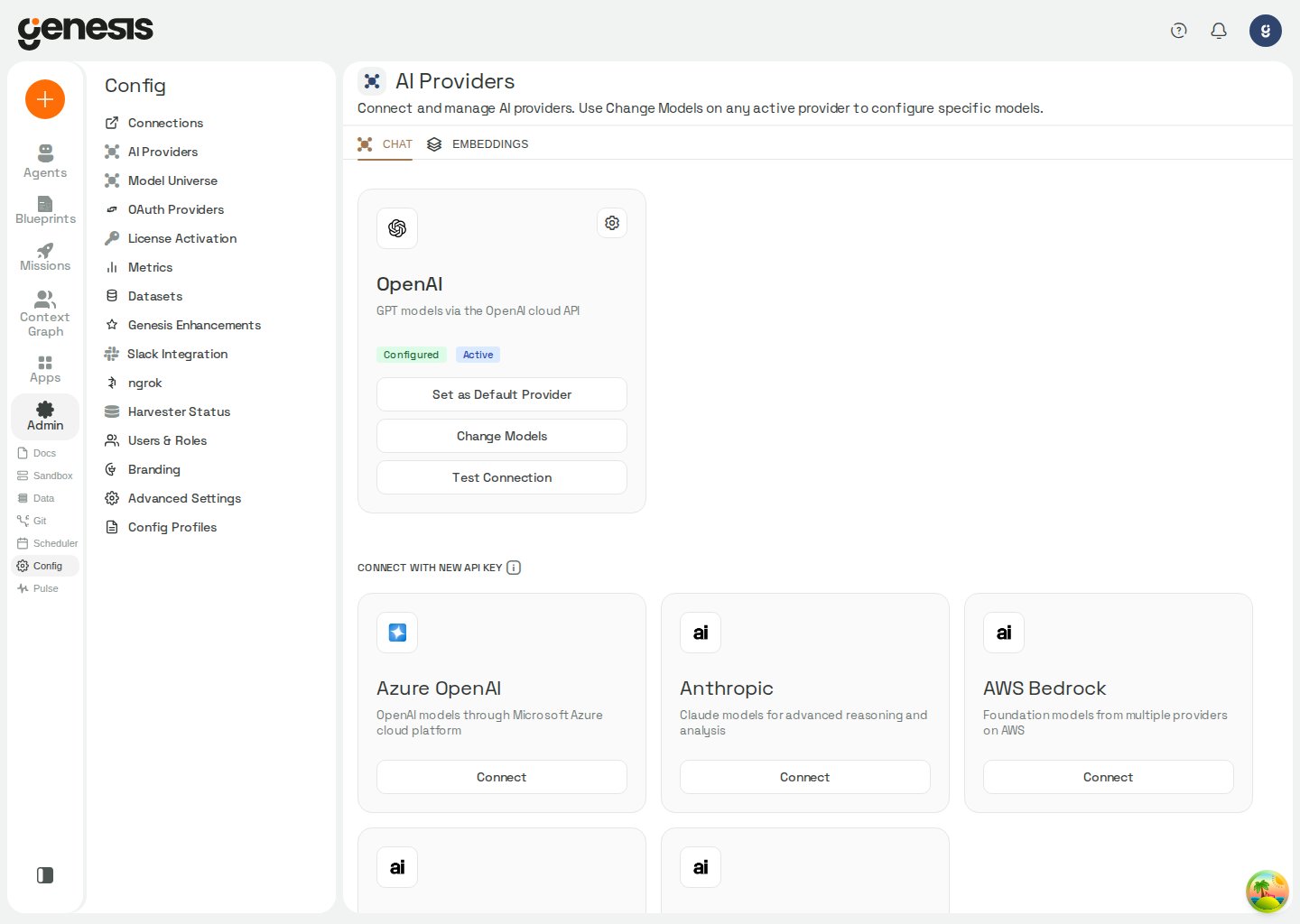 ## Main page areas
| Area | Purpose |
| - | - |
| **Chat tab** | Configure providers used for conversational and reasoning tasks. |
| **Embeddings tab** | Select the active embedding provider and embedding model for search, retrieval, and indexing. Shows only providers that already support embeddings. |
| **Configured provider cards** | Review active/default state, test connectivity, and change model selections. |
| **Available provider cards** | Connect additional providers such as Azure OpenAI, Anthropic, AWS Bedrock, LiteLLM Proxy, or **Other Providers** (LiteLLM-managed vendors such as Google Gemini). |
On the **Beta** page, a configured connection with denied admission shows an
**Enable** control; providers already admitted do not show a toggle. Enabling
sets admission to `auto`; parameter sufficiency is evaluated separately. If no
chat provider is selected and this is the sole eligible chat provider, Genesis
may select it; admission changes do not select an embedding provider. Setting
admission to `deny` refuses provider use and clears it as the active chat
provider when selected, without deleting its saved connection, credentials, or
embedding identity.
The admission setting is available in `APP_CONFIG` at these paths. Each setting
is a string that accepts `auto` or `deny`, and defaults to `auto`.
| Config path | Environment fallback |
| - | - |
| `providers.openai.admission` | `OPENAI_ADMISSION` |
| `providers.azureopenai.admission` | `AZURE_OPENAI_ADMISSION` |
| `providers.cortex.admission` | — |
| `providers.databricks.admission` | `DATABRICKS_ADMISSION` |
| `providers.litellm_anthropic.admission` | `ANTHROPIC_ADMISSION` |
| `providers.litellm_bedrock.admission` | `BEDROCK_ADMISSION` |
| `providers.litellm_gemini.admission` | `GEMINI_ADMISSION` |
| `providers.litellm_proxy.admission` | `LITELLM_PROXY_ADMISSION` |
| `providers.voyage.admission` | `VOYAGE_ADMISSION` |
The former `
## Main page areas
| Area | Purpose |
| - | - |
| **Chat tab** | Configure providers used for conversational and reasoning tasks. |
| **Embeddings tab** | Select the active embedding provider and embedding model for search, retrieval, and indexing. Shows only providers that already support embeddings. |
| **Configured provider cards** | Review active/default state, test connectivity, and change model selections. |
| **Available provider cards** | Connect additional providers such as Azure OpenAI, Anthropic, AWS Bedrock, LiteLLM Proxy, or **Other Providers** (LiteLLM-managed vendors such as Google Gemini). |
On the **Beta** page, a configured connection with denied admission shows an
**Enable** control; providers already admitted do not show a toggle. Enabling
sets admission to `auto`; parameter sufficiency is evaluated separately. If no
chat provider is selected and this is the sole eligible chat provider, Genesis
may select it; admission changes do not select an embedding provider. Setting
admission to `deny` refuses provider use and clears it as the active chat
provider when selected, without deleting its saved connection, credentials, or
embedding identity.
The admission setting is available in `APP_CONFIG` at these paths. Each setting
is a string that accepts `auto` or `deny`, and defaults to `auto`.
| Config path | Environment fallback |
| - | - |
| `providers.openai.admission` | `OPENAI_ADMISSION` |
| `providers.azureopenai.admission` | `AZURE_OPENAI_ADMISSION` |
| `providers.cortex.admission` | — |
| `providers.databricks.admission` | `DATABRICKS_ADMISSION` |
| `providers.litellm_anthropic.admission` | `ANTHROPIC_ADMISSION` |
| `providers.litellm_bedrock.admission` | `BEDROCK_ADMISSION` |
| `providers.litellm_gemini.admission` | `GEMINI_ADMISSION` |
| `providers.litellm_proxy.admission` | `LITELLM_PROXY_ADMISSION` |
| `providers.voyage.admission` | `VOYAGE_ADMISSION` |
The former `