> ## Documentation Index
> Fetch the complete documentation index at: https://docs.genesiscomputing.com/llms.txt
> Use this file to discover all available pages before exploring further.
# Microsoft OneDrive
> Configure Microsoft OneDrive access so Genesis Data Agents can work with OneDrive files and folders.
## Overview
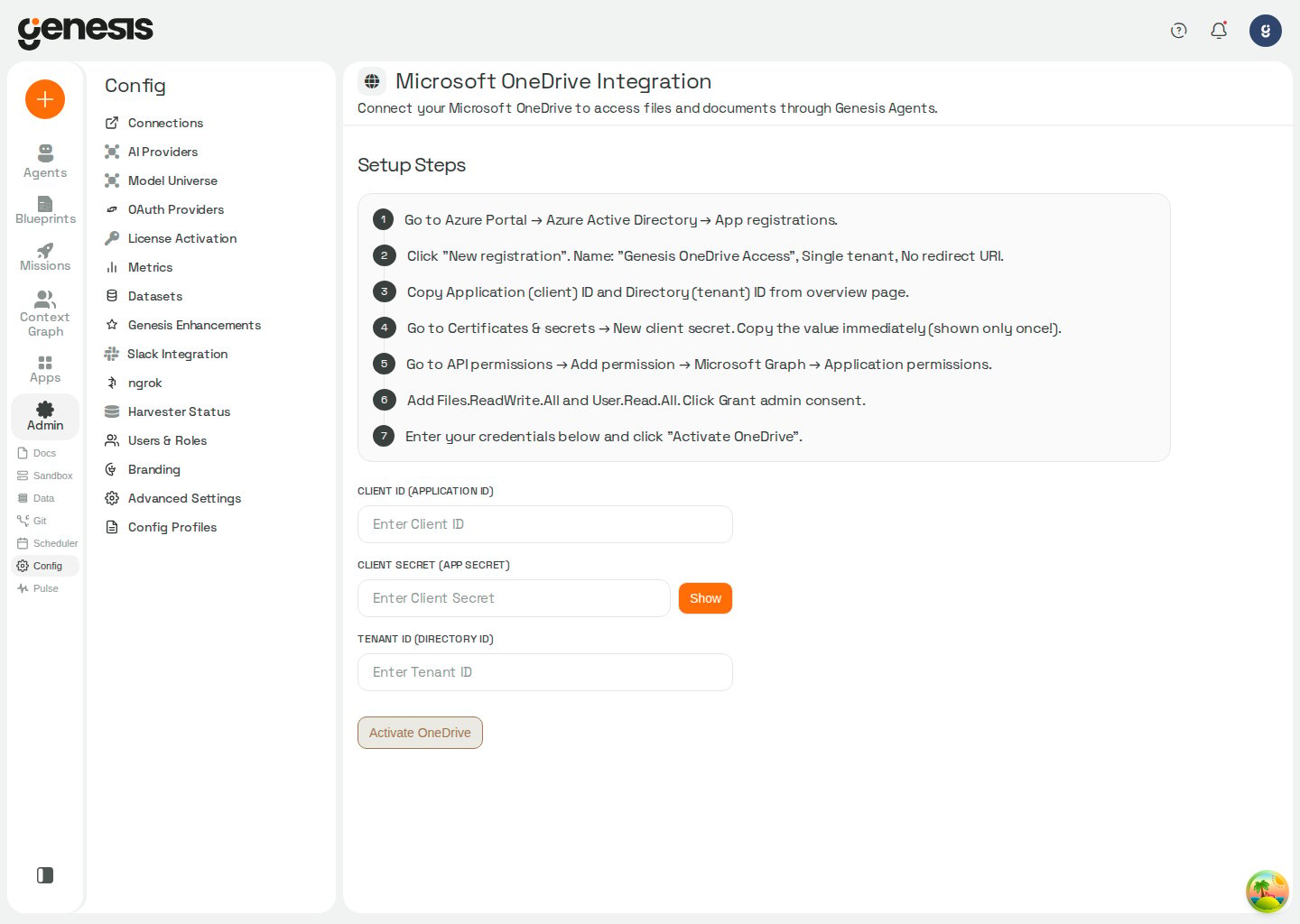
The **Microsoft OneDrive Integration** page is the customer-facing setup workflow for connecting OneDrive to Genesis.
 ## Setup workflow
1. Open **Config -> Microsoft OneDrive**.
2. Follow the Azure and Microsoft Graph setup steps shown in the page.
3. Enter the client ID, client secret, and tenant ID.
4. Activate the integration.
In Snowflake / SPCS deployments, OneDrive setup can show
**Approve External Access** and **Assign to Genesis** after you save
credentials. **Approve External Access** opens Snowsight's
**Configurations** page for the Genesis app — not the Streamlit app.
Under **External connections**, find **Microsoft OneDrive External Access
Integration**, click **Review** to approve it, then return to Genesis and
click **Assign to Genesis**. Genesis rechecks the assignment immediately
after the user-triggered action so the page can advance as soon as the
integration is ready.
## What it enables
After setup, Genesis Data Agents can support file- and folder-oriented workflows across OneDrive content.
## Connection defaults
Genesis can load OneDrive credentials from a saved **onedrive** connection in **Config -> Connections**. When the `onedrive` tool runs without a named connection, Genesis resolves the effective default `onedrive` connection for the active agent (**My default**, then **Role default**). Credentials saved on **Config -> Microsoft OneDrive**, legacy file storage, or environment variables apply only when no scoped default resolves. See [Default connection layers](/docs/Setup/Connections#default-connection-layers).
## Related pages
* [Connections](/docs/Setup/Connections)
* [SharePoint](/docs/Setup/SharePoint)
## Setup workflow
1. Open **Config -> Microsoft OneDrive**.
2. Follow the Azure and Microsoft Graph setup steps shown in the page.
3. Enter the client ID, client secret, and tenant ID.
4. Activate the integration.
In Snowflake / SPCS deployments, OneDrive setup can show
**Approve External Access** and **Assign to Genesis** after you save
credentials. **Approve External Access** opens Snowsight's
**Configurations** page for the Genesis app — not the Streamlit app.
Under **External connections**, find **Microsoft OneDrive External Access
Integration**, click **Review** to approve it, then return to Genesis and
click **Assign to Genesis**. Genesis rechecks the assignment immediately
after the user-triggered action so the page can advance as soon as the
integration is ready.
## What it enables
After setup, Genesis Data Agents can support file- and folder-oriented workflows across OneDrive content.
## Connection defaults
Genesis can load OneDrive credentials from a saved **onedrive** connection in **Config -> Connections**. When the `onedrive` tool runs without a named connection, Genesis resolves the effective default `onedrive` connection for the active agent (**My default**, then **Role default**). Credentials saved on **Config -> Microsoft OneDrive**, legacy file storage, or environment variables apply only when no scoped default resolves. See [Default connection layers](/docs/Setup/Connections#default-connection-layers).
## Related pages
* [Connections](/docs/Setup/Connections)
* [SharePoint](/docs/Setup/SharePoint)