> ## Documentation Index
> Fetch the complete documentation index at: https://docs.genesiscomputing.com/llms.txt
> Use this file to discover all available pages before exploring further.
# Jenkins
> Configure Jenkins so Genesis Data Agents can monitor jobs, trigger builds, and support CI/CD workflows.
## Overview
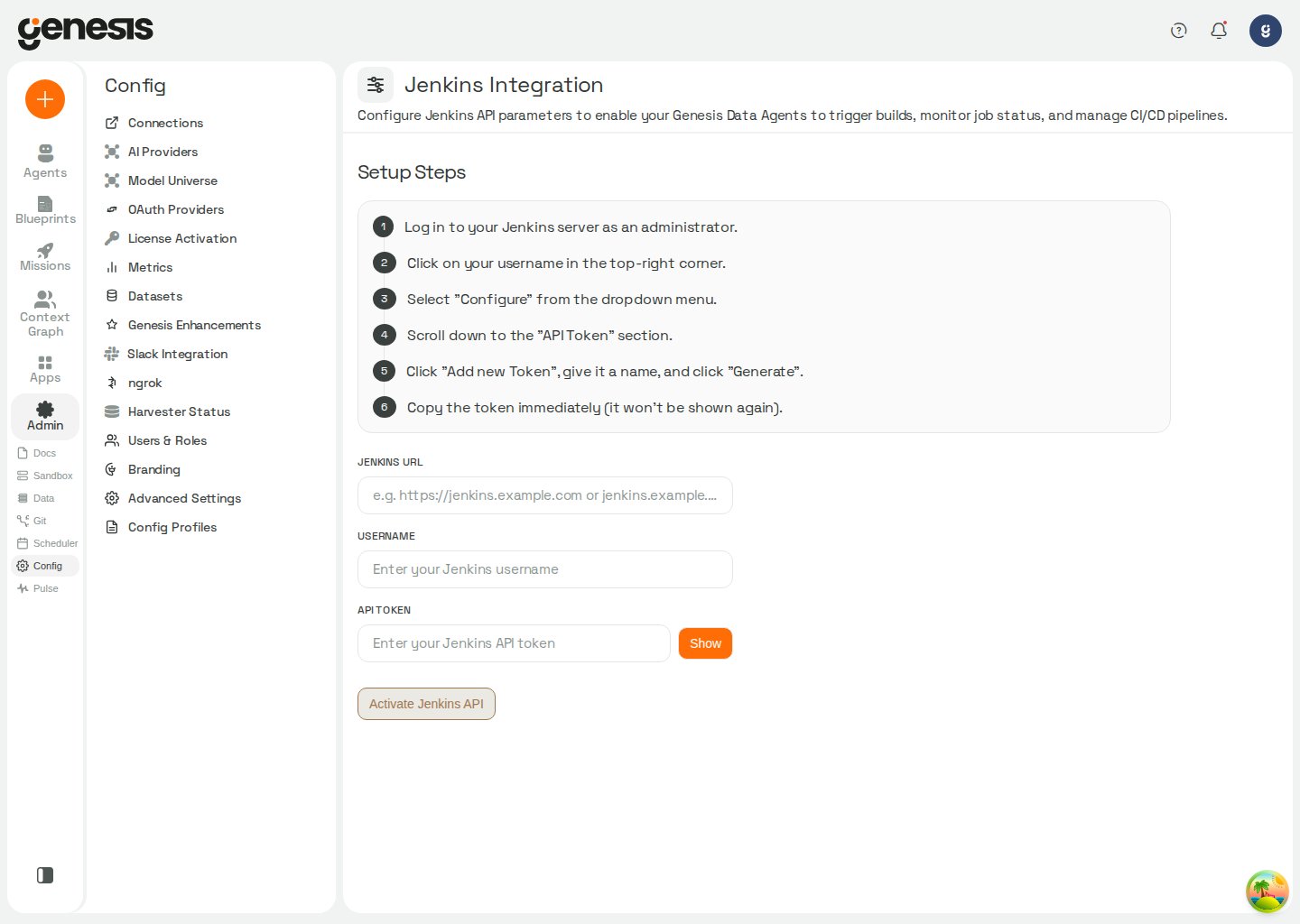
The **Jenkins Integration** page provides the customer-facing setup flow for connecting Jenkins to Genesis.
 ## Setup workflow
1. Open **Config -> Jenkins**.
2. Follow the guided setup steps shown in the page.
3. Enter the Jenkins URL, username, and API token.
4. Activate the Jenkins API integration.
In Snowflake / SPCS deployments, Jenkins setup can show
**Approve External Access** and **Assign to Genesis** after you save
credentials. Genesis rechecks the assignment immediately after the
user-triggered action so the page can advance as soon as the external access
integration is ready.
Jenkins currently uses token-based saved credentials only. Roles without
`access_pat_connections_tools` cannot create, update, or test Jenkins connections
until an admin enables that permission.
## What it enables
After setup, Genesis Data Agents can support customer workflows such as reviewing jobs, triggering builds, checking build status, and following build logs. Jenkins tools saved in **Config -> Connections** resolve the effective default `jenkins` connection for the current user when `connection` is omitted (My default, then Role default). Sandbox image builds through `sandbox_action` follow the same scoped-default resolution. When no scoped default applies, both can use the install-wide `jenkins.shared` connection. The Jenkins tools can then fall back to configured external-service settings and operator-set `JENKINS_URL`, `JENKINS_USERNAME`, and `JENKINS_API_TOKEN` environment variables; sandbox image builds fall back to those environment variables. See [Default connection layers](/docs/Setup/Connections#default-connection-layers).
The Jenkins tool's **SET** action stores credentials in the `jenkins.shared` connection, not in a plaintext local file or environment variables. Older `~/.genesis/jenkins_config.json` files are migrated to that connection when Jenkins configuration is loaded and removed after successful migration (or when they contain no usable credentials). If a shared connection already exists, it is kept; a differing legacy token is not substituted automatically.
## Related pages
* [Connections](/docs/Setup/Connections)
* [Missions and Tasks](/docs/Missions/Missions-And-Tasks)
## Setup workflow
1. Open **Config -> Jenkins**.
2. Follow the guided setup steps shown in the page.
3. Enter the Jenkins URL, username, and API token.
4. Activate the Jenkins API integration.
In Snowflake / SPCS deployments, Jenkins setup can show
**Approve External Access** and **Assign to Genesis** after you save
credentials. Genesis rechecks the assignment immediately after the
user-triggered action so the page can advance as soon as the external access
integration is ready.
Jenkins currently uses token-based saved credentials only. Roles without
`access_pat_connections_tools` cannot create, update, or test Jenkins connections
until an admin enables that permission.
## What it enables
After setup, Genesis Data Agents can support customer workflows such as reviewing jobs, triggering builds, checking build status, and following build logs. Jenkins tools saved in **Config -> Connections** resolve the effective default `jenkins` connection for the current user when `connection` is omitted (My default, then Role default). Sandbox image builds through `sandbox_action` follow the same scoped-default resolution. When no scoped default applies, both can use the install-wide `jenkins.shared` connection. The Jenkins tools can then fall back to configured external-service settings and operator-set `JENKINS_URL`, `JENKINS_USERNAME`, and `JENKINS_API_TOKEN` environment variables; sandbox image builds fall back to those environment variables. See [Default connection layers](/docs/Setup/Connections#default-connection-layers).
The Jenkins tool's **SET** action stores credentials in the `jenkins.shared` connection, not in a plaintext local file or environment variables. Older `~/.genesis/jenkins_config.json` files are migrated to that connection when Jenkins configuration is loaded and removed after successful migration (or when they contain no usable credentials). If a shared connection already exists, it is kept; a differing legacy token is not substituted automatically.
## Related pages
* [Connections](/docs/Setup/Connections)
* [Missions and Tasks](/docs/Missions/Missions-And-Tasks)