> ## Documentation Index
> Fetch the complete documentation index at: https://docs.genesiscomputing.com/llms.txt
> Use this file to discover all available pages before exploring further.
# Advanced Settings
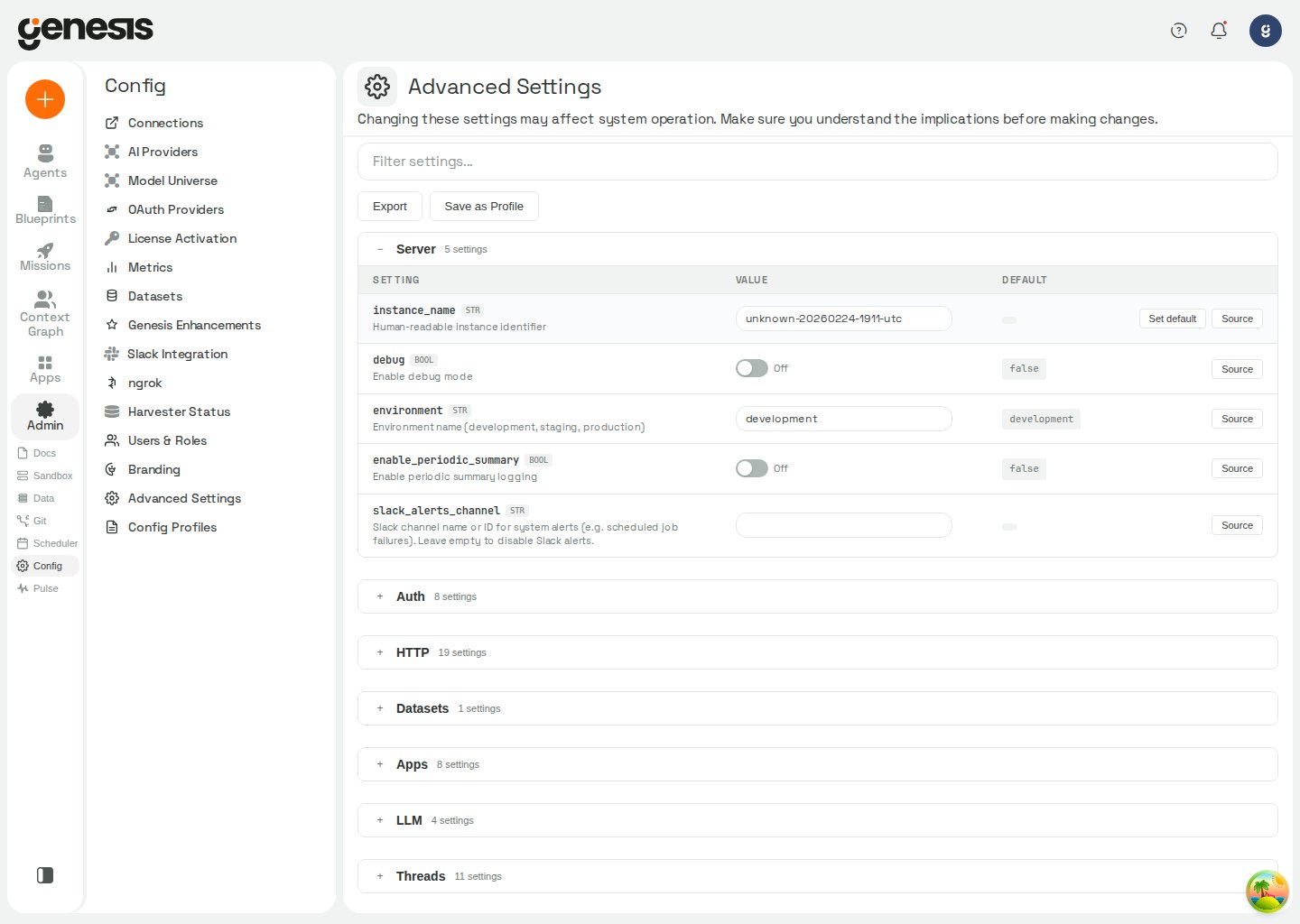
> Browse configuration sections, filter settings, stage edits, export configuration, and save reusable profiles.
## Overview
The **Advanced Settings** page is the customer/admin workspace for reviewing and editing broader system configuration sections in one place.
You can also open it from **Users & Roles**.
On Snowflake-hosted deployments, the page loads its sections with two database
queries, so it opens in seconds instead of the minutes required by the previous
per-section and per-secret reads.
 ## Config path format
Schema field paths use lowercase dot-notation (for example
`wiki.librarian_enabled`, `providers.openai.connection.api_key`). Genesis
normalizes path lookups to lowercase — mixed-case spellings such as
`Server.Debug` resolve to the same field as `server.debug`. The Advanced
Settings UI and APIs always display canonical lowercase paths.
## Goal mode limits
These limits apply to blueprint phases running in goal mode. Goal mode is
selected by a blueprint run; these settings do not enable it. A goal already
running keeps the limits it started with, so changes apply to goals created
afterward.
| Setting path | Type | Default | Description |
| - | - | - | - |
| `goal_mode.max_nudges` | `int` | `3` | Minimum `1`. Maximum nudges without agent-reported progress; a new progress report resets this count. Reaching the limit stops nudging and leaves the goal open for a person. |
| `goal_mode.max_total_nudges` | `int` | `50` | Minimum `1`. Lifetime ceiling on nudges sent to one goal-mode phase, regardless of reported progress. Progress does not reset this count; reaching it stops nudging and leaves the goal open for a person. |
Neither limit ends a goal or caps the amount of work the phase may do. See
[thread goal tools](/docs/Genbot-Toolkit/Additional-Tool-Groups#thread-goal-tools)
for how goal progress and nudges work.
## Genesis Desktop sign-in targets
Genesis Desktop's laptop-mode sign-in uses the Try Me provisioner and Auth0
tenant configured by these settings. The live Try Me site is the default; a
test macOS build sets the test tenant, and shell builds can override the
provisioner URL.
| Setting path | Type | Default | Description |
| - | - | - | - |
| `desktop.auth0_domain` | `str` | `dev-8fbfhxkny0ljn5er.us.auth0.com` | Auth0 tenant Genesis Desktop signs in with. A test build uses `genesis-trials.us.auth0.com` via `desktop/scripts/build-mac.sh GENESIS_DESKTOP_TARGET=test`. |
| `desktop.auth0_client_id` | `str` | `jcVs31l3dROtdqLeCg2ZYuinS1wGF4Si` | Public native-app client ID for that tenant; no client secret is used. |
| `desktop.provisioner_base_url` | `str` | `https://try.genesiscomputing.io` | Live Try Me provisioner. Desktop shell builds use this default unless `GENESIS_PROVISIONER_BASE_URL` is set; the test site is `https://genesis-provisioner-desktop-test.fly.dev`. |
| `desktop.callback_relay_url` | `str` | `https://try.genesiscomputing.io/desktop/callback` | HTTPS relay used for the Auth0 callback before forwarding it to Desktop's loopback callback. |
When an installed app's provisioner or Auth0 tenant changes, it asks the person
to sign in again; see [Genesis Desktop sign-in behavior](/docs/Genesis-API/API-Reference#genesis-desktop-sign-in-errors).
## Genesis Desktop DNS fallback
In Genesis Desktop laptop mode, DNS fallback can keep connections to the LiteLLM
proxy and Try Me provisioner working when the computer's DNS resolver cannot
resolve their host names. When enabled, Genesis looks up the name at `1.1.1.1`
and then `8.8.8.8`, and uses the original host name for TLS certificate
verification. DNS answers are reused for their TTL. Private and local names are
not sent to the fallback resolvers. Genesis logs one warning per outage:
`system DNS failed for ; using fallback resolver`.
| Setting path | Type | Default | Description |
| - | - | - | - |
| `desktop.dns_fallback_enabled` | `bool` | `true` | Enables fallback DNS lookups for Genesis Desktop laptop mode. Ignored outside laptop mode and read at call time. |
## Genesis Desktop command mode
On Genesis Desktop, an administrator can let agents run bash commands on the
person's computer with `run_local_command`. The tool is available only in
laptop mode. A local read runs immediately, such as `ls`, `cat`, `grep`, `df`,
`du`, `ps` or a program's `--version`, as do read-only AWS, GitHub, Azure and Git
CLI commands and local reads joined by `|`, `&&`, `||` or `;`. Every other
command, including any command with a redirect, waits for the person's approval
in Action Review, and the approval card shows the exact command and why the
agent wants to run it. Destructive
commands are flagged on the card, and sign-in commands are handed to the person.
This is off by default, and changing it takes effect on the next agent turn
without a restart.
Commands run with `bash` in Anthropic's `sandbox-runtime`. For the command
approval flow and the sandbox's file and network access, see
[run\_local\_command](/docs/Genbot-Toolkit/Context-Tools#run_local_command).
In Genesis Desktop, command mode is always on and the setting is read-only,
regardless of its stored value. In laptop mode outside Genesis Desktop, an
administrator can change it and the new value takes effect on the next agent
turn. Outside laptop mode, the command tool is not registered and this setting
has no effect.
| Setting path | Type | Default | Description |
| - | - | - | - |
| `desktop.local_cli_enabled` | `bool` | `false` | Administrator switch for `run_local_command` in laptop mode outside Genesis Desktop. When off, the tool is hidden and calls are refused. In Genesis Desktop it is always on, shown locked in Advanced Settings, and writes or resets are refused, regardless of the stored value. |
| `desktop.local_cli_srt_command` | `str` | `""` | Optional command to start Genesis's sandbox launcher, for example `/path/to/node /path/to/desktop/sandbox-runtime/genesis-srt.mjs` in a developer checkout. Empty uses the launcher shipped with Genesis Desktop. |
The earlier `desktop.local_cli_enabled_clis` setting is retired; a stored value
is ignored.
## Never-compress default skills
Set the maximum number of an agent's default skills that can be marked **Never
compress** in the agent's **Skills** tab. Each flagged skill keeps its full
injected text through thread compression and automatic overflow recovery, at
the cost of including those tokens on every turn. Setting the limit to `0`
prevents adding new flags; lowering the limit does not remove flags already
saved. This option is available in **Advanced Settings** and `APP_CONFIG`.
| Setting path | Type | Default | Description |
| - | - | - | - |
| `context_management_improvements.max_never_compress_skills_per_agent` | `int` | `3` | Maximum number of default skills per agent that may be marked never-compress. Bounded `0`..`20`; `0` prevents new flags, while lowering the limit does not remove existing flags. |
## Durable dataset snapshot size limit
When durable SQLite storage is enabled, this setting limits the size of each
dataset snapshot uploaded to durable storage. An oversized snapshot cannot
become active, so the previous snapshot remains active. This setting does not
limit snapshots when durable storage is off.
| Setting path | Type | Default | Description |
| - | - | - | - |
| `sqlite_durability.user_db_max_bytes` | `int` | `1073741824` | Maximum size in bytes for an individual durable dataset snapshot. `0` disables the limit. |
## Automatic runtime recovery setting
For eligibility and failure details, see
[Genesis Apps](/docs/genesis-apps#starting-after-a-genesis-restart).
| Setting path | Type | Default | Description |
| - | - | - | - |
| `apps.autostart_after_restart` | `bool` | `true` | Start again in the background GenesisApps that were running when the server stopped. |
## Catch-all state-file durability sweep
On Databricks Apps with `GENESIS_DURABLE_BY_DEFAULT`, the catch-all sweep
restores and keeps state files that are not declared to Genesis. The boot budget
limits how long startup spends restoring files; files left for later are restored
by a following sweep pass or on demand when Genesis reads them. Full walks repeat
at the configured interval. Files larger than the configured maximum are recorded
as too large and reported rather than silently dropped. These settings apply when
the catch-all sweep is enabled; the guard and quotas are active at their defaults.
The delete-fraction guard protects tombstones: a
pass that would record deletions for a larger share of a state folder's kept files
is refused, and the folder stays degraded until an administrator confirms the
deletes. The guard does not cover repository whiteouts, so tracked working-tree
deletions may replace kept edits without confirmation. Quota limits record files
past the configured byte limit as over quota.
| Setting path | Type | Default | Description |
| - | - | - | - |
| `storage_sweep.boot_budget_s` | `int` | `60` | Seconds the sweep may spend restoring undeclared state files at boot. Minimum: `0`. |
| `storage_sweep.walk_interval_s` | `int` | `120` | Seconds between full walks of the state folders; changes Genesis was not told about may wait this long to be kept. Minimum: `30`. |
| `storage_sweep.max_delete_fraction` | `float` | `0.2` | Largest share of a state folder's kept files one sweep pass may record as deleted. Minimum: `0.0`; maximum: `1.0`. A pass over this limit is refused. |
| `storage_sweep.max_file_bytes` | `int` | `2147483648` | Largest file the sweep keeps, in bytes. Larger files are recorded as too large and reported. Maximum: `2147483648` (2 GiB). |
| `storage_sweep.root_quota_bytes` | `int` | `53687091200` | Maximum bytes kept per state folder. Files past the limit are recorded as over quota and reported. Minimum: `0`; `0` disables the quota. |
| `storage_sweep.repository_quota_bytes` | `int` | `5368709120` | Maximum bytes kept per top-level folder under `repos/` (one agent workspace or repository). Files past the limit are recorded as over quota. Minimum: `0`; `0` disables the quota. |
## Hosted authentication
Use hosted authentication when an installation receives signed identity
assertions from the Genesis hosted identity broker. Set `auth.enabled` to
`true` and `auth.provider` to `hosted`. Hosted mode requires the same JWT
verification settings as the other JWT-backed providers — `auth.issuer`,
`auth.audience`, and `auth.jwks_url` — plus an exact tenant and installation
binding. For hosted authentication, `auth.issuer` must be exactly
`urn:genesis:hosted-access:gateway:h1`, and `auth.jwks_url` must be an
independently pinned HTTPS JWKS URL.
| Setting path | Type | Default | Description |
| - | - | - | - |
| `auth.provider` | `str` | `none` | Set to `hosted` to enable hosted assertion verification. |
| `auth.issuer` | `str` | `""` | Hosted authentication requires the exact value `urn:genesis:hosted-access:gateway:h1`. |
| `auth.jwks_url` | `str` | `""` | HTTPS JWKS URL used for hosted token verification. The hosted URL must be independently pinned. |
| `auth.hosted.tenant_id` | `str` | `""` | Exact tenant binding required in every hosted identity assertion. Used only when `auth.provider` is `hosted`. |
| `auth.hosted.installation_id` | `str` | `""` | Exact installation binding required in every hosted identity assertion. Used only when `auth.provider` is `hosted`. |
| `auth.hosted.assertion_contract` | `str` | `genesis-hosted-identity/v1` | Versioned hosted assertion contract. Hosted mode accepts only `genesis-hosted-identity/v1`. |
| `auth.hosted.topology` | `str` | `""` | Proved hosted persistence topology. Hosted lifecycle mutations currently require `legacy_sqlite_single_writer`. |
When hosted mode is enabled, a verified assertion is not enough to create an
application session: the subject must have an active explicit identity link for
the configured tenant and installation. Use the hosted identity lifecycle
endpoints documented in the [API Reference](/docs/Genesis-API/API-Reference#hosted-identity-lifecycle)
to create or revoke those links. Hosted configuration validation fails when any
required setting is empty or when the assertion contract or topology is not the
supported value.
## Proxy authentication sign-out
For deployments using an authenticating proxy, enable authentication with
`auth.enabled` and set `auth.provider` to `proxy`, then configure
`auth.proxy_sign_out_url` to show **Sign out** in the web client header and send
the browser to the proxy's sign-out endpoint. This setting is used only with
`auth.provider` set to `proxy`.
Leave it empty to keep **Sign out** hidden when the deployment has no app session
to end behind the proxy. Set the value to an absolute `http://` or `https://` URL,
or to a path on this host beginning with a single `/`; other values are ignored. An optional
`?rd=` query parameter can return the browser to a destination after sign-out.
| Setting path | Type | Default | Env var | Description |
| - | - | - | - | - |
| `auth.proxy_sign_out_url` | `str` | `""` | `AUTH_PROXY_SIGN_OUT_URL` | Proxy sign-out endpoint. Accepts an absolute HTTP(S) URL or a path on this host beginning with `/`; used only when `auth.provider` is `proxy`. |
## Databricks App test service principals
For automated test identities on a Databricks App, a Genesis administrator can
list workspace service-principal application IDs in
`auth.databricks_app_test_service_principals`. It is an empty list by default,
so this sign-in option is disabled until configured, and has no effect outside
a Databricks App. See [Databricks App test identities](/docs/deployments/Databricks/Genesis-On-Databricks#automated-test-identities)
for the sign-in and role restrictions.
| Setting path | Type | Default | Description |
| - | - | - | - |
| `auth.databricks_app_test_service_principals` | `list` | `[]` | Application IDs of workspace service principals allowed to sign in as automated test users on a Databricks App. Admin-only; no effect outside a Databricks App. |
## Group-to-role mapping
Administrators can map external groups to Genesis roles at **Settings → Advanced**.
The mapping is empty by default, so no group-based roles are assigned unless configured.
| Setting path | Type | Default | Description |
| - | - | - | - |
| `auth.group_role_mapping` | `dict` | `{}` | Admin-only mapping from external group names to Genesis roles. |
Genesis reads group names from OIDC claims or proxy headers at sign-in. For a
Databricks App user, it uses the workspace's SCIM response; listed Databricks App
test service principals are never granted roles through this mapping. A user gets
the mapped role while in a mapped group and loses it after leaving the group, at
their next sign-in. A person signing in to a Databricks App keeps `admin` while no
other usable administrator exists. When set,
`GENESIS_GROUP_ROLE_MAPPING_FILE` or `GENESIS_GROUP_ROLE_MAPPING` takes precedence
over `auth.group_role_mapping`.
## Connection finder
Use the `connection_finder` section to control how Genesis matches a pasted
provider URL or host to visible saved connections during chat and agent tool
execution.
| Setting path | Type | Default | Description |
| - | - | - | - |
| `connection_finder.use_immutable_audit_for_search` | `bool` | `false` | Write finder searches to the immutable audit store instead of structured logs. Disabled by default. |
The finder only considers connections visible and usable by the requesting user and agent. Only one warning-free exact resource match is eligible for an agent-led read-only or idempotent call; lower-confidence or ambiguous matches require the user to choose.
A row is treated as **modified** (and shows **Set default**) when an operator
or API call has explicitly stored a value for that path, when the effective
value differs from the schema `default`, or while a staged edit or reset is
pending. That includes overrides that happen to match the schema default —
Genesis still treats them as explicit choices until reset. At startup Genesis
scaffolds every schema field as a `NULL` row in `APP_CONFIG`; those scaffold
rows are not considered explicit choices and do not mark the field as modified.
## What the page supports
* filtering settings by keyword,
* browsing grouped config sections,
* editing customer-visible settings,
* applying or discarding pending changes,
* running the thread archive job immediately from the **Archive** section using the currently saved settings,
* cleaning up invalid bot-thread directories from the **Invalid bot directories** section,
* deleting all bundled demo data from the **Maintenance** section,
* exporting configuration,
* saving reusable profiles,
* choosing which optional sidebar items appear under **UI Complexity**.
## UI Complexity
The **UI Complexity** section lets each operator choose which optional main-sidebar items to show. Toggles are stored in browser `localStorage` per device — they are not server-wide settings.
| Item | Sidebar label |
| - | - |
| Docs | Docs |
| Deployments | Deployments |
| Data | Data |
| Git | Git |
| Scheduler | Scheduler |
| Flows | Flows |
| Work | Work |
| Pulse | Pulse |
**Agents**, **Blueprints**, **Config**, **Context Graph**, and **Apps** are always visible and cannot be hidden. **Enable all** restores every hideable item. Work is enabled by default and contains Missions as a tab. Set `GENESIS_SHOW_WORK=false` to turn Work off and give Missions its own sidebar entry. UI Complexity only controls whether an enabled Work entry appears in the sidebar.
## Browser tools
Genesis Desktop (laptop mode) includes a **Browser tools** section under
**Settings → Advanced**. It shows whether the downloadable browser tools are
installed, installing, outdated, or failed, and reports download progress when
available. Choose Install to download them, or Remove to delete the downloaded
driver and browser. The first `browser_open` also starts the one-time download
when needed; see [Browser Tools](/docs/Genbot-Toolkit/Browser-Tools) for how to
use the browser while installation is in progress.
## Genesis Desktop diagnostics
Genesis Desktop (laptop mode) also shows a **Diagnostics** section under
**Settings → Advanced**. It explains what diagnostic logs the trial version
sends; this section is informational and has no setting to change. For the
diagnostics preview, consent, and upload behavior, see [Genesis Desktop
diagnostics](/docs/Genesis-API/API-Reference#genesis-desktop-diagnostics).
## Web dashboard chrome
The web dashboard uses Genesis Desktop-style chrome by default. Its thin top
bar has the setup, MCP, help, and notification controls; the Genesis mark sits
at the top of the left rail, with the account menu at its foot. The rail, thread
list, and content panels tile edge to edge. A deployment showing a custom
Branding logo keeps its taller header. The desktop app always uses its own
chrome.
Set `features.unified_chrome` to `false` to restore the previous web layout,
with rounded floating panels under the full-width header. This `bool` defaults
to `true` and can be configured in Advanced Settings or through
`PUT /api/config/advanced/value`. `GENESIS_UNIFIED_CHROME` supplies a default
only while this setting is unset; an explicitly configured value takes
precedence. The frontend bootstrap response exposes the setting as
`unified_chrome`; see [Genesis API — Frontend bootstrap config](/docs/Genesis-API/API-Reference#frontend-bootstrap-config).
## Prover workspace visibility
The **Estate** (Prover) workspace is shown by default. The `features.show_estate`
setting is a `bool` with a default of `true`; it controls the top-level Prover
navigation, not access to the estate routes. To hide the workspace, set
`features.show_estate` to `false` through Advanced Settings or
`PUT /api/config/advanced/value`. You can also set
`GENESIS__FEATURES__SHOW_ESTATE=false` to force it off and lock the Advanced
Settings toggle. The former Prover-specific `GENESIS_SHOW_ESTATE` variable is
retired and is no longer read.
## Action Review visibility
The **Action Review** page is shown by default. The `features.show_action_review`
setting is a `bool` with a default of `true`; while it is `true`, the web client
shows the Action Review entry in the sidebar and mobile navigation, offers Action
Review as a default homepage, and serves the `/action-review` page. Hide it
through Advanced Settings or `PUT /api/config/advanced/value`. You can also set
`GENESIS__FEATURES__SHOW_ACTION_REVIEW=false` to force it off and lock the Advanced
Settings toggle. The setting controls the web client only: governed actions such as
CRM merges still require human review, and their in-chat approval cards still appear.
## Agent Review settings
Use the **Agent Review** section to enable the analysis and advisory grading
surfaces shown in [Pulse Monitoring](/docs/User-Guide/Pulse-Monitoring). Agent
Review is off by default, and grading requires the master switch as well as its
own switch:
| Setting path | Type | Default | Description |
| - | - | - | - |
| `agent_review.enabled` | `bool` | `false` | Enables agent-review analysis, including the classifier routes, backfill, scorecard, learning APIs, feedback, and prompt injection. |
| `agent_review.grading.enabled` | `bool` | `false` | Enables review cycles, weakness tracking, levels, promotions, and year-end reports. Requires `agent_review.enabled`; the feature is advisory-only. |
See [Pulse Monitoring](/docs/User-Guide/Pulse-Monitoring) for the disabled-state
behavior and the link back to this section from Agent Scorecard and Agent
Learning.
## Mission Value settings
Mission Value manual duration baselines are managed from the dedicated
**Pulse → Mission Value** editor, not from the generic Advanced Settings
sections or setup-apply endpoints. The editor replaces the complete versioned
baseline table and is available to users with `access_config_panel`. See
[Pulse Monitoring](/docs/User-Guide/Pulse-Monitoring) for the reporting view.
| Setting path | Type | Default | Description |
| - | - | - | - |
| `mission_value.manual_baselines` | `dict` | `{ "schema_version": 1, "items": [] }` | Versioned per-mission manual duration baselines. Each item supplies a namespaced work type, display name, and positive manual duration in seconds. |
Set `GENESIS__MISSION_VALUE__MANUAL_BASELINES` to provide an environment
override. While that override is set, the Mission Value editor refuses changes
because the environment value has higher precedence. The `mission_value`
section is omitted from Advanced Settings and cannot be applied through generic
partial configuration.
## Organization health fix
Use the **Organization Health** section to control whether the built-in
`GenesisAuditor` agent may propose fixes. The read-side audit is available by default;
this setting controls only whether GenesisAuditor may propose a fix, and whether a
person may apply one, in Action Review.
| Setting path | Type | Default | Options | Description |
| - | - | - | - | - |
| `org_health.fix_mode` | `str` | `silent` | `silent`, `active` | Controls whether the GenesisAuditor may propose organization fixes. `silent` (default) refuses every fix proposal and every Apply; `active` lets the identity-bound auditor propose fixes to organization content re-proved under the current policy and corpus, each of which waits in Action Review until a person who may manage the target applies it. Unset, unreadable, and unrecognized values fail closed to `silent`. |
| `org_health.proposal_payload_max_bytes` | `int` | `750000` | — | Conservative pre-admission ceiling, in bytes, for the handler-known serialized proposal-row content of organization fixes that edit a whole blueprint manifest or skill document. Oversized fixes are refused before Action Review stores a proposal. Uninitialized, unset, unparseable, nonpositive, and unreadable runtime values use the `750000`-byte default. |
Fixes are not enabled by default. GenesisAuditor never changes anything itself: a
user must explicitly ask it for a fix, the fix waits in Action Review, and a person who
may manage the target applies it. Applying re-checks the caller identity, the target,
the current doctrine, the skill corpus and the target's state, and writes only if the
target has not changed since the proposal. Switching the setting back to `silent`
also stops pending fixes from being applied. See the
[GenesisAuditor tool reference](/docs/Genbot-Toolkit/Additional-Tool-Groups#genesis-auditor-tools)
for parameters and refusal behavior.
## When to use it
Use Advanced Settings when the value you want to change is not already exposed by a more specific setup page, or when you need to review broader configuration sections side by side.
## Reset to defaults
Each modified non-secret row shows a **Set default** action. Choosing it stages
a reset and previews the effective default; the button hides while that reset is
already pending. **Set default** works like other Advanced Settings edits — click
**Apply** to persist. On apply, staged resets are sent to
`POST /api/config/advanced/reset`, which **deletes the stored value** for the
path so the field returns to "never explicitly set" and resolves through the
normal config priority chain again — a field's `default_env_var` when that
environment variable is set, the schema `default` otherwise. Genesis does **not**
write the schema default back into the database through the batch update endpoint;
doing so would record an explicit operator choice that permanently outranks
`default_env_var`. When a single **Apply** mixes value changes and resets,
Genesis applies ordinary updates first and runs resets only after those succeed.
**Discard** cancels staged resets as well as staged value edits. If you manually
change a field after clicking **Set default**, the staged reset for that path
becomes an ordinary value update instead.
The reset request is **refused outright** (nothing is deleted) when any path
is:
* not a schema field (for example connection definitions or profile metadata
rows that live in `APP_CONFIG` but are not Advanced Settings fields),
* a secret field (`is_secret: true` in the schema) — use
`/api/config/secret-fields/...` instead,
* locked by a `GENESIS__*` runtime override (the same guard as value updates).
On success, the API response includes `reset_paths` (paths whose stored value
was deleted) and `env_default_paths` (subset whose restored value came from a
`default_env_var`, not the schema default). When `env_default_paths` is
non-empty, the `message` notes that those fields were restored from environment
defaults rather than schema defaults. For the env-backed leaf restoration
behavior, see the [Advanced settings reset endpoint](/docs/Genesis-API/API-Reference#advanced-settings-reset-endpoint).
## Secret-valued settings
Fields marked as secrets in the config schema accept reference strings
(`secret_*`, `env_*`, `${VAR}`, `aws_*`, `gcp_*`) instead of pasting raw
credentials. Plain text you enter is migrated once into the Genesis secret
store; references are stored as-is and resolved when the value is read. See
[External Secrets](/docs/Setup/External-Secrets) for syntax, including
environment-variable references that track live env changes without a Genesis
restart.
Unlike non-secret fields, secret schema fields do **not** read `default_env_var`
on every config snapshot. An unset secret field resolves to its default managed
secret reference (`secret_`), which is empty until a value is stored
there. On each main-server startup (after database migrations), Genesis captures
the `default_env_var` value from the environment into that managed secret when
the field has no `GENESIS__` override, no explicit `APP_CONFIG` value, and no
existing managed secret at `secret_`. Capture is idempotent and
never clobbers a prior capture or an operator-set value. After capture, the
credential is a first-class managed secret — rotatable through **Config →
Secrets** or Advanced Settings. Rotating only the deployment env var after
capture has no effect; update the managed secret instead. Capture is
best-effort: failures are logged and do not block startup (for example when the
secret store is unavailable on first boot).
## Admin audit log
Saving or resetting settings through this page writes rows to
`ADMIN_AUDIT_LOG`. Genesis records the config path, the value's Python type,
and the change source (`ui` in `details`; table `source` defaults to `api`) —
never the new secret or configuration value. Bulk saves emit one
`advanced_config.updated` event per changed path; **Reset to defaults** emits
`advanced_config.reset` with the list of paths reset.
Browse these events from **Config → Admin Audit Log** or
`GET /api/admin/audit-log`. See
[RBAC Practical Guide → Admin audit log](/docs/Security-Controls/RBAC-Practical-Guide#admin-audit-log)
for the full table schema, REST parameters, and query examples.
## RBAC defaults
Use the `rbac` section to control default behavior for newly created custom
roles.
| Setting path | Type | Default | Description |
| - | - | - | - |
| `rbac.default_roles` | `string[]` | `["admin", "user"]` (built-in `DEFAULT_NEW_USER_ROLES`) | Roles assigned to brand-new users when no admin UI override exists in `EXT_SERVICE_CONFIG`. Used when `rbac_config.default_roles_for_new_users` is unset (always the case in SQLAlchemy metadata mode). If that saved list exists but cannot be read, new users receive no roles rather than this fallback. Left unset, every new user becomes an administrator; set it explicitly (for example `["user"]`, or `[]` for no roles) to keep new users off `admin`. An explicit value always wins over the built-in default. |
| `rbac.default_pat_capability_for_new_roles.databases` | `bool` | `false` | Default value of the `Databases` PAT connections permission in the Create Role modal (`access_pat_connections_databases`). |
| `rbac.default_pat_capability_for_new_roles.git` | `bool` | `true` | Default value of the `Git & Code` PAT connections permission in the Create Role modal (`access_pat_connections_git`). |
| `rbac.default_pat_capability_for_new_roles.cloud` | `bool` | `false` | Default value of the `Cloud & Storage` PAT connections permission in the Create Role modal (`access_pat_connections_cloud`). |
| `rbac.default_pat_capability_for_new_roles.pipelines` | `bool` | `true` | Default value of the `Data Pipelines` PAT connections permission in the Create Role modal (`access_pat_connections_pipelines`). |
| `rbac.default_pat_capability_for_new_roles.tools` | `bool` | `true` | Default value of the `Dev Tools` PAT connections permission in the Create Role modal (`access_pat_connections_tools`). |
These settings only seed the dashboard Create Role modal. Programmatic role
creation through `POST /api/rbac/create_role` is unaffected because the
explicit `permissions` list still wins.
## Guardrail settings
Use the `guardrails` section to tune customer-visible safety limits.
The `repetition_guard` settings apply only to repeated user messages in the
same thread. They do not control agent messages or repeated tool calls; agent
tool-call loop detection is handled by a separate internal guard.
| Setting path | Type | Default | Description |
| - | - | - | - |
| `guardrails.repetition_guard.enabled` | `bool` | `true` | Enable detection of repeated identical user messages. |
| `guardrails.repetition_guard.threshold` | `int` | `20` | Block after this many strictly consecutive identical user messages. |
| `guardrails.repetition_guard.max_tracked_threads` | `int` | `1000` | Maximum user-message threads to track for repetition, using LRU eviction. |
## Thread archive settings
Use the `archive` section to configure automatic retention exports for inactive
threads. Genesis validates the selected archive connection against the
authenticated admin before saving or running the job, then reuses those saved
settings to verify remote archive objects before it removes local thread data.
| Setting path | Type | Default | Description |
| - | - | - | - |
| `archive.threads.enabled` | `bool` | `false` | Enable daily archival of old thread ZIP bundles to external object storage. |
| `archive.threads.age_days` | `int` | `365` | Archive threads whose last activity is at least this many days old. |
| `archive.threads.connection_type` | `str` | `"aws"` | Named connection type used to resolve archive storage credentials. Allowed value: `"aws"`. |
| `archive.threads.connection_name` | `str` | `""` | Named connection used to authenticate archive uploads. |
| `archive.threads.bucket` | `str` | `""` | Destination object-storage bucket for archived thread ZIP bundles. |
| `archive.threads.path_prefix` | `str` | `"genesis/archive"` | Root path prefix inside the bucket. Thread archives are stored beneath `threads/...` under this prefix. |
| `archive.threads.max_threads_per_run` | `int` | `100` | Maximum number of thread archives to process in a single daily run. |
For AWS archives, `archive.threads.connection_name` shows the AWS connections visible to the current admin, and `archive.threads.bucket` can suggest S3 bucket names from the selected connection while still allowing manual entry.
Each archived object is a canonical ZIP bundle that contains the thread's
stored source files and any uploaded files for that thread. When available,
Genesis also adds `message_log.csv` to that bundle.
After saving those settings, expand **Archive** and select **Run thread archive now** to execute the job immediately. The button is disabled while there are pending Archive edits, always uses the saved values, and still respects `GENESIS_THREAD_ARCHIVE_DRY_RUN` when that environment variable is enabled.
If an earlier run already uploaded the archive but did not finish local cleanup,
later scheduled or manual runs verify the existing remote bundle and complete
cleanup instead of rebuilding the archive.
Thread archival uses file-backed thread storage and is not supported when the
Postgres thread-storage engine is selected. Scheduled runs skip archival in
that mode, and the manual run endpoint rejects the request.
## Thread snapshot cache
For the Postgres thread-storage engine, `threads.storage.snapshot_cache_mb`
sets the per-process memory budget, in MB, for recently read thread snapshot
documents. It avoids fetching the full snapshot row again for each short-lived
write-path open. Entries do not expire; the setting only bounds memory. Set it
to `0` to disable the cache. Genesis reads this setting at every insert, so a
change takes effect without a restart.
| Setting path | Type | Default | Description |
| - | - | - | - |
| `threads.storage.snapshot_cache_mb` | `int` | `64` | Per-process memory budget, in MB, for the Postgres thread snapshot cache. |
## Thread search index build settings
Use this setting to bound memory growth while the thread-service worker builds
the search index. The limit is active by default; when the build reaches it,
Genesis releases memory and indexes one thread at a time until usage is back
under the limit. Set it to `0` to disable the bound.
| Setting path | Type | Default | Env var | Description |
| - | - | - | - | - |
| `threads.search.build_rss_growth_ceiling_mb` | `int` | `1536` | `THREAD_SEARCH_BUILD_RSS_GROWTH_CEILING_MB` | Maximum resident-memory growth, in MB, above the worker's RSS when the background index build starts. |
## Agent review settings
Use the `agent_review` section to control review analysis. Explicit message
feedback remains available when analysis is disabled; see [Genesis API —
Expectation-met message feedback endpoints](/docs/Genesis-API/API-Reference#expectation-met-message-feedback-endpoints).
| Setting path | Type | Default | Description |
| - | - | - | - |
| `agent_review.enabled` | `bool` | `false` | Enable agent-review analysis, including classifier routes, backfill, scorecard, learning APIs, and prompt injection. When `false`, analysis routes return `404` and the scheduled classifier job is a no-op. |
## Action Review settings
Use the `action_review` section to control the default-on cleanup sweep for the
Action Review ledger. The sweep materializes expired proposals and reconciles
stale claims; expiry remains enforced by the decision and claim predicates.
| Setting path | Type | Default | Description |
| - | - | - | - |
| `action_review.sweep_interval_seconds` | `int` | `600` | Seconds between Action Review cleanup sweeps. Set the interval to control how often expired rows are materialized and stale claims are reconciled. The sweep is registered by default. |
| `action_review.claim_stale_after_seconds` | `int` | `900` | Age in seconds after which a claimed Action Review proposal moves to `reconciliation_required`. Set this higher than all provider execution timeouts so an in-flight action is not swept. |
| `action_review.store_large_text_by_reference` | `bool` | `false` | Store each long text in a new Action Review proposal once in a side table instead of repeating it in every payload column; the proposal intent remains inline. A file edit otherwise repeats its text about twenty times in one proposal row, and Snowflake refuses a row over its 1 MB statement limit. Off (default) keeps proposals inline as in earlier builds; rows stored by reference are read correctly whether this is on or off. **Rollback warning:** after enabling this and writing a large proposal, do not roll back to an older build: it cannot read the stored form and can invalidate pending approvals. |
| `action_review.snowflake_hybrid_tables` | `bool` | `false` | On a Snowflake metadata database, create the Action Review ledger's per-approval tables (proposals, sealed events, and text blobs) as Snowflake hybrid tables. On env3, the ledger statements in one package approval took 6.2 seconds instead of 9.3 seconds. Read when the ledger is first used after a start. This creates missing tables only; an existing standard table is not converted while Genesis is running and is named in a warning. To convert it, stop Genesis and run `scripts/convert_action_review_ledger_to_hybrid.py --genesis-is-stopped`; each original is retained as `
## Config path format
Schema field paths use lowercase dot-notation (for example
`wiki.librarian_enabled`, `providers.openai.connection.api_key`). Genesis
normalizes path lookups to lowercase — mixed-case spellings such as
`Server.Debug` resolve to the same field as `server.debug`. The Advanced
Settings UI and APIs always display canonical lowercase paths.
## Goal mode limits
These limits apply to blueprint phases running in goal mode. Goal mode is
selected by a blueprint run; these settings do not enable it. A goal already
running keeps the limits it started with, so changes apply to goals created
afterward.
| Setting path | Type | Default | Description |
| - | - | - | - |
| `goal_mode.max_nudges` | `int` | `3` | Minimum `1`. Maximum nudges without agent-reported progress; a new progress report resets this count. Reaching the limit stops nudging and leaves the goal open for a person. |
| `goal_mode.max_total_nudges` | `int` | `50` | Minimum `1`. Lifetime ceiling on nudges sent to one goal-mode phase, regardless of reported progress. Progress does not reset this count; reaching it stops nudging and leaves the goal open for a person. |
Neither limit ends a goal or caps the amount of work the phase may do. See
[thread goal tools](/docs/Genbot-Toolkit/Additional-Tool-Groups#thread-goal-tools)
for how goal progress and nudges work.
## Genesis Desktop sign-in targets
Genesis Desktop's laptop-mode sign-in uses the Try Me provisioner and Auth0
tenant configured by these settings. The live Try Me site is the default; a
test macOS build sets the test tenant, and shell builds can override the
provisioner URL.
| Setting path | Type | Default | Description |
| - | - | - | - |
| `desktop.auth0_domain` | `str` | `dev-8fbfhxkny0ljn5er.us.auth0.com` | Auth0 tenant Genesis Desktop signs in with. A test build uses `genesis-trials.us.auth0.com` via `desktop/scripts/build-mac.sh GENESIS_DESKTOP_TARGET=test`. |
| `desktop.auth0_client_id` | `str` | `jcVs31l3dROtdqLeCg2ZYuinS1wGF4Si` | Public native-app client ID for that tenant; no client secret is used. |
| `desktop.provisioner_base_url` | `str` | `https://try.genesiscomputing.io` | Live Try Me provisioner. Desktop shell builds use this default unless `GENESIS_PROVISIONER_BASE_URL` is set; the test site is `https://genesis-provisioner-desktop-test.fly.dev`. |
| `desktop.callback_relay_url` | `str` | `https://try.genesiscomputing.io/desktop/callback` | HTTPS relay used for the Auth0 callback before forwarding it to Desktop's loopback callback. |
When an installed app's provisioner or Auth0 tenant changes, it asks the person
to sign in again; see [Genesis Desktop sign-in behavior](/docs/Genesis-API/API-Reference#genesis-desktop-sign-in-errors).
## Genesis Desktop DNS fallback
In Genesis Desktop laptop mode, DNS fallback can keep connections to the LiteLLM
proxy and Try Me provisioner working when the computer's DNS resolver cannot
resolve their host names. When enabled, Genesis looks up the name at `1.1.1.1`
and then `8.8.8.8`, and uses the original host name for TLS certificate
verification. DNS answers are reused for their TTL. Private and local names are
not sent to the fallback resolvers. Genesis logs one warning per outage:
`system DNS failed for ; using fallback resolver`.
| Setting path | Type | Default | Description |
| - | - | - | - |
| `desktop.dns_fallback_enabled` | `bool` | `true` | Enables fallback DNS lookups for Genesis Desktop laptop mode. Ignored outside laptop mode and read at call time. |
## Genesis Desktop command mode
On Genesis Desktop, an administrator can let agents run bash commands on the
person's computer with `run_local_command`. The tool is available only in
laptop mode. A local read runs immediately, such as `ls`, `cat`, `grep`, `df`,
`du`, `ps` or a program's `--version`, as do read-only AWS, GitHub, Azure and Git
CLI commands and local reads joined by `|`, `&&`, `||` or `;`. Every other
command, including any command with a redirect, waits for the person's approval
in Action Review, and the approval card shows the exact command and why the
agent wants to run it. Destructive
commands are flagged on the card, and sign-in commands are handed to the person.
This is off by default, and changing it takes effect on the next agent turn
without a restart.
Commands run with `bash` in Anthropic's `sandbox-runtime`. For the command
approval flow and the sandbox's file and network access, see
[run\_local\_command](/docs/Genbot-Toolkit/Context-Tools#run_local_command).
In Genesis Desktop, command mode is always on and the setting is read-only,
regardless of its stored value. In laptop mode outside Genesis Desktop, an
administrator can change it and the new value takes effect on the next agent
turn. Outside laptop mode, the command tool is not registered and this setting
has no effect.
| Setting path | Type | Default | Description |
| - | - | - | - |
| `desktop.local_cli_enabled` | `bool` | `false` | Administrator switch for `run_local_command` in laptop mode outside Genesis Desktop. When off, the tool is hidden and calls are refused. In Genesis Desktop it is always on, shown locked in Advanced Settings, and writes or resets are refused, regardless of the stored value. |
| `desktop.local_cli_srt_command` | `str` | `""` | Optional command to start Genesis's sandbox launcher, for example `/path/to/node /path/to/desktop/sandbox-runtime/genesis-srt.mjs` in a developer checkout. Empty uses the launcher shipped with Genesis Desktop. |
The earlier `desktop.local_cli_enabled_clis` setting is retired; a stored value
is ignored.
## Never-compress default skills
Set the maximum number of an agent's default skills that can be marked **Never
compress** in the agent's **Skills** tab. Each flagged skill keeps its full
injected text through thread compression and automatic overflow recovery, at
the cost of including those tokens on every turn. Setting the limit to `0`
prevents adding new flags; lowering the limit does not remove flags already
saved. This option is available in **Advanced Settings** and `APP_CONFIG`.
| Setting path | Type | Default | Description |
| - | - | - | - |
| `context_management_improvements.max_never_compress_skills_per_agent` | `int` | `3` | Maximum number of default skills per agent that may be marked never-compress. Bounded `0`..`20`; `0` prevents new flags, while lowering the limit does not remove existing flags. |
## Durable dataset snapshot size limit
When durable SQLite storage is enabled, this setting limits the size of each
dataset snapshot uploaded to durable storage. An oversized snapshot cannot
become active, so the previous snapshot remains active. This setting does not
limit snapshots when durable storage is off.
| Setting path | Type | Default | Description |
| - | - | - | - |
| `sqlite_durability.user_db_max_bytes` | `int` | `1073741824` | Maximum size in bytes for an individual durable dataset snapshot. `0` disables the limit. |
## Automatic runtime recovery setting
For eligibility and failure details, see
[Genesis Apps](/docs/genesis-apps#starting-after-a-genesis-restart).
| Setting path | Type | Default | Description |
| - | - | - | - |
| `apps.autostart_after_restart` | `bool` | `true` | Start again in the background GenesisApps that were running when the server stopped. |
## Catch-all state-file durability sweep
On Databricks Apps with `GENESIS_DURABLE_BY_DEFAULT`, the catch-all sweep
restores and keeps state files that are not declared to Genesis. The boot budget
limits how long startup spends restoring files; files left for later are restored
by a following sweep pass or on demand when Genesis reads them. Full walks repeat
at the configured interval. Files larger than the configured maximum are recorded
as too large and reported rather than silently dropped. These settings apply when
the catch-all sweep is enabled; the guard and quotas are active at their defaults.
The delete-fraction guard protects tombstones: a
pass that would record deletions for a larger share of a state folder's kept files
is refused, and the folder stays degraded until an administrator confirms the
deletes. The guard does not cover repository whiteouts, so tracked working-tree
deletions may replace kept edits without confirmation. Quota limits record files
past the configured byte limit as over quota.
| Setting path | Type | Default | Description |
| - | - | - | - |
| `storage_sweep.boot_budget_s` | `int` | `60` | Seconds the sweep may spend restoring undeclared state files at boot. Minimum: `0`. |
| `storage_sweep.walk_interval_s` | `int` | `120` | Seconds between full walks of the state folders; changes Genesis was not told about may wait this long to be kept. Minimum: `30`. |
| `storage_sweep.max_delete_fraction` | `float` | `0.2` | Largest share of a state folder's kept files one sweep pass may record as deleted. Minimum: `0.0`; maximum: `1.0`. A pass over this limit is refused. |
| `storage_sweep.max_file_bytes` | `int` | `2147483648` | Largest file the sweep keeps, in bytes. Larger files are recorded as too large and reported. Maximum: `2147483648` (2 GiB). |
| `storage_sweep.root_quota_bytes` | `int` | `53687091200` | Maximum bytes kept per state folder. Files past the limit are recorded as over quota and reported. Minimum: `0`; `0` disables the quota. |
| `storage_sweep.repository_quota_bytes` | `int` | `5368709120` | Maximum bytes kept per top-level folder under `repos/` (one agent workspace or repository). Files past the limit are recorded as over quota. Minimum: `0`; `0` disables the quota. |
## Hosted authentication
Use hosted authentication when an installation receives signed identity
assertions from the Genesis hosted identity broker. Set `auth.enabled` to
`true` and `auth.provider` to `hosted`. Hosted mode requires the same JWT
verification settings as the other JWT-backed providers — `auth.issuer`,
`auth.audience`, and `auth.jwks_url` — plus an exact tenant and installation
binding. For hosted authentication, `auth.issuer` must be exactly
`urn:genesis:hosted-access:gateway:h1`, and `auth.jwks_url` must be an
independently pinned HTTPS JWKS URL.
| Setting path | Type | Default | Description |
| - | - | - | - |
| `auth.provider` | `str` | `none` | Set to `hosted` to enable hosted assertion verification. |
| `auth.issuer` | `str` | `""` | Hosted authentication requires the exact value `urn:genesis:hosted-access:gateway:h1`. |
| `auth.jwks_url` | `str` | `""` | HTTPS JWKS URL used for hosted token verification. The hosted URL must be independently pinned. |
| `auth.hosted.tenant_id` | `str` | `""` | Exact tenant binding required in every hosted identity assertion. Used only when `auth.provider` is `hosted`. |
| `auth.hosted.installation_id` | `str` | `""` | Exact installation binding required in every hosted identity assertion. Used only when `auth.provider` is `hosted`. |
| `auth.hosted.assertion_contract` | `str` | `genesis-hosted-identity/v1` | Versioned hosted assertion contract. Hosted mode accepts only `genesis-hosted-identity/v1`. |
| `auth.hosted.topology` | `str` | `""` | Proved hosted persistence topology. Hosted lifecycle mutations currently require `legacy_sqlite_single_writer`. |
When hosted mode is enabled, a verified assertion is not enough to create an
application session: the subject must have an active explicit identity link for
the configured tenant and installation. Use the hosted identity lifecycle
endpoints documented in the [API Reference](/docs/Genesis-API/API-Reference#hosted-identity-lifecycle)
to create or revoke those links. Hosted configuration validation fails when any
required setting is empty or when the assertion contract or topology is not the
supported value.
## Proxy authentication sign-out
For deployments using an authenticating proxy, enable authentication with
`auth.enabled` and set `auth.provider` to `proxy`, then configure
`auth.proxy_sign_out_url` to show **Sign out** in the web client header and send
the browser to the proxy's sign-out endpoint. This setting is used only with
`auth.provider` set to `proxy`.
Leave it empty to keep **Sign out** hidden when the deployment has no app session
to end behind the proxy. Set the value to an absolute `http://` or `https://` URL,
or to a path on this host beginning with a single `/`; other values are ignored. An optional
`?rd=` query parameter can return the browser to a destination after sign-out.
| Setting path | Type | Default | Env var | Description |
| - | - | - | - | - |
| `auth.proxy_sign_out_url` | `str` | `""` | `AUTH_PROXY_SIGN_OUT_URL` | Proxy sign-out endpoint. Accepts an absolute HTTP(S) URL or a path on this host beginning with `/`; used only when `auth.provider` is `proxy`. |
## Databricks App test service principals
For automated test identities on a Databricks App, a Genesis administrator can
list workspace service-principal application IDs in
`auth.databricks_app_test_service_principals`. It is an empty list by default,
so this sign-in option is disabled until configured, and has no effect outside
a Databricks App. See [Databricks App test identities](/docs/deployments/Databricks/Genesis-On-Databricks#automated-test-identities)
for the sign-in and role restrictions.
| Setting path | Type | Default | Description |
| - | - | - | - |
| `auth.databricks_app_test_service_principals` | `list` | `[]` | Application IDs of workspace service principals allowed to sign in as automated test users on a Databricks App. Admin-only; no effect outside a Databricks App. |
## Group-to-role mapping
Administrators can map external groups to Genesis roles at **Settings → Advanced**.
The mapping is empty by default, so no group-based roles are assigned unless configured.
| Setting path | Type | Default | Description |
| - | - | - | - |
| `auth.group_role_mapping` | `dict` | `{}` | Admin-only mapping from external group names to Genesis roles. |
Genesis reads group names from OIDC claims or proxy headers at sign-in. For a
Databricks App user, it uses the workspace's SCIM response; listed Databricks App
test service principals are never granted roles through this mapping. A user gets
the mapped role while in a mapped group and loses it after leaving the group, at
their next sign-in. A person signing in to a Databricks App keeps `admin` while no
other usable administrator exists. When set,
`GENESIS_GROUP_ROLE_MAPPING_FILE` or `GENESIS_GROUP_ROLE_MAPPING` takes precedence
over `auth.group_role_mapping`.
## Connection finder
Use the `connection_finder` section to control how Genesis matches a pasted
provider URL or host to visible saved connections during chat and agent tool
execution.
| Setting path | Type | Default | Description |
| - | - | - | - |
| `connection_finder.use_immutable_audit_for_search` | `bool` | `false` | Write finder searches to the immutable audit store instead of structured logs. Disabled by default. |
The finder only considers connections visible and usable by the requesting user and agent. Only one warning-free exact resource match is eligible for an agent-led read-only or idempotent call; lower-confidence or ambiguous matches require the user to choose.
A row is treated as **modified** (and shows **Set default**) when an operator
or API call has explicitly stored a value for that path, when the effective
value differs from the schema `default`, or while a staged edit or reset is
pending. That includes overrides that happen to match the schema default —
Genesis still treats them as explicit choices until reset. At startup Genesis
scaffolds every schema field as a `NULL` row in `APP_CONFIG`; those scaffold
rows are not considered explicit choices and do not mark the field as modified.
## What the page supports
* filtering settings by keyword,
* browsing grouped config sections,
* editing customer-visible settings,
* applying or discarding pending changes,
* running the thread archive job immediately from the **Archive** section using the currently saved settings,
* cleaning up invalid bot-thread directories from the **Invalid bot directories** section,
* deleting all bundled demo data from the **Maintenance** section,
* exporting configuration,
* saving reusable profiles,
* choosing which optional sidebar items appear under **UI Complexity**.
## UI Complexity
The **UI Complexity** section lets each operator choose which optional main-sidebar items to show. Toggles are stored in browser `localStorage` per device — they are not server-wide settings.
| Item | Sidebar label |
| - | - |
| Docs | Docs |
| Deployments | Deployments |
| Data | Data |
| Git | Git |
| Scheduler | Scheduler |
| Flows | Flows |
| Work | Work |
| Pulse | Pulse |
**Agents**, **Blueprints**, **Config**, **Context Graph**, and **Apps** are always visible and cannot be hidden. **Enable all** restores every hideable item. Work is enabled by default and contains Missions as a tab. Set `GENESIS_SHOW_WORK=false` to turn Work off and give Missions its own sidebar entry. UI Complexity only controls whether an enabled Work entry appears in the sidebar.
## Browser tools
Genesis Desktop (laptop mode) includes a **Browser tools** section under
**Settings → Advanced**. It shows whether the downloadable browser tools are
installed, installing, outdated, or failed, and reports download progress when
available. Choose Install to download them, or Remove to delete the downloaded
driver and browser. The first `browser_open` also starts the one-time download
when needed; see [Browser Tools](/docs/Genbot-Toolkit/Browser-Tools) for how to
use the browser while installation is in progress.
## Genesis Desktop diagnostics
Genesis Desktop (laptop mode) also shows a **Diagnostics** section under
**Settings → Advanced**. It explains what diagnostic logs the trial version
sends; this section is informational and has no setting to change. For the
diagnostics preview, consent, and upload behavior, see [Genesis Desktop
diagnostics](/docs/Genesis-API/API-Reference#genesis-desktop-diagnostics).
## Web dashboard chrome
The web dashboard uses Genesis Desktop-style chrome by default. Its thin top
bar has the setup, MCP, help, and notification controls; the Genesis mark sits
at the top of the left rail, with the account menu at its foot. The rail, thread
list, and content panels tile edge to edge. A deployment showing a custom
Branding logo keeps its taller header. The desktop app always uses its own
chrome.
Set `features.unified_chrome` to `false` to restore the previous web layout,
with rounded floating panels under the full-width header. This `bool` defaults
to `true` and can be configured in Advanced Settings or through
`PUT /api/config/advanced/value`. `GENESIS_UNIFIED_CHROME` supplies a default
only while this setting is unset; an explicitly configured value takes
precedence. The frontend bootstrap response exposes the setting as
`unified_chrome`; see [Genesis API — Frontend bootstrap config](/docs/Genesis-API/API-Reference#frontend-bootstrap-config).
## Prover workspace visibility
The **Estate** (Prover) workspace is shown by default. The `features.show_estate`
setting is a `bool` with a default of `true`; it controls the top-level Prover
navigation, not access to the estate routes. To hide the workspace, set
`features.show_estate` to `false` through Advanced Settings or
`PUT /api/config/advanced/value`. You can also set
`GENESIS__FEATURES__SHOW_ESTATE=false` to force it off and lock the Advanced
Settings toggle. The former Prover-specific `GENESIS_SHOW_ESTATE` variable is
retired and is no longer read.
## Action Review visibility
The **Action Review** page is shown by default. The `features.show_action_review`
setting is a `bool` with a default of `true`; while it is `true`, the web client
shows the Action Review entry in the sidebar and mobile navigation, offers Action
Review as a default homepage, and serves the `/action-review` page. Hide it
through Advanced Settings or `PUT /api/config/advanced/value`. You can also set
`GENESIS__FEATURES__SHOW_ACTION_REVIEW=false` to force it off and lock the Advanced
Settings toggle. The setting controls the web client only: governed actions such as
CRM merges still require human review, and their in-chat approval cards still appear.
## Agent Review settings
Use the **Agent Review** section to enable the analysis and advisory grading
surfaces shown in [Pulse Monitoring](/docs/User-Guide/Pulse-Monitoring). Agent
Review is off by default, and grading requires the master switch as well as its
own switch:
| Setting path | Type | Default | Description |
| - | - | - | - |
| `agent_review.enabled` | `bool` | `false` | Enables agent-review analysis, including the classifier routes, backfill, scorecard, learning APIs, feedback, and prompt injection. |
| `agent_review.grading.enabled` | `bool` | `false` | Enables review cycles, weakness tracking, levels, promotions, and year-end reports. Requires `agent_review.enabled`; the feature is advisory-only. |
See [Pulse Monitoring](/docs/User-Guide/Pulse-Monitoring) for the disabled-state
behavior and the link back to this section from Agent Scorecard and Agent
Learning.
## Mission Value settings
Mission Value manual duration baselines are managed from the dedicated
**Pulse → Mission Value** editor, not from the generic Advanced Settings
sections or setup-apply endpoints. The editor replaces the complete versioned
baseline table and is available to users with `access_config_panel`. See
[Pulse Monitoring](/docs/User-Guide/Pulse-Monitoring) for the reporting view.
| Setting path | Type | Default | Description |
| - | - | - | - |
| `mission_value.manual_baselines` | `dict` | `{ "schema_version": 1, "items": [] }` | Versioned per-mission manual duration baselines. Each item supplies a namespaced work type, display name, and positive manual duration in seconds. |
Set `GENESIS__MISSION_VALUE__MANUAL_BASELINES` to provide an environment
override. While that override is set, the Mission Value editor refuses changes
because the environment value has higher precedence. The `mission_value`
section is omitted from Advanced Settings and cannot be applied through generic
partial configuration.
## Organization health fix
Use the **Organization Health** section to control whether the built-in
`GenesisAuditor` agent may propose fixes. The read-side audit is available by default;
this setting controls only whether GenesisAuditor may propose a fix, and whether a
person may apply one, in Action Review.
| Setting path | Type | Default | Options | Description |
| - | - | - | - | - |
| `org_health.fix_mode` | `str` | `silent` | `silent`, `active` | Controls whether the GenesisAuditor may propose organization fixes. `silent` (default) refuses every fix proposal and every Apply; `active` lets the identity-bound auditor propose fixes to organization content re-proved under the current policy and corpus, each of which waits in Action Review until a person who may manage the target applies it. Unset, unreadable, and unrecognized values fail closed to `silent`. |
| `org_health.proposal_payload_max_bytes` | `int` | `750000` | — | Conservative pre-admission ceiling, in bytes, for the handler-known serialized proposal-row content of organization fixes that edit a whole blueprint manifest or skill document. Oversized fixes are refused before Action Review stores a proposal. Uninitialized, unset, unparseable, nonpositive, and unreadable runtime values use the `750000`-byte default. |
Fixes are not enabled by default. GenesisAuditor never changes anything itself: a
user must explicitly ask it for a fix, the fix waits in Action Review, and a person who
may manage the target applies it. Applying re-checks the caller identity, the target,
the current doctrine, the skill corpus and the target's state, and writes only if the
target has not changed since the proposal. Switching the setting back to `silent`
also stops pending fixes from being applied. See the
[GenesisAuditor tool reference](/docs/Genbot-Toolkit/Additional-Tool-Groups#genesis-auditor-tools)
for parameters and refusal behavior.
## When to use it
Use Advanced Settings when the value you want to change is not already exposed by a more specific setup page, or when you need to review broader configuration sections side by side.
## Reset to defaults
Each modified non-secret row shows a **Set default** action. Choosing it stages
a reset and previews the effective default; the button hides while that reset is
already pending. **Set default** works like other Advanced Settings edits — click
**Apply** to persist. On apply, staged resets are sent to
`POST /api/config/advanced/reset`, which **deletes the stored value** for the
path so the field returns to "never explicitly set" and resolves through the
normal config priority chain again — a field's `default_env_var` when that
environment variable is set, the schema `default` otherwise. Genesis does **not**
write the schema default back into the database through the batch update endpoint;
doing so would record an explicit operator choice that permanently outranks
`default_env_var`. When a single **Apply** mixes value changes and resets,
Genesis applies ordinary updates first and runs resets only after those succeed.
**Discard** cancels staged resets as well as staged value edits. If you manually
change a field after clicking **Set default**, the staged reset for that path
becomes an ordinary value update instead.
The reset request is **refused outright** (nothing is deleted) when any path
is:
* not a schema field (for example connection definitions or profile metadata
rows that live in `APP_CONFIG` but are not Advanced Settings fields),
* a secret field (`is_secret: true` in the schema) — use
`/api/config/secret-fields/...` instead,
* locked by a `GENESIS__*` runtime override (the same guard as value updates).
On success, the API response includes `reset_paths` (paths whose stored value
was deleted) and `env_default_paths` (subset whose restored value came from a
`default_env_var`, not the schema default). When `env_default_paths` is
non-empty, the `message` notes that those fields were restored from environment
defaults rather than schema defaults. For the env-backed leaf restoration
behavior, see the [Advanced settings reset endpoint](/docs/Genesis-API/API-Reference#advanced-settings-reset-endpoint).
## Secret-valued settings
Fields marked as secrets in the config schema accept reference strings
(`secret_*`, `env_*`, `${VAR}`, `aws_*`, `gcp_*`) instead of pasting raw
credentials. Plain text you enter is migrated once into the Genesis secret
store; references are stored as-is and resolved when the value is read. See
[External Secrets](/docs/Setup/External-Secrets) for syntax, including
environment-variable references that track live env changes without a Genesis
restart.
Unlike non-secret fields, secret schema fields do **not** read `default_env_var`
on every config snapshot. An unset secret field resolves to its default managed
secret reference (`secret_`), which is empty until a value is stored
there. On each main-server startup (after database migrations), Genesis captures
the `default_env_var` value from the environment into that managed secret when
the field has no `GENESIS__` override, no explicit `APP_CONFIG` value, and no
existing managed secret at `secret_`. Capture is idempotent and
never clobbers a prior capture or an operator-set value. After capture, the
credential is a first-class managed secret — rotatable through **Config →
Secrets** or Advanced Settings. Rotating only the deployment env var after
capture has no effect; update the managed secret instead. Capture is
best-effort: failures are logged and do not block startup (for example when the
secret store is unavailable on first boot).
## Admin audit log
Saving or resetting settings through this page writes rows to
`ADMIN_AUDIT_LOG`. Genesis records the config path, the value's Python type,
and the change source (`ui` in `details`; table `source` defaults to `api`) —
never the new secret or configuration value. Bulk saves emit one
`advanced_config.updated` event per changed path; **Reset to defaults** emits
`advanced_config.reset` with the list of paths reset.
Browse these events from **Config → Admin Audit Log** or
`GET /api/admin/audit-log`. See
[RBAC Practical Guide → Admin audit log](/docs/Security-Controls/RBAC-Practical-Guide#admin-audit-log)
for the full table schema, REST parameters, and query examples.
## RBAC defaults
Use the `rbac` section to control default behavior for newly created custom
roles.
| Setting path | Type | Default | Description |
| - | - | - | - |
| `rbac.default_roles` | `string[]` | `["admin", "user"]` (built-in `DEFAULT_NEW_USER_ROLES`) | Roles assigned to brand-new users when no admin UI override exists in `EXT_SERVICE_CONFIG`. Used when `rbac_config.default_roles_for_new_users` is unset (always the case in SQLAlchemy metadata mode). If that saved list exists but cannot be read, new users receive no roles rather than this fallback. Left unset, every new user becomes an administrator; set it explicitly (for example `["user"]`, or `[]` for no roles) to keep new users off `admin`. An explicit value always wins over the built-in default. |
| `rbac.default_pat_capability_for_new_roles.databases` | `bool` | `false` | Default value of the `Databases` PAT connections permission in the Create Role modal (`access_pat_connections_databases`). |
| `rbac.default_pat_capability_for_new_roles.git` | `bool` | `true` | Default value of the `Git & Code` PAT connections permission in the Create Role modal (`access_pat_connections_git`). |
| `rbac.default_pat_capability_for_new_roles.cloud` | `bool` | `false` | Default value of the `Cloud & Storage` PAT connections permission in the Create Role modal (`access_pat_connections_cloud`). |
| `rbac.default_pat_capability_for_new_roles.pipelines` | `bool` | `true` | Default value of the `Data Pipelines` PAT connections permission in the Create Role modal (`access_pat_connections_pipelines`). |
| `rbac.default_pat_capability_for_new_roles.tools` | `bool` | `true` | Default value of the `Dev Tools` PAT connections permission in the Create Role modal (`access_pat_connections_tools`). |
These settings only seed the dashboard Create Role modal. Programmatic role
creation through `POST /api/rbac/create_role` is unaffected because the
explicit `permissions` list still wins.
## Guardrail settings
Use the `guardrails` section to tune customer-visible safety limits.
The `repetition_guard` settings apply only to repeated user messages in the
same thread. They do not control agent messages or repeated tool calls; agent
tool-call loop detection is handled by a separate internal guard.
| Setting path | Type | Default | Description |
| - | - | - | - |
| `guardrails.repetition_guard.enabled` | `bool` | `true` | Enable detection of repeated identical user messages. |
| `guardrails.repetition_guard.threshold` | `int` | `20` | Block after this many strictly consecutive identical user messages. |
| `guardrails.repetition_guard.max_tracked_threads` | `int` | `1000` | Maximum user-message threads to track for repetition, using LRU eviction. |
## Thread archive settings
Use the `archive` section to configure automatic retention exports for inactive
threads. Genesis validates the selected archive connection against the
authenticated admin before saving or running the job, then reuses those saved
settings to verify remote archive objects before it removes local thread data.
| Setting path | Type | Default | Description |
| - | - | - | - |
| `archive.threads.enabled` | `bool` | `false` | Enable daily archival of old thread ZIP bundles to external object storage. |
| `archive.threads.age_days` | `int` | `365` | Archive threads whose last activity is at least this many days old. |
| `archive.threads.connection_type` | `str` | `"aws"` | Named connection type used to resolve archive storage credentials. Allowed value: `"aws"`. |
| `archive.threads.connection_name` | `str` | `""` | Named connection used to authenticate archive uploads. |
| `archive.threads.bucket` | `str` | `""` | Destination object-storage bucket for archived thread ZIP bundles. |
| `archive.threads.path_prefix` | `str` | `"genesis/archive"` | Root path prefix inside the bucket. Thread archives are stored beneath `threads/...` under this prefix. |
| `archive.threads.max_threads_per_run` | `int` | `100` | Maximum number of thread archives to process in a single daily run. |
For AWS archives, `archive.threads.connection_name` shows the AWS connections visible to the current admin, and `archive.threads.bucket` can suggest S3 bucket names from the selected connection while still allowing manual entry.
Each archived object is a canonical ZIP bundle that contains the thread's
stored source files and any uploaded files for that thread. When available,
Genesis also adds `message_log.csv` to that bundle.
After saving those settings, expand **Archive** and select **Run thread archive now** to execute the job immediately. The button is disabled while there are pending Archive edits, always uses the saved values, and still respects `GENESIS_THREAD_ARCHIVE_DRY_RUN` when that environment variable is enabled.
If an earlier run already uploaded the archive but did not finish local cleanup,
later scheduled or manual runs verify the existing remote bundle and complete
cleanup instead of rebuilding the archive.
Thread archival uses file-backed thread storage and is not supported when the
Postgres thread-storage engine is selected. Scheduled runs skip archival in
that mode, and the manual run endpoint rejects the request.
## Thread snapshot cache
For the Postgres thread-storage engine, `threads.storage.snapshot_cache_mb`
sets the per-process memory budget, in MB, for recently read thread snapshot
documents. It avoids fetching the full snapshot row again for each short-lived
write-path open. Entries do not expire; the setting only bounds memory. Set it
to `0` to disable the cache. Genesis reads this setting at every insert, so a
change takes effect without a restart.
| Setting path | Type | Default | Description |
| - | - | - | - |
| `threads.storage.snapshot_cache_mb` | `int` | `64` | Per-process memory budget, in MB, for the Postgres thread snapshot cache. |
## Thread search index build settings
Use this setting to bound memory growth while the thread-service worker builds
the search index. The limit is active by default; when the build reaches it,
Genesis releases memory and indexes one thread at a time until usage is back
under the limit. Set it to `0` to disable the bound.
| Setting path | Type | Default | Env var | Description |
| - | - | - | - | - |
| `threads.search.build_rss_growth_ceiling_mb` | `int` | `1536` | `THREAD_SEARCH_BUILD_RSS_GROWTH_CEILING_MB` | Maximum resident-memory growth, in MB, above the worker's RSS when the background index build starts. |
## Agent review settings
Use the `agent_review` section to control review analysis. Explicit message
feedback remains available when analysis is disabled; see [Genesis API —
Expectation-met message feedback endpoints](/docs/Genesis-API/API-Reference#expectation-met-message-feedback-endpoints).
| Setting path | Type | Default | Description |
| - | - | - | - |
| `agent_review.enabled` | `bool` | `false` | Enable agent-review analysis, including classifier routes, backfill, scorecard, learning APIs, and prompt injection. When `false`, analysis routes return `404` and the scheduled classifier job is a no-op. |
## Action Review settings
Use the `action_review` section to control the default-on cleanup sweep for the
Action Review ledger. The sweep materializes expired proposals and reconciles
stale claims; expiry remains enforced by the decision and claim predicates.
| Setting path | Type | Default | Description |
| - | - | - | - |
| `action_review.sweep_interval_seconds` | `int` | `600` | Seconds between Action Review cleanup sweeps. Set the interval to control how often expired rows are materialized and stale claims are reconciled. The sweep is registered by default. |
| `action_review.claim_stale_after_seconds` | `int` | `900` | Age in seconds after which a claimed Action Review proposal moves to `reconciliation_required`. Set this higher than all provider execution timeouts so an in-flight action is not swept. |
| `action_review.store_large_text_by_reference` | `bool` | `false` | Store each long text in a new Action Review proposal once in a side table instead of repeating it in every payload column; the proposal intent remains inline. A file edit otherwise repeats its text about twenty times in one proposal row, and Snowflake refuses a row over its 1 MB statement limit. Off (default) keeps proposals inline as in earlier builds; rows stored by reference are read correctly whether this is on or off. **Rollback warning:** after enabling this and writing a large proposal, do not roll back to an older build: it cannot read the stored form and can invalidate pending approvals. |
| `action_review.snowflake_hybrid_tables` | `bool` | `false` | On a Snowflake metadata database, create the Action Review ledger's per-approval tables (proposals, sealed events, and text blobs) as Snowflake hybrid tables. On env3, the ledger statements in one package approval took 6.2 seconds instead of 9.3 seconds. Read when the ledger is first used after a start. This creates missing tables only; an existing standard table is not converted while Genesis is running and is named in a warning. To convert it, stop Genesis and run `scripts/convert_action_review_ledger_to_hybrid.py --genesis-is-stopped`; each original is retained as `_standard_`. Hybrid tables have no `CHECK` constraints; the store writes status, admission outcome, and authorization basis only from its own constants. If the account cannot create hybrid tables, standard tables are created and the failure is logged. Off (default) keeps standard tables; turning this setting off later does not convert hybrid tables back. |
## Estatechar store settings
Use `estate_char.store` to control storage for estate comparison and disposition-package
work. This option affects only a Snowflake metadata database.
| Setting path | Type | Default | Description |
| - | - | - | - |
| `estate_char.store.snowflake_hybrid_tables` | `bool` | `false` | Create the five estatechar tables used for keyed package-approval writes as Snowflake hybrid tables: review events, correspondence rules and their bindings, rule field events, and diff findings. On env3 scratch copies, in 16 interleaved runs of the same 11-item approval, a keyed write took a median 0.31 seconds instead of 0.61 seconds. After the hybrid tables had served a few approvals, their statements in one approval took 18.2 seconds instead of 23.4 seconds; freshly loaded hybrid tables showed no difference. The findings table's 2,000-row startup family-signature backfill took 16.8 seconds instead of 25.4 seconds, and a comparison minting 200 findings took 196 seconds instead of 318 seconds. Bulk `INSERT ... SELECT` operations, such as conversion, are about 18 times slower. The setting is read when a process first uses the store after startup; if its configuration is not initialized then, it reads as off. On a fresh install, the first process to open the store decides whether missing tables are created as hybrid. Missing tables are created as hybrid when enabled; if the account cannot create them, Genesis logs the failure and creates standard tables. Existing standard tables are never converted at runtime and are named in a warning. To convert them, stop Genesis and run `uv run python scripts/convert_estatechar_tables_to_hybrid.py --genesis-is-stopped`; each original is kept as `_standard_`, and conversion is refused if rows share a primary key. If startup finds a `_converting_*` table from an interrupted conversion, it refuses to open the store until the original table is restored and the conversion is run again. Hybrid tables have no `CHECK` constraints, and the two indexes that are unique on standard tables are plain indexes because hybrid-table `UNIQUE` indexes treat multiple `NULL` values as duplicates. Turning this setting off later does not convert hybrid tables back to standard tables. Hybrid tables have different storage and request charges from standard tables. |
## Interrupted Flow copy target checks
Use `jobs.flow_interrupted_copy_target_check` to control the background check
that records what an interrupted Flow copy step currently holds in its external
target after a restart. The check runs only while qualifying interrupted steps
are waiting; it does not change their status or populate `rows_written`.
| Setting path | Type | Default | Description |
| - | - | - | - |
| `jobs.flow_interrupted_copy_target_check.enabled` | `bool` | `true` | After a restart, count what interrupted Flow copy steps left in their target tables and add it to the step summary. Enabled by default; checks run only while such steps are waiting. |
| `jobs.flow_interrupted_copy_target_check.interval_seconds` | `int` | `120` | Seconds between interrupted-copy target check passes. Set to `0` or less to disable the checks. |
## Foundry copy evidence recording
Genesis records each Foundry copy filed under a migration project on its
`landed` goal, whether or not the copy was cited in chat. The recording job
checks once a minute. Set `jobs.project_evidence_recorder.enabled` to `false`
to pause it; filed copies wait and are recorded when it resumes. The setting
takes effect at the next restart or when the job is resumed from Pulse. While
idle, the job costs one indexed metadata read per minute; each copy check can
start the copy's SQL warehouse. See [checked project records](/docs/Genbot-Toolkit/Project-Manager-Tools#checked-project-records)
for the recorded verdicts and retry behavior.
| Setting path | Type | Default | Description |
| - | - | - | - |
| `jobs.project_evidence_recorder.enabled` | `bool` | `true` | Record each copy the server filed under a migration project on that project, once a minute. Enabled by default. Each check reads the copy's table and writes one note by the server. |
## Managed skill release checks
Use `jobs.managed_skill_release_poll` to check enabled managed skill sources for
new release tags. Findings appear on the source's **Managed Sources** row. The
check runs only when skill revision tracking is enabled. Each pass makes one
request to each enabled skill source's Git host.
For a **Fixed** release source, a newer release is flagged without changing the
source; a moved or deleted pinned tag raises an alert. A **Follow latest**
source upgrades to the newest release as an audited system change, subject to
the same production policy as an administrator's change. Enabling or disabling
the job takes effect at the next restart, or when the job is resumed from Pulse;
interval changes take effect at the next restart.
| Setting path | Type | Default | Description |
| - | - | - | - |
| `jobs.managed_skill_release_poll.enabled` | `bool` | `false` | Check managed skill sources for new release tags on a schedule. Off by default: the job stays paused and nothing is checked. Does nothing while `features.skill_revision_tracking` is off. |
| `jobs.managed_skill_release_poll.interval_seconds` | `int` | `900` | Seconds between checks (15 minutes by default; minimum `60`, maximum `86400`). Each pass requests tags from each skill source's Git host, so shorter intervals increase that traffic. |
## Managed source automatic sync
Use `jobs.managed_source_auto_sync` to schedule syncs for managed sources that
an administrator has opted in to with **Sync automatically** on **Config →
Managed Sources**. The job checks each opted-in source's Git host for changes to
its tags, tracked branch, or default branch, then runs the same sync as the
source's **Sync** action when it detects a change. Sources without the switch
are not contacted. The scheduled job is enabled by default, but no sources are
automatically synced until they are opted in. Changes to `enabled` take effect
at the next restart or when the job is resumed from Pulse; interval changes take
effect at the next restart.
| Setting path | Type | Default | Description |
| - | - | - | - |
| `jobs.managed_source_auto_sync.enabled` | `bool` | `true` | Run scheduled sync checks for managed sources with **Sync automatically** enabled. Off: the job stays paused and no source is synced automatically. |
| `jobs.managed_source_auto_sync.interval_seconds` | `int` | `300` | Seconds between automatic sync passes (5 minutes by default; minimum `60`, maximum `86400`). Each pass makes one request to the Git host of each opted-in source, so shorter intervals increase that traffic. |
## Agent room settings
Use the `rooms` and `jobs.room_sweep` sections to configure shared rooms for
development agents. The room sweep drains buffered room messages into the room
thread after the running turn is idle; it is enabled by default.
| Setting path | Type | Default | Description |
| - | - | - | - |
| `rooms.bot_id` | `str` | `"Eve"` | Agent under which every room thread is created. Set this before the first room is created. It is effectively write-once: changing it makes existing rooms unreachable until the original value is restored. |
| `rooms.sweep_interval_seconds` | `int` | `10` | Seconds between passes that drain buffered room messages into their thread. Set to `0` to disable the sweep. |
| `jobs.room_sweep.enabled` | `bool` | `true` | Drain buffered agent-room messages into their room thread once no turn is running. |
See [Genesis API — Agent rooms endpoints](/docs/Genesis-API/API-Reference#agent-rooms-endpoints)
for the room routes, message fields, polling cursor, and participant behavior.
## Invalid bot directories
Users with `manage_all_threads` (or the built-in admin role) see an **Invalid
bot directories** section on the Advanced Settings page. Other roles do not see
the section.
The helper text explains that Genesis moves invalid directories under the bot
store to a safe archive location. **Clean up now** opens a confirmation dialog.
Genesis quarantines stray, orphaned, or wrong-case bot folders under
`{STORAGE_PATH}/threads` that do not match the bot registry:
* Wrong-case directory names are renamed to the registry's canonical `bot_id`.
* Orphan directories (no matching registered bot) are moved to a reversible
graveyard at `{STORAGE_PATH}/graveyard` after a grace period with no writes.
* When both a canonical directory and a variant hold threads, Genesis merges
non-colliding threads into the canonical bot and graveyards the colliding
remainder for manual reconciliation.
Genesis never hard-deletes thread data. No bot is deleted. Best run during a
quiet period because the action executes against a live server.
Selecting **Clean up** calls `POST /api/bot-directories/cleanup` with no request
body. On success, the UI reports how many directories were moved (`executed`),
and may also note `conflicts` (ambiguous directories left untouched) or
`skipped_recent` (orphans still inside the grace window).
Genesis also reconciles bot directories automatically: a mutating pass at startup
(while thread storage is quiescent) and a read-only detection sweep every 24
hours on live servers. Disable the scheduled sweep with
`GENESIS_RUN_BOT_DIR_CLEANUP_JOBS=false`.
## Delete all demo data
Users with `manage_all_connections` (or the built-in admin role) see a
**Maintenance** section with **Delete all demo data**. The button is hidden for
other roles.
The confirmation dialog lists the bundled demo connection identifiers Genesis
targets:
* `baseball_sqlite`
* `formula_1_sqlite`
* `hcls_demo_1_sources`
* `credit_card_sqlite`
* `asset_mgmt_sqlite`
* `lab_source_data`
Selecting **Delete all demo data** calls `POST /api/admin/demo-data/purge`.
Genesis hides each bundled demo legacy database connection from discovery lists,
persists the connection IDs in Twin storage as a tombstone
(`demo_evictions.json`), and asks Twin to evict that connection's demo graph and
search entries. The action does not hard-delete registry rows.
After a successful purge, tombstoned demos stay hidden and are not re-created on
restart — including when optional seed flags such as `LOAD_BASEBALL_DB`,
`LOAD_FORMULA1_DB`, `LOAD_CREDIT_CARD_DB`, `LOAD_ASSET_MGMT_DB`, or
`LOAD_LAB_SOURCE_DATA_DB` are `true`. Connection registry seeding, SQLite
startup preparation, Twin `ensure_demo_entries()`, and the HCLS demo loader all
consult the same tombstone.
On success, Genesis reports how many connections were targeted and how many Twin
entries were evicted. If connection hide succeeds but Twin eviction reports
errors, Genesis still finishes with a partial-success warning — demos may
continue to appear in semantic search until Twin is reachable and eviction
completes.
Bundled demo connections cannot be deleted from **Config -> Connections**. If
an agent or API call attempts a hard delete, Genesis returns an error directing
operators to this action or to `POST /api/admin/demo-data/purge`.
## Slots queue timeout
Use the `slots` section to control how long queued chat turns wait for
execution capacity before Genesis times them out.
| Setting path | Type | Default | Description |
| - | - | - | - |
| `slots.chat_queue_timeout_seconds` | `float` | `-1` | Queue wait limit in seconds for queued chat turns. `-1` waits indefinitely, `0` fails fast without queuing, and positive values wait up to that many seconds before Genesis posts a timeout notice back into the thread. |
If `GENESIS_CHAT_QUEUE_TIMEOUT` is set, Genesis treats that legacy environment
variable as an override for the saved `slots.chat_queue_timeout_seconds`
setting.
## Connector resolved-connection cache
Use the `connectors` section when estate characterization or other high-volume
query workloads repeatedly resolve the same saved connection (secret decrypt,
RBAC checks, connection-string build, and Databricks service-principal OAuth
mint).
| Setting path | Type | Default | Description |
| - | - | - | - |
| `connectors.engine_cache_max_entries` | `int` | `64` | Maximum number of SQLAlchemy engines retained by the process-wide `DatabaseConnector` cache. The cache is enabled by default. Entries use least-recently-used eviction and include credential identity, so OAuth rotation and distinct personal credentials create separate engines. Eviction disposes the engine and clears related cache state. The value is read when a new engine is published. Env: `GENESIS_ENGINE_CACHE_MAX_ENTRIES`. |
| `connectors.engine_cache_max_entries_per_connection` | `int` | `32` | Maximum engines one connection may hold in the `DatabaseConnector` cache for one credential, counting its per-database and per-catalog variants together. A connection over the cap evicts and disposes that credential's least-recently-used engine, so one connection touching many databases or catalogs cannot evict other connections' engines; engines of other users on the same connection do not count. `connectors.engine_cache_max_entries` still bounds the whole cache, and that bound evicts the least-recently-used engine of any connection. The value is read when a new engine is published. |
| `connectors.resolved_connection_cache_ttl_seconds` | `float` | `60.0` | TTL in seconds for the process-wide resolved-connection cache on `DatabaseConnector`. A full-estate characterization can fire thousands of queries against one connection; this cache reuses a successful resolution for the TTL instead of re-resolving on every query. The connection-catalog epoch drops cached entries immediately when a connection is created, updated, or deleted; the TTL bounds credential-rotation staleness (rotating a secret in place does not bump the epoch). Keep the value well under minted-token lifetimes (Databricks service-principal OAuth is about one hour). `0` or negative disables the cache (always resolve fresh). Env: `GENESIS_RESOLVED_CONNECTION_CACHE_TTL_SECONDS`. Override at runtime with `GENESIS__CONNECTORS__RESOLVED_CONNECTION_CACHE_TTL_SECONDS`. Snowflake resolutions are never cached — Snowflake owns a per-query session-token recovery path that must not be short-circuited. |
| `connectors.duckdb_memory_limit_gb` | `float` | `2.0` | Per-connection DuckDB buffer-manager cap in GB, applied when Genesis opens DuckDB connections, including `duckdb://` user connections and local Iceberg, PyIceberg, and iceberg-worker scratch databases. The cap is read at connection time and is enabled by default; an oversized query can spill to DuckDB's temp directory or fail with `OutOfMemoryException` instead of allowing the process to exceed a container's memory budget. Set to `0` to disable the cap and use DuckDB's default. Env: `GENESIS_DUCKDB_MEMORY_LIMIT_GB`. |
| `connectors.connect_preflight_interval_seconds` | `float` | `300.0` | How long (seconds) a successful pre-query connectivity preflight (`connect` + `SELECT 1` under a hard timeout) stays valid for one cached SQLAlchemy engine before the next query re-runs it. The preflight costs a full extra round trip per query, which dominates large estate scans; Genesis still runs it on first contact with a freshly built engine and clears the cached result when the engine is rebuilt or a query fails. `0` or negative restores legacy preflight-on-every-query behavior. Env: `GENESIS_CONNECT_PREFLIGHT_INTERVAL_SECONDS`. Override at runtime with `GENESIS__CONNECTORS__CONNECT_PREFLIGHT_INTERVAL_SECONDS`. |
| `connectors.palantir_foundry_timeout_seconds` | `int` | `120` | Per-request socket timeout for interactive Palantir Foundry clients used by agent tools. It applies to every Foundry REST call, including resource walks, schema reads, and `foundry_query` data-proxy SQL. Read at call time; direct no-server Prover library use falls back to `120` before configuration is initialized. |
| `connectors.palantir_foundry_scan_timeout_seconds` | `int` | `900` | Per-request socket timeout for Palantir Foundry clients used by Prover scans and contract verification. A statement may run for several minutes on the tenant's Spark compute; the default is `900` seconds. Read at call time; direct no-server Prover library use falls back to `900` before configuration is initialized. |
| `connectors.palantir_foundry_measurement_budget_seconds` | `int` | `3600` | Elapsed budget for one Foundry Prover characterization, starting before its scope and catalog walks. When it expires, completed measurements are retained and unfinished or remaining objects become named indeterminate results. This budget applies only to Foundry characterization; other Foundry query users have no shared budget. It is enabled by default and read at characterization start; direct no-server runs use the same built-in default. Backend-owned scan runs stay heartbeated while the scan is active. A read already in progress is not interrupted by this budget and remains subject to `connectors.palantir_foundry_scan_timeout_seconds`. See [Prover characterization](/docs/Genesis-Prover/Overview#1-estates-and-characterization). |
| `connectors.palantir_foundry_sql_upstream_attempts` | `int` | `4` | Maximum attempts at one Foundry SQL query while it fails transiently. It caps two retries separately: submissions to the public SQL execute route while Foundry's SQL service answers 5xx (its own failure, not the query's), and whole-query attempts while the query fails in transport (broken pipe, reset connection, read timeout) or the legacy data-proxy route answers 5xx. The public route's 403 on a dataset's inputs is never itself retried, and a legacy-route 403 fails at once. `1` switches retries off; a 4xx is never retried. Each attempt runs a Spark job on the tenant. The schema accepts `1`–`10`. Read when a connection-backed client is built; before configuration is initialized, the built-in fallback is `4`. |
| `connectors.palantir_foundry_sql_upstream_backoff_ceiling_seconds` | `int` | `30` | Maximum wait in seconds between retries in either series. Waits double from `1` second (`1`, `2`, `4`, …) and are capped here; each retry series can wait up to `(attempts - 1) × this value`, but nested public-route submission retries can make total wait for one query exceed that amount. Waiting blocks only the worker thread running the query, not the event loop. Read when a connection-backed client is built; before configuration is initialized, the built-in fallback is `30` seconds. |
## Snowflake connection routing
| Setting path | Type | Default | Description |
| - | - | - | - |
| `connectors.snowflake_spcs_internal_credentials_enabled` | `bool` | `false` | Allows Snowflake PAT and Key Pair connections flagged **Connect inside Snowflake** (`spcs_internal`) to log in over the SPCS-internal `$SNOWFLAKE_HOST` with their own credentials. Enable this only when the Native App install has also run `CALL CORE.ENABLE_CUSTOM_CREDENTIALS()`. When off, saving a flagged connection is refused and a flagged connection refuses to connect; other connections are unaffected. Read at call time. See [Connect inside Snowflake](/docs/Setup/Connections#connect-inside-snowflake-spcs-same-account). |
## Outpost routing
Outposts let Genesis reach private hosts through a customer-run process that
dials out to Genesis. Manage Outposts and the feature switch in **Config →
Outposts**; these settings are also available in Advanced Settings. See
[Genesis Outposts](/docs/Setup/Outposts-Overview) for setup and security.
| Setting path | Type | Default | Description |
| - | - | - | - |
| `outpost.enabled` | `bool` | `false` | Route connections to private hosts through customer-run Outposts. An Outpost runs in the customer's network, dials out to this Genesis over its tunnel endpoint, and carries the connections routed through it (`outpost.outposts`). Off: no hostname is mapped, no `outpost_` secret reference resolves, and the reconcile job stays paused. In the Snowflake Native App, this setting reads off even if the stored value is on, and attempts to enable it are refused; see [Genesis Outposts](/docs/Setup/Outposts-Overview). |
| `outpost.outposts` | `dict` | `{}` | Outposts by name: `{name: {slot: 1-250, serves: [host patterns], route_roles: [role names], tunnel_credentials: 'own', tunnel_key_id: <16 hex digits>}}`. Genesis writes `tunnel_credentials` when an Outpost is created and `tunnel_key_id` when its key is issued; the key itself is a Genesis secret. A new Outpost cannot sign in until its key is issued from **Config -> Outposts -> Install -> New tunnel key**. The slot picks the loopback range `127.77..0/24` where the Outpost's destinations appear inside Genesis; two Outposts may not share a slot. A connection is routed through an Outpost when it chooses it (its locator's `outpost` field); `serves` optionally lists fnmatch patterns such as `*.corp.internal` that route a whole domain without that choice. `route_roles` lists the RBAC roles, besides admins, that may route connections through the Outpost. A host name can route through only one Outpost: Genesis refuses a pattern change that would make saved connections reach the same host through different Outposts. An invalid definition disables routing rather than guessing. |
| `outpost.enforce_tunnel_admission` | `bool` | `true` | Only forward connections to Outpost tunnel listeners from Genesis's own processes. See [Who can use a tunnel listener](/docs/Setup/Outposts-Security#who-can-use-a-tunnel-listener) for platform behavior and cost. |
| `outpost.reconcile_interval_seconds` | `int` | `3600` | Safety-net interval for the Outpost route reconcile, which recomputes routed destinations from the connections, rewrites the managed hosts-file block, and tells each Outpost which tunnel listeners to hold. Routing is event-driven without it: a connection write that adds, moves or removes an Outpost-served host reconciles at once, Genesis reconciles once at startup, and an Outpost request that finds its Outpost unreachable re-sends that Outpost its routes; a restarted Outpost also restores its last routes from its own state file. This job only catches a change that bypassed those paths. `0` disables it. |
| `outpost.tunnel_endpoint_url` | `str` | `null` | Public URL of this Genesis's Outpost tunnel endpoint, shown in Outpost install instructions as the Outpost's `GENESIS_ENDPOINT`. When unset, in the Snowflake Native App (release 1.19.97 or later) it is the ingress URL of the app's `outposttunnel` endpoint, looked up in Snowflake (one `SHOW ENDPOINTS` query per install-instructions request); elsewhere it is the address the install wizard was opened at, followed by `/outpost-tunnel` (the App URL alone in a Databricks App, where the Outpost adds the path); an agent asking without a browser gets a placeholder. Set it when the Outpost must dial a different address. |
## In-product spec author (`estate_char.spec_author`)
Use the `estate_char.spec_author` section to tune the spec-author surfaces.
The section covers two different consumers, and the split matters when you are
sizing a knob: `escalation_mode`, `interpretation_policy`, `authoring_tooling`,
`poll_seconds` and `max_turn_seconds` govern
the **spec-author seat** (`POST /api/estate/spec-conformance/author-seat`),
while `compile_timeout_seconds`, `chunk_retry_bound` and `author_concurrency`
govern the **reading consult**'s author call
(`POST /api/estate/spec-conformance/consult-reading`) — raising
`compile_timeout_seconds` will not lengthen a seat turn. Values are read at
call time; schema `min` / `max` bounds are enforced on save.
| Setting path | Type | Default | Description |
| - | - | - | - |
| `estate_char.spec_author.compile_timeout_seconds` | `int` | `900` | Per-call budget (seconds) for one **reading-consult** author call. It is the HTTP read timeout for that call; the asyncio ceiling derives from it plus a fixed grace, so the HTTP timeout always fires first. Does not bound a seat turn — see `max_turn_seconds`. Bounded `30`..`3600`. Override at runtime with `GENESIS__ESTATE_CHAR__SPEC_AUTHOR__COMPILE_TIMEOUT_SECONDS`. |
| `estate_char.spec_author.chunk_retry_bound` | `int` | `2` | Extra attempts the **reading consult**'s author call gets after its first when it exits transiently. `0` means one attempt with no retry. Bounded `0`..`5`. Override at runtime with `GENESIS__ESTATE_CHAR__SPEC_AUTHOR__CHUNK_RETRY_BOUND`. |
| `estate_char.spec_author.author_concurrency` | `int` | `2` | Maximum concurrent **reading-consult** author calls per process. Each holds one `asyncio.to_thread` worker from the shared thread budget, so this caps the consult's draw on that budget. Bounded `1`..`4`. Override at runtime with `GENESIS__ESTATE_CHAR__SPEC_AUTHOR__AUTHOR_CONCURRENCY`. |
| `estate_char.spec_author.escalation_mode` | `str` | `"human"` | How the spec-author seat handles an open question it cannot settle by measuring the estate. `"human"` reports the question for a person and may hold the run; `"autonomous"` forks the reading, annotates the artifact, and continues without blocking on a person. Values are read at call time; an unset or unrecognized value uses `"human"`. |
| `estate_char.spec_author.interpretation_policy` | `str` | `"lean"` | How the spec-author seat reads a ticket that leaves a choice open. `"lean"`, the only policy, commits to the most likely reading, forks with a lean, and flags the assumption. `"open"` is retired: a configured `"open"` is logged and read as `"lean"`, a run that names it is refused, and a spec sealed under it is repaired under `"lean"`. Recorded on the run and its seal. Values are read at call time; an unset or unrecognized value uses `"lean"`. |
| `estate_char.spec_author.authoring_tooling` | `str` | `"registrar"` | Which tool set the spec-author seat authors with, for a new seat run that does not name one: `"registrar"`, the only accepted value. `"classic"` is retired for new specs: a configured `"classic"` is logged and read as `"registrar"`, and a run may name `authoring_tooling: "classic"` only to repair a spec sealed with it, naming that seal as `repair_of` — a classic submit without one is refused before anything starts. `"registrar"` adds the Registrar's tool group to the run's own thread. Registrations close completed phases, and the seal records a checkpoint for every phase; the group remains available for the closing turn and is withdrawn when the run becomes terminal. A repair round skips the phases. See the [Registrar tool reference](/docs/Genbot-Toolkit/Additional-Tool-Groups#spec-author-registrar-tools) for phase use and thread tool-group behavior. Fixed when the run is created and recorded on the run and its seal; a repair round must use the tooling of the seal it repairs. When `authoring_tooling` is omitted for a repair, `load_prior_spec` adopts the prior seal's tooling when its provenance is readable; an explicitly named mismatch is still refused at finalization. Values are read at call time; an unset or unrecognized value uses `"registrar"`. |
| `estate_char.spec_author.max_registration_calls` | `int` | `200` | Maximum registration calls one spec-author seat thread may make. The intake also uses this ceiling to reject a ticket and its document clauses that could not fit even if every accounting call carried `100` clauses. Bounded `10`..`5000`; read at call time. |
| `estate_char.spec_author.poll_seconds` | `int` | `20` | How often the spec-author seat driver re-reads its thread while a turn is running, in seconds. The async-dispatcher path can return as soon as the prompt is accepted, so polling continues until the run reaches a terminal status; each poll reads thread messages and, once a `RESULT` appears, the compiled spec. This does not change the heartbeat cadence, which is derived from `estate_char.reconcile.stale_after_seconds`. Bounded `1`..`300`; read at call time. |
| `estate_char.spec_author.max_turn_seconds` | `int` | `14400` | Maximum time the seat driver waits on one turn, in seconds; it does not stop the turn itself. At the ceiling, the driver stops heartbeats, records a non-terminal note, and releases its wait. The run remains owned by its thread so a later `RESULT` can be adopted; if none arrives, stale-run reconciliation reaps it as `error` after the `estate_char.reconcile.stale_after_seconds` window. Bounded `60`..`86400`; read at call time. |
| `estate_char.spec_author.no_progress_seconds` | `int` | `1800` | How long the spec-author seat may make no progress before its driver ends the run. Progress is a message or accepted write recorded by the seat's thread, or activity from the turn in the runtime that dispatched it (a token on any engine, a tool starting or ending, or a new model call); the driver's run-row heartbeat never counts. Past this bound, the driver retries refused hard-stop requests under `estate_char.spec_author.stall_stop_attempts` and `estate_char.spec_author.stall_stop_retry_seconds`. If a request is accepted, it waits up to three poll intervals for the turn to end before writing terminal `error_type: "run_stalled"`; if all requests are refused, it writes the terminal row after the retries and the owner continues stopping the turn under the policy below. Its next action says to start the run again. A runtime view that cannot be read gives no verdict. The terminal summary says whether the stop was taken or the retries ran out. The default `1800` seconds is bounded `900`..`14400`, read at call time, and is enabled by default. |
| `estate_char.spec_author.stall_stop_attempts` | `int` | `3` | Maximum number of hard-stop requests for a stalled spec-author seat run or Adjudicator proceeding after `estate_char.spec_author.no_progress_seconds` is reached. A refused request is retried after `estate_char.spec_author.stall_stop_retry_seconds`; the stalled row is retired after one request is taken or all requests are refused. If every request is refused, its owner keeps asking on every reconcile sweep and replacement submission, and blocks a replacement seat for the same operator and connection or an Adjudicator proceeding over the same comparison until a stop request is accepted or the turn leaves the runtime. The terminal summary says when retries ran out. The driver holds the run and its heartbeat during retries; the Adjudicator defers the proceeding to a later reconcile pass. Bounded `1`..`10`; `1` means one request with no retry. Read at call time. |
| `estate_char.spec_author.stall_stop_retry_seconds` | `int` | `60` | Seconds between hard-stop requests that the runtime refused for a stalled seat turn. The spec-author driver waits asynchronously without blocking the event loop while keeping the run heartbeat; the Adjudicator does not ask again on a reconcile pass that arrives sooner, so its effective interval is at least one `estate_char.reconcile.interval_seconds`. Bounded `5`..`600`; read at call time. |
| `estate_char.spec_author.provider_fault_retry_seconds` | `int` | `60` | How long (seconds) the spec-author seat driver waits quietly before its first automatic retry when the model provider drops or stalls the stream mid-turn. Each later retry waits twice as long as the one before (`60`, `120`, `240` at the defaults), within `provider_fault_retry_attempts` and `provider_fault_retry_ceiling_seconds`. Each retry resumes the same thread, preserving the brief and registered work; a provider fault after the last retry ends the run as `failed` with `error_type: "provider_fault"`. Invalid or rejected requests are not retried. The run heartbeat stays alive during every wait. Bounded `0`..`900`; `0` retries immediately; read at call time. |
| `estate_char.spec_author.provider_fault_retry_attempts` | `int` | `3` | How many automatic retries a spec-author seat run gets after provider faults, each after a cool-down twice as long as the one before. Bounded `1`..`6`; read at call time. |
| `estate_char.spec_author.provider_fault_retry_ceiling_seconds` | `int` | `900` | Ceiling on the total quiet wait across a seat run's provider-fault retries. The first retry is always taken; a later one only while the total wait, its own included, stays within this ceiling. Bounded `0`..`3600`; `0` allows only the first retry; read at call time. |
### Prover API wait ceiling
The Prover remains asynchronous and returns a run handle immediately. A caller of a
run-creating route can optionally provide `wait_seconds` instead of polling; this setting
limits how long that request may hold its connection. It is read at call time. When the
limit is reached, the route returns the same handle with HTTP `202` and the run continues.
| Setting path | Type | Default | Description |
| - | - | - | - |
| `estate_char.api.max_wait_seconds` | `int` | `300` | Maximum internal wait in seconds for a run-creating route that accepts `wait_seconds`. Requests above the ceiling are clamped, not refused, and the response discloses both `wait.requested_seconds` and `wait.ceiling_seconds`. Bounded `1`..`3600`. |
## Estate readiness preflight (`estate_char.preflight`)
Use these settings for the readiness run that follows estate registration or an
explicit preflight request. Values are read at call time.
| Setting path | Type | Default | Description |
| - | - | - | - |
| `estate_char.preflight.enabled` | `bool` | `true` | Master switch for estate preflight. When `false`, `POST /api/estate/estates/{estate_id}/preflight` refuses with HTTP `400`, and automatic post-save preflight is not commissioned. |
| `estate_char.preflight.auto_on_save` | `bool` | `true` | Whether creating or editing an estate starts a non-blocking background preflight. When `false`, require an explicit preflight request; ignored when `estate_char.preflight.enabled` is `false`. |
| `estate_char.preflight.etl_timeout_seconds` | `int` | `600` | Wall-clock budget for the read-only agent turn that understands registered ETL assets. If it expires, the ETL light reports the timeout and names this setting instead of judging the partial reply's format. Raise it for a larger ETL; the agent does not execute the ETL. |
| `estate_char.preflight.persist_clones` | `bool` | `false` | Default for whether the CLONABILITY check keeps the Postgres scratch schema it provisions. A request can override this with `persist_clones`; `false` tears the scratch schema down after the capability probe. |
## Comparison migration-envelope settings
Use these settings when the Prover registers a system comparison. The automatic
envelope is a platform-only grade that keeps the comparison replayable before a
specification is authored; it is not a substitute for grading an attached
specification.
| Setting path | Type | Default | Description |
| - | - | - | - |
| `estate_char.comparison.auto_envelope` | `bool` | `true` | After a system diff registers a comparison for an estate pair, automatically create and grade a platform-clause-only migration-envelope run. The envelope has zero change items, is labelled **No specification attached yet**, opens no findings or Human Review worklist, and is not the comparison card or chapter once any grade carrying a specification exists for that comparison. A comparison commissioned by a `prove` call that carries a `spec_hash` gets no envelope: that proof grades its specification against the comparison next, and that grade is the chapter. The operation is idempotent per `diff_hash` and non-fatal to diff registration. Set `false` to leave a system diff without an automatic envelope; an operator can still grade it through `POST /api/estate/migration-envelope/grade`. |
| `estate_char.comparison.envelope_backfill_on_startup` | `bool` | `false` | On each backend restart, sweep previously registered comparisons and create a migration envelope for each forward diff that has none. Each envelope creates a `spec_conformance` run and can appear in the Prover live-runs strip. A comparison with no authored specification opens this run as **No specification attached yet**. This setting is independent of `estate_char.comparison.auto_envelope`; use it as a deliberate one-off maintenance action, then set it back to `false`. |
## Prover behavioral and drill harness settings
Use these `estate_char` settings when running the Prover's behavioral bench,
self-drill, or standalone stimulus acceptance driver. The settings are read at
call time. Drill credentials are not read from environment variables: set the
connection-id fields to registered PostgreSQL connections in [Connections](/docs/Setup/Connections).
If a required connection-id field is empty, the corresponding drill refuses to
guess a local server and fails with `no drill connection configured`.
### Behavioral bench
The behavioral bench mutates and restores rows on both databases, so point it at
a throwaway drill server. `drill_connection_id` names the registered connection;
the other fields select the clone pair and evidence behavior.
| Setting path | Type | Default | Description |
| - | - | - | - |
| `estate_char.behavioral.drill_connection_id` | `string` | `""` | Registered connection id for the PostgreSQL server hosting the persisted source and target drill clones. Host, port, user, and password come from that connection. Empty means the bench fails fast instead of using a guessed local server. |
| `estate_char.behavioral.source_database` | `string` | `"sbp4b_24cdd72f"` | Name of the source-side behavioral drill clone. A stimulus legacy-bench caller that already knows the clone pair passes its name explicitly, so this setting is not consulted for that path. |
| `estate_char.behavioral.target_database` | `string` | `"sbp4w_24cdd72f"` | Name of the target-side behavioral drill clone. A stimulus legacy-bench caller that already knows the clone pair passes its name explicitly, so this setting is not consulted for that path. |
| `estate_char.behavioral.audit_dir` | `string` | `"prover_audit"` | Directory for the durable `behavioral-test-p1.json` evidence artifact. Relative paths are resolved from the process working directory; an absolute path pins the evidence location. The directory is created if absent. |
| `estate_char.behavioral.mechanism_sql_path` | `string` | `""` | Optional path to a persisted spec-conformance run-view JSON. When it contains the implementer's `mechanism_sql`, those target mart derivations are preferred and remain subject to the byte-identity self-check. Empty, absent, or unreadable paths use the recovered fallback. |
| `estate_char.behavioral.use_agent_designer` | `bool` | `true` | Whether the standalone behavioral entry point asks a nested agent CLI to design the edge batch before using the deterministic fallback. `true` preserves the standalone default; `false` keeps the bench run reproducible without a nested agent. Programmatic stimulus callers pass this choice explicitly. |
### dbt Cloud-to-BigQuery runtime
Use these settings to enable the Prover's isolated dbt Cloud pipeline runtime.
The runtime allocates run-owned BigQuery and GCS resources, qualifies separate
lifecycle, runner, and grader identities, and removes the resources after the
dbt Cloud run reaches a proven terminal state. Credential values stay in Genesis
Connections; these settings contain only connection references, expected
identities, dataset names, and bounded runtime controls. Values marked as read at
call time do not require a backend restart.
| Setting path | Type | Default | Description |
| - | - | - | - |
| `estate_char.behavioral.dbt_cloud_lifecycle_connection_ref` | `str` | `""` | Non-secret pointer to the dedicated Genesis GCP connection used to allocate and clean up dbt Cloud-to-BigQuery campaign resources. The actual service-account credential remains in Genesis Connections and must never be stored in APP\_CONFIG. Empty (the default) fails closed: no runtime authority lease can be issued. Read at call time. |
| `estate_char.behavioral.dbt_cloud_lifecycle_principal` | `str` | `""` | Expected GCP service-account email for the dbt Cloud-to-BigQuery lifecycle connection. This is an identity pin, not a credential; the actual credential remains in Genesis Connections. Empty (the default) fails closed: no runtime authority lease can be issued. Read at call time. |
| `estate_char.behavioral.dbt_cloud_grader_connection_ref` | `str` | `""` | Non-secret pointer to the dedicated Genesis BigQuery connection used to grade dbt Cloud campaign outputs. The actual service-account credential remains in Genesis Connections and must never be stored in APP\_CONFIG. Empty (the default) fails closed: no runtime authority lease can be issued. Read at call time. |
| `estate_char.behavioral.dbt_cloud_grader_principal` | `str` | `""` | Expected GCP service-account email for the dbt Cloud-to-BigQuery grader connection. This is an identity pin, not a credential; the actual credential remains in Genesis Connections. Empty (the default) fails closed: no runtime authority lease can be issued. Read at call time. |
| `estate_char.behavioral.dbt_cloud_grader_control_dataset` | `str` | `""` | Fully qualified `project.dataset` identity of the standing grader-control dataset used by dbt Cloud-to-BigQuery authority probes. Empty (the default) fails closed. Runtime composition requires it to be in the configured warehouse project and distinct from every run-owned and comparison-arm dataset. Read at call time. |
| `estate_char.behavioral.dbt_cloud_other_arm_dataset` | `str` | `""` | Fully qualified `project.dataset` identity of the standing comparison-arm dataset the dbt runner must be unable to read. Empty (the default) fails closed. Runtime composition requires it to be in the configured warehouse project and distinct from every run-owned and grader-control dataset. Read at call time. |
| `estate_char.behavioral.dbt_cloud_runtime_enabled` | `bool` | `false` | Whether dbt Cloud-to-BigQuery runtime composition may allocate resources and issue execution authority. The default is false so dormant groundwork cannot be activated accidentally; cleanup recovery remains independently controlled and continues even while execution is disabled. Read at call time. |
| `estate_char.behavioral.dbt_cloud_runtime_cleanup_enabled` | `bool` | `true` | Whether the dedicated dbt Cloud runtime cleanup owner runs immediately when the backend scheduler starts and periodically thereafter. This safety reconciler is independent of stale estate-run reconciliation so disabling an unrelated job cannot strand durable runtime resources. Read at scheduler registration. |
| `estate_char.behavioral.dbt_cloud_runtime_cleanup_interval_seconds` | `int` | `60` | Interval in seconds for the dedicated dbt Cloud runtime cleanup owner after its immediate startup pass. Accepted range is `10`-`3600` seconds; default `60`. Read at scheduler registration. |
| `estate_char.behavioral.dbt_cloud_runtime_lease_ttl_seconds` | `int` | `900` | Lifetime in seconds of a qualified dbt Cloud-to-BigQuery runtime authority lease. A short bounded lease limits stale resource and identity authority; `60`-`3600` seconds is accepted and `900` seconds is the conservative default. A lease is never authority by itself after it expires. Read at call time. |
| `estate_char.behavioral.dbt_cloud_terminal_timeout_seconds` | `int` | `900` | Wall-clock ceiling for proving one dbt Cloud run terminal during qualification, execution, or cleanup recovery. Runtime composition refuses a value longer than the authority lease TTL so polling cannot silently outlive its lease. Accepted range is `60`-`3600` seconds; default `900`. Read at call time. |
Set the two connection-reference fields to registered Genesis Connections and keep
their service-account credentials there. Runtime composition fails closed when a
reference, principal, control dataset, or comparison-arm dataset is empty or when
the configured identities and dataset boundaries do not qualify. The cleanup
owner remains separately controllable so operators can recover abandoned resources
even when execution is disabled.
### Self-drill
The self-drill creates and drops throwaway clone databases, so its registered
PostgreSQL connection must point to a disposable drill server and its role must
have `CREATEDB`.
| Setting path | Type | Default | Description |
| - | - | - | - |
| `estate_char.self_drill.connection_id` | `string` | `""` | Registered connection id for the PostgreSQL server where the self-drill creates its throwaway clone pair. Credentials come from the connection; empty means the drill fails fast rather than falling back to a local server. |
| `estate_char.self_drill.admin_database` | `string` | `"postgres"` | Maintenance database used to create and drop clone databases. Change this only when the drill server does not provide the standard `postgres` maintenance database. |
#### Databricks runtime
Databricks spec drills are disabled by default. Set
`estate_char.self_drill.databricks_enabled` to `true` and configure both scratch
catalogs and `estate_char.self_drill.databricks_connection_id` to admit Databricks
estates through the spec-drill endpoint and Eve. If the flag is on while any of those
settings are unset, the endpoint refuses the request and names the missing settings.
The drill connection below is separate from the estate's own connection;
`estate_char.self_drill.connection_id` above remains the PostgreSQL connection.
Configure two pre-made, disposable Unity Catalog scratch catalogs. For the data,
the runtime drops and recreates only their `raw` and `marts` schemas; it also
creates and drops a `drill_lease` schema in the base catalog to serialize runs. It
does not create or drop catalogs. The drill principal needs the permissions to
create and drop these schemas and to create, load, and query their tables; limit
its access to these two catalogs. Catalog names must be at most 255 characters,
use lower-case letters, digits, and underscores, start with a letter, include
`sd` as a standalone underscore-separated word, and differ from each other. Only
one Databricks drill may run at a time. If a drill crashes and leaves the lease
behind, or teardown cannot safely release it, an operator can drop that schema after
confirming no drill is running. For the Databricks run summary's kept-lease field, see
the [spec-drill API reference](/docs/Genesis-API/API-Reference). Databricks drills
cannot keep a clone for later inspection because every run reuses these catalogs.
| Setting path | Type | Default | Description |
| - | - | - | - |
| `estate_char.self_drill.databricks_enabled` | `bool` | `false` | Whether Databricks estates may run a spec drill. When `true`, the base catalog, work catalog, and drill connection id must also be set. Read at call time. |
| `estate_char.self_drill.databricks_base_catalog` | `string` | `""` | Pre-made Unity Catalog scratch catalog for the pristine BASE side. It must be disposable, satisfy the catalog-name rules above, differ from `databricks_work_catalog`, and allow the drill principal to create and drop schemas. The runtime drops and recreates only `raw` and `marts` as data schemas inside it; it also creates and drops `drill_lease` here. An empty value refuses construction. Only one Databricks drill may run at a time because every run reuses this catalog. Read at call time. |
| `estate_char.self_drill.databricks_work_catalog` | `string` | `""` | Pre-made Unity Catalog scratch catalog for the WORK side that the implementer migrates. It follows the same scratch-catalog and permission rules as the base catalog, must differ from it, and is refused when empty. The runtime drops and recreates only the `raw` and `marts` data schemas inside it. Read at call time. |
| `estate_char.self_drill.databricks_connection_id` | `string` | `""` | Registered Genesis Databricks connection used for every Databricks spec drill; the drill never uses the estate's own connection. The connection's host, warehouse, and token are resolved through the connections layer. Empty keeps Databricks estates out of the spec drill. Read at call time. |
### Standalone stimulus driver
| Setting path | Type | Default | Description |
| - | - | - | - |
| `estate_char.stimulus.bot_server_url` | `string` | `""` | URL of an already-running Genesis bot server used by the standalone stimulus bot driver instead of booting an in-process server. Backend-commissioned stimulus runs do not consult this setting. Empty means the standalone driver constructs its embedded in-process proxy. |
## In-product Prover Adjudicator (`estate_char.adjudicator`)
Use the `estate_char.adjudicator` section to control how the built-in
Prover Adjudicator's verdicts take effect after it triages a completed comparison. The
setting is read when adjudication starts; it does not change an already-running
proceeding.
| Setting path | Type | Default | Description |
| - | - | - | - |
| `estate_char.adjudicator.mode` | `str` | `"silent"` | `"silent"` persists verdicts with receipts and provenance in the adjudication log; it stages no dispositions and changes no flow. In `"active"` mode, `target_defect` verdicts are sent back immediately under the Adjudicator's name: the finding stays open until a fresh comparison shows the fix, so no person approves a send-back. A `pocket` `candidate_improvement` is likewise sent back with the builder order to match the declared behavior for now; `blocking` still records its improvement-docket entry but sends no builder item back. Other routable verdicts (`spec_defect`, `platform`, and `instrument_defect`) are staged as a disposition package and applied only after a human approves it. `no_deviation`, `stands`, `question`, and `spec_ambiguity` do not stage; questions and ambiguities remain in the adjudication log. Improvement-docket entries are for human review and never license the deviation. Unrecognized values read as `"silent"` (fail-closed). Override at runtime with `GENESIS__ESTATE_CHAR__ADJUDICATOR__MODE`. |
## Prover Consult ruling application (`estate_char.consult`)
The built-in **Prover Consult** agent records a ruling against the open finding it
was asked to measure. Use this setting to control whether an accepted supporting
ruling only informs the caller or also seeds the estate ruling library. The value
is read when the consult request applies its result; a human can approve or decline an
actionable recorded ruling — through its Action Review request when an agent or a service
asked for it — and an agent ruling never licenses a finding by itself.
| Setting path | Type | Default | Description |
| - | - | - | - |
| `estate_char.consult.apply_mode` | `str` | `"human_approval"` | `"advisory"` records the ruling on the finding and changes nothing; it is the only mode with nothing to approve or decline. `"human_approval"` records it and reports `ruling pending approval`; the finding remains in the red (unlicensed) count until a human approves, which seeds and ratifies the recorded direction in one action. `"auto"` seeds a `PROVISIONAL` direction in the estate ruling library under `consult_ruling` provenance when the finding has an ambiguity class; the finding shows `ruled — provisional` until a human ratifies it, and declining withdraws that direction. A decision must name the exact `ruling_digest_id` read by the human; if the finding was ruled again, the stale decision is refused. In all modes, `estate_char.rulings.enabled: false` or `estate_char.rulings.fairness_hold: true` prevents unattended seeding; a finding without an ambiguity class has no slot to seed. Unrecognized values read as `"advisory"` (fail-closed). Override at runtime with `GENESIS__ESTATE_CHAR__CONSULT__APPLY_MODE`. |
## LLM streaming timeouts
Use the `llm` section when long-running streaming calls need a higher
pre-first-token wait budget or a longer mid-stream idle budget between chunks.
| Setting path | Type | Default | Description |
| - | - | - | - |
| `desktop.llm_stream_open_timeout_seconds` | `float` | `60.0` | On Genesis Desktop, when `server.laptop_mode` is true and `llm.stream_open_timeout_seconds` is unset, maximum seconds an LLM call waits for the provider to start streaming before the attempt is abandoned and retried according to `llm.stream_timeout_max_retries`. This default applies automatically in laptop mode. An explicit `llm.stream_open_timeout_seconds` takes precedence; hosted and SPCS servers default to `llm.call_timeout_seconds` instead. |
| `desktop.llm_connection_error_retries` | `int` | `11` | On Genesis Desktop, when `server.laptop_mode` is true, retries for an LLM call that never reached the provider ("Connection error.": name resolution or connect failed), in place of `llm.connection_error_retries`. Allowed range is `0`–`20`. Set `llm.transient_error_retries` to `0` to disable retries. |
| `desktop.llm_connection_retry_max_delay_seconds` | `float` | `15.0` | On Genesis Desktop, upper bound in seconds for the delay between those retries, in place of `llm.connection_retry_max_delay_seconds` (allowed range `0`–`120`). With the default 1-second base delay, the waits between tries are 1, 2, 4 and 8 seconds, then 15 seconds seven times (120 seconds of waiting; a try whose connect times out adds its connect timeout). While it waits, the chat shows "Reconnecting to Genesis AI…" when the model is served by Genesis AI and "Reconnecting to the AI provider…" for any other provider, and Stop ends the wait. |
| `llm.stream_read_timeout_seconds` | `float` | `900.0` | Transport-level idle-read timeout in seconds while waiting for the first chunk. This is separate from the stream-open wall-clock timeout. Raised from the historical `120.0` default because cold-cache providers such as AWS Bedrock can legitimately take several minutes to start emitting tokens for large prompts. Tune this from Advanced Settings without redeploying. |
| `llm.active_stream_idle_timeout_seconds` | `float` | `900.0` | Idle timeout in seconds between two consecutive chunks of an already open stream. Guards a provider that started emitting and then went quiet mid-answer (large tool payloads, extended reasoning). When it fires the thread fails with `LLM_CHUNK_TIMEOUT`; it also bounds the per-call `request_timeout` and the Bedrock httpx read budget. Tune this from Advanced Settings without redeploying. |
| `llm.stream_timeout_max_retries` | `int` | `2` | Number of fresh attempts after a timeout before the first chunk, including the stream-open wall-clock timeout. Each retry discards partial output and starts again; a `provider_stream_stalled` no-progress stall is never retried. |
| `llm.active_stream_timeout_max_retries` | `int` | `0` | Number of fresh attempts after `llm.active_stream_idle_timeout_seconds` expires between chunks. Off by default because a provider that goes silent mid-answer often repeats the failure; raise it only when that silence represents a connection worth reopening. |
| `llm.stream_no_progress_timeout_seconds` | `float` | `900.0` | Maximum seconds an already-open stream may run without delivering new output (text, reasoning, or tool-call arguments) before the turn ends with `provider_stream_stalled`. Unlike `llm.active_stream_idle_timeout_seconds`, this measures the gap between chunks that advance the answer, so content-free keepalives do not reset it. Measured from stream open, it also covers a stream that never produces a first token. Applies to the async streaming path only; the synchronous express lane cannot slice its per-chunk wait. Keep it at or above the cold-start budget required by large prompts. |
| `llm.provider_preflight_ttl_seconds` | `int` | `60` | How long a successful model-provider readiness check is reused before a model-backed seat starts. Spec-author, Adjudicator, Consult, and stimulus starts share one small fast-tier model call within this window; a failed check is reused for at most `10` seconds. Set `0` to check every seat start. Bounded `0`..`600`, read at call time. Cortex deployments are reported ready without a model call, so this setting does not detect Cortex availability. The probe tokens are recorded as a cost fact under the seat that triggered it. |
| `llm.twin_scanner_model_tier` | `str` | `fast` | Chat-model tier the Twin context-graph scanner uses for bulk description generation during scans. Allowed values: `fast`, `main`, `frontier`. Resolves against the active provider's tier assignments (`fast_model`, `default_chat`, `premier_model`) and falls back to the provider's main chat model when the chosen tier has no assignment. Genesis forwards the resolved model to Twin at boot and when the tier changes (`PUT /api/config/models/twin-scanner-tier` or the **Scanner model tier** control on **Context graph spend**). Lower tiers minimize scan cost; higher tiers trade cost for richer descriptions. |
`llm.stream_read_timeout_seconds` is the transport-level read guard while
waiting for the stream to start. The stream-open wall-clock limit uses an
explicit `llm.stream_open_timeout_seconds` when configured; otherwise it
defaults to `desktop.llm_stream_open_timeout_seconds` in Desktop laptop mode
and `llm.call_timeout_seconds` on hosted or SPCS servers. It does not replace
the general non-streaming `llm.call_timeout_seconds` limit used for shorter
utility calls.
When the stream goes idle after the first chunk,
`llm.active_stream_idle_timeout_seconds` is the primary guard. Separate retry
limits may also apply (`llm.active_stream_timeout_max_retries` and related
settings). If those retries are exhausted, Genesis posts a **Connection Lost**
notice in the thread with retry guidance. The chat **Stop** control is polled
independently of these idle limits, so a user stop request during a silent
stall is honored within a few seconds instead of waiting for the idle-timeout
window to expire.
`llm.stream_no_progress_timeout_seconds` is an independent bound for an open
stream that keeps delivering chunks without advancing the answer. It ends the
turn with `provider_stream_stalled` rather than retrying the stalled stream, and
posts a **The model stopped responding** notice that includes the elapsed
no-progress bound and the output received so far. The default is `900.0`
seconds; raise it when a large prompt needs more cold-start time, or lower it
to end provider stalls sooner.
## LiteLLM Proxy model universe refresh
Use the `llm` section to tune how often Genesis re-discovers models from a
configured **LiteLLM Proxy** when a model-picking screen opens (**Change Models**,
the **Embeddings** model step, or the new-connection models step). The picker
reads the saved Model Universe; this setting bounds how often the proxy itself
is polled to keep that snapshot current.
| Setting path | Type | Default | Description |
| - | - | - | - |
| `llm.proxy_universe_refresh_interval_seconds` | `int` | `300` | Minimum seconds between two proxy re-discoveries triggered by opening a model-picking screen. Lower it to pick up newly added proxy models sooner; raise it if the proxy is slow or rate-limited. `0` disables the throttle (every open re-discovers). |
## Provider engine overrides
Use the `llm` section when a chat provider should route through a different
execution engine than the built-in provider→engine map. **OpenAI**, **Azure OpenAI**,
and **Databricks** use the LiteLLM engine in the built-in map; **Cortex** uses
the Cortex engine. The custom OpenAI chat engine has been retired. A saved
`openai` engine override is warned about and ignored, so the provider uses its
built-in engine. Reading it leaves saved provider, model, and tier settings unchanged.
The OpenAI provider and SDK-backed image and speech features remain available.
| Setting path | Type | Default | Description |
| - | - | - | - |
| `llm.engine_overrides` | `dict` | `{}` | Per-provider override map. Keys are provider identifiers — canonical names or aliases such as `azureopenai` or `azure`. Values are engine names: `cortex` or `litellm`. Unknown keys or values (including the retired `openai` engine) are logged once per process and ignored; routing falls back to the built-in map. Changing an override does not rebind already-constructed assistant instances — restart the server after edits. |
Example in `genesis-config.yaml`:
```yaml theme={null}
llm:
engine_overrides: {}
```
Restart the server after changing `llm.engine_overrides`. For **OpenAI**,
**Azure OpenAI**, and **Databricks**, Genesis always resolves credentials from the saved provider
connection at call time (not from ambient OpenAI env vars), prefixes model or
deployment names with `azure/` or `databricks/` for LiteLLM calls, and applies
the provider-specific stream-fallback and tool-schema rules documented below.
## Azure OpenAI stream fallback
Use the `providers.azureopenai.settings` section for Azure OpenAI stream-fallback
tuning on the LiteLLM engine path.
| Setting path | Type | Default | Description |
| - | - | - | - |
| `providers.azureopenai.settings.stream_fallback` | `bool` | `true` | When `true`, Genesis retries a streamed chat turn once in non-streaming mode if no first token (or tool-call delta) arrives within `stream_fallback_timeout`. Env: `AZURE_OPENAI_STREAM_FALLBACK`. |
| `providers.azureopenai.settings.stream_fallback_timeout` | `float` | `8.0` | Seconds to wait after the stream opens before triggering the non-streaming retry. Env: `AZURE_OPENAI_STREAM_FALLBACK_TIMEOUT`. |
Genesis measures the timeout from stream open, not from the initial HTTP
handshake. A tool-only completion that emits tool-call deltas counts as alive and
does not trigger the retry. Token usage is recorded once on the successful
non-streaming retry (or on fallback failure), not twice.
Example in `genesis-config.yaml`:
```yaml theme={null}
providers:
azureopenai:
connection:
api_key: "aws_prod/genesis#azureopenai_api_key"
endpoint: "https://my-resource.openai.azure.com"
api_version: "2025-04-01-preview"
settings:
stream_fallback: true
stream_fallback_timeout: 8.0
models:
default_chat: gpt-5.5-deployment
```
## Databricks stream fallback
Use the `providers.databricks.settings` section for Databricks stream-fallback
tuning on the LiteLLM engine path.
| Setting path | Type | Default | Description |
| - | - | - | - |
| `providers.databricks.settings.stream_fallback` | `bool` | `false` | When `true`, Genesis retries a streamed chat turn once in non-streaming mode if no first token (or tool-call delta) arrives within `stream_fallback_timeout`. Env: `DATABRICKS_STREAM_FALLBACK`. |
| `providers.databricks.settings.stream_fallback_timeout` | `float` | `2.0` | Seconds to wait after the stream opens before triggering the non-streaming retry. Env: `DATABRICKS_STREAM_FALLBACK_TIMEOUT`. |
Genesis measures the timeout from stream open, not from the initial HTTP
handshake. A tool-only completion that emits tool-call deltas counts as alive and
does not trigger the retry.
For OAuth-mode Databricks, optional service-principal fallback for no-user
auxiliary calls is configured at
`providers.databricks.connection.oauth.m2m_connection_name` in
`genesis-config.yaml` (a `service_principal` Databricks connection name). The
**AI Providers** UI configures the per-user OAuth connection; set the M2M
connection in config files when background jobs need Model Serving access without
an authenticated user.
Example in `genesis-config.yaml`:
```yaml theme={null}
providers:
databricks:
connection:
auth_mode: oauth
base_url: "https://my-workspace.cloud.databricks.com/serving-endpoints"
oauth:
connection_name: my-databricks-user-oauth
m2m_connection_name: my-databricks-service-principal
settings:
stream_fallback: true
stream_fallback_timeout: 2.0
models:
default_chat: databricks-claude-opus-5-5
```
## LLM transient error retries
Use the `llm` section to tune how Genesis retries transient provider failures
during streaming chat (for example a mid-flight Bedrock or LiteLLM Proxy
connection drop) before surfacing an error to the user.
| Setting path | Type | Default | Description |
| - | - | - | - |
| `llm.transient_error_retries` | `int` | `3` | Maximum automatic retries per chat turn for transient errors such as service-unavailable or gateway HTTP responses (`500`, `502`, `503`, `504`, and related codes), API connection errors, and mid-stream connection drops. A connect or name-resolution failure before reaching the provider uses `llm.connection_error_retries` below instead. Rate-limit recovery uses `llm.rate_limit_recovery_seconds`. `0` disables transient retries, including connection-failure retries. |
| `llm.transient_retry_base_delay_seconds` | `float` | `1.0` | Base delay in seconds for exponential backoff between transient retries. The first retry waits this many seconds unless the provider supplies a `Retry-After` header. |
| `llm.transient_retry_max_delay_seconds` | `float` | `8.0` | Upper bound in seconds for the delay between transient retries (including `Retry-After` values). |
| `llm.connection_error_retries` | `int` | `6` | Retries for a call that never reached the provider ("Connection error.": name resolution or connect failed, for example a brief DNS outage). Local DNS and no-route outages are retried outside SPCS; SPCS external-access configuration failures are not. Used instead of `llm.transient_error_retries` when larger; allowed range is `0`–`20`. Set `llm.transient_error_retries` to `0` to disable retries. Genesis Desktop uses `desktop.llm_connection_error_retries` instead. |
| `llm.connection_retry_max_delay_seconds` | `float` | `16.0` | Upper bound in seconds for the delay between those retries (allowed range `0`–`120`). With the default 1-second base delay, waits are 1, 2, 4, 8, 16 and 16 seconds (47 seconds total). Genesis Desktop uses `desktop.llm_connection_retry_max_delay_seconds` instead. |
| `llm.rate_limit_recovery_seconds` | `int` | `120` | Maximum elapsed seconds after the first rate-limit error during which a chat call through the LiteLLM adapter may start another retry. Waiting and failed attempts share this budget, while an already-started request keeps its own timeout. Set to `0` to disable rate-limit recovery retries. The allowed range is `0`–`600`. |
Pressing **Stop** during a retry backoff cancels the pending retry, so Genesis ends
the turn without sending another provider request.
Genesis retries only when the current turn has not yet produced user-visible
output — non-empty streamed assistant text or assembled tool calls. A drop after
only a non-content keepalive chunk (no visible text or tool calls yet) is
retried automatically; a drop after the user has already seen partial content is
not re-issued, to avoid duplicate replies. Brief gateway blips from **LiteLLM
Proxy** or other LiteLLM-backed routes that return HTTP `500` or `502` before
any user-visible output are classified the same way and consume a retry attempt
rather than surfacing immediately.
A provider payload that explicitly marks a failure as retryable is treated the
same way even when LiteLLM exposes it as a `400`-class error. This includes
AWS Bedrock `internalServerException` responses with `retryable: true`; an
explicit `retryable: false` remains non-retryable.
On a connection-class error, Genesis discards any trivial partial from that
attempt before re-invoking the model. When retries are exhausted, Genesis posts
a **Connection Lost** notice in the thread: progress from earlier turns is
preserved, and the message steers you to retry or to ask for smaller artifacts
per response so each step stays within the provider's streaming limit. Technical
details from the provider are included beneath that guidance.
For diagnosis, retry warnings and final LLM-call failure logs include a failure
kind and a bounded exception-chain description. This distinguishes causes such
as DNS resolution, refused connections, TLS failures, and timeouts that a generic
`Connection error.` message can hide; key- and token-shaped values in exception
messages are redacted.
Rate limits use a separate bounded recovery window configured by
`llm.rate_limit_recovery_seconds`, rather than the general transient retry
count. Genesis waits with capped backoff and jitter between fresh provider
requests, using a provider `Retry-After` value when available. For Databricks,
the recovery path can also use a `retry_after` value in the provider's JSON error
body when standard headers are absent. Recovery stops when the window expires,
when the turn has already produced user-visible output, or when the user stops
the turn. Set the value to `0` to surface the rate-limit error without another
request.
For an active blueprint phase, an exhausted provider rate limit is treated as a
terminal failure for that turn. Genesis persists the rate-limit error in the
mission thread, marks the current blueprint phase **Stuck**, and stops the
completion loop instead of waiting for the mission watchdog timeout. Review
provider quota and retry or resume the mission after limits clear.
Failures that already have more specific messaging are not reclassified as a
mid-stream drop — for example Bedrock event-stream checksum mismatches, SPCS
external-access setup issues, or model access / authorization denials still use
their dedicated error paths (including the red **AI provider error** notice
when configuration is at fault). Outside SPCS, a local DNS lookup failure or
missing route can use the connection retry budget above; in SPCS, configure the
required External Access Integration instead of waiting for retries.
## Model pricing overrides
Use the `llm` section's **`llm.pricing`** field to set **per-model LLM price
overrides** that Genesis uses for thread cost estimates, budget enforcement,
and other token-cost surfaces. Overrides are stored in the app config system
(`APP_CONFIG`) and ship in `genesis-config.yaml` or config profiles like other
settings.
| Setting path | Type | Default | Description |
| - | - | - | - |
| `llm.pricing` | `dict` | `{}` | Mapping of model name to a rate object. Rates are **USD per 1 million tokens**. Model names are matched case-insensitively; provider prefixes (`anthropic/`, a Bedrock prefix, etc.) are tolerated via substring match. Each rate object may set any of: `input`, `output`, `cache_read`, `cache_write` — omitted fields fall back to the LiteLLM catalog for that model. Takes precedence over LiteLLM catalog, Genesis hardcoded overrides, and flat defaults. |
Example value (as shown in the Advanced Settings JSON editor):
```json theme={null}
{
"claude-sonnet-4-6": { "input": 2.40, "output": 12.00 },
"gpt-5.5": { "input": 1.50, "output": 8.00 }
}
```
The same structure can be written in YAML under `llm.pricing` in
`genesis-config.yaml` (nested under the `llm` section as a mapping, not a JSON
string). Example:
```yaml theme={null}
llm:
pricing:
claude-sonnet-4-6:
input: 2.40
output: 12.00
```
**Lookup order** for a model's rates: `llm.pricing` (this setting) → LiteLLM
catalog → Genesis hardcoded gap-fill → derived cache prices → flat default
pricing.
## Cost accounting
Cost accounting runs on every install. Use these settings to control cost
recording and rollups; `features.cost_accounting` is retained only to validate
older saved configurations and has no effect. The canonical projection is
consumed by the protected `genesis_cost_usage_cube_v1` dataset.
| Setting path | Type | Default | Description |
| - | - | - | - |
| `features.cost_usage_tracking` | `bool` | `true` | Records per-turn LLM token costs, tool usage, and scan spend in the local SQLite cost cube. It also feeds Demo Budget and bot stats, not only Costs. Disable only as an emergency measure to reduce SQLite write contention under heavy concurrent load; Costs then shows recording as off. |
| `features.cost_accounting` | `bool` | `false` | Deprecated and ignored: nothing reads this key. Costs is on for every install: the Pulse Costs screen, its routes, the rollup job and every cost producer run whatever this is set to. The Cost & Usage dataset keeps its `instance` column (the agent) and adds `install_instance`, and `/api/config/frontend` reports `cost_accounting` as true for older clients. It remains accepted so an existing stored value or saved configuration still validates. |
| `cost_accounting.legacy_rows_belong_to_this_instance` | `bool` | `false` | Deprecated and ignored: nothing reads this key. Costs counts only spend recorded after this install began recording it, so earlier cost facts are never assigned to an instance or shown, whatever this is set to. It remains accepted so an existing stored value or saved configuration still validates. |
| `jobs.cost_accounting_rollup.enabled` | `bool` | `false` | Deprecated and ignored: nothing reads this key. The rollup job runs on every install; use `jobs.cost_accounting_rollup.interval_seconds` to stop it. It remains accepted so an existing stored value or saved configuration still validates. |
| `jobs.cost_accounting_rollup.interval_seconds` | `int` | `300` | Seconds between cost accounting rollup passes. Set to `0` or less to stop the rollup job (retention then falls back to `jobs.cost_cube_v2_retention`). While the rollup is off, by this setting or a permanent pause, retention seals and expires only days the rollup fully read. Cost facts it never read are kept rather than deleted unsummarized, so raw cost facts grow until the rollup runs again. This is deliberate: spend is never lost or counted twice. |
| `jobs.cost_accounting_rollup.batch_size` | `int` | `5000` | Number of cost facts read per rollup batch. Each batch commits its derived rows and cursor together. |
| `jobs.cost_accounting_rollup.max_day_facts` | `int` | `5000` | Maximum number of facts in one complete open day that ordinary refresh derives, independent of cursor page size. Ordinary refresh does not derive a larger day and holds that source's rollup cursor until a staged rederivation rebuilds it. |
| `jobs.cost_accounting_rollup.overlap_hours` | `int` | `3` | Hours before each source's rollup cursor that every pass re-reads, so late facts and still-open Twin buckets can correct their rollups. This also controls how long after its last fact an execution closes. |
| `jobs.cost_cube_v2_retention.enabled` | `bool` | `true` | Runs the daily cost cube retention cleanup for `90` days. This job is always registered; each firing stands down only while `jobs.cost_accounting_rollup` is registered and active (not paused), because the rollup job then owns retention. If the rollup job is off, paused, unregistered, or unsupported on the substrate, this job runs the cleanup. |
The rollup job runs every `300` seconds by default on every install. The
retention job runs daily by default and keeps the cost cube for `90` days; it is
the fallback owner whenever the rollup job is not registered and active.
Refresh the Cost & Usage dataset to materialize the projection.
The Cost & Usage dataset projection also includes
provider usage from auxiliary or background LLM calls that do not represent a
conversation turn. These facts retain `usage_category`, `usage_subcategory`,
and `invocation_origin` so Cost & Usage consumers can distinguish system work
from conversation activity. A synthesized service-thread label remains
available for traceability but is classified as system work, not as a real
conversation thread; the values appear after the next dataset refresh. For a
scheduled job's real thread, thread-title generation is attributed to the run
captured when that work was queued rather than to a separate thread activity.
Launchpad's adaptive guided-start completions use
`usage_category=launchpad_guide` and `usage_subcategory=next_step`; these fields
appear after the next Cost & Usage dataset refresh.
Genesis also records successful requests to non-token metered services as
cost facts: image generation, text-to-speech, web search, web scraping, web
crawling, Snowflake Cortex Search, Snowflake Cortex Agent, and Databricks or
Snowflake document parsing. These are `llm_call` rows with
`usage_kind=metered_service_request`; they count as calls and chat turns, but
Genesis does not estimate the provider's charge. Successful requests appear in
Pulse Costs automatically. The Cost & Usage dataset projection exposes the
`usage_kind` field after its next refresh; see the [API reference](/docs/Genesis-API/API-Reference#internal-cost-accounting-endpoints).
**Dict fields in the UI:** schema fields with `type: dict` (including
`llm.pricing`) render as a monospace JSON textarea with pretty-printed
formatting. Genesis validates JSON on edit; invalid JSON blocks save until
corrected. Environment-variable locks still apply when a field is bound to
`default_env_var`.
For targeted API or profile updates without replacing the full config, use
`POST /api/config/setup/apply-partial` with only the `llm.pricing` path you need.
See [Config Profiles](/docs/Setup/Config-Profiles).
## OCR volume
Configure `tools.ocr.databricks_volume_path` when the Databricks method of the
`ocr` tool needs a Unity Catalog volume for `ai_parse_document` uploads. Set a
volume root in the form `/Volumes///`; subpaths are
refused. The Databricks connection used for OCR needs `READ VOLUME` and
`WRITE VOLUME`. Each OCR call uses its own `genesis_ocr/` subpath and attempts
to delete its upload after parsing.
| Setting path | Type | Default | Description |
| - | - | - | - |
| `tools.ocr.databricks_volume_path` | `string` | `""` | Unity Catalog volume root for Databricks OCR uploads. In a Databricks App this setting is required and is the only upload location. Outside an App, an explicit `databricks_volume_path` argument takes precedence; when neither is set, the tool keeps its workspace-volume guess with a DBFS fallback. |
Set the value in Advanced Settings or as
`GENESIS__TOOLS__OCR__DATABRICKS_VOLUME_PATH` in a Databricks App's `app.yaml`
`env`. For the Databricks App connection requirement, see
[Databricks App OCR setup](/docs/deployments/Databricks/Genesis-On-Databricks#ocr).
## Unity Catalog Pages authoring
| Setting path | Type | Default | Description |
| - | - | - | - |
| `tools.databricks.unity_catalog_pages_enabled` | `bool` | `false` | Allows `create_uc_page`, `publish_uc_page`, `list_uc_pages`, `delete_uc_page`, and `bulk_create_uc_pages`. When `false`, each action refuses and sends no request to the Databricks workspace. |
Set this path in Advanced Settings or use
`GENESIS__TOOLS__DATABRICKS__UNITY_CATALOG_PAGES_ENABLED=true` in the Genesis
environment. For usage guidance, see [Unity Catalog Pages](/docs/Genbot-Toolkit/Databricks-Action-Tools#unity-catalog-pages).
## Tool output governor
Use the `tools.output_governor` section to cap oversized tool results before
Genesis carries them forward into later model turns. General-purpose and Python
tool outputs now default to `32768` bytes (`32 KB`), down from the older
`98304` byte (`96 KB`) budget.
| Setting path | Type | Default | Description |
| - | - | - | - |
| `tools.output_governor.python_budget_bytes` | `int` | `32768` | Maximum inline size for `execute_python_code`-style results. Larger outputs are reduced to a preview and the full payload is spilled to a `truncated_tool_outputs/` artifact. Changes take effect on the next tool call. |
| `tools.output_governor.inline_budget_bytes` | `int` | `32768` | Default inline size cap for tool outputs that do not fall into a more specific bucket. |
| `tools.output_governor.file_read_budget_bytes` | `int` | `262144` | Relaxed inline cap for file-read tools such as `read_file`, `file(action="read")`, and `git_action(action="read")`, so normal source-file reads can stay inline. |
Blueprint phase transitions (`enter_phase`, `exit_phase`, `proceed_to_next_phase`
on `_blueprint_tool`) are exempt from the governor so injected mission documents
arrive whole; reclamation is handled at the next phase entry (see
[Injected documents and mission file preview](/docs/Blueprint/Blueprint-Library-And-Missions#injected-documents-and-mission-file-preview)).
Re-reading a governor-spilled copy under `truncated_tool_outputs/` uses the
default inline budget (not the relaxed file-read budget), so agents should page
with `start_line` / `end_line` instead of loading the spill file whole.
## Tool query cancellation
Use the `tools.cancellation` section to bound the work Genesis performs when a
user stops a tool call. For database queries that expose a cancellation
primitive, Genesis asks the server to stop the active statement; these settings
limit how long the stop path waits for those abort requests.
| Setting path | Type | Default | Description |
| - | - | - | - |
| `tools.cancellation.abort_deadline_seconds` | `float` | `10.0` | Maximum time one database abort may hold the stopping thread. Set to `0` to wait indefinitely. |
| `tools.cancellation.total_deadline_seconds` | `float` | `30.0` | Maximum time for all aborts during one stop. Statements not aborted when this expires are logged and abandoned. Set to `0` for no overall ceiling. |
These defaults apply to the stop path only; they do not set a query execution
timeout. Server-side cancellation is enabled by default for agent-facing
database queries.
## Tool worker ceiling
Each agent tool call runs on its own worker thread so it can be stopped while it
runs. A stopped call's worker keeps its thread until the tool returns, so
`tools.execution` bounds how many workers may be alive at once. The default
`tools.execution.max_tool_worker_threads` value of `20` matches the shared
20-thread executor, so the limit is reached when abandoned workers accumulate,
not during ordinary load.
| Setting path | Type | Default | Description |
| - | - | - | - |
| `tools.execution.max_tool_worker_threads` | `int` | `20` | Maximum tool-worker threads alive at once across the server. A tool call arriving at the ceiling is refused without running, and the agent is told to retry. Minimum `1`. |
## Child process supervisor
In a Databricks App, Genesis checks persistent MCP servers (scheduler and
lineage) and the Slack worker for process exits and respawns eligible children.
The job is registered only in a Databricks App, when it is enabled and its
interval is positive. Outside a Databricks App, this setting does not change
the existing child-process recovery behavior.
| Setting path | Type | Default | Description |
| - | - | - | - |
| `jobs.child_process_supervisor.enabled` | `bool` | `true` | Enables the child-process supervision job in a Databricks App. |
| `jobs.child_process_supervisor.interval_seconds` | `int` | `30` | Seconds between child-process liveness checks. Set to `0` or less to prevent job registration. |
| `jobs.child_process_supervisor.max_restarts` | `int` | `5` | Maximum restarts for each child in the sliding restart window. After the budget is used, Genesis leaves the child down and logs the condition. Set to `0` to disable restarts. |
| `jobs.child_process_supervisor.restart_window_seconds` | `int` | `3600` | Sliding window used to count each child's restart budget. Minimum `60` seconds. |
## dbt safety settings
Use the `dbt.safety` section to tune `dbt_action` safety guards.
| Setting path | Type | Default | Description |
| - | - | - | - |
| `dbt.safety.trusted_projects` | `list` | `[]` | Allowlist of trusted dbt project names or git `repo_id` values whose `dbt_action` calls skip the static blocks and LLM injection/access judge (reducing latency on trusted automation such as benchmark harnesses). Matching is exact and case-sensitive after trimming on `project_name` **or** `repo_id`. Accepts a YAML/JSON list or a comma-separated string. Host-path and secret redaction in `dbt_action` is a separate mechanism and always still runs. An empty list (the default) keeps the guards enabled for every project. |
| `dbt.safety.trusted_env_vars` | `dict` | `{}` | Explicit non-secret environment name/value pairs available only to projects matched by `trusted_projects`. Names must be valid environment identifiers and cannot use dbt, Python, dynamic-loader, or process-startup control names. Values are read from the raw stored APP\_CONFIG cell; `env_VAR` and `${VAR}` references are rejected and never resolved. Unsupported or invalid mappings fail closed. |
See [DBT Action Tools](/docs/Genbot-Toolkit/Dbt-Action-Tools) for how trusted
projects interact with the tool's safety warnings. Trusted status bypasses the
request/response judges; it does not grant access to ambient server variables.
## Demo mode settings
Use the `demo` section on Try Me and other ephemeral demo deployments. Demo behavior is inert when `demo.enabled` is `false` (the production default), except for the historically named `demo.staff_*` identity signals and explicit `demo.restrict_to_staff` access gate, which apply on every authenticated instance.
Configure them in **Advanced Settings**, `genesis-config.yaml`, or via
`DEMO_*` environment variables (provisioner-injected on cold-provisioned
instances). Legacy `IS_DEMO` is still honored as a bootstrap fallback for
`demo.enabled`.
At startup, Genesis loads file-backed values into `APP_CONFIG` and runs the
env↔config bridge: non-secret fields with `default_env_var` are exported into
the process environment unless that variable is already set; secret fields with
`default_env_var` are captured from the environment into their default managed
secrets when unset (see [Secret-valued settings](#secret-valued-settings)).
List-typed fields such as
`demo.staff_email_domains` are exported as JSON arrays (for example
`["genesiscomputing.com","genesiscomputing.io"]`) so they round-trip through
config casting. When setting list env vars manually, use a JSON array or a
comma-separated string — both parse correctly.
### Genesis Staff resolution
Genesis resolves **Genesis Staff** (`is_staff`) for each authenticated visitor on every instance using two independent signals (OR):
1. **Verified email domain** — the JWT must include `email_verified: true`, and
the normalized email must end with `@` for one of
`demo.staff_email_domains`.
2. **JWT claim (optional)** — a JMESPath expression at `demo.staff_jwt_claim_path`
whose stringified value equals `demo.staff_jwt_claim_value`
(case-insensitive). Use this for IdP-specific staff markers when email
domain alone is insufficient.
Staff identity does not grant RBAC permissions, bypass demo budget or model-tier limits, or expose Presentation mode or the presenter routes by itself. Those also require `features.presenter_controls_enabled: true`. `demo.restrict_to_staff` can additionally deny non-staff users on any authenticated instance.
| Setting path | Type | Default | Description |
| - | - | - | - |
| `demo.enabled` | `bool` | `false` | Master flag for demo-mode behavior (budget cap, model tier, CWA clamp, and single-user gating). Env: `DEMO_MODE`. Legacy `IS_DEMO` still works at bootstrap. |
| `demo.staff_email_domains` | `list` | `genesiscomputing.com`, `genesiscomputing.io`, `genesiscomputing.ai` | Domains whose verified-email users count as Genesis Staff. Env: `DEMO_STAFF_EMAIL_DOMAINS` (JSON array or comma-separated). |
| `demo.staff_jwt_claim_path` | `str` | `""` | Optional JMESPath into `raw_claims` for a staff marker (for example a namespaced claim key). Env: `DEMO_STAFF_JWT_CLAIM_PATH`. Ignored when `demo.staff_jwt_claim_value` is empty. |
| `demo.staff_jwt_claim_value` | `str` | `""` | Expected string value at `demo.staff_jwt_claim_path`. Env: `DEMO_STAFF_JWT_CLAIM_VALUE`. |
### Demo access gate
Genesis applies `demo.restrict_to_staff` after staff resolution on HTTP and
WebSocket traffic, regardless of `demo.enabled`:
* **`demo.restrict_to_staff`** — deny non-staff visitors. Browsers receive HTTP
`303` to `/demo-access-denied` (a static page that clears cached Auth0 SPA
tokens before IdP logout so SSO does not silently re-login the blocked
account). API clients receive HTTP `403` with `error: "demo_access_denied"`.
WebSocket connections close with code `1008`.
* **`demo.single_user_only`** — when demo mode is enabled, allow only the recorded owner and Genesis Staff. If `demo.owner_sub` is set, the caller's token subject must match it; otherwise the caller must have a verified email matching `demo.owner_email`. If no owner is recorded, only Genesis Staff are admitted.
Other non-staff callers are denied with the same transport behavior.
`demo.single_user_only` is a no-op when `demo.enabled` is `false`.
User-delegated PATs and app tokens pass through the same staff gate. Process/internal service tokens and capability-scoped app tokens owned by `system_default_user` remain system-identity exceptions.
Delegated tokens re-evaluate staff status from the persisted user identity. Verified staff email domains work for PATs and app tokens; a staff signal available only in a non-persisted custom JWT claim cannot be re-proven without the JWT and therefore fails closed.
| Setting path | Type | Default | Description |
| - | - | - | - |
| `demo.restrict_to_staff` | `bool` | `false` | When `true`, deny access to users who are not Genesis Staff on any authenticated instance. Env: `DEMO_RESTRICT_TO_STAFF`. If `true` with no staff signals configured, all visitors are denied. |
| `demo.single_user_only` | `bool` | `false` | When demo mode is enabled, admit only the owner (token subject matching `demo.owner_sub`, or verified email matching `demo.owner_email` when no subject is set) and Genesis Staff. With no owner recorded, only staff are admitted. The provisioner enables this on self-service and warm-pool instances. Env: `DEMO_SINGLE_USER_ONLY`. |
| `demo.owner_email` | `str` | `""` | Owner email. The provisioner seeds it with `DEMO_OWNER_EMAIL` for cold-provisioned instances and records it with the owner push at claim. It identifies the owner only when `demo.owner_sub` is empty and the caller's email is verified. Env: `DEMO_OWNER_EMAIL`. |
| `demo.owner_sub` | `str` | `""` | Auth0 subject of the owner, recorded by the provisioner's owner push at claim. When set, the caller's token subject identifies the owner instead of email. Empty on an unclaimed warm-pool instance, which admits staff only when `demo.single_user_only` is enabled. |
| `demo.owner_display_name` | `str` | `""` | Informational owner display name recorded by the provisioner's owner push; not used for access decisions. |
| `demo.owner_profile` | `dict` | `{}` | Informational profile recorded by the provisioner's owner push, reserved for company and trial-agreement version/time; not used for access decisions. |
| `demo.internal_auth_token` | `str` | `""` | Legacy fleet-wide provisioner secret. In demo mode, it is accepted on `/api/internal/*` routes only when `demo.accept_legacy_internal_token` is true and no `demo.instance_auth_token` is configured; it does not authenticate ordinary API paths. Env: `DEMO_INTERNAL_AUTH_TOKEN`. Secret. |
| `demo.instance_auth_token` | `str` | `""` | Per-instance provisioner token injected as `GENESIS__DEMO__INSTANCE_AUTH_TOKEN`. In demo mode, accepted on `/api/internal/*` routes and sent as `X-Genesis-Instance-Token` when a pot-backed instance fetches its Genesis AI key; it grants no access to other user API paths. Must be at least 32 characters. Secret. |
| `demo.accept_legacy_internal_token` | `bool` | `true` | Migration switch for the legacy fleet token: in demo mode it is accepted only when no instance token is configured. An instance with its own token never accepts the fleet token. The provisioner disables this switch when it assigns an instance token. Remove after pre-token instances have aged out. Env: `DEMO_ACCEPT_LEGACY_INTERNAL_TOKEN`. |
| `demo.genesis_ai_from_pot` | `bool` | `false` | Set by the provisioner as `GENESIS__DEMO__GENESIS_AI_FROM_POT` on hosted Try Me instances that use their owner's Genesis AI plan, shared with Genesis Desktop. When the owner signs in, the instance fetches a Genesis AI key from the provisioner, stores it as the `litellm_proxy` provider, and presents it as the Genesis AI card. A LiteLLM budget refusal, including the live proxy's HTTP 422 response, uses plan-specific out-of-credit wording; on a monthly plan it says the allowance is used and gives its reset date, or says it resets next month if the date is unavailable. |
| `demo.instance_id` | `str` | `""` | Hosted instance id at the provisioner, injected as `GENESIS__DEMO__INSTANCE_ID` and sent with `demo.instance_auth_token` when fetching a Genesis AI key. |
| `demo.genesis_ai_issued_at` | `str` | `""` | ISO-8601 UTC time when this instance first stored a Genesis AI key. Written by the instance. The first key becomes the active provider; a later re-issue takes over only if no provider or the LiteLLM proxy itself is active. |
The provisioner enables this flow on hosted Try Me instances; it is off by
default elsewhere. If the key is lost, the next owner sign-in fetches a
replacement. See [Hosted Genesis AI endpoints](/docs/Genesis-API/API-Reference#hosted-genesis-ai)
for how hosted mode restricts AI providers and exposes the shared credit meter,
along with the status and activation API.
### Trusted demo relaxation flags
When `demo.enabled` is `true`, Genesis applies several safety limits on Try Me
and other ephemeral demos (token budget, model tier, agent-slot concurrency,
local-SQLite-only database connections, and remote Git operations). For trusted
internal or partner instances, operators can lift individual limits without
turning off demo mode. Each flag defaults to `false`; set it to `true` only on
instances you trust with the relaxed behavior. Being Genesis Staff does not
enable these relaxations — they are config-only.
| Setting path | Type | Default | Description |
| - | - | - | - |
| `demo.allow_unlimited_budget` | `bool` | `false` | When `true`, do not enforce `demo.token_budget_usd` (REST `402`, WebSocket `demo_budget_exceeded`, and related UI). Env: `DEMO_ALLOW_UNLIMITED_BUDGET`. |
| `demo.allow_full_model_tier` | `bool` | `false` | When `true`, do not force the demo model tier; bots resolve their normal tier instead of `demo.default_model_tier`. Env: `DEMO_ALLOW_FULL_MODEL_TIER`. |
| `demo.allow_full_concurrency` | `bool` | `false` | When `true`, do not clamp agent slots to `demo.max_cwa_concurrency`; use the license / `GENESIS_MAX_AGENT_SLOTS` cap only. Env: `DEMO_ALLOW_FULL_CONCURRENCY`. |
| `demo.allow_external_databases` | `bool` | `false` | When `true`, allow non-SQLite database connections and SQLite files outside `bot_storage` / repo-embedded paths. Env: `DEMO_ALLOW_EXTERNAL_DATABASES`. |
| `demo.allow_remote_git` | `bool` | `false` | When `true`, allow remote Git and GitHub/GitLab actions blocked in demo mode (`pull`, `push`, `fetch`, PR workflows, credential storage, and related actions). Env: `DEMO_ALLOW_REMOTE_GIT`. |
Other demo limits (`demo.token_budget_usd`, `demo.max_cwa_concurrency`,
`demo.sales_url`) are documented in [Chat and Threads](/docs/User-Guide/Chat-And-Threads)
and the [API Reference](/docs/Genesis-API/API-Reference) (`GET /api/config/demo-mode`).
## Launchpad setup checklist
Use the `launchpad` section to control the guided onboarding checklist on
Launchpad, the **Finish setup** header pill, and the connect banners on
**Data Explorer** and **Git Browser**. Completion is derived from backend
state per user — the web client does not store checklist progress except for
tour seen/completed and dismissal preferences in browser storage.
| Setting path | Type | Default | Description |
| - | - | - | - |
| `launchpad.checklist_enabled` | `bool` | `true` | Master switch for the Launchpad setup checklist and finish-setup indicator. When `false`, the API returns an empty item list and `mandatory_complete: true` so the UI renders nothing. |
| `launchpad.checklist_items` | `list` | See below | Ordered checklist rows. Each item requires `key`, `label`, and `kind`. Optional `mandatory` (`bool`, default `false`) marks items that gate `mandatory_complete` in the API response. Malformed items are skipped with a server warning. |
Default `launchpad.checklist_items`:
```yaml theme={null}
launchpad:
checklist_enabled: true
checklist_items:
- key: encryption
label: Set up the encryption key
kind: encryption_key
mandatory: true
- key: database
label: Connect to your Data Sources
kind: database_connection
mandatory: true
- key: git
label: Connect to your Code Repositories
kind: git_connection
mandatory: false
- key: first_chat
label: Chat with Eve
kind: first_thread
mandatory: false
```
Supported `kind` values:
| `kind` | Completion derived from |
| - | - |
| `database_connection` | At least one user-created database connection visible to the user (connections created by `system` / `__system__` and legacy `CUST_DB_CONNECTIONS` demo rows do not count). |
| `git_connection` | Bitbucket config is present (`configured: true`), or at least one Git-category connection visible to the user (any creator — the Bitbucket save path can dual-write a system-attributed shared row). |
| `first_thread` | At least one Eve thread owned by the user, excluding placeholder thread ids (`1on1_…`, `_thread_…`) and the title **Untitled Thread**. |
| `encryption_key` | Whether the master encryption key is configured. Included only when `SPCS_MODE=TRUE`, `GENESIS_MASTER_KEY` and `GENESIS_MASTER_KEY_REF` are unset, and the user can manage secrets. On the first checklist request before the key is cached, Genesis queries Snowflake with `CORE.GET_ENCRYPTION_KEY()`; a resolved key is cached in process. |
| `connection:` | At least one user-created connection of `` visible to the user (for example `connection:snowflake`). Unknown types resolve to incomplete, not an error. |
The web client reads checklist state from `GET /api/launchpad/checklist` and
invalidates that query after connection create/delete and Bitbucket credential
saves. See [Chat and Threads — Launchpad](/docs/User-Guide/Chat-And-Threads#setup-checklist-and-guided-tour)
for end-user behavior.
## Launchpad feature flags
Use the `features` section to show or hide gated Launchpad journeys and related
UI. These flags default to `false` and are intended for Genesis-internal demo
deployments. The exception is `features.show_secrets_panel`, which defaults to
`true`: set it to `false` to hide Secrets from the Config sidebar.
| Setting path | Type | Default | Description |
| - | - | - | - |
| `features.presenter_controls_enabled` | `bool` | `false` | Enable the staff-only Presentation mode toggle in the user menu, the presenter demo routes, and presenter-bound Mission starts on this instance. |
| `features.show_client_file_onboarding_journey` | `bool` | `false` | Show the **Onboard client files** Launchpad card. Requires a GitHub connection that can read the private FinData starter repository and a writable Databricks connection. Env: `SHOW_CLIENT_FILE_ONBOARDING_JOURNEY`. |
| `features.show_bake_demo_journey` | `bool` | `false` | Show the **Bake a Genesis demo** Launchpad card. Env: `SHOW_BAKE_DEMO_JOURNEY`. |
| `features.show_secrets_panel` | `bool` | `true` | Show the Secrets panel in the Config sidebar (to users who can manage or view secrets). Shown by default; set false to hide it. Env: `SHOW_SECRETS_PANEL`. |
| `features.managed_upgrade_panel` | `bool` | `false` | Show the **Upgrades** page and mount its API on a managed deployment. Off by default; only the managed chart should set `GENESIS__FEATURES__MANAGED_UPGRADE_PANEL=true`. Standalone and unmanaged installs do not expose the page or routes. Read once when the app starts. |
When enabled, **Config → Upgrades** lets operators pause upgrades, choose an
upgrade policy, and set the weekly maintenance window (day, local start time,
time zone, duration, and maximum graceful drain). Operators can also require a
customer scan and set its result deadline. When a release is offered, the page
shows its status and running version; it presents approval actions when approval
is required and accepts a pass or fail scan result when a scan is pending. The
management agent must report since the app started before settings can be saved
or release actions submitted. See the [managed-upgrades API reference](/docs/Genesis-API/API-Reference#managed-upgrades-endpoints)
for the endpoint details.
Example `genesis-config.yaml` fragment (also present in the Helm chart's
`genesis-config-example.yaml` under **UI Features**):
```yaml theme={null}
features:
show_client_file_onboarding_journey: true
```
The web client reads `show_client_file_onboarding_journey` from
`GET /api/config/frontend`. See
[Genesis API — Frontend bootstrap config](/docs/Genesis-API/API-Reference#frontend-bootstrap-config).
## Managed skill revision tracking
| Setting path | Type | Default | Description |
| - | - | - | - |
| `features.skill_revision_tracking` | `bool` | `false` | Enable governed Git revisions for managed skills, including the **Change release** picker and its audit trail. Off by default; enable in the deployment configuration to expose release comparison and change controls. |
## Documentation settings
Use the `docs` section to control where in-app documentation links open. The
web client reads `use_internal_docs` from `GET /api/config/frontend`.
| Setting path | Type | Default | Description |
| - | - | - | - |
| `docs.use_internal_docs` | `bool` | `true` | When `true`, in-app docs links (for example **Help**, changelog links) open the locally served offline export at `/client-docs` (intranet-safe, no external network), and the backend refuses new hosted sessions. When `false`, links open the hosted docs at `docs.genesiscomputing.com` directly. Override or lock at runtime with `GENESIS__DOCS__USE_INTERNAL_DOCS`. The offline export remains available at `/client-docs` when baked into the image regardless of this flag. |
| `docs.mintlify_jwt_private_key` | `str` (secret) | unset | PKCS#8 Ed25519 private key used to sign the short-lived hosted-docs session JWT. The backend resolves it for each session request; it is never returned through frontend config. The default environment variable is `MINTLIFY_JWT_PRIVATE_KEY`. |
### Hosted Mintlify cutover checklist
The hosted docs site is public, and in-app links open its pages directly. The steps below apply only if Mintlify JWT authentication is enabled for the site: Mintlify then sends an unauthenticated visitor to the Genesis `/docs-login` page, which creates the session. Complete every item before enabling it:
The supported hosted-docs rollout scope is interactive Auth0 human sessions and
identity-aware proxy deployments that supply a trusted email identity. Generic
OIDC and Snowflake deployments must retain internal docs; machine, delegated,
system, and auth-disabled sessions cannot create hosted sessions. This integration
alone does not demonstrate the Help, changelog, direct-bookmark, session-expiry,
or fallback journeys against a configured Mintlify tenant.
The `/docs-login` page owns cancellation when its route changes or unmounts,
and offers an explicit retry action after failure.
These eligibility restrictions are specific to hosted docs. Existing approval
and adjudication actions retain the canonical authority policy. Docs evaluates
the live authenticator provider independently of the persisted user provider,
so an older Auth0 label cannot admit a generic OIDC token.
1. Confirm the Mintlify account has Enterprise JWT authentication enabled for the `docs.genesiscomputing.com` custom domain. Follow Mintlify's [authentication setup](https://www.mintlify.com/docs/deploy/authentication-setup).
2. In Mintlify admin, register `https:///docs-login` as the Genesis login URL. Mintlify generates the signing key pair; store the private key it issues as `MINTLIFY_JWT_PRIVATE_KEY`. Confirm the callback contract is exactly `https://docs.genesiscomputing.com/login/jwt-callback`, with the originally requested docs path encoded in the `redirect` query parameter and the short-lived JWT in the fragment.
3. Assign a named security/platform owner for fleet key custody, rotation, deployment-secret updates, and workload rollout. A rotated environment-backed key is visible only after the workload receives the updated environment.
4. In a controlled deployment with hosted mode enabled, test as a real authenticated human. Smoke **Help**, a changelog link, a direct hosted-docs bookmark, and re-authentication after an expired Mintlify session. Confirm each lands on its requested hosted page, and that a failed `/docs-login` session request falls back to the internal docs. Only then enable authentication for the fleet.
This software change does not configure Mintlify and does not prove that the entitlement, signing key, or login URL is active. The hosted-docs gate rejects system identities plus machine and delegated identities that Genesis can detect. Generic OIDC identities fail closed because provider-neutral JWT claims cannot prove that a user, rather than a client-credentials principal, authenticated. Snowflake ingress tokens do not expose the Snowflake user type, so hosted-docs sign-in rejects Snowflake identities rather than risk admitting a service account.
For Docker image builds and local export generation, see [Genesis on Docker → Product documentation links](/docs/deployments/Docker/Genesis-Container-Distribution#product-documentation-links). For Helm `genesisConfig` examples, see [Deploying Genesis - Local Kubernetes → Documentation links](/docs/deployments/Local-Kubernetes/Deploying-Genesis-Local-Kubernetes#documentation-links-internal-offline-vs-public-hosted-mintlify).
## Document-index settings
Use the `document_index` section to control how long document-index statistics
may remain cached between invalidations. This setting affects statistics such as
file counts and creation dates returned with index listings; index names are
maintained separately by the document manager.
| Setting path | Type | Default | Env var | Description |
| - | - | - | - | - |
| `document_index.stats_cache_ttl_seconds` | `float` | `600` | `DOCUMENT_INDEX_STATS_CACHE_TTL_SECONDS` | How long document-index statistics may remain cached between invalidations, in seconds. Values below `1` are clamped to `1`. |
## Talend settings
Use the `talend` section to point Genesis at a Talend Open Studio project and
built job artifacts so `talend_tools` can list, describe, and run jobs. Unlike
Airflow or Matillion, Talend does not use **Config -> Connections** — all paths
live here (or in equivalent environment variables).
| Path | Type | Default | Env var | Description |
| - | - | - | - | - |
| `talend.project_path` | `str` | `""` | `TALEND_PROJECT_PATH` | Local Talend project directory (holds `talend.project` and `process/*.item`). Used to list and describe jobs by parsing `.item` files. |
| `talend.jobs_dir` | `str` | `""` | `TALEND_JOBS_DIR` | Directory of **built** standalone job artifacts (unzipped **Build Job** exports, each with `_run.sh`). Used for local execution when `talend.runner_url` is empty. |
| `talend.runner_url` | `str` | `""` | `TALEND_RUNNER_URL` | Base URL of a remote **talend-runner** HTTP service. When set, `list_talend_jobs`, `run_talend_job`, and `get_talend_run` use HTTP instead of the local filesystem. |
| `talend.run_timeout_seconds` | `int` | `900` | — | Maximum seconds a built job may run before Genesis terminates it. |
| `talend.cloud_base_url` | `str` | `https://api.us.cloud.talend.com` | `TALEND_CLOUD_BASE_URL` | Talend Cloud Management Console API base URL for your region. Reserved for a future Talend Cloud surface; ignored for built-artifact execution. |
| `talend.cloud_token` | `str` (secret) | `""` | `TALEND_CLOUD_TOKEN` | Talend Cloud personal access token. Reserved for a future Talend Cloud surface; local execution needs no credentials. |
`describe_talend_job` always reads local `.item` files and needs
`talend.project_path` even when `talend.runner_url` is set. See
[Talend setup](/docs/Setup/Talend) and [Talend Tools](/docs/Genbot-Toolkit/Talend-Tools).
## Team Wiki / Librarian settings
Use the `wiki` section to control Team Wiki writes, the Librarian background
extraction pipeline, and operator-only wiki inspection tools. All paths in this
section require the built-in admin role (or equivalent) to change through
Advanced Settings or the advanced config APIs; non-admins receive HTTP `403`.
On first startup after upgrade, Genesis runs the `aa007_wiki_flags` migration:
when a legacy environment variable was set to a truthy value and the matching
AppConfig path is still unset, Genesis copies that value into `APP_CONFIG` once.
New installs use the schema defaults below until an operator enables the
settings. The wiki UI visibility flag `show_wiki` on `GET /api/config/frontend`
still comes from `WIKI_ENABLED` (not AppConfig).
| Setting path | Type | Default | Description |
| - | - | - | - |
| `wiki.write_enabled` | `bool` | `false` | Master gate for the `wiki_tools` group (read, search, list, and write). When `false`, agents do not see wiki tools at all. When `true`, enables Path A (`wiki_write` from chat, Flows, and sandbox runtime) and is required for Path B (Librarian background extraction, which also needs `wiki.librarian_enabled`). Also drives `wiki_write_enabled` in the web client bootstrap config and agent wiki-write guidance. Read at tool-registry load time; changing this path requires a server restart. Legacy env: `WIKI_WRITE_ENABLED`. |
| `wiki.librarian_enabled` | `bool` | `false` | Opt-in gate for the Librarian's background extraction loop (per-tick conversation scanning and correction detection). Background work runs only when **both** `wiki.write_enabled` and `wiki.librarian_enabled` are `true`. Lets you enable on-demand and Flow `wiki_write` without automatic conversation scraping until you turn this on. Checked live each Librarian tick (no restart). Hard env kills (`WIKI_LIBRARIAN_DISABLED`, `GENESIS_RUN_WIKI_LIBRARIAN=false`) still block spawn independently. |
| `wiki.extractor_model` | `str` | `""` | LLM model the Librarian uses for background extraction and for reconciling new learnings with existing ones, including learnings written by chat and Flow `wiki_write`. The value carries a provider prefix, and that provider must be the active LLM provider (`llm.active_provider`), for example `litellm_proxy/bedrock-claude-sonnet-4-6` when LiteLLM Proxy is active or `cortex/claude-sonnet-4-6` when Snowflake Cortex is active. A value naming any other provider is refused when saved, and the wiki stops calling it after a provider switch until you choose a model from the new provider. Legacy env: `WIKI_EXTRACTOR_MODEL`. |
| `wiki.admin_tools_enabled` | `bool` | `false` | Register the seven `wiki_admin_*` operator inspection tools. Read at tool-registry load time; changing this path requires a server restart. Legacy env: `WIKI_ADMIN_TOOLS_ENABLED`. |
| `wiki.admin_trace_bodies_enabled` | `bool` | `false` | Allow `wiki_admin_trace_detail` to return raw prompt/response bodies. Enable only on single-tenant operator deployments. Legacy env: `WIKI_ADMIN_TRACE_BODIES_ENABLED`. |
| `wiki.correction_classifier_enabled` | `bool` | `false` | Run the H2 LLM-based correction detector in the Librarian trigger loop (drives LLM spend). Like `wiki.extractor_model`, only runs when `wiki.librarian_enabled` is `true`. Legacy env: `WIKI_CORRECTION_CLASSIFIER_ENABLED`. |
| `wiki.correction_classifier_model` | `str` | `""` | LLM model the H2 correction classifier uses to judge post-surface user replies (for example, `litellm_proxy/gpt-5-mini`). Used **only** by the H2 correction scan (`wiki.correction_classifier_enabled`); checked when the scan runs. Must be a **non-Claude** model — Claude/Anthropic values are rejected by cross-family validation to prevent self-family bias. Like `wiki.extractor_model`, its provider prefix must name the active LLM provider; a value naming any other provider is refused when saved and is not called after a provider switch. When set, this value takes precedence over `WIKI_CORRECTION_CLASSIFIER_MODEL`; when both are empty, the H2 correction scan fails explicitly instead of falling back to a default model. |
| `wiki.correction_learning_write_enabled` | `bool` | `false` | When `true`, persist an auto-supersession learning when the H2 correction classifier returns a confident contradiction whose user reply states the corrected fact. When `false`, the classifier stays telemetry-only: `wiki.correction` events record the writer decision (`outcome=skipped_write_disabled`) but nothing is written. Checked live per verdict (no restart). Only reachable when `wiki.write_enabled`, `wiki.librarian_enabled`, and `wiki.correction_classifier_enabled` are all `true`. |
| `wiki.correction_write_min_confidence` | `float` | `0.85` | Minimum classifier confidence for the H2 correction writer to persist an auto-supersession learning. Must be between `0.0` and `1.0`. Stricter than the `0.70` telemetry threshold: verdicts in between still emit `wiki.correction` events with `outcome=skipped_below_write_threshold` and are never written. Checked live per verdict (no restart). |
| `wiki.degradation_ranker_enabled` | `bool` | `false` | Switch wiki preview ranker from newest-wins to rollup-driven composite ranking. Requires backfilled rollups first. Legacy env: `WIKI_DEGRADATION_RANKER_ENABLED`. |
### Librarian extraction model picker
The `wiki.extractor_model` row is a dropdown (not free text) that lists LLM models from your deployment's **active main** LLM provider (the one in effect for model calls, as reported by the LLM providers overview). Genesis qualifies each option with the prefix for that provider (for example `litellm_proxy/`, `bedrock/`, `anthropic/`, `cortex/`, `openai/`, `databricks/`, or `gemini/`) so the Librarian can call it. An existing value set via env, migration, or a model later removed from the catalog stays selectable so it is never silently dropped, but saving a value whose provider is not the active one is refused.
| UI helper | Meaning |
| - | - |
| Loading available models... | Resolving the active provider and model list. |
| No active LLM provider is configured... | Set up a provider under **AI Providers** first. |
| The Librarian can't call models from your active LLM provider yet. | The wiki cannot call the active provider's models yet (Azure OpenAI, or the legacy aggregate `litellm` provider). |
| Your configured LLM provider exposes no models... | Provider is supported but returned an empty model list. |
| The Librarian needs an extraction model selected while background extraction is enabled. | `wiki.write_enabled` and `wiki.librarian_enabled` are both `true` but `wiki.extractor_model` is empty (helper only; saving other fields is not blocked). |
**The wiki models follow the active LLM provider.** When you switch the active provider under **AI Providers**, Genesis shows a warning naming any wiki model setting that still names the old provider. The wiki stops calling those settings (background extraction, reconciliation, and the H2 correction scan pause) until you choose a model from the new provider here. The warning lists only settings that have a value: an empty `wiki.correction_classifier_model` falls back to `WIKI_CORRECTION_CLASSIFIER_MODEL`, and when both are empty the H2 correction scan fails explicitly instead of defaulting to a model — there is no hardcoded fallback to silently call. Set the classifier model explicitly (or the env var) before enabling `wiki.correction_classifier_enabled`. See [Team Wiki Learnings and Memory](/docs/User-Guide/Team-Wiki-Learnings).
### Team Wiki storage and startup recovery
Team Wiki learnings and Librarian state live in an internal SQLite database,
`wiki.db`, separate from connection SQLite files under **Config → Connections**.
| Item | Default / behavior |
| - | - |
| Database file | `{STORAGE_PATH}/wiki/wiki.db` (`STORAGE_PATH` defaults to `bot_storage`) |
| Storage directory override | `WIKI_STORAGE_PATH` — directory that holds `wiki.db` |
| Database path override | `GENESIS_WIKI_DB` — full path to the wiki database file |
On every startup, before the Librarian or read-side wiki overlay opens the
database, Genesis runs an offline integrity check on `wiki.db`:
* **Healthy database** — Genesis refreshes a validated local snapshot next to
the database file (`wiki.db.backup.`). Genesis keeps the three
newest snapshots and prunes older ones.
* **Corrupt database with a valid snapshot** — Genesis restores from the newest
valid backup candidate (snapshots or prior `.corrupted.*` copies in the same
directory).
* **Corrupt database with no valid snapshot** — Genesis moves the corrupt
`wiki.db` file (and any `-wal` / `-shm` sidecars) into
`forensics/startup-restore-active-/` under the wiki storage
directory and lets the wiki subsystem create a fresh `wiki.db` on next open.
This path is **fail-open** for `wiki.db` because the database is recreatable.
The primary Genesis metadata database uses a separate **fail-closed** restore
path — Genesis refuses to start when a suspicious file has backup candidates
that all fail validation, rather than quarantining and re-creating metadata.
#### Genesis metadata database startup recovery
On SQLite-backed deployments (`SNOWFLAKE_METADATA=FALSE`), the metadata database
defaults to `genesis.db` (override with `SQLITE_DB_PATH`). Genesis runs
file-level recovery **before** opening any application connection — the same
startup ordering used for SQLAlchemy metadata mode with Alembic.
| Step | What happens |
| - | - |
| 1. Resolve path | `get_sqlite_db_path()` — the same path the connector uses, so a custom `SQLITE_DB_PATH` (for example `/var/lib/genesis/main.db`) receives the same validation semantics as the default filename. |
| 2. Pre-engine recovery | Runs only when the file already exists and `SNOWFLAKE_METADATA=FALSE`. |
| 3. Connect and bootstrap | Metadata schema and system-bot rows (idempotent when the file is already populated), legacy Databricks env bootstrap (`DATABRICKS_DB_*` when enabled), and generic connection seeding from `GENESIS_SEED_CONNECTIONS` after AppConfig initializes on the same startup. See [Connections — Environment-based connection seeding](/docs/Setup/Connections#environment-based-connection-seeding). |
Pre-engine recovery behavior for the metadata file:
* **Healthy file** — no action.
* **Missing file** — skip recovery; bootstrap creates the schema on first connect.
* **Suspicious file with a valid backup** — Genesis restores from the newest
validated backup candidate.
* **Suspicious file with backup candidates that all fail validation** — startup
fails closed.
* **Suspicious file with no backup candidates** — Genesis leaves the file in
place for bootstrap to populate (typical fresh-install edge case).
Snowflake metadata mode (`SNOWFLAKE_METADATA=TRUE`) does not run this path against
a local `genesis.db`; control tables live in Snowflake instead. In SQLAlchemy
metadata mode, Alembic owns schema and `genesis_app` seeds bot rows instead;
the legacy SQLite/Snowflake bootstrap path is skipped. Stored query-result
behavior in this mode is documented under [Stored query-result endpoints](/docs/Genesis-API/API-Reference#stored-query-result-endpoints).
During legacy Snowflake metadata startup, a schema-wide table listing is only
used to confirm tables it found. If the listing fails, is truncated, or omits a
table, Genesis checks that table directly before creating it. If that check
cannot determine whether the table exists, Genesis leaves it untouched rather
than recreating it; a required table's check error can still stop startup.
Startup recovery is logged (for example, `wiki.db recovery: healthy …` or
`wiki.db recovery: RESTORED …`). A wiki recovery failure is logged but does not
block server boot.
Include `bot_storage/wiki/` (or your `WIKI_STORAGE_PATH` / `GENESIS_WIKI_DB`
location) in volume backups when Team Wiki learnings must survive a restore.
The local `wiki.db.backup.*` snapshots are a last-resort on-disk recovery
pool; they are not a substitute for backing up the wiki storage directory.
## Genesis Enhancements — Cursor Agent launcher
The `genesis_enhancements.cursor_agent` section controls the Cursor launcher:
enhancement-report Cursor actions, `genesis_enhancement_action` with
`START_CURSOR_AGENT` / `GET_CURSOR_AGENT_STATUS`, and the coding lane only when
`genesis_enhancements.coding_agent.backend` selects `cursor`.
| Setting path | Type | Default | Description |
| - | - | - | - |
| `genesis_enhancements.cursor_agent.enabled` | `bool` | `false` | Enable the launcher. Honors `CURSOR_AGENT_TICKET_ENABLED` when unset. |
| `genesis_enhancements.cursor_agent.adapter` | `str` | `auto` | `auto`, `local`, or `cloud`. `auto` uses a local runner when `CURSOR_AGENT_RUNNER_COMMAND` is set; otherwise cloud when `connection_name` is set. Explicit `cloud` overrides a configured local runner. |
| `genesis_enhancements.cursor_agent.connection_name` | `str` | `""` | Name of the shared-scope [Cursor connection](/docs/Setup/Cursor) used by the cloud adapter. |
| `genesis_enhancements.cursor_agent.target_repo_url` | `str` | `""` | GitHub repository URL cloud agents work on. Required for cloud runs. |
| `genesis_enhancements.cursor_agent.target_base_ref` | `str` | `main` | Base ref cloud agents start from. Honors `CURSOR_AGENT_TARGET_BRANCH` when unset. |
| `genesis_enhancements.cursor_agent.auto_create_pr` | `bool` | `true` | Ask Cursor Cloud to open a pull request automatically on completion. |
Local adapter runs still require `CURSOR_AGENT_RUNNER_COMMAND` in the runtime
environment. See [Support and Enhancements — Software Factory](/docs/Setup/Support-And-Enhancements#software-factory).
### Provider-neutral coding-agent backend
The `genesis_enhancements.coding_agent` section selects the backend used for
new coding-agent dispatches. Changing `backend` takes effect on the next
dispatch; runs already in flight continue to refresh through the backend that
started them. The default is `sandbox_claude`, which runs coding tasks in a
dedicated Docker container or Kubernetes pod. Configure and enable
`genesis_enhancements.coding_agent.sandbox_claude` before dispatching; selecting
the backend does not enable it. An explicitly configured backend remains in use.
`genesis_enhancements.coding_agent.sandbox_claude.enabled` controls coding tasks
independently of `sandbox_runner.enabled`, which controls the chat sandbox engine.
| Setting path | Type | Default | Description |
| - | - | - | - |
| `genesis_enhancements.coding_agent.review.enabled` | `bool` | `true` | Enables server-managed pull request review and correction for Claude Code and GitHub Actions Factory runs. Cursor keeps its existing Eve-owned settlement and is not enrolled in this review loop. |
| `genesis_enhancements.coding_agent.review.max_rounds` | `int` | `0` | Maximum coding correction runs per active review cycle. `0` means unlimited; polling and retries do not consume rounds. |
| `genesis_enhancements.coding_agent.review.active_cycle_timeout_seconds` | `int` | `28800` | Active review correction budget in seconds. Idle monitoring for later feedback has no deadline; active coding children retain their own runtime deadline. |
| `genesis_enhancements.coding_agent.backend` | `str` | `sandbox_claude` | Backend for coding tasks: `cursor`, `claude_code`, `github_actions`, or `sandbox_claude`. |
| `genesis_enhancements.coding_agent.sandbox_claude.enabled` | `bool` | `false` | Enables the Sandbox Runner coding backend. |
| `genesis_enhancements.coding_agent.sandbox_claude.runtime` | `str` | `""` | Optional transport override: `docker` or `kubernetes`. A blank value inherits `sandbox_runner.runtime`. |
| `genesis_enhancements.coding_agent.sandbox_claude.session_retention_seconds` | `int` | `86400` | Retention window in seconds for the workspace and Claude home after a terminal run. If a run ends without collected evidence or with failed publication, its workspace remains available for this interval after it finishes, then is released. |
| `genesis_enhancements.coding_agent.claude_code.enabled` | `bool` | `false` | Enables Claude Code when `backend` is `claude_code`. |
| `genesis_enhancements.coding_agent.claude_code.connection_name` | `str` | `""` | Name of the `claude_code` connection holding the coding credential. Production runs should use a LiteLLM virtual key; subscription OAuth is a development convenience. |
| `genesis_enhancements.coding_agent.claude_code.git_connection_name` | `str` | `""` | Name of the GitHub connection whose GitHub App identity pushes the branch and opens the pull request. Keep it separate from the model credential connection. |
| `genesis_enhancements.coding_agent.claude_code.target_repo_url` | `str` | `""` | GitHub repository URL the backend clones and works in. |
| `genesis_enhancements.coding_agent.claude_code.target_base_ref` | `str` | `main` | Base ref from which every run's worktree is created and against which Claude Code verification runs. |
| `genesis_enhancements.coding_agent.claude_code.model` | `str` | `""` | Optional model slug for new runs. An empty value inherits the Claude CLI default. |
| `genesis_enhancements.coding_agent.claude_code.worktree_root` | `str` | `/opt/genesis-agents-start-cursor-agent` | Directory for the base clone and per-run worktrees. On EKS this is the container writable layer; run evidence is stored separately under the run root. |
| `genesis_enhancements.coding_agent.claude_code.max_concurrent_runs` | `int` | `1` | Maximum number of tickets the Linear poller may hold claimed at once. |
| `genesis_enhancements.coding_agent.claude_code.max_verify_cycles` | `int` | `3` | Maximum verification retries after a failure before the ticket stops and parks. |
| `genesis_enhancements.coding_agent.claude_code.verify_timeout_seconds` | `int` | `2700` | Wall-clock limit for one verification subprocess. |
| `genesis_enhancements.coding_agent.claude_code.run_deadline_seconds` | `int` | `7200` | Wall-clock limit for the whole run. |
See [Cursor and Claude Code coding backends](/docs/Setup/Cursor#claude-code-backend)
for connection setup and backend-specific behavior.
## Sandbox thread runner (prototype)
The **sandbox thread runner** is an optional, gated alternative to the in-process
Genesis harness: flagged chat threads run **Claude Code** headless inside a
per-thread Docker container while Genesis remains the GUI, transcript store, and
governed tool/credential provider. With `sandbox_runner.enabled` off (the schema
default), no sandbox containers start and message dispatch is unchanged.
Use the `sandbox_runner` section in **Advanced Settings**, `genesis-config.yaml`,
or the advanced config APIs. All paths in this section require the built-in admin
role (or equivalent); non-admins do not see these fields on read routes and
receive HTTP `403` on write or reset. Each field keeps its `GENESIS_SANDBOX_RUNNER_*`
env var as an opt-in default; Genesis exports admin values into those env vars at
startup via the config→env bridge, so a server restart applies Advanced Settings
changes. A stored admin value takes precedence over the corresponding
`GENESIS_SANDBOX_RUNNER_*` default environment variable after startup. Set the
matching `GENESIS__SANDBOX_RUNNER__` override to force and lock a value instead.
| Setting path | Type | Default | Env var | Description |
| - | - | - | - | - |
| `sandbox_runner.enabled` | `bool` | `false` | `GENESIS_SANDBOX_RUNNER_ENABLED` | Master switch. When `false`, no sandbox containers start and no thread routes to the sandbox — even a per-thread `claude_code_sandbox` metadata flag or a previously marked thread. Set `GENESIS__SANDBOX_RUNNER__ENABLED` to force the value and lock this toggle in the UI. Requires `sandbox_runner.bot_ids` to name at least one bot before any bot routes by default. |
| `sandbox_runner.bot_ids` | `list` | `[]` | `GENESIS_SANDBOX_RUNNER_BOT_IDS` | Bot ids whose chat threads use the sandbox runner when enabled. Example: `["eve","cocoa"]`. The env var accepts comma-separated ids or a JSON array. Empty = no bot uses the runner even when enabled. |
| `sandbox_runner.image` | `str` | `genesis-sandbox-claude:latest` | `GENESIS_SANDBOX_RUNNER_IMAGE` | Docker image for per-thread sandbox containers. Build from `container/Dockerfile.sandbox-claude`. |
| `sandbox_runner.proxy_base_url` | `str` | `""` | `GENESIS_SANDBOX_RUNNER_PROXY_BASE_URL` | `ANTHROPIC_BASE_URL` injected into the container — must be reachable **from inside the container**, for example `http://host.docker.internal:8081/api/internal/sandbox-llm` on Docker Desktop or the host IP on Linux. |
| `sandbox_runner.llm_model` | `str` | `""` | `GENESIS_SANDBOX_RUNNER_LLM_MODEL` | litellm model string the [sandbox LLM proxy](/docs/Genesis-API/API-Reference#internal-sandbox-llm-proxy-endpoints) routes to (for example `bedrock/us.anthropic.claude-sonnet-4-6`). When set, the container needs no provider credentials — Genesis injects them server-side. Databricks-backed Claude Code streams preserve the first text fragment after a tool call, and unsupported extended thinking in request history is removed and retried automatically; see the [sandbox LLM proxy reference](/docs/Genesis-API/API-Reference#internal-sandbox-llm-proxy-endpoints). When unset, the proxy falls back to direct Anthropic using the configured org Anthropic key. |
| `sandbox_runner.model` | `str` | `""` | `GENESIS_SANDBOX_RUNNER_MODEL` | Model id passed to the Claude Code CLI (`--model`) inside the container. When unset, Claude Code uses its own default. |
| `sandbox_runner.network` | `str` | `""` | `GENESIS_SANDBOX_RUNNER_NETWORK` | Docker `--network` value for sandbox containers (for example `host` on Linux when the proxy URL is on the host). |
| `sandbox_runner.mcp_url` | `str` | `""` | `GENESIS_SANDBOX_RUNNER_MCP_URL` | When set, Genesis registers this reachable Genesis MCP endpoint inside the container so Claude Code can call governed Genesis tools over MCP. |
| `sandbox_runner.reap_idle_seconds` | `float` | `1800.0` | `GENESIS_SANDBOX_RUNNER_REAP_IDLE_SECONDS` | Reap a thread's container after it has been idle this long (seconds). Per-thread volumes are kept, so a reaped thread restarts fast and `--resume`s with full context. |
| `sandbox_runner.busy_max_idle_seconds` | `float` | `10800.0` | `GENESIS_SANDBOX_RUNNER_BUSY_MAX_IDLE_SECONDS` | Hard ceiling (default 3 hours) on how long a container with running processes may be spared past `reap_idle_seconds` without a turn. This protects background builds, dev servers, and monitors from being reaped based only on turn activity while bounding a wedged process; set `<= 0` to remove the ceiling and allow a stuck process to leak indefinitely. The ceiling is measured from the last turn observed by this backend process, so a backend restart re-bases the timer. |
| `sandbox_runner.reap_interval_seconds` | `float` | `300.0` | `GENESIS_SANDBOX_RUNNER_REAP_INTERVAL_SECONDS` | How often the idle-container reaper sweep runs (seconds). The reaper registers only when `sandbox_runner.enabled` is `true`. |
| `sandbox_runner.volume_gc_idle_seconds` | `float` | `604800.0` | `GENESIS_SANDBOX_RUNNER_VOLUME_GC_IDLE_SECONDS` | Reclaim a thread's per-thread volumes after they have been dangling (referenced by no container) this long (seconds; default 7 days). Much larger than the container reap window so a thread has ample time to resume and re-attach its volume. `<= 0` disables volume GC. |
| `sandbox_runner.session_store_path` | `str` | `~/.genesis/sandbox_runner_sessions.json` | `GENESIS_SANDBOX_RUNNER_SESSION_STORE` | Durable file mapping each thread to its CLI resume id so `--resume` survives a backend restart. |
\| `sandbox_runner.cpu_request` | `str` | `100m` | `GENESIS_SANDBOX_RUNNER_CPU_REQUEST` | CPU reserved for each sandbox, as a Kubernetes quantity (`100m` = a tenth of a core). Kubernetes deducts a request from the node whether or not it is used, and these containers are idle between turns (measured: \~1MiB and one process while idle, since the agent is spawned per turn and exits), so a small request keeps them densely packed. Too small is not free either: it is the floor that survives eviction when a node comes under pressure. Blank leaves the CPU request unset. Ignored by the Docker runtime, which has no scheduler to reserve against. Applies to sandboxes created after the change; an existing one keeps its current bounds until it is reaped (`reap_idle_seconds`), because replacing a live sandbox would kill whatever its agent is in the middle of. |
\| `sandbox_runner.cpu_limit` | `str` | `2` | `GENESIS_SANDBOX_RUNNER_CPU_LIMIT` | Hard CPU ceiling for each sandbox, as a Kubernetes quantity (`2` = two cores). A limit costs nothing until it is reached, so it can be generous; exceeding it throttles the container rather than killing it. Blank leaves CPU uncapped, which lets one agent burst across every core on the host or node. Applied as `--cpus` under the Docker runtime. Applies to sandboxes created after the change; an existing one keeps its current bounds until it is reaped (`reap_idle_seconds`), because replacing a live sandbox would kill whatever its agent is in the middle of. |
\| `sandbox_runner.memory_request` | `str` | `256Mi` | `GENESIS_SANDBOX_RUNNER_MEMORY_REQUEST` | Memory reserved for each sandbox, as a Kubernetes quantity. Same trade-off as `cpu_request`: reserved whether used or not, so keep it near the idle footprint plus headroom rather than near the peak. Under the Docker runtime this becomes `--memory-reservation`, a soft limit that applies only when the host is under memory pressure. Blank leaves the memory request unset. Applies to sandboxes created after the change; an existing one keeps its current bounds until it is reaped (`reap_idle_seconds`), because replacing a live sandbox would kill whatever its agent is in the middle of. |
\| `sandbox_runner.memory_limit` | `str` | `2Gi` | `GENESIS_SANDBOX_RUNNER_MEMORY_LIMIT` | Hard memory ceiling for each sandbox, as a Kubernetes quantity. This is the load-bearing bound: memory cannot be throttled, only reclaimed by killing something, so without it a runaway agent drives the host or node into memory pressure and takes neighbours down with it. Exceeding it OOM-kills the sandbox alone, which is the containment we want. A trivial turn was measured at \~140MiB peak, but real data work goes well above that, so raise this rather than leaving it blank. Applied as `--memory` under the Docker runtime. Applies to sandboxes created after the change; an existing one keeps its current bounds until it is reaped (`reap_idle_seconds`), because replacing a live sandbox would kill whatever its agent is in the middle of. |
\| `sandbox_runner.runtime` | `str` | `docker` | `GENESIS_SANDBOX_RUNNER_RUNTIME` | Execution backend: `docker` (the default, for local development or hosts exposing a Docker daemon) or `kubernetes` (one in-cluster Pod per thread). Unrecognized values fall back to `docker`. Managed clusters such as GKE Autopilot, which do not expose a Docker socket to workloads, must use `kubernetes`. |
\| `sandbox_runner.k8s_namespace` | `str` | `genesis-sandbox` | `GENESIS_SANDBOX_RUNNER_K8S_NAMESPACE` | Kubernetes only: namespace for per-thread sandbox Pods. A dedicated namespace isolates the runner from the backend namespace and can carry its own `ResourceQuota`. |
\| `sandbox_runner.k8s_runtime_class` | `str` | `""` | `GENESIS_SANDBOX_RUNNER_K8S_RUNTIME_CLASS` | Kubernetes only: `runtimeClassName` for sandbox Pods, such as `gvisor`. Blank uses the cluster default; if the requested runtime class is unavailable, preflight degrades. |
\| `sandbox_runner.k8s_service_account` | `str` | `""` | `GENESIS_SANDBOX_RUNNER_K8S_SERVICE_ACCOUNT` | Kubernetes only: service account for sandbox Pods. Blank uses the namespace default. Sandbox Pods do not need Kubernetes API access. |
\| `sandbox_runner.k8s_storage_class` | `str` | `""` | `GENESIS_SANDBOX_RUNNER_K8S_STORAGE_CLASS` | Kubernetes only: storage class for each thread's home PVC. Blank uses the cluster default. |
\| `sandbox_runner.k8s_home_volume_size` | `str` | `2Gi` | `GENESIS_SANDBOX_RUNNER_K8S_HOME_VOLUME_SIZE` | Kubernetes only: size of each thread's home PersistentVolumeClaim, expressed as a Kubernetes quantity such as `2Gi`. |
\| `sandbox_runner.k8s_pod_ready_timeout_seconds` | `float` | `420.0` | `GENESIS_SANDBOX_RUNNER_K8S_POD_READY_TIMEOUT_SECONDS` | Kubernetes only: maximum seconds to wait for a sandbox Pod to become Ready before the turn fails. The `420.0`-second default accommodates measured 169–187-second cold starts when GKE Autopilot provisions a gVisor node; terminal Pod failures are reported immediately. |
\| `sandbox_runner.backend_service` | `str` | `genesis` | `GENESIS_SANDBOX_RUNNER_BACKEND_SERVICE` | Kubernetes only: backend Service name used to build the in-cluster callback URL for the LLM proxy and MCP. It replaces Docker's `host.docker.internal` address. |
The sandbox runner uses the Genesis metadata store for session-token persistence
across backend restarts; Snowflake-metadata deployments must meet the [Snowflake
metadata prerequisite](/docs/Integrations/Data%20Sources/Snowflake/Snowflake#sandbox-session-token-storage).
**Per-thread override:** When `sandbox_runner.enabled` is `true`, send a chat
message with `metadata.runner` set to `claude_code_sandbox` (WebSocket
`send_message` metadata or REST message metadata) to route one thread without
adding the bot to `sandbox_runner.bot_ids`. Follow-up turns on a marked thread
route automatically while the feature stays enabled.
**Requirements:** With the default `sandbox_runner.runtime: docker`, the Genesis
process must access a Docker daemon and the sandbox image must be built before first
use — see [Genesis on Docker — Sandbox Claude Code runner image](/docs/deployments/Docker/Genesis-Container-Distribution#sandbox-claude-code-runner-image).
With `sandbox_runner.runtime: kubernetes`, apply the platform resources and grant the
backend permission to manage runner Pods and per-thread PVCs; see [Deploying the Genesis
Sandbox Runner on GKE](/docs/deployments/GCP/Genesis-On-GCP-GKE). Genesis preflights the
configured runtime before offering the Claude Code engine. If it is unavailable, the
engine picker stays hidden and a routed turn falls back to the normal Genesis harness.
Prototype scope: warm pools and credential provisioning into sandboxes are not
yet productionised. MCP-originated threads (`mcp_` prefix or `mcp_origin`
metadata) never route to the sandbox runner to prevent recursive container
forks.
## Direct CLI terminal
The **direct CLI terminal** gives an authorized user a private workspace container
running Claude Code. The user attaches a real terminal from a laptop client, such as
the `scripts/genesis_cli_terminal.py` client or `genesis login`, over the standard
Genesis port; the browser UI does not provide a terminal. Admins can manage the
resulting workspaces from the **Pulse → CLI Workspaces** tab, which requires
`view_sandboxes`. The feature is disabled by default and requires both
`cli_terminal.enabled` and the `use_cli_terminal` permission on one of the user's
roles. Because this is a genuine shell and Claude Code runs with permission prompts
disabled, grant the permission deliberately. See [RBAC in Genesis](/docs/Security-Controls/RBAC-Practical-Guide#user-regular-user)
and the [CLI terminal WebSocket](/docs/Genesis-API/API-Reference#direct-cli-terminal-websocket)
reference for access and connection details.
The terminal client gets its OAuth coordinates from the public
`/api/config/cli-login` bootstrap. To use a separate public/native OAuth app for
`genesis login`, configure the following auth setting; leave it empty to reuse
the browser SPA client configured by `auth.client_id`. The app must allow the
CLI's loopback callback (`http://localhost:PORT/callback`).
| Setting path | Type | Default | Env var | Description |
| - | - | - | - | - |
| `auth.cli_client_id` | `str` | `""` | `GENESIS_CLI_CLIENT_ID` | OAuth client ID used by the terminal CLI's loopback+PKCE browser flow. A customer-hosted deployment can register a separate public/native OAuth app instead of reusing the browser SPA client. |
Use the `cli_terminal` section in **Advanced Settings**, `genesis-config.yaml`, or the
advanced config APIs. These settings are environment-backed leaves, so an admin change
is re-exported to its `GENESIS_CLI_TERMINAL_*` environment variable without requiring a
restart when the refresh succeeds. An explicit environment variable takes precedence.
| Setting path | Type | Default | Env var | Description |
| - | - | - | - | - |
| `cli_terminal.enabled` | `bool` | `false` | `GENESIS_CLI_TERMINAL_ENABLED` | Master switch. `false` disables direct CLI terminal access. Turning it on does not grant access; the caller also needs `use_cli_terminal`. |
| `cli_terminal.image` | `str` | `"genesis-sandbox-claude:latest"` | `GENESIS_CLI_TERMINAL_IMAGE` | Container image for each user's CLI workspace. Build it from `container/Dockerfile.sandbox-claude`. |
| `cli_terminal.image_pull_timeout_seconds` | `float` | `1800.0` | `GENESIS_CLI_TERMINAL_IMAGE_PULL_TIMEOUT_SECONDS` | Maximum time in seconds for the first attach to pull the workspace image while creating the container (default 30 minutes). This timeout applies only to the container-create call; subsequent Docker commands keep the ordinary short timeout. |
| `cli_terminal.idle_reap_seconds` | `float` | `3600.0` | `GENESIS_CLI_TERMINAL_IDLE_REAP_SECONDS` | Remove a workspace container after this many seconds with no terminal attached. The user's volume and Claude Code sessions are kept. `<= 0` disables reaping. |
| `cli_terminal.reap_interval_seconds` | `float` | `300.0` | `GENESIS_CLI_TERMINAL_REAP_INTERVAL_SECONDS` | Interval, in seconds, between idle-workspace sweeps. `<= 0` registers no sweep, so workspaces are not reclaimed automatically. |
| `cli_terminal.max_workspaces` | `int` | `25` | `GENESIS_CLI_TERMINAL_MAX_WORKSPACES` | Hard ceiling on concurrently running CLI workspace containers across all users. |
| `cli_terminal.max_sessions_per_workspace` | `int` | `8` | `GENESIS_CLI_TERMINAL_MAX_SESSIONS_PER_WORKSPACE` | Maximum number of new terminal sessions in one user's workspace. Existing named sessions can always be reattached, and sessions outlive a disconnected terminal. `<= 0` disables the cap. |
| `cli_terminal.cpus` | `str` | `"2"` | `GENESIS_CLI_TERMINAL_CPUS` | CPU ceiling per user workspace. Docker passes this to `--cpus`; Kubernetes does not set a CPU limit, so `cli_terminal.cpu_request` is the scheduler reservation. |
| `cli_terminal.cpu_request` | `str` | `"500m"` | `GENESIS_CLI_TERMINAL_CPU_REQUEST` | Kubernetes-only CPU reservation per workspace. Ignored by Docker. Nothing caps CPU growth above this value, so the smaller reservation costs throughput only when the node is genuinely contended. |
| `cli_terminal.memory` | `str` | `"8g"` | `GENESIS_CLI_TERMINAL_MEMORY` | Hard memory ceiling per user workspace, not per agent. Every session in the workspace shares it; exceeding it OOM-kills the container and every session the user has open. The memory-backed `/dev/shm` (`shm_size`) shares this ceiling. Kubernetes reserves the smaller `cli_terminal.memory_request`; this value is converted to a Kubernetes quantity (`"8g"` → `"8Gi"`). |
| `cli_terminal.memory_request` | `str` | `"4g"` | `GENESIS_CLI_TERMINAL_MEMORY_REQUEST` | Kubernetes-only memory reservation per workspace. Ignored by Docker. Kubernetes uses it for scheduling and eviction ranking, not as an absolute floor; keep it below `cli_terminal.memory` so idle workspaces do not reserve their full ceiling. Ten concurrent users require capacity for `10 ×` this request, not `10 ×` the ceiling. |
| `cli_terminal.shm_size` | `str` | `"1Gi"` | `GENESIS_CLI_TERMINAL_SHM_SIZE` | Kubernetes-only size of the memory-backed `/dev/shm` mounted into a workspace. The runtime's 64Mi default is too small for the headless browser. Used pages are charged to the memory ceiling, not `cli_terminal.memory_request`, and Docker units are converted (`"1g"` → `"1Gi"`). |
| `cli_terminal.image_pull_secret` | `str` | `""` | `GENESIS_CLI_TERMINAL_IMAGE_PULL_SECRET` | Kubernetes-only name of the docker-registry Secret used to pull the workspace image in the workspace namespace. It is required for private registries; with `ecr.enabled`, the Helm chart creates the `genesis-ecr-pull` Secret there. |
| `cli_terminal.model` | `str` | `""` | `GENESIS_CLI_TERMINAL_MODEL` | Anthropic model name exported to the workspace as `ANTHROPIC_MODEL`, for example `claude-opus-4-5`. This is a label for Claude Code's context-window and auto-compaction calibration, not a routing choice: the proxy resolves the model serving each call from the thread's provider settings and ignores the client-requested model. Set it to the Anthropic model whose context window most closely matches the model behind the proxy. When blank, Claude Code falls back to its own default and may calibrate against a model the proxy does not serve, causing a short conversation to report itself as full. |
| `cli_terminal.agent_id` | `str` | `"Eve"` | `GENESIS_CLI_TERMINAL_AGENT_ID` | Genesis agent whose MCP tool calls the terminal uses. Each Claude Code conversation creates and keeps its own Genesis thread; the terminal transcript is not written into a thread. |
| `cli_terminal.mcp_url` | `str` | `""` | `GENESIS_CLI_TERMINAL_MCP_URL` | Genesis MCP endpoint as seen from the workspace container. Blank derives it from `FASTAPI_HTTP_PORT` through `host.docker.internal`. |
| `cli_terminal.proxy_base_url` | `str` | `""` | `GENESIS_CLI_TERMINAL_PROXY_BASE_URL` | `ANTHROPIC_BASE_URL` for the workspace. Blank derives it from `FASTAPI_HTTP_PORT`; LLM calls then route through the Genesis proxy, so the real organization key does not enter the container. |
| `cli_terminal.runtime` | `str` | `"docker"` | `GENESIS_CLI_TERMINAL_RUNTIME` | Backend for terminal workspaces. `docker` runs each workspace as a container on the local daemon; `kubernetes` runs one Pod per user in `cli_terminal.k8s_namespace`. Unrecognized values are treated as `docker`. |
| `cli_terminal.home_volume_size` | `str` | `"10Gi"` | `GENESIS_CLI_TERMINAL_HOME_VOLUME_SIZE` | Kubernetes only. Size of each of the two per-user PersistentVolumeClaims: the home volume containing `CLAUDE_CONFIG_DIR` and saved conversations, and the work volume containing the user's files. The default allocates `20Gi` per user in total; Docker named volumes are unsized. |
| `cli_terminal.k8s_namespace` | `str` | `"genesis-cli"` | `GENESIS_CLI_TERMINAL_K8S_NAMESPACE` | Kubernetes only. Namespace where per-user terminal workspace Pods run. A dedicated namespace keeps workspace resources separate from the backend and gives them their own `ResourceQuota`. |
When `cli_terminal.runtime` is `kubernetes` and `cli_terminal.image` has no
registry host, the **CLI Terminal** section displays an advisory warning that
Kubernetes resolves the image against Docker Hub. Set `cli_terminal.image` to
the full path in your registry; the warning does not block use, since some
clusters rewrite image names. Docker runtime does not show this warning.
In a Databricks App, Docker workspaces are unavailable because the App has no
Docker daemon. Set `cli_terminal.runtime` to `kubernetes` to offer the CLI
Workspaces surface there. With the default `docker` runtime, the dashboard
hides that surface and direct WebSocket clients receive an error explaining
that Kubernetes is required.
## Ticket automation settings
Use the `ticket_automation` section to control how Slack, Microsoft Teams, and Google Chat
conversations become rows on the [Requests](/docs/User-Guide/Work-Center) page.
Paths in this section require the built-in admin role (or equivalent) to change
through Advanced Settings or the advanced config APIs.
| Setting path | Type | Default | Description |
| - | - | - | - |
| `ticket_automation.auto_track_chat_requests` | `bool` | `true` | Automatically create Requests for accepted Slack, Microsoft Teams, and Google Chat messages. When `false`, chat conversations become Requests only when a user asks the agent to track or promote them. Slack threads and Teams channel reply chains reuse one Request; unquoted Teams personal/group-chat messages and Google Chat DM episodes start separate Requests. |
## Related pages
* [Config Profiles](/docs/Setup/Config-Profiles)
* [Cursor](/docs/Setup/Cursor)
* [Support and Enhancements](/docs/Setup/Support-And-Enhancements)
* [Metrics](/docs/Setup/Metrics)
* [License Activation](/docs/Setup/License-Activation)