> ## Documentation Index
> Fetch the complete documentation index at: https://docs.genesiscomputing.com/llms.txt
> Use this file to discover all available pages before exploring further.
# Blueprint Library and Missions
> Browse blueprints, import or export them, connect remote blueprint repositories, and start missions from reusable workflows.
## Overview
The **Blueprint Library** is the reusable workflow catalog inside Genesis. It lets customers browse curated blueprints in **tile** or **list** views, search and filter them, sort by name, author, source, or dates, import or export ZIP packages, and start new missions from a known workflow pattern.
## Main library actions
| Action | Purpose |
| - | - |
| **Search** | Find blueprints by name, description, or tags. Toggle **Use regular expression** beside the search box for regex matching (session-only — Genesis does not persist regex mode). Invalid patterns show **Invalid regular expression**; patterns rejected by the safety gate show **Pattern too complex — simplify the expression**. |
| **View mode** | Switch between **Tile view** (card grid, default) and **List view** (sortable table with Name, Author, Source, Created, Last modified, and Tags columns). Genesis remembers view mode per signed-in user in persisted user settings (`blueprint_browser_preferences` via `GET`/`PUT` `/api/auth/settings`) so the choice follows you across browsers. |
| **Sort** | Use the **Sort by** dropdown beside the filters. Default is **Recently modified** (last modified, newest first). Other options: **Least recently modified**, **Newest created**, **Oldest created**, **Name A→Z**, **Name Z→A**, **Author A→Z**, **Author Z→A**, **Source: Genesis first**, and **Source: Custom first**. In list view you can also click column headers to toggle sort direction (date columns start newest-first; text columns start A→Z). Sort is persisted with view mode in `blueprint_browser_preferences`. |
| **Filters** | Open the filter menu to narrow by **Source** (Genesis-shipped vs Custom), **author**, **origin** (local vs remote), **created** or **modified** date ranges, **repository**, and **tags**. The filter badge counts active filters only (not sort). Active filters appear as removable chips above the grid; use **Clear all** to reset filters while keeping search text, or **Clear search and filters** from the empty state to reset everything. Selecting multiple tags shows blueprints that have **any** of those tags (OR semantics), consistent with Mission Center. Selected tag filters are reflected in the page URL as repeated `tag` query parameters (for example `?tag=analytics&tag=etl`) so you can bookmark or share a filtered view; tag matching is case-insensitive. |
| **Preview / View / Start** | Open a quick preview from the card, jump to the full blueprint detail page, or launch a mission from the same library flow. |
| **Rename** | Rename an existing non-default blueprint from the library actions menu or the detail-page header when you have `manage` access. |
| **Delete** | Delete a custom blueprint from its actions menu or detail page when permitted. See the [delete API contract](/docs/Genesis-API/API-Reference#blueprint-delete-endpoint) for access requirements and deletion behavior. |
| **Import** | Bring in a blueprint package from a ZIP file from the header actions menu. |
| **Remote Repositories** | Open the header actions menu to connect or review blueprint repositories used as shared catalogs. |
| **Create New** | Use the header actions menu to start a new blueprint workflow where your deployment allows it. |
See [Git Action Tools](/docs/Genbot-Toolkit/Git-Action-Tools) for branch guidance.
If blueprint discovery reports repositories in `unconfigured_repos`, those
repositories are present on disk but are not registered as managed blueprint
sources. Before editing or syncing blueprints in one, register it in the
Genesis web app at **Blueprints → ⋯ menu → Remote Repositories → Configure**.
Register each repository separately; registration is performed by the user in
the web app, not by a tool call. Without registration, blueprint discovery,
canonical per-blueprint branches, and dashboard merge-request surfacing will
not work correctly.
Creating a new blueprint from example threads runs asynchronously. During
generation, Genesis can report `pending`, `analyzing`, `generating`,
`optimizing`, and `saving` before the job reaches `complete` or `error`.
If analysis or manifest synthesis reaches the model's output-token limit,
creation ends in `error` rather than saving a partial blueprint. If the
optional optimization reply reaches that limit, Genesis keeps the complete
synthesized manifest and continues without optimization.
### Library index resilience
When Genesis encounters a malformed field in a hand-written blueprint manifest
while building the library index, it skips that blueprint instead of discarding
the entire library. The remaining blueprints stay available; the generated
index summary reports how many entries were skipped, and the server log names
the affected blueprint and the manifest rendering error to help you correct
`blueprint_manifest.yaml`.
On the Blueprint detail page, the **Author** row shows a readable author label.
Genesis uses the RBAC creator's display name or email for custom blueprints when
available, then falls back to the manifest author and finally `Unknown`.
Genesis-shipped blueprints display `Genesis Team`. The API fields are documented
in [Key Blueprint detail response fields](/docs/Genesis-API/API-Reference#key-blueprint-detail-response-fields).
### Hidden built-in blueprints
The built-in `upgrade_check` blueprint is marked `hidden: true`, so Genesis does
not include it in blueprint listings. The post-upgrade check starts it by name
through the internal upgrade-check API. Its single fast-tier phase uses the
read-only `get_project_bots` tool to count the mission's agents, writes that
count to `reports/upgrade_check.md`, and exits. A completed mission verifies
that the mission engine, a tool call, and the configured LLM still work. See
[Internal upgrade-check endpoints](/docs/Genesis-API/API-Reference#internal-upgrade-check-endpoints)
for the API that runs the check.
Genesis's own release and QA test blueprints are hidden the same way:
`system_test`, `system_test_lite`, `spcs_system_test`, `fast_test_tier_matrix`,
`llm_qa_lite`, `llm_qa_full` and `cli522_smoke_test`. They do not appear on the
Blueprints page, in the agent's blueprint index, or in capability search. They
still start by name, through `POST /api/blueprints/{blueprint_name}/start`, the
agent's `start_blueprint_mission` tool and
[Programmatic BlueprintRun](/docs/Blueprint/Programmatic-BlueprintRun); Genesis's
release validation starts them that way. The customer-facing `fast_test` and
`genesis_health_check` blueprints stay listed.
A hidden built-in still owns its name. Creating, copying or renaming a custom
blueprint to that name is refused with HTTP 409, and an imported blueprint with
that name is installed under a numbered name such as `system_test_2`.
## Local and managed installs
When you import a blueprint ZIP, Genesis supports two destination patterns:
* **Local install** is the default. Genesis installs the blueprint into the
local `blueprints` repo and registers it in the Blueprint Library
immediately.
* **Managed repo install** writes the blueprint into the selected managed
git-backed blueprint repo, commits it in that repo's working copy, and
registers the managed artifact for shared use.
If you first install a blueprint locally and later decide it belongs in a
shared managed repo, Genesis can promote that existing local install without
asking you to upload the ZIP again. If the destination repo already contains
the same blueprint name, rename the local blueprint or choose **Replace** when
prompted before promoting.
### Managed blueprint visibility
Each Genesis instance stores managed-blueprint enablement locally. A blueprint
published by a managed source appears in the Blueprint Library only when its
artifact is enabled on that instance. If an administrator disables the artifact,
Genesis omits it from both the library and the blueprint capability registry;
the source's selectors and the repository contents are unchanged.
To diagnose or restore a disabled managed blueprint, open **Config → Managed
Sources → Blueprints** on the owning source and enable the artifact, or call:
```http theme={null}
PATCH /api/managed-sources/{source_id}/artifacts/blueprint/{blueprint_name}
{"enabled": true}
```
The change is instance-local and takes effect immediately. A disabled managed
blueprint cannot be restored by registering it manually: `REGISTER_BLUEPRINT`
reports that the managed source still controls visibility and returns the
enablement hint. Likewise, `UNREGISTER_BLUEPRINT` cannot hide a managed
blueprint; it can remove only a stale manual registration, without changing the
managed artifact's visibility. See the managed-source endpoint details in the
[Genesis API reference](/docs/Genesis-API/API-Reference#unified-managed-sources-api-managed-sources).
When an administrator deletes a managed source, Genesis stages its ownership
records before cleanup so a failed deletion can be retried without the deleted
legacy source returning after a reload. See the [managed-source deletion
contract](/docs/Genesis-API/API-Reference#unified-managed-sources-api-managed-sources)
for retry behavior and error codes.
### Organization health blueprint fixes
When `org_health.fix_mode` is `active`, GenesisAuditor can propose repairing
missing skill requests or hiding a blueprint whose manifest does not parse. These
changes wait in Action Review for a person with the required management permission;
remote-backed blueprints are changed in their source repository rather than by the
local fix. See the [GenesisAuditor tool reference](/docs/Genbot-Toolkit/Additional-Tool-Groups#org_health_fix_tools)
for parameters, refusal conditions, and reversal behavior. The proposal uses the
same plain-language decision brief and full-record disclosure described in
[Chat and Threads](/docs/User-Guide/Chat-And-Threads#action-review).
### Import collisions and versioned updates
Genesis previews every blueprint ZIP before importing it. When no blueprint
matches, the package is installed as a new local blueprint. When the exported
identity matches an editable local blueprint, the import dialog offers:
* **Import as a separate copy** keeps the existing blueprint and installs the
package with a suffixed name such as `_2`. A versioned package restores its
bundled history into the new copy.
* **Add as a new version** keeps the existing name, `blueprint_id`, access
rules, production assignment, and destination-owned history. Genesis saves
the imported working copy as the next local version. Re-importing identical
content is an idempotent no-op. Genesis also commits the import to the
backing Git repository (`Import blueprint version: {name}`) so it appears on
the blueprint's **Edit History** tab. The import dialog includes a **Promote
the imported version** checkbox; select it only when the new version should
immediately become production. Otherwise, review and promote it later from
the **Versions** tab.
* **Replace** swaps the editable working copy without creating a version.
Existing ownership, access grants, destination version history, and
production assignment remain unchanged, so the replacement appears as
working-copy changes relative to the current baseline.
Exports created by current Genesis versions carry identity metadata and can be
matched automatically. Older ZIP exports remain supported, but because they do
not contain a `blueprint_id`, Genesis requires explicit confirmation before
using an exact name match for **Add as a new version**. Default, WIP, ambiguous,
and managed-repository blueprints cannot receive ZIP-imported versions;
managed artifacts should be updated through repository sync.
Blueprint import copies files with **symlink confinement**: entries whose real path
resolves outside the source root are refused (following them would pull external host
content into the managed, API-readable blueprint). Refused symlinks are neither copied
nor treated as a loss — they are excluded from the import completeness check so a
blueprint that legitimately contains an escaping symlink can still import successfully.
Agent tool installs such as `_blueprint_tool(action="INSTALL_BLUEPRINT_FROM_UPLOAD")`
and create-only `IMPORT_BLUEPRINT` paths refuse same-name collisions. Use the
Blueprint Library import UI or the REST import endpoints above when you need
**Add as a new version** or **Replace** behavior.
To move an updated blueprint between Genesis instances:
1. In the source instance, open the blueprint card's actions menu and choose
**Export**.
2. In the destination instance, choose **Blueprints → Actions → Import** and
select the downloaded ZIP.
For exact file-selection behavior in downloaded Blueprint packages, see the
[API export reference](/docs/Genesis-API/API-Reference#export-download-responses),
alongside its endpoint-specific manifest details.
3. Review the detected identity. Choose **Add as a new version** to update the
same logical blueprint while preserving destination history, **Replace** to
swap only its working copy, or **Import as a separate copy** to keep both.
4. After a version import, open the blueprint's **Versions** tab to review the
newly created local version. Promote it only when it is ready for production.
Promoting from **Versions** switches the detail view to **Production
Version** so you can inspect the pinned snapshot immediately.
## Remote repository selector matching
When you configure or edit a remote repository source, Genesis scans the
selected `release_ref` and shows a preview grid of discovered artifacts. The
checkbox state in that grid follows the same `include` / `exclude` selector
rules that Genesis applies during sync.
* `include` and `exclude` are `string[]` fields, and both default to empty
lists.
* Selectors without glob metacharacters are exact matches.
* Selectors containing `*`, `?`, or `[...]` use shell-style glob matching.
* Genesis compares each selector against `artifact_id`,
`artifact_type:artifact_id`, `path`, and `artifact_type:path`, where
`artifact_type` is `blueprint`, `app`, or `mission`.
* `exclude` overrides `include` when both match the same artifact.
For example, `blueprint:sample_*` matches blueprint IDs by prefix, while
`apps/team/*` matches artifacts by repository path.
## Sync recovery and reauthorization
Remote repository sync can now return an actionable warning instead of only a
generic failure when the saved Git provider grant has expired.
* When Genesis detects an expired OAuth grant during repository add, update, or
manual sync, the warning toast includes a **Reauthorize** action for the
affected provider.
* Completing that reauthorization refreshes the saved connection so you can
retry the repository sync and pull the latest remote changes.
* When you start a mission from a remote-backed blueprint, Genesis first tries a
best-effort refresh of the release copy. If that refresh fails, the mission
can still start from the previously synced commit or version, and the warning
tells you what release Genesis used and how recently it was last synced.
* If the failure is the same expired OAuth grant case, the mission-start
warning can include the same **Reauthorize** action. Missions that already
started keep running on the previously synced release.
## Card summaries
Blueprint cards and list rows are optimized for fast scanning. Each entry shows
a **Genesis** (gold) or **Custom** provenance badge so you can distinguish
Genesis-shipped blueprints from customer-created ones at a glance. Tile cards
also show the resolved **Author** (for example **Genesis Team** on shipped
blueprints, or the RBAC creator's display name or email on custom blueprints).
When a blueprint manifest includes `blueprint.short_description`, Genesis uses
that text on the library tile and falls back to the full `description` when
`short_description` is blank.
Keep `short_description` outcome-focused and around 116 characters for the best
card layout. The Blueprint editor accepts up to 200 characters, but the library
truncates longer visible summaries on the card.
## Quick preview from the library
Use the preview action on a blueprint card to open a lightweight modal before
leaving the library. The preview can show the full blueprint description, use
cases, key features, tags, and the first phases in the workflow. From the same
modal, you can open the full detail page or start a mission immediately.
Starting a mission from the preview modal or full detail page uses the standard
mission-start flow: Genesis creates or reuses the Mission context for that
conversation and enters the blueprint's entry phase automatically.
At the top of the **Start Mission** modal, Genesis shows the selected
blueprint name and description. Long descriptions are clamped to four lines by
default so the rest of the setup form stays visible. When the description is
truncated, Genesis shows **Show more** and **Show less** so you can expand or
collapse the full text without leaving the modal.
The same modal also lets you choose an **LLM provider** and **chat tier**
(`frontier`, `main`, or `fast`) for the mission thread. Genesis persists these
as mission kickoff defaults on the thread and uses them for subsequent chat
turns unless a turn supplies its own explicit model override. When you leave
either control at its default, Genesis uses the selected agent's inherited
provider and chat tier.
On Genesis Desktop, selecting a provider other than Genesis AI opens the
Genesis Enterprise modal instead of changing the mission provider.
The modal also shows the **Working context** controls described in
[Working context selectors](/docs/User-Guide/Chat-And-Threads#working-context-selectors).
Choose the repository, an optional folder, and the connections for the mission;
Genesis validates those selections before creating the Mission thread. If no
repository is selected, the blueprint's resolved mission repository is used
when the mission-start flow supplies one. The selected working context is saved
on the resulting thread for subsequent chat turns.
If workspace **High-Risk Tool Controls** prevent the mission from starting, the
modal identifies the required tools that are blocked. Viewers who can manage
workspace policies can open [Workspace Policies → Tool Permissions → High-Risk
Tool Controls](/docs/Setup/Workspace-Policies#tool-permissions) from the notice;
other viewers are prompted to ask an administrator to enable the tools.
The **Assign to agent** dropdown lists agents by display name but stores and
submits each agent's `bot_id`. Genesis matches the selection by `bot_id` only —
display names are labels, not identifiers, so an agent merely named `Eve` or
`Adam` is never treated as the built-in agents with those ids.
For **disposable demo** blueprints (manifest tag `demo:disposable`), start the
mission through the [presenter routes](#presenter-controls). The
`client_file_onboarding` blueprint is also available from the standard **Start
Mission** modal: the web client generates a browser-tab
`presenter_session_id` (pattern `presenter-` plus 1–20 lowercase letters or
digits) and submits it without a `demo_scope`. Genesis derives the canonical
`demo_scope` from your authenticated user id and that session. For other
presenter starts, submit both `demo_scope` and `presenter_session_id`.
Genesis persists the scope with a collision-resistant `demo_resource_scope` on
the Mission, appends the scope to the mission name, and returns both identifiers
from `ENTER_PHASE` so every mutable artifact can be namespaced without
colliding across concurrent Sales Engineering runs.
Genesis rejects starts where a submitted `demo_scope` does not match the scope
bound to that session and user. Genesis reads the tag from blueprint metadata at
start time — blueprint name alone does not mark a workflow as disposable.
Approved disposable demo blueprints are `client_file_onboarding`,
`demo_dashboard_root_cause`, and `demo_data_migration`.
## Presenter Controls
The **Presenter Controls** panel is no longer in the web UI. The user menu
offers the same Genesis Staff users a **Presentation mode** toggle instead
(below). The presenter routes described here still prepare, start and clean up
each vignette for API clients.
### Presentation mode
On an instance with `features.presenter_controls_enabled`, Genesis Staff users
see a **Presentation mode** toggle (screen icon) beside their name in the user
menu. Turning it on shows only the page, without the header and side panels, for
screen sharing. **Exit presentation** or Esc turns it off. The mode lasts for the
browser tab, across reloads.
### Presenter routes
**Presenter Controls** was a header panel (sliders icon) for Genesis Staff
users when `features.presenter_controls_enabled` is true. It prepared, reset, and cleaned up Sales Engineering
vignettes so every demo starts from a known baseline and only deletes resources
owned by the current presenter session.
The rest of this section describes that retired panel, for reference: its
scenario cards, selectors and buttons are gone. API clients reach the same
prepare, start and cleanup operations through the
[Presenter Controls endpoints](/docs/Genesis-API/API-Reference#presenter-controls-endpoints).
Genesis stores one `presenter_session_id` for the browser profile in `localStorage`
(format `presenter-{id}`). The backend combines that session with the
authenticated user to derive a deterministic `demo_scope` and prove exact
ownership before any mutation. All tabs in the same browser profile therefore
show the same presenter examples; other browser profiles and users remain
isolated for active work. The proactive dbt Cloud card additionally shows the
newest completed dbt run and Slack investigation from the demo environment so
every authorized presenter has an immediate finished example.
| Vignette | Prepare / reset | Start mission | Cleanup |
| - | - | - | - |
| Proactive pipeline recovery | Validate and arm the selected shared dbt Cloud scenario | Start real dbt run; deliver its terminal failure to Eve in Slack | No destructive cleanup; prior dbt runs and Slack investigations remain presenter examples |
| Ticket-driven dashboard anomaly | **Reset dashboard fixture** from a ready version, then **Prepare Jira ticket** (requires [Jira automation](/docs/Setup/Jira-Automation)) | **Set up demo dashboard** / **Start fresh demo dashboard** from the selected version; choose an implementation agent (`Eve`, `Codex`, or `Claude Code`) | — (reset or remove exact Mission resources through [Presenter Control Missions](/docs/Genesis-API/API-Reference#presenter-control-missions-apidemopresenter-missions) when needed) |
| Data migration | Start fresh mission (new isolated Mission) | Set up mission | Cleanup stopped or terminal Mission |
| Client file onboarding | Start fresh mission | Set up mission (GitHub + Databricks inputs; optional coding agent) | Cleanup stopped or terminal Mission |
| Cost optimization and safe action | Prepare / reset (Snowflake fixture DB) | Open chat with prompt (Eve, pre-filled DIAGNOSE) | Drop marker-proven database |
| Interactive AUM dashboard | Prepare / reset | Open chat with prompt (Eve, canonical prompt) | Remove app, connection, and SQLite file |
### Reusable demo versions
Presenter Controls keeps a version catalog for the three reusable scenarios:
**Proactive pipeline recovery**, **Client file onboarding**, and
**Ticket-driven dashboard anomaly**. Use the **Demo version** selector inside
each scenario card to choose a curated version or one of your tailored versions.
To create a tailored version, choose **Create tailored version…**, enter an
industry or prospect context (at least two characters), and optionally provide a
version name. Genesis prepares the draft immediately. A successful preparation
compiles the scenario's business story and evidence-backed fixture; the version
then becomes **Ready** and is shared with presenters. Drafts and failed
preparations remain private to their creator, while a prepared version is
immutable so earlier demo evidence remains available.
Starting a scenario creates a fresh isolated presentation run for the selected
ready version. The catalog retains every run, its Mission, investigation, and
scenario artifacts. After a completed presentation, use **Recommend as gold**
to mark the run as the recommended example; clearing that marker does not delete
the run history. Ready **Client file onboarding** versions also expose the exact
immutable synthetic client-file bundle for download before the Mission starts.
Mission-backed vignettes opened the blueprint **Start Mission** modal with the
presenter scope locked. Of the disposable demos, only `client_file_onboarding`
starts from the Blueprint Library's **Start Mission** modal; start
`demo_dashboard_root_cause` and `demo_data_migration` through the presenter
routes.
**Ticket-driven dashboard anomaly.** Select a ready ticket-dashboard version,
choose an implementation agent, and click **Reset dashboard fixture**. After the
fixture is ready, choose **Prepare Jira ticket**. Genesis creates a real Jira issue in the configured automation project with a
dashboard screenshot, live dashboard link, tailored business story, and coding
agent. It also starts the matching dbt Cloud failure fixture and posts the failed
run details to the ticket. Assign the issue to a configured Genesis worker (for
example `Genesis`) to launch the `ticket_dashboard_rca` Blueprint as a
`continuous` Mission on that same Jira thread (Jira automation names the mode
explicitly); no parallel chat is created. The
Mission traces the affected app through Twin, diagnoses the bound dbt Cloud run,
applies the smallest repair to the isolated branch, reruns the same configured
job, obtains protected Prover `PASS`, refreshes the app, and posts the exact
five-line `Genesis RCA final debrief` before moving the ticket to Done. If the
Mission cannot start or its public link is unavailable, Genesis posts a blocker
to Jira and dispatches no repair. When Jira automation is not ready, Presenter
Controls surfaces setup guidance and a link to **Config → Jira**.
API clients can call the presenter routes documented in
[Presenter Controls endpoints](/docs/Genesis-API/API-Reference#presenter-controls-endpoints).
See [Advanced Settings — Genesis Staff resolution](/docs/Setup/Advanced-Settings#genesis-staff-resolution)
for how Genesis identifies staff users on every authenticated instance.
A Mission starts in its blueprint's `default_mode` unless you choose another
mode. Every blueprint that ships with Genesis defaults to `goal` mode, except
the interactive ones (`blueprint_tutorial`, `cli522_smoke_test`,
`dbt_engineering`, `simple_dbt_loader` and `source_to_target_mapping`), which
default to `manual`, and a new blueprint is created in `goal` mode. In `goal`
mode the agent pursues the overall mission outcome under goal-mode limits; one
run-level goal carries across phases while their exit gates still control
transitions. See [goal mode transitions](/docs/Blueprint/Blueprint-Branching#goal-mode-transitions).
Choose `manual` mode to review and approve each phase before the next starts.
`continuous` mode is a legacy value: Genesis still accepts it from the API,
[Programmatic BlueprintRun](/docs/Blueprint/Programmatic-BlueprintRun) hosts and
existing blueprints and Missions, but the **Start Mission** modal and the
blueprint editor offer it only for a blueprint whose saved default is already
`continuous`. For a blueprint saved without a `default_mode`, the **Start
Mission** modal preselects `manual`, and an API or tool start must name a mode.
In the **Start Mission** modal, goal mode displays an optional **Goal statement**
field. If left blank, Genesis uses `Complete the blueprint
without stopping, except as directed by the blueprint phases or if you need
help from the operator`; enter a custom statement to make the mission goal
reflect the requested outcome.
Before Genesis creates a mission project or thread, it runs a **tool policy
preflight** on the selected blueprint source. If the blueprint requires
high-risk tools that are globally blocked under
[Workspace Policies → Tool Permissions → High-Risk Tool Controls](/docs/Setup/Workspace-Policies#tool-permissions),
mission start fails with a clear error and **no mission is created**.
Genesis infers required high-risk tools from each phase's `context_defaults`
(for example `code_executor_tools` implies `execute_python_code`, and
`dbt_action` implies `dbt_action`) and from phase text that references a
high-risk tool by name (`dbt_action`, `execute_python_code`, or
`_run_sqlite_cli_commands`). An administrator must allow the high-risk tool
family before operators or agents can start that blueprint.
The same preflight applies to chat `start_blueprint_mission`,
`POST /api/blueprints/{blueprint_name}/start`, and programmatic
`POST /api/blueprints/{blueprint_name}/runs`.
Genesis also carries a stable `blueprint_id` behind the scenes for Blueprint
actions. When the same blueprint name exists in more than one source, Genesis
keeps using that identity as you move from the library into detail, versioning,
access, edit/WIP, rename, delete, or mission-start flows so you stay on the exact
selected blueprint.
When a mission starts, Genesis records its resolved `blueprint_id` when one is
available. Mission phase details and template-file reads use that identity. For
older missions without a recorded id, Genesis resolves a duplicate name from the
mission record and the blueprint selected by name when the mission ran; if it
cannot identify a matching candidate, the read remains ambiguous rather than
choosing another blueprint.
## Rename a blueprint
Genesis lets callers with Blueprint `manage` access rename existing
non-default blueprints from the library actions menu or the Blueprint detail
header.
* In the web UI, Genesis trims the entered value, lowercases it, and converts
spaces to underscores before submit. The final name must use only lowercase
letters, numbers, underscores, or hyphens, and it must be 100 characters or
fewer.
* Local blueprints rename immediately. Genesis updates the blueprint manifest
and re-points completed missions and related Blueprint metadata to the new
name.
* Remote-backed blueprints open a rename pull request against the managed
repository. The rename becomes effective after that pull request is merged
and the next source sync runs.
* Genesis blocks renames when the blueprint still has in-flight missions.
Default blueprints and active WIP sessions cannot be renamed.
## Source-aware detail views
When a Blueprint detail page has more than one readable source, Genesis shows a
source chip in the title area and, for callers who can edit or manage that
Blueprint, a source switcher in the header.
* **Working Copy** is the editable draft. On the detail page, Genesis keeps
this state lightweight: the title chip stays visible, and the explanatory
text moves into that chip as a tooltip instead of showing the larger source
banner.
* **Production Version** is the read-only pinned production snapshot for a
versioned Blueprint.
* **Default Release** is the read-only synced checkout from the backing
repository, available on remote blueprints when Genesis needs to let you
compare the release source against an active draft.
On desktop, hover or focus the **Working Copy** chip to confirm that you are in
the editable draft. On mobile, tap the chip to open the same explanation.
When you are viewing **Production Version** or **Default Release**, Genesis
shows the read-only source banner, and the primary edit action changes to
**Edit Working Copy** so you can jump back into the editable draft before
making changes.
The same source selection applies when you start a mission. If a blueprint
exposes more than one readable source, Genesis asks you to choose which source
to run before the Mission begins.
If you are already editing a Blueprint, **Preview in Blueprint View** opens the
full detail page on that same `Working Copy` so you can inspect phases, files,
missions, and metadata without leaving the current draft context.
Working-copy edits use a preview-before-apply flow. When an edit targets a
specific phase field, action, or exit criterion, Genesis preserves the rest
of that phase in the preview instead of rewriting unrelated fields. For
broader rewrites, review the preview carefully and make each intended field
explicit before applying it.
When applying a manifest edit, Genesis retains the leading YAML comment header
from the existing manifest. Comments elsewhere in the YAML are not retained by
the parsed-manifest editor, so include important guidance in manifest fields
rather than relying on inline or body comments.
For an approved manifest edit inside a Git repository, Genesis commits the
manifest as part of applying the edit. This includes a manifest that is present
on disk but has never been tracked: Genesis stages that file before committing
it. A manifest outside a repository or covered by the repository's ignore rules
is written without a commit. If the commit fails, Genesis restores the previous
manifest bytes and reports the edit as not applied.
See the [Git policy](/docs/Genbot-Toolkit/Git-Action-Tools).
The source switcher appears only when Genesis has more than one source to
show and the current caller can `edit` or `manage` that Blueprint.
## Typical workflow
1. Open the Blueprint Library.
2. Search or use the filter menu to find a relevant blueprint.
3. Use the quick preview for a summary, or open the full blueprint details.
4. Start a mission from the blueprint, or import a new blueprint package.
Blueprint and mission execution consume concurrent working agent (CWA)
slots. When all slots are busy, Genesis may queue the run automatically and
start it when a slot opens, with queue position shown when available, or ask
you to try again later. If you need more parallel mission capacity, contact
Genesis about increasing your Genesis License.
If Genesis detects suspected replay growth on a blueprint mission thread, it
pauses automated execution, switches the thread back to `manual` mode, and
adds a thread-visible guard notice. Review that thread instead of restarting
the mission from Phase 0 on the same thread; quarantined threads stay blocked
until a human confirms the thread state is healthy. When continuous execution
is paused this way, the current phase stays active so you can continue from
that phase after review.
## Start from a goal instead of a known blueprint
If you know the outcome you want but not the right blueprint name, open
[Missions and Tasks](/docs/Missions/Missions-And-Tasks) and select
the full-page **Create Mission** flow. Genesis can ask up to two clarifying
questions, then return up to three ranked blueprint recommendations with fit
rationale, match strength, and blueprint details. When you already have visible
saved connections, Genesis can use them as soft platform hints while still
prioritizing the goal you described. Select **Start Mission with this
Blueprint** on a recommendation card to open the standard mission setup flow
with the goal, any answered questions, and the recommendation rationale
prefilled in kickoff notes.
Genesis uses only one follow-up round in this guided flow. After you answer the
clarifying questions, it returns recommendations instead of asking a second
round of follow-up questions.
When the blueprint advisor's auxiliary LLM call fails — for example because the
active provider is misconfigured, the provider returns an error or empty
response, or the model output cannot be parsed — the wizard shows a clear AI
failure notice with a recommended next step and, when available, a Support ID.
It does not display raw provider error text or treat the failure as "no blueprint
fits." For the HTTP status and response fields, see the [Blueprint wizard error
response contract](/docs/Genesis-API/API-Reference#blueprint-wizard-error-responses).
Disposable demo blueprints (manifest tag `demo:disposable`) are excluded from
this recommendation list. Start those vignettes through the [presenter routes](#presenter-controls)
instead.
## Access and visibility
When authentication is enabled, the Blueprint Library shows only blueprints the
current user can `view`.
Genesis resolves blueprint ownership from `blueprint_manifest.yaml` using the
top-level `created_by` field, with fallback to legacy
`blueprint.created_by` and, when needed, `origin.created_by_user_id`. The
owner automatically satisfies Blueprint RBAC checks, and newly created or
copied blueprints remain owner-only until you add role grants.
When you grant access from a blueprint's access panel, choose a configured RBAC
role from the searchable **Select a configured role** dropdown. The list is
populated from `available_roles` on
`GET /api/blueprints/{blueprint_name}/access`, so callers with Blueprint
`manage` access (or ownership) can share a blueprint without the `manage_users`
system permission. Genesis only accepts built-in and custom roles already
defined in **Config → Users**; the **Grant** button stays disabled until you
pick a matching role from the list.
Custom and imported blueprints can also carry an `origin` block for
provenance. Genesis preserves who created the blueprint, how it was created or
imported, and any recorded source-thread or import-event history so library,
detail, export, and re-import flows keep that audit trail intact.
For blueprints that are visible in the library, the actions Genesis shows still
depend on the caller's Blueprint access level, including `manage`, `edit`, and
`execute`.
With authentication enabled, starting a mission from the Blueprint Library or
the mission-start API also requires `execute` access. A user who can view a
blueprint may still be denied permission to start it; ask a Blueprint manager or
administrator to grant the role `execute`. See
[Blueprint RBAC actions](/docs/Genesis-API/API-Reference#blueprint-rbac-actions)
for how Genesis resolves these grants.
The guided recommendation flow used by **Create Mission** only returns
blueprints the caller can `execute`.
## Blueprint inputs and outputs
Blueprints can declare an input/output contract in `blueprint_manifest.yaml`
under `blueprint.inputs` and `blueprint.outputs`.
* **`inputs.required`** — each entry has `name`, `type`, and `description`.
These names must be supplied (by exact name) when starting the blueprint via
`POST /api/blueprints/{blueprint_name}/start`, the **Start Mission** UI, or
`BLUEPRINT_HANDOFF`.
* **`inputs.optional`** — same shape; omitted values fall back to manifest
defaults when defined.
* **`outputs`** — artifacts downstream blueprints or handoffs can consume
(for example `migration_repo_id` with `type: repo_id`). Entries with
`type: document` and a `path` also declare report filenames for the
[report consistency guard](/docs/Blueprint/Blueprint-Branching#report-consistency-guard)
at phase exit.
When an agent inspects a blueprint with `GET_BLUEPRINT_INDEX` (via
`_blueprint_tool`), the response includes `inputs` (`required` and `optional`
arrays) and `outputs`, plus a summary line listing required input names when
present.
When `BLUEPRINT_HANDOFF` fails because the target blueprint still needs
required inputs, Genesis returns a structured `awaiting_inputs` response with
`missing_required_inputs` and `agent_action_required` (retry with the `inputs`
parameter filled from the parent blueprint's outputs) instead of a generic
"requires inputs" error.
When the **Start Mission** modal receives pre-filled structured inputs (for
example from Launchpad), Genesis shows a read-only **Structured inputs** panel
listing each input name and value before you submit. Object values are shown as
JSON; scalar values are shown as text. The same values are sent as the `inputs`
object on `POST /api/blueprints/{blueprint_name}/start` and stored on the
mission thread as `blueprint_inputs` for phase entry and downstream handoffs.
## Blueprint journeys
Genesis can attach a **journey recipe** when a mission starts from a guided
flow such as Launchpad. Journey recipes are declarative YAML files (for example
`database-migration`) that declare:
* **`entry_blueprint`** — the first blueprint in the chain (must match the
first `stages[]` entry).
* **`stages[]`** — ordered steps with `id`, `blueprint_name`, `label`,
`description`, optional `optional: true`, and optional `requires_target: true`
for stages that need a live target connection.
* **`edges[]`** — conditional transitions between stage ids (for example
`target_connection`, `user_approval`).
* **`input_bindings`** — maps Launchpad answers into structured blueprint
inputs (for example `source_connections` from a connection-picker step).
Mission start accepts an optional `journey_context` object:
| Field | Type | Description |
| - | - | - |
| `definition_id` | string | Journey id (lowercase letters, numbers, hyphens). |
| `variant` | string | Platform variant within the journey (for example `snowflake` or `databricks`). |
| `plan_only` | boolean | `true` when the user chose plan-only mode (no target connection). |
Genesis validates that `entry_blueprint` on the journey matches the blueprint
being started, stores `blueprint_journey_context` on the mission thread, and
inherits that context across `blueprint_chain` handoffs to child threads.
Resolve a journey recipe with
`GET /api/blueprints/journey-definitions/{journey_id}?variant={variant}`.
See [Genesis API — Blueprint journeys](/docs/Genesis-API/API-Reference#blueprint-journey-definitions).
## Mission Center blueprint chain
When a mission is part of a multi-blueprint journey or has spawned child
blueprint handoff threads, Mission Center shows a **Blueprint chain** strip
above the mission tabs. The strip lists each stage in journey order (or spawned
order when no journey recipe is present).
Mission Center also sets the browser tab title for the open mission. It uses the
format **Mission: *mission name* | Thread: *thread name*** when both names are
available, **Mission: *mission name*** when only the mission name is available,
and **Genesis** when no mission or thread title is available. Standalone mission
tabs use the same title format.
* **Solid pills** — a spawned thread exists; select the pill to open that
thread on the **Thread** tab (`chain_thread` URL parameter).
* **Dashed pills** — a planned stage that has not started yet.
* **Expected** — upcoming stage from the journey recipe.
* **Skipped** — stage omitted because plan-only mode or a missing target
connection made a `requires_target` stage unnecessary.
* **Optional** — journey stage marked `optional: true` (for example incremental
CDC testing).
Parallel branches show a branch icon between pills instead of a chevron. Hover
or focus a stage pill to see its label and description in a tooltip.
**Remediation rounds.** When a validator re-fires the runner in remediation
mode, each corrective mission appears as a remediation node in the chain.
A single remediation round shows a green **Remediation** badge on the stage
pill. Multiple rounds from the same validator parent collapse into one
expandable group labeled with the round count (for example **×2**); expand the
group to select an individual round. Round numbers come from
`remediation_round` on each chain node (1-based, chronological under the same
parent).
**Run-state indicators.** A pulsing green dot on a stage pill marks the mission
that is actively running (`run_state="running"` from the blueprint-chain API).
For the current mission, an amber pulsing dot marks `current_status` equal to
`IN_PROGRESS_NEEDING_INPUT` or `STUCK`, and a gray dot marks `PAUSED`; the gray
paused indicator does not pulse. The dot follows live execution — for example,
it moves back to the runner pill when a validator hands work off in a
remediation round, even if you are still viewing the validator thread.
Collapsed remediation groups show the highest-priority indicator from their
rounds: awaiting input, paused, then running.
To retrieve visible missions waiting on a person and their unanswered Blueprint
task questions when available, use `GET /api/projects/awaiting-input`; see the
[Genesis API reference](/docs/Genesis-API/API-Reference) for its response fields.
**Retired missions.** A mission with status `RETIRED` is permanently terminal:
Genesis blocks new Blueprint phase entry and phase progression for it. The blocked
operation reports the mission's retirement reason when one is recorded. Start a new
mission if the work needs to continue; do not retry Blueprint operations on the
retired mission.
**Handoff toast.** When the chain spawns a new mission thread while you are
viewing a different stage, Genesis shows a clickable toast (forward handoff or
remediation re-fire). The toast stays visible until you click it, dismiss it, or
leave the mission screen — it does not auto-dismiss. Click it to open the new
stage on the **Thread** tab (Genesis resolves the latest chain state at click
time so navigation reaches the child's mission workspace when it is ready).
Toasts fire only for threads that appear after you open the mission — existing
chain nodes never trigger one on load.
**Coding agent badge.** When the mission thread carries a presenter-safe
`coding_agent` blueprint input (`ginie`, `cocoa`, or `claude_code`), the chain
strip shows a compact badge (for example **Claude Code**) beside the chain
label. Genesis exposes only these three values — never arbitrary blueprint
inputs. The strip can appear for a single-stage mission when a coding agent is
selected even if the chain has only one spawned node.
When you select a spawned stage:
* If the chain node belongs to a **different** mission project, Genesis
navigates to that mission's **Overview** tab.
* If the node shares the current mission project, Genesis opens the **Thread**
tab with `chain_thread` set to that stage's thread id (preserving other URL
parameters except `debrief_id`).
Fetch the chain programmatically with
`GET /api/projects/{project_id}/blueprint-chain`. See
[Genesis API — Project blueprint chain](/docs/Genesis-API/API-Reference#project-blueprint-chain).
### Journey debrief
When a mission chain has two or more spawned nodes or two or more planned
journey stages, Mission Center adds a **Debrief** tab on the **root** mission
project. That tab aggregates evidence from each recorded stage — child mission
debriefs, phase checklist history, query activity, validation outcomes, and
connection context — into one Journey debrief (`source_kind="journey"`).
Genesis generates the aggregate on demand (or returns a cached version when the
underlying evidence fingerprint is unchanged). Synthesis can produce a narrative
headline and summary; when the Journey is still in progress or synthesis fails,
Genesis falls back to deterministic copy while keeping per-stage evidence intact.
For an in-progress stage, the aggregate uses the stage's live
`blueprint_phase` (`phase_number` or `phase_id`) and `phase_name`, marks that
phase `in_progress`, and includes it even when it is not yet present in the
recorded phase timeline.
From the Journey debrief, open a stage's mission workspace via the chain
stepper, or drill into an individual stage's mission debrief without leaving the
root mission (`?tab=debrief&debrief_id=`). See
[Missions and Tasks — Journey debrief tab](/docs/Missions/Missions-And-Tasks#journey-debrief-tab)
and [Genesis API — Debrief endpoints](/docs/Genesis-API/API-Reference#debrief-endpoints).
## Database migration blueprints
Genesis ships paired Snowflake and Databricks migration suites. Each platform
has four blueprints that chain together. In demo mode, these blueprints (and
other gold-path vignettes such as `client_file_onboarding` and
`demo_dashboard_root_cause`) carry the manifest tag `demo:gold` so Mission
Center can default to today's gold demos — see
[Missions and Tasks — Mission Center](/docs/Missions/Missions-And-Tasks#mission-center).
| Blueprint | Role |
| - | - |
| `{platform}_migration_planning` | Discover sources, convert SQL, generate flows and execution artifacts |
| `{platform}_migration_runner` | Execute the plan against live connections |
| `{platform}_migration_validator` | Post-migration validation |
| `{platform}_migration_incremental_test` | Incremental / CDC testing |
Replace `{platform}` with `snowflake` or `databricks`.
### Approved chat migration blueprint
Chat migration plans that the blueprint can execute run as `migrate_and_prove`,
a lightweight Mission in the chat that approved the plan. It starts only from
the plan card's **Approve and start** action or a Launchpad hand-off—not from a
typed migration request—and is hidden from blueprint listings. The start reads
the plan bound to that approval and begins in goal mode; the approved plan
id is the Mission's `server_scope_id` input.
| Phase | Work | Exit record |
| - | - | - |
| 0 — Plan | Read the approved plan, capture answered choices, ask for remaining choices, and write the plan record. | `PLAN.md` |
| 1 — Build | Run the approved plan's dbt or declarative-pipeline recipe and record its build receipt. | `BUILD.md` |
| 2 — Prove | Run the data and (for pipeline plans) behavior proofs; require a verified spec grade and the pinned behavior check. | `PROOF.md`; pipeline plans also keep `BEHAVIOR_RUN.json` |
| 3 — Readout | Summarize what moved and how it was proven. | `READOUT.md`, `READOUT.json` |
The Prove and Readout phases do not load `flow_tools`. The `prove-data-work`
skill supplies `prover_tools` and `migration_prover_tools` for the behavior-proof
path, keeping unrelated Flow tools out of the thread's provider tool set.
The blueprint runs pipeline plans rebuilt as dbt on Snowflake or as a
declarative pipeline on Databricks, and data-only plans on either platform. Its
Prove phase seals a source-contract spec and therefore requires
`ratify_source_contract`. If the plan is usable in chat but cannot run under
these blueprint conditions, it continues in chat without this Mission; it does
not run beside a migration Mission already active in the thread. Pipeline-service
sources do not start this Mission directly; see [Migrate data and pipelines](/docs/User-Guide/Chat-And-Threads#migrate-data-and-pipelines)
for their service-specific handoff. For approval and chat-card behavior, see
[Migration intake tools](/docs/Genbot-Toolkit/Additional-Tool-Groups#migration-intake-tools).
### Bronze-to-silver onboarding
The built-in `bronze_to_silver_onboarding` blueprint treats the source schema as the
Prover's source estate. If no answered document says whether other source-schema tables may
be left unassessed, ask in `DECISION_REQUEST.md`; only add them to `TARGET_MODEL.json`'s
`unassessed` list when the owner agrees, and quote that ruling as `basis`. See [Declared
target mappings](/docs/Genesis-Prover/Overview#declared-target-mappings-and-data-vault-shapes)
for the distinction from a split with `"images": []` and the comparison rules.
### Planning inputs and online vs plan-only mode
The planning blueprints declare these inputs in the manifest:
| Input | Required | Purpose |
| - | - | - |
| `source_connections` | Yes | Comma-separated Genesis connection names for source databases |
| `target_connection` | No | Live Snowflake or Databricks target connection |
When `target_connection` is provided and valid, the planning mission runs in
**online** mode — artifacts can be validated or executed against the target
during planning.
When `target_connection` is omitted, planning runs in **offline** (plan-only /
artifact-generation) mode. All SQL, flow definitions, and execution manifests
are written to the mission repository but not executed against the target.
For the Databricks planning blueprint's bulk Git deployment, each selected
source directory is placed under the requested workspace target by its basename
while preserving descendants; repository ancestors above the selected
directory are not reproduced. A single source file is placed by basename. See
[`sync_from_git` path mapping](/docs/Genbot-Toolkit/Databricks-Action-Tools#sync_from_git-path-mapping)
for the exact path rules and deployment response fields.
The Launchpad **Migrate data and pipelines** journey uses the
`database-migration` journey recipe (`snowflake` or `databricks` variant). It
collects `source_connections` and `target_connection` up front, then asks
whether you are migrating **Pipeline and its data** or **Data only**. The
data-only choice follows the existing migration journey. The pipeline choice
lets you select a repository, immutable revision, entrypoint, and supporting
files; Genesis inspects those selected files without running them or changing
the checkout, then carries the pinned source into the migration mission.
The current planning intake also builds a reviewable migration plan from the
source catalog and Context Graph. It identifies tables and views written or read
by the selected pipelines, finds candidate row keys, chooses a destination
namespace and rebuild runtime, and lists the Prover checks the plan will use.
The user approves the displayed plan before Eve acts on it; the approved scope is
bound server-side. With a Snowflake target, the default rebuild runtime is `dbt`.
With Databricks, the default is `declarative_pipeline`, and `databricks_job` is
also available. Planning without a destination can record the intended platform
and runtime, but does not authorize execution. See [Migration intake tools](/docs/Genbot-Toolkit/Additional-Tool-Groups#migration-intake-tools)
for the chat route and [migration plan API](/docs/Genesis-API/API-Reference#migration-plan-proposal)
for the request contract.
For a selected pipeline, review the objects it reads and produces, choose
**Rebuild the outputs from the current inputs** (`full_refresh`) or **Process new
and changed data** (`incremental`), and confirm the run requirements. The
converted pipeline is deployed at the destination and Prover compares its
outputs with the source execution. The mission workspace exposes the pinned
files, task dependencies, target execution, Prover result, and the requested
incremental and replay-without-new-input checks. A pipeline proof is not shown
as complete until the published code and its execution evidence are verified.
The journey maps its connection and pipeline choices into structured blueprint
inputs. When you choose **I don't have one yet — plan only** on the target step,
it passes `journey_context.plan_only: true`; the selected source is still
captured as immutable identity for the plan. Genesis also records connection
context in kickoff notes, but the structured inputs and journey context drive
plan-only vs online behavior and the Mission Center chain stepper.
Launchpad does not expose private demo-only journey cards. Use **Migrate data
and pipelines** for standard customer migration demos. Use its **Data only**
choice when you need the existing table migration flow, or **Pipeline and its
data** when the source code that produces the data must also be migrated.
Legacy sales-demo
blueprints such as `demo_data_migration` and `client_file_onboarding` remain
in the Blueprint Library for direct starts through the standard **Start
Mission** modal when an operator still needs them; they are not linked from
Launchpad.
### SQL syntax validation during planning
During analysis and SQL conversion phases, migration planning blueprints
syntax-check converted SQL with `_validate_sql` from `data_connector_tools`.
Pass `dialect` as the sqlglot dialect name for the **target** system the SQL
will run on — for example `dialect='snowflake'` for Snowflake migration
targets and `dialect='databricks'` for Databricks targets. The tool uses
sqlglot parsing only; it does not execute SQL against a live connection.
Returns `valid` (whether the SQL parsed cleanly), `dialect` (normalized
dialect used), `errors` (parse failures, if any), and `normalized_sql` (first
1000 characters of transpiled SQL). Pair with `_diff_sql` for side-by-side
source vs converted diffs during manual review.
`_validate_databricks_sql` remains as a deprecated alias that forwards to
`_validate_sql(dialect='databricks')`; new work should call `_validate_sql`
directly with the correct target dialect.
### Palantir Foundry to Databricks
Genesis ships the `foundry_to_databricks` blueprint in the Blueprint Library for an
end-to-end Foundry migration. Start a mission with the required `foundry_connection`
(the Connections-service name, not a token), `foundry_space` (a compass folder RID or
display name), `target_connection`, and `target_catalog`. Optional inputs select
`pipeline_mechanism` (`dlt` by default; `pyspark` or `designer` are also supported) and
the destination schemas: `raw_schema` (`foundry_raw`), `ontology_schema`
(`foundry_ontology`), and `semantic_schema` (`foundry_semantic`). The estimated duration
is hours, depending mainly on landing volume and the proof loop.
The mission runs in goal mode and advances through seven phases:
| Phase | Work and report in the mission repository |
| - | - |
| Characterize the estate | Inventory datasets and Pipeline Builder pipelines; count the estate twice. `01_estate/ESTATE_INVENTORY.md` |
| Land the data | Land datasets in Unity Catalog and prove each landing as leg A while it is still a direct copy. By default, reconcile row counts, character counts for every text column, `null_count` (per-column NULL counts), `empty_string_vs_null`, and `whole_row_multiset` on every table; these preservation checks do not need to be requested. Cite a migration default by its property ID in `requirement_source.property`, with a `citation` beginning `migration default: target reproduces source`, rather than paraphrasing the check. The seat's catalogue also covers other properties and can grow. Record the grade run ID and verdict in `02_landing/PROOF_LANDING.md`, alongside `02_landing/LANDING_RECONCILIATION.md`. |
| Rebuild pipelines | Build and run each pipeline in the selected mechanism. A pipeline that needs unsupported `parseGeoJson` falls back to PySpark individually, with the fallback reported. Prove each transform as leg B by recomputing its expected output from landed data; record the grade run ID and verdict in `03_pipelines/PROOF_TRANSFORMS.md`, alongside `03_pipelines/PIPELINE_REBUILD.md`. |
| Stand up the ontology | Create the ontology schema with column comments, Palantir provenance, declared keys, carried nullability, and orphan-count verification. `04_ontology/ONTOLOGY_REPORT.md` |
| Build the semantic layer | Create metric views over conformed base views and reconcile each measure with a control query. `05_semantic/SEMANTIC_RECONCILIATION.md` |
| Prove the migration | Prove leg C end to end, comparing the source platform's objects with the delivered ontology, then compose it with legs A and B. `06_proof/PROVER_VERIFIED.md` records the verdict for every grade run and carries the earlier leg run IDs; if the grade is not verified, it names each cause and the mission waits for input. |
| Ask the ontology questions through Genie | Bind the governed semantic layer to a Databricks Genie space with one `bind_semantic_layer_to_genie` call, then put one business question per metric view to it — at least five times each, in a governed-only space and in one that also holds the raw tables. `07_genie/GENIE_ANSWERS.md` records every ask with its answer, the SQL Genie generated for it, the control value from phase 4 beside each governed answer, the distinct-answer count per question, and any refusals. |
Phase 0 also records which SQL route served its reads, using `served_by` from
`foundry_query`. If `legacy_data_proxy` serves a read instead of
`public_sql_queries`, every remaining read in the run uses the legacy route. Record
the route as an observation, not a defect: proof work is unaffected, and the routes
have not been compared for latency on this estate, so do not attribute run duration
to the route. A long proof reflects the digests it computes over the rows it reads.
Record Foundry's refusal verbatim. A 403 `ReadQueryInputsPermissionDenied` does not
mean the token lacks data access or needs a wider scope. The public route is gated by
the resource-scoped `foundry-sql-server:read` role granted on the project; that role
is independent of the token and administrator status. Do not grant dataset
permissions for it.
Each proof runs in the phase that produces its result: leg A checks the landed copies,
and leg B checks the rebuilt transformations against their stated rules. The phase
records the grade run ID and actual verdict even when it is not verified. A landing
difference that remains unexplained, or a transform difference that cannot be fixed or
licensed, stops that phase; an unstated business rule raised during leg B also waits for
input. Leg C then checks the Foundry objects against the delivered ontology end to end.
The proof phase gates the build on a Prover grade with the `verified` verdict. Its
record's heading states the verdict and includes the spec hash, grade run ID, verdict
sentence word for word, and run IDs for legs A and B. The mission does not treat a
successful pipeline run or row-count match alone as proof.
A grade limited to selected checks is always partial and cannot satisfy this gate; grade
every check to prove the build. See [selected-check grades](/docs/Genesis-Prover/Agents-And-The-API)
for the Prover result semantics.
Use the characterization inventories' object names in each proof spec's `scope`; a
display title from a ticket does not resolve. An identifier is also valid when the
engine resolves it to exactly one characterized object. If neither estate's latest
snapshot holds a scoped object under the supplied name, sealing refuses with
`scope_entry_unresolved`; a prove-time map cannot repair the sealed scope.
Declare comparison mappings on the prove. When the spec's scope names objects under
source schemas absent from the target, and the prove-time pre-check applies, submission
is refused with cause `schema_map_undeclared` before comparison: there is no run ID or
verdict, and the refusal ends “Nothing was submitted.” An explicit `schema_map={}`
does not avoid that refusal. This differs from an **indeterminate** reading with the
same cause: when the pre-check does not apply, comparison runs but cannot address the
objects. This can occur with no spec attached, a spec with `target_model`, incomplete
scan enumeration, a pair with a ratified addressing rule, or an unaddressed source
schema not named in the scope. Treat the refusal as a request to fix the mapping, not
as a grade.
Use `object_map` for individual renamed objects (keys and values are `schema.object`),
and `schema_map` for a source schema whose objects retain their names after relocation.
They can be combined: an `object_map` entry takes precedence for that object, while
other objects fall through to `schema_map`. A schema mapping covers every object in
that schema, including objects outside the scope; prefer the smallest set of entries
that addresses each source schema named in the scope. A key that matches nothing is
inert, while overlapping or contradictory entries can still produce an addressing
finding. A map does not repair a scope sealed with the wrong spelling.
When authoring a spec, measure questions about the existing data (such as types,
nullability, keys, row identity, and row counts) rather than asking an owner to look
them up. Apply recurring rulings with the same answer on every run as defaults and
record them in the spec. Ask an owner only about an intended change from the source
or a rule the data cannot settle, with a required recommended answer and its reason.
Write owner-facing questions in business terms, not Prover terminology, and refer to
the owner's actual columns and tables. Unaccounted-for data differences still stop the
phase; only knowable rulings cease to be blockers. Migration defaults are adopted
silently; questions about them, if raised, appear on the run summary as
`migration_default_questions`, not as owner questions.
Legs A and C are cross-estate comparisons: their `source_sql` runs against Foundry's
own estate on the Foundry connection, while `target_sql` runs against Databricks. Do
not use a landed copy as the source side; that would put the migration step on both
sides and could hide a landing defect. Leg B is intentionally different: it compares
the landing with its rebuilt transformation, both on Databricks. If Foundry's SQL
route is unavailable during leg A, report the proof as unmeasured. The grade-time
rewrite cannot substitute the landing being graded with another copy of that same
landing.
For derived targets, submit `target_model` with `schema_version: "2"` and a `derived`
list. Each derived object uses `object`, `sources` (the original Foundry objects),
`layer_sources` (the immediately preceding Databricks layer), `columns`, `grain` (a
list of key columns), and a prose `derivation`. Re-submit the model with every
submission: it is carried only within one authoring thread, and a resubmission opens a
new thread. Prefer `resubmission_of` with the previous spec-author seat run's `run_id`
and omit `target_model` to carry its registered mapping unchanged. Confirm the response
includes `data.target_model_carried_from`; if absent on this leg, submit the full model
instead. Re-submit the full model unchanged as the fallback when the earlier run ID is
unavailable or the build does not support carrying.
The final phase is what the grade is for: a verified ontology that nobody can question has
not finished the migration. It does not accept a created Genie space as its result — the
evidence it records is the number of asks, the number of distinct answers each question
produced across its repeats, and the number of governed answers that disagreed with their
control query, none of which a bind call produces. The mission advances only when each
governed question produces one distinct answer across its repeats, every answer agrees
with its control query, and Genie uses the governed measure rather than SQL of its own;
it then returns the bound space ID as `genie_space_id`. Otherwise, the mission names the
measure and question and waits for input rather than re-asking until an answer agrees.
For a tailored migration outside this standard seven-phase workflow, an agent can also use
the `palantir_foundry_tools` and `palantir_foundry_migration_tools` groups. Give the agent
a ticket that states the outcomes (datasets landed at Foundry's counts, each Pipeline
Builder pipeline translated to a PySpark script, published as a workspace notebook and
run on Databricks, ontology object types materialized, the migration proved) and it
sequences the work itself: it plans pipeline dependencies from Foundry's job specs,
extracts long datasets through a background handle it polls until terminal — resuming
that handle rather than starting a second extraction, and reading `foundry_list_landings`
to clear any staging table an abandoned attempt left — and hands each landed dataset to
the Prover. Unsupported pipeline nodes, ontology links and action types are recorded
rather than silently dropped; a copied derived input is labelled as copied from Foundry,
not recomputed.
Each translated pipeline is published into the customer's Databricks workspace as a notebook
by `foundry_publish_notebook`, which splits the compiled script at its function boundaries
and leads with a provenance header (the Foundry pipeline name, RID, sandbox and version, when
it was translated and the compiler's source hash) and an output-contract table naming every
target table with the columns and Spark types the Foundry target declares. That notebook is
the durable artifact the customer's own engineers open and review; a Databricks Connect run
leaves nothing behind. Publishing refuses rather than replacing: it writes onto a path the
workspace confirms is free, or over the notebook recording the same Foundry pipeline, so
re-translating a pipeline updates its own notebook and nothing else. Execution stays with
`foundry_run_pipeline_script`, which runs the
same script through the Databricks Python session — running the published notebook itself
would go through the Jobs API and create a job run, which this migration path deliberately
does not do.
The verification step is `foundry_verify_migration`, which registers and characterizes the
Foundry dataset and its Databricks target before submitting a Prover proof. Record the
returned `proof_run_id` and `diff_hash` in the migration report; a successful pipeline run
or a row-count check is not a proof. See [Palantir Foundry migration
tools](/docs/Genbot-Toolkit/Palantir-Foundry-Migration-Tools) for tool parameters and
[Genesis Prover](/docs/Genesis-Prover/Overview) for the verdict and review flow.
### Semantic fidelity during SQL conversion
Migration scoring is a pattern scan plus a type-fidelity check, not a semantic-
correctness verdict. A `SIMPLE` rating means no known vendor-specific patterns
were detected; it does not certify the transpiled SQL or eliminate manual
review. Check numeric types against the source schema before accepting the
output, especially when a source type carries implicit precision and scale:
* For Databricks targets, a bare `DECIMAL`, `DEC`, or `NUMERIC` defaults to
`DECIMAL(10,0)` and can silently truncate scale. BigQuery `NUMERIC` must be
preserved as `DECIMAL(38,9)`.
* For Snowflake targets, a bare `DECIMAL`, `DEC`, `NUMERIC`, or `NUMBER`
defaults to `NUMBER(38,0)` and can silently drop scale. BigQuery `NUMERIC`
must be preserved as `NUMBER(38,9)`.
* For SQLite sources converted to Databricks, `REAL`, `FLOAT`, and `DOUBLE`
affinity columns are mapped to Databricks `DOUBLE` because SQLite stores this
family as 64-bit IEEE doubles, while Databricks `FLOAT` is 32-bit. The DDL
conversion reports the widened column count in `warnings`; override it only
when the source values are known to be 32-bit.
The scorer returns dropped parameterisation in `type_fidelity_warnings` and
does not rate those objects `SIMPLE`. If `sqlglot_transpilation.success` is
false, the object requires manual conversion. The Databricks DDL generator
also fails when its draft contains an unparameterised decimal; repair the
returned `databricks_ddl_draft` with explicit precision and scale from the
source schema before retrying. It also refuses a draft that no longer declares
the source table or columns; see [Connections — Query comparison safeguards](/docs/Setup/Connections#query-comparison-safeguards)
for the returned loss fields and other conversion refusals. For the source-type
mapping table and the `BIGNUMERIC` decision, see the platform-specific migration
blueprint's type mapping reference.
### Runner handoff and resume recipes
At the end of planning, the agent offers handoff to
`{platform}_migration_runner`. The runner **requires** a live target connection
and cannot run in artifact-generation mode.
**Online planning** (target was configured): the planning phase declares a
`handoff_decision` exit criterion — present the runner handoff, wait for a
separate user reply, then exit with boolean `completion_proof` fields. See
[Handoff decision exit criteria](/docs/Blueprint/Blueprint-Branching#handoff-decision-exit-criteria)
for manifest fields and same-phase retry behavior. On approval, hand off with
these three required inputs:
* `migration_repo_id`
* `source_connections`
* `target_connection`
Optional: `flow_definitions_path` — defaults to
`03_staging/flows/FLOW_MANIFEST.json`; pass only when the generated flow
manifest is elsewhere.
**Remediation mode (runner re-fire).** On both Snowflake and Databricks, in
Phase 6 (Fix Loop), after the validator authors `10_validation/RUNNER_ACTIONS.md`
and `10_validation/FIX_DELEGATION.md`, it presents the delegation package and —
on user approval — triggers a declarative `blueprint_handoff` to
`{platform}_migration_runner` (`mode: async`, `on_completion="notify"` so Phase
6 stays open and the validator resumes automatically when the corrective mission
finishes). Genesis maps these inputs automatically:
| Input | Source |
| - | - |
| `remediation_repo_id` | Validator mission repo (`validator_repo_id`) |
| `remediation_actions_path` | `10_validation/RUNNER_ACTIONS.md` |
| `remediation_delegation_path` | `10_validation/FIX_DELEGATION.md` |
| `migration_repo_id` | Planning mission repo (pass-through) |
| `runner_repo_id` | Original runner mission repo |
| `source_connections` | Pass-through from validator inputs |
| `target_connection` | Pass-through from validator inputs |
When `remediation_repo_id` is present, the runner enters **remediation mode**:
Phase 0 routes directly to the `remediation` phase — only the delegated fixes
are applied and only the affected objects are rebuilt; the full pipeline is not
rerun. In remediation mode, `runner_repo_id` (the original runner mission repo,
whose `09_run/` logs hold execution context) is also required. When the mission
is part of a database-migration journey, this handoff appears as a spawned
stage in the Mission Center blueprint chain, inheriting `blueprint_journey_context`
from the parent thread. When starting remediation outside the validator handoff,
`remediation_actions_path` defaults to `10_validation/RUNNER_ACTIONS.md` and
`remediation_delegation_path` defaults to `10_validation/FIX_DELEGATION.md`.
**Plan-only planning** (no target at kickoff): do not attempt
`BLUEPRINT_HANDOFF` to the runner yet. If kickoff notes already declared
plan-only mode, treat that as the user's standing decision. Otherwise the agent
asks whether a target connection is now available and waits for a response.
Whenever runner handoff is skipped, the completion message and the planning
summary manifest (`08_summary/EXECUTION_MANIFEST.md` for Snowflake,
`08_summary/WORKSPACE_MANIFEST.md` for Databricks) must include a **resume
recipe** with the runner's exact input names — `migration_repo_id`,
`source_connections`, `target_connection` — filled in with the actual values so
operators can copy-paste when a target connection becomes available.
### Migration validator: data equivalence and open-deviation reconciliation
The `{platform}_migration_validator` blueprints validate code conversion and
data equivalence after the runner completes. Data-equivalence and reporting
phases load `system_diff_tools` and `scheduler_tools` in addition to
`data_connector_tools`, `git_action`, and platform-specific connector tools
(`databricks_tools` for Databricks; `flow_tools` for Snowflake).
**Contract-driven verification (preferred).** For keyed tables and query outputs, the
validator uses `verify_against_contract` with a `Contract` YAML: source and
target `connection_id` + `query`, a required non-empty `keys` list, and
per-column `method`, `tolerance`, and `normalize` rules where exact checksums
are insufficient. The run is submit-and-return — it returns a `run_id` with
`status: "running"` (optionally pass `wait_seconds` up to 60 for small tables).
Poll `get_verification_run(run_id)` until `finished_at` is set. Finished runs
carry a tri-state `verdict` (`PASS` / `FAIL` / `INDETERMINATE`),
`rows_compared`, `mismatched_key_count`, `mismatched_keys_overflow`,
`hot_suspended_key_count`, `truncated` / `truncation_reason`, and per-column
method details. Treat a `FAIL` with zero mismatched keys as a confirmed mismatch
whose localization is incomplete — never as clean.
**Quick checks with `_compare_query_results`.** Keyless spot checks still use
`_compare_query_results` (row count, aggregates, samples). The tool also
accepts optional `keys` (array of strings). When provided, Genesis runs the
same system diff verifier and adds `checks.keyed` with a tri-state
`verdict`. Only `PASS` keeps the overall comparison clean — `FAIL` and
`INDETERMINATE` both fail the overall result. Verifier errors surface as
`checks.keyed.verdict == "INDETERMINATE"` with an `error` reason; they are never
silently skipped.
**Open-deviation reconciliation (validator-owned).** While a validation mission
is open, the validator — not a background Genesis job — reconciles open deviations:
* **Surface the queue** — when writing `10_validation/REGRESSION_REPORT.md`,
call `list_open_deviations(spec_name)` for each contract-driven verification.
Record each deviation's status (`timing-noise`, `real-regression`, `known-tolerance`, or
`hot-suspended`) so the report separates accepted noise from true
regressions.
* **Event-driven recheck** — after a code fix, data reload, or timing-window
change, call `recheck_deviations(spec_name, spec_yaml)` before updating the
regression report. `recheck_deviations` returns `still_open` and `newly_passed`;
keys that now pass are retired, while keys still failing past the window
escalate toward `real-regression`.
* **Time-based aging** — distinguish transient replication lag from true
regression by registering a contract-scoped recurring job with `scheduler_action`
(`action="ADD_JOB"`, `job_id="validator_recheck_"`, an interval or
cron trigger sized to the lag window, and a `what_to_do_prompt` that drives
`recheck_deviations` and updates the report). Record each `job_id` for teardown at
sign-off. Use `replace_existing=true` when re-entering the phase.
At final sign-off, tear down every `validator_recheck_*` job with
`scheduler_action(action="REMOVE_JOB", ...)` and confirm with
`scheduler_action(action="LIST_JOBS")` that none remain.
Reporting, remediation, and final-validation phases inject
`validation_instructions.md` with the full workflow. See
[Process Scheduler Tools](/docs/Genbot-Toolkit/Process-Scheduler-Tools) for
`scheduler_action` parameters and
[Connections — Query comparison safeguards](/docs/Setup/Connections#query-comparison-safeguards)
for verifier limits and keyed-check behavior.
### Foundry Workshop app to GenesisApp
For app migration separately from the data-and-pipeline migration, Genesis ships
`foundry_workshop_to_app` in the Blueprint Library. It rebuilds one Workshop app
as a GenesisApp over ontology tables that have already landed in Databricks, then
proves the rebuilt app's values, charts, and tables against Workshop; it does not
migrate data or pipelines. Its visual-review step is described in the
[migration guide](/docs/Integrations/Palantir-Foundry/Palantir-Foundry#migrating-and-proving-a-workshop-app).
Required inputs are `foundry_connection`, `module_rid`, `target_connection`, and
`target_catalog`. `ontology_schema` defaults to `foundry_ontology`, `app_id`
defaults to a slug of the Workshop app name, and `deploy_target` defaults to
`genesis`; set `deploy_target: databricks_apps` to deploy and prove it again as a
Databricks App. The mission takes an estimated 20–40 minutes per app. See the
[Foundry Workshop app migration guide](/docs/Integrations/Palantir-Foundry/Palantir-Foundry#migrating-and-proving-a-workshop-app)
for the workflow and proof details.
## Dashboard root-cause demo blueprint (Demo 2b)
Genesis ships `demo_dashboard_root_cause` (v0.10) for repeatable Sales
Engineering demos that bake a real dashboard, versioned Python ETL Flow with a
plausible business-logic anomaly, Twin lineage chain, and operator-safe handoff
document. When `features.presenter_controls_enabled` is true, the recommended path is the
ticket-driven dashboard anomaly vignette through the [presenter routes](#presenter-controls):
set up the dashboard Mission, choose an ETL system and coding agent, then prepare
the Jira ticket so Genesis files a real
Jira issue and starts the matching failure fixture before Jira automation hands
work to Eve. It is a disposable demo, so the Blueprint Library does not start
it; the standard mission-start API does, given its presenter scope (`demo_scope`
and `presenter_session_id`). No private Launchpad journey or `demo_builder` bot
is required.
The dashboard's daily recognized-revenue chart highlights a material low outlier
against the recent operating baseline, rather than always highlighting the latest
day.
Kickoff must include only the standard profile label:
```text theme={null}
Demo profile: standard_product_journey
```
Do not put PR mode, repository routing, or managed-source identity in kickoff.
After Eve independently diagnoses the dashboard symptom and proves a corrected
candidate in isolated scratch state, the operator supplies routing in an
approval reply:
```text theme={null}
approval: create review
pr_mode: live
managed_flow_repo_id:
managed_flow_source_id:
reviewed_artifact_path:
```
Live PR mode requires `demo.allow_remote_git=true`, provider credentials, an
origin/default branch, and managed Flow source capability. PR creation uses
`flow_action` managed-source actions (`REGISTER_MANAGED_SOURCE`,
`SYNC_FROM_REPO`, `EXPORT_COMMIT`) — not broad raw Git mutations.
The live handoff is fail-closed:
**diagnose → immutable scratch proof → post-diagnosis routing approval →
managed-Flow PR/rehearsal artifact → explicit apply approval → safe rerun →
warehouse + dashboard proof → debrief**
A PR failure never falls through to a Flow update. Apply runs the proven
candidate into a validated replacement table and swaps rows transactionally;
failed reruns or dashboard proof automatically restore the prior Flow
definition, pin, and warehouse rows before idempotent cleanup. Mission-repo
handoffs contain symptom and routing guidance only — never the correction or
corrected expected value.
Every mutable artifact is prefixed
`demo____*` using the bounded collision-resistant
scope persisted at mission start (`demo_resource_scope` is derived from the
presenter `demo_scope` plus the unique project identity). Copy the exact
`demo_scope` and `demo_resource_scope` values returned by `ENTER_PHASE` — do not
derive them from `repo_id` or a truncated mission id. Concurrent SE runs stay
isolated because each mission gets its own `demo_resource_scope`. Flow Python
steps consume the runner's `parameters` mapping; fixture and template integrity
use `file(action="read", include_sha256=true)` and `flow_action`
`definition_sha256` responses for preflight checks.
## Data Estate Health Dashboard blueprint
Genesis ships `data_estate_health_dashboard` for creating a client-specific,
point-in-time health snapshot from a populated Context Graph. The blueprint
organizes the result into **Trust**, **Cost (Benefit)**, and **Hygiene** views;
it is not a recurring monitor and does not replace an existing app. A run takes
approximately **30–60 minutes** and a later run creates a new snapshot.
Launch the blueprint from the **Build Data Estate Health Dashboard** journey in
Launchpad when the Context Graph contains data. The journey collects five
structured inputs:
| Input | Choices or purpose |
| - | - |
| Systems and sources | Systems and sources to reconcile to graph records |
| Databases, jobs, and naming | Database, job-family, and naming guidance |
| Environment exclusions | Environments or asset families to exclude |
| Leadership priority | `balanced`, `trust`, `cost_benefit`, or `hygiene` |
| Pipeline history availability | `available`, `partial`, or `unavailable` |
The mission uses the Context Graph as its scope and lineage authority, then
prepares and verifies its owned analysis runtime before it captures bounded
evidence, analyzes deterministic signals, materializes a mission-scoped dataset,
and builds the dashboard from that dataset. Capture is admitted only after the
runtime preparation check passes, and the normal dashboard review requires
stakeholder approval before the retained-resource handoff is published. Missing
or incomplete evidence remains `unavailable` or `partial`; it is not converted
to zero. The dashboard labels weighted compute as an estimate and ranking proxy,
not billed credits. For each accepted source, the workflow makes at most one
compact `SEARCH_NODES` request. If the response indicates another page, the
workflow records partial coverage and the continuation instead of fetching more
pages. See [Lineage Tools](/docs/Genbot-Toolkit/Lineage-Tools) for the paging
parameters and response fields.
Each run owns its app, dataset, SQLite projection, and mission files for the
app's lifetime. The mission does not delete those resources at completion; the
handoff records ownership, retention, recovery caveats, and the manual deletion
order.
See [Digital Twin and Context Graph](/docs/User-Guide/Digital-Twin-And-Context-Graph)
for the Context Graph workspace and [Lineage Tools](/docs/Genbot-Toolkit/Lineage-Tools)
for the graph statistics and lineage actions used by the blueprint.
## Client file onboarding blueprint
Genesis ships a `client_file_onboarding` blueprint for repeatable Sales
Engineering demos that onboard a realistic four-file client file package into
Databricks or Snowflake.
| Input | Required | Purpose |
| - | - | - |
| `source_mode` | No (default `github`) | Source route: `local_files` for Mission chat attachments or `github` for the pinned legacy package |
| `source_git_connection` | Conditional | Fully-qualified GitHub connection id that can read `genesis-computing-ai/genesis_demos`; required only for `github` mode |
| `target_connection` | Yes | Fully-qualified writable Databricks or Snowflake connection id |
| `coding_agent` | No (default `ginie`) | Presenter-selected coding agent for the showcase mapping model: `ginie`, `cocoa`, or `claude_code` |
The blueprint runs as one goal-mode mission with four phases:
| Phase | Work | Key artifacts |
| - | - | - |
| 0 — Preflight and mapping | Verify the private source package, prove Databricks privileges, write field mappings | `.onboarding/CONTEXT.md`, `01_mapping/SOURCE_INVENTORY.md`, `01_mapping/SCHEMA_MAPPING.md` |
| 1 — Ingestion | Land four CSVs in a mission-scoped Unity Catalog volume and build raw Delta tables | `02_ingestion/LOAD_REPORT.md` |
| 2 — SQL pipeline | Build staging, latest-market, identifier-bridge, and enriched-holdings models | `03_pipeline/pipeline.yaml`, `03_pipeline/models/`, `03_pipeline/BUILD_REPORT.md` |
| 3 — Validation and handoff | Independently prove counts and identifier reconciliation | `04_validation/VALIDATION_REPORT.md`, `04_validation/DEBRIEF.md`, `READY.md` |
Every mutable repository, Unity Catalog schema, volume, pipeline, and table name
includes a ten-character SHA-256 suffix derived from the complete mission
repository id so concurrent runs stay isolated. The blueprint never writes to an
unscoped shared schema.
Launch the flow from the gated **Onboard client files** Launchpad journey when
`features.show_client_file_onboarding_journey` is enabled. See
[Chat and Threads — Onboard client files](/docs/User-Guide/Chat-And-Threads#onboard-client-files)
for the local-file attachment flow and wizard steps, and
[Advanced Settings — Launchpad feature flags](/docs/Setup/Advanced-Settings#launchpad-feature-flags)
for enablement.
For the `local_files` attachment workflow and its waiting, retry, and cancel
behavior, see [Chat and Threads — Onboard client files](/docs/User-Guide/Chat-And-Threads#onboard-client-files).
When `source_mode` is `local_files`, Launchpad uploads and stages one or more
client onboarding files before the target-selection step opens the generic
**Start Mission** modal. The modal shows the number of files selected in
Launchpad; it does not provide a second upload control. The staged file ids and
session id are passed with the mission-start request, and Genesis verifies each
upload, preserves the exact bytes in the Mission repository, and starts Eve
with the staged files ready for mapping. Chat-started Missions that do not
provide pre-staged files continue to use the attachment workflow linked above.
The target Databricks connection needs SQL warehouse access plus `USE CATALOG`,
`CREATE SCHEMA`, `USE SCHEMA`, `CREATE VOLUME`, `WRITE VOLUME`, and `CREATE
TABLE` privileges on the catalog the mission pins during preflight.
For Snowflake targets, this blueprint uses the repository-backed execution
profile described in [`register_execution_profile`](/docs/Genbot-Toolkit/Additional-Tool-Groups#register_execution_profile)
and carries its execution evidence into validation.
For Databricks Prover targets, reusable model SQL must use only two-part
`.
` relations and must not embed the live target catalog.
Keep `target_catalog` in execution configuration and evidence; the guarded
Prover adapter selects the mission's sandbox catalog and retargets the reviewed
SQL before execution. The selected target model key must list every dependency
SQL file the adapter consumes, in execution order, with the mart file last when
one exists.
### Behavioral Prover contract inputs
The validation phase prepares a credential-free source and target execution
contract before calling `validate_migration`. In selected-bundle or local-files
mode, use the adapter-keyed descriptors below and replace every placeholder with
the verified mission value:
```json theme={null}
{
"profile_scope": ":",
"source_profile": {
"csv_sql": {
"connection_ref": "",
"payload": {
"repo_id": "",
"csv_files": {"": "client_files/"},
"schema_columns": {"": [""]},
"transform_sql": {"": ""}
}
}
},
"target_profile": {
"databricks_repo_sql": {
"connection_ref": "",
"payload": {
"catalog": "",
"sandbox_catalog": "_stim_",
"repo_id": "",
"source_tables": {"": [""]},
"table_map": {"": "."},
"model_sql_files": {
"": [
"03_pipeline/models/.sql",
"03_pipeline/models/.sql",
"03_pipeline/models/.sql"
]
}
}
}
}
}
```
For `client_file_onboarding`, `profile_scope` must be the exact
`repo_id:validation_specification_checksum` binding shared by both profiles;
the checksum is 64 lowercase hexadecimal characters. Phase 3 also emits the
`authoritative_onboarding_validation_ready` completion proof, which requires a
finished, reproducible Prover result with zero findings and at least one case
and model validated, plus `validation_reference.schema_version: 1`, the
checksum, and the matching Prover run id.
Managed storage is connection-owned. The authoritative Databricks connection
may provide the optional non-secret `prover_managed_location_root`; do not copy
it into the profile, emit a `managed_location` field, or auto-discover arbitrary
external locations. Legacy stored runtime profiles may still contain
`managed_location`, but new Mission-authored profiles must leave managed storage
to the connection. Every source
`schema_columns` key must have a matching `csv_files` key, and every stimulus
row must use one of those logical keys and only its declared columns. The
`target_node` suffix after the final `.` must match a key in both
`transform_sql` and `model_sql_files`; use the stable logical key, not a physical
table name. For the Databricks output-relation validation and its exact
fail-closed behavior, see [`prepare_migration_prover`](/docs/Genbot-Toolkit/Additional-Tool-Groups#prepare_migration_prover).
Use JSON `null` for nullable non-string stimulus values, never an empty string;
date values must be valid calendar dates in the source format.
When Launchpad pre-stages local files, the server adds `local_file_bundle` to
the execution inputs. It contains the complete Mission `repo_id`, the fixed
manifest path `client_files/manifest.json`, the manifest SHA-256, and an
ordered `files` list with each file's `path`, `filename`, `byte_size`,
`mime_type`, and SHA-256. The mapping phase must verify this evidence before
reading the files and must stop if any path, size, MIME type, or checksum does
not match.
For the client-file onboarding blueprint, the final FinData projection uses
this exact ordered contract: `position_id STRING`, `internal_security_id STRING`,
`isin_number STRING`, `security_name STRING`, `fund_name STRING`,
`portfolio_name STRING`, `current_market_value_usd DECIMAL(18,2)`,
`unrealized_gain_loss_usd DECIMAL(18,2)`, `portfolio_weight_pct DECIMAL(18,6)`,
`cusip_id STRING`, `trade_date STRING`, `px_last DECIMAL(18,6)`,
`composite_esg_rating DECIMAL(18,6)`, `letter_grade STRING`,
`carbon_intensity DECIMAL(18,6)`, `has_identifier_mapping INTEGER`,
`has_latest_market_data INTEGER`, and `has_esg_data INTEGER`. Both final
`SELECT` lists must explicitly cast and alias every expression in that order;
do not use `SELECT *`. Indicator expressions must return integer `1` or `0`,
not boolean values.
Cross-engine validation normalizes declared numeric values to canonical decimal
text (including exponent forms), booleans to lowercase `true` or `false`, and
migration test-value timestamps to UTC wall-clock `YYYY-MM-DD HH:MM:SS` text.
For System Diff comparisons, full timestamp values in columns declared `date`
or `timestamp` by both engines compare as one instant when drivers use `T` or a
space as the separator, and `Z`, `+00:00`, or no UTC suffix. Fractional seconds
are preserved, with trailing zeros ignored. Other offsets and text-typed values
are not canonicalized. Text values are not coerced. The comparison uses the
declared output types from both engines when they are available.
A migration whose source consumes landing FILES rather than table rows uses the
`file_python_oracle` source kind instead of a SQL adapter. Declare the reviewed
program that executes the transform, pinned by `sha256`, together with the
landing location, the input files and the typed declared outputs; the shape and
its fail-closed guards are described under
[`prepare_migration_prover`](/docs/Genbot-Toolkit/Additional-Tool-Groups#prepare_migration_prover).
Name only a profile kind that is actually registered, and never present a
profile as ready for a runtime that has none: preparation answers
`status: "unsupported"` with the exact missing capability, and that answer is
the one to relay rather than a substitute profile. When the executable oracle is
a reviewed clone rather than the original runtime, set
`oracle.assurance: "reviewed_clone"` and name the original in `stands_in_for` —
the campaign then records that it does not cover that runtime, and the Blueprint
must not describe the result as proving it.
Call `prepare_migration_prover` with `user_approved=true` and pass the cases
through unchanged. A person then approves the test cases once, in Action Review:
the agent asks with `request_test_case_approval` for each view, and the request
appears in the chat as an Action Review card. No path skips this, and the agent
does not also ask in the chat. When the cases are approved, the agent calls
`validate_migration` with the returned profile ids; when they are declined, it
tells the user the reason and what it will change, and asks again in the user's
next turn. With sign-in off, the cases are approved at once.
If the tool refuses a pinned baseline because it was recorded with a different
test-value rendering, rerun without `baseline_trace_hash` to record a fresh source
oracle and save its new hash; see the \[`validate_migration` reference]
(/docs/Genbot-Toolkit/Additional-Tool-Groups#validate\_migration).
For the ticket-driven dashboard path, assigning the prepared Jira issue to a
configured Genesis worker authorizes investigation and remediation of that
isolated fixture; Eve does not request a second approval or token. Completion
requires a successful recovery run, Prover `PASS`, and the five-line
`Genesis RCA final debrief` comment before the Jira issue is closed.
## Phase order and document flow
Blueprints can declare `blueprint.phase_order` in `blueprint_manifest.yaml` as a
list of phase ids. Use this when phases use string ids (for example `catalog`,
`select_documents`) instead of only numeric keys.
Genesis uses `phase_order` to lay out the blueprint document-flow graph, to pick
default “next phase” hints in the phase details modal, and to map legacy numeric
active-phase indices to the correct string id during mission replay. Phases not
listed in `phase_order` still appear after the explicit list, using numeric-then-
alphabetic fallback ordering.
For a programmatic mission whose entry phase Genesis enters before the first
agent turn, Document Flow shows that server-started phase and the injected
documents returned by `ENTER_PHASE`. The kickoff message records the phase entry
and its documents so they appear in the graph even though the agent did not
enter the phase with a tool call.
Programmatic BlueprintRun missions with string phase ids should always keep
`phase_order` in sync with the manifest phase keys. See
[Programmatic BlueprintRun](/docs/Blueprint/Programmatic-BlueprintRun) for host
integration details.
### Phase work summaries
When a phase exits with work context, Genesis generates a work summary from that
phase's thread activity and completion proof. A generated summary is passed to the next phase;
when `auto_update_work_log` is enabled in the blueprint manifest, Genesis also
appends it to the mission repository's `WORK_LOG.md`. Summaries that name
recognized artifact files absent from both the phase activity and completion
proof are replaced with a completion-proof-based summary.
If the phase has no work context to summarize, Genesis does not generate or pass
on a summary. Instead, the mission work history records that no summary was
available. A thread-history read failure is recorded separately, so it is not
reported as an empty phase.
### Database read and write activity on the graph
When a blueprint mission executes SQL through governed connectors, Genesis
records compact execution activity with the active blueprint phase
(`phase_metadata`) and classifies each statement as **read** or **write** access.
The mission **Document Flow** graph uses that attribution to render separate
connection nodes per phase:
| Node | Layout | Meaning |
| - | - | - |
| **READ** | Upstream of the phase (purple) | Read-classified statements such as `SELECT`, `SHOW`, and `DESCRIBE` against the connection during that phase. |
| **WRITE** | Downstream of the phase (amber) | Write-classified statements such as `INSERT`, `UPDATE`, `MERGE`, `CREATE`, and `DROP` against the connection during that phase. |
Select a connection node on the graph to expand or collapse its inline activity
list. Open stored query results from clickable entries when available, and (for
reads) jump to related tables referenced by phase artifacts. Activity labels
prefer explicit titles; when none was recorded, Genesis derives a short SQL
summary for display. When a computed result combines saved results from multiple
connections, the graph labels its node **Computed results** rather than showing
the placeholder connection ID. Journey debriefs and
`GET /api/data/bots/{bot_id}/threads/{thread_id}/query-activity` use the same
underlying activity records. See
[Overview tab: Document Flow and database activity](/docs/Missions/Missions-And-Tasks#overview-tab-document-flow-and-database-activity).
### Coding-agent delegation on the graph
When a mission delegates a coding task to **Claude Code**, **Codex**, or
**Cortex Code**, Document Flow adds a coding-agent node downstream of the active
phase. The node is connected with a cyan delegation edge and groups tasks by
provider. Select the node to expand its task list and inspect each task's
`running`, `delegated`, `completed`, or `failed` status. A running delegation
also keeps its edge animated so presenters can show work that is still in
progress.
The same coding-agent nodes and task statuses are restored when a mission is
replayed. Genesis refreshes the flow while a coding-agent tool starts and after
it stops, so the live graph can show a delegation before the task completes.
For the realtime payload used to restore this graph, see [Unified realtime
WebSocket](/docs/Genesis-API/API-Reference#unified-realtime-websocket).
### Injected documents and mission file preview
Phases can list input documents under `context_management.inject_documents` in
`blueprint_manifest.yaml`. Each entry is either a path string or an object with
a `path` field (and optional `description`, `required`, or `repo_id`). Genesis
injects those files into the agent context when the phase runs. Phase-transition
results deliver injected documents in full (they are exempt from the tool-output
governor). When any new phase is entered, Genesis stubs document content from
**all** prior phase-transition results to reclaim context window space; stubs
keep `file_path` / `repo_id` so the agent can re-read on demand. A hard ceiling
of `256` KB total injected-document content applies per transition — documents
past the budget are replaced with read-it-yourself stubs instead of being
truncated mid-string.
In the mission **work log** phase-details view, Genesis resolves declared paths
against mission artifacts so **Open** and **Preview** target the mission
repository copy when a match exists:
* **Injected documents** — Genesis searches outputs from earlier phases.
* **Exit criteria** and branch `requires_documents` paths — Genesis searches
outputs from the current phase.
Matching rules for that UI resolution:
| Spec shape | Example | Matches |
| - | - | - |
| Full path (exact) | `docs/ARCH.md` | Only that exact path in the mission repo |
| Wildcard | `reports/REPORT_*.md` | Paths matching the shell-style `*` pattern |
| Bare filename | `PHASE_0_SUMMARY.md` | Any artifact whose final path segment equals the filename, such as `phase_logs/PHASE_0_SUMMARY.md` |
Bare-filename fallback applies only when the spec contains **no** `/` and **no**
`*`. Specs with a directory prefix require an exact or wildcard match on the
full path — `docs/ARCH.md` does not match `other/ARCH.md`.
When more than one earlier phase produced an artifact with the same basename,
Genesis uses the match from the earliest phase.
These rules apply to mission UI preview and download links. The blueprint
document-flow graph still uses exact and wildcard matching on manifest paths to
decide whether an injected document is a prior-phase output.
## Review details and files
When you open a blueprint detail or phase view, Genesis can expose related files
for preview or download when the blueprint includes them. During a mission, the
phase-details panel in the work log uses the same preview controls for injected
documents and deliverable paths; see
[Injected documents and mission file preview](#injected-documents-and-mission-file-preview).
In OAuth- or OIDC-protected deployments, protected downloads run through your
current signed-in session automatically.
Some built-in blueprints also carry executor-specific implementation guidance.
When a blueprint phase asks you to run local Python with third-party packages,
follow the managed environment workflow from
[Code Executor Tools](/docs/Genbot-Toolkit/Code-Executor-Tools): create the
environment with `create_env`, inspect it with `list_env_deps`, reuse it with
`execute_python_code(..., env=...)`, and add packages later with `update_env`
instead of invoking `pip` inside the executed script.
For the built-in `synthetic_data_generation` blueprint, database destinations
now require Genesis-side connection and query proof before the run is treated
as complete. When the generated output is a database rather than files, the
delivery should record the final Genesis `connection_id`, whether the
connection was newly registered or reused, and the registration details used
for access. SQLite runs created in the repo should capture the `repo_id` and
`relative_db_path` used to register the database with Genesis.
The same run should also include `docs/GENESIS_CONNECTION_VERIFICATION.md` and
`docs/GENESIS_QUERY_VALIDATION.md`. These documents should show that Genesis
could query the generated database through `_query_database`, including table
discovery, `SELECT COUNT(*)` checks for every manifest table, representative
schema checks proving expected columns are queryable, relationship or integrity
queries, and at least three realistic read queries that a Genesis user would
care about. File destinations do not require this extra database connection
proof.
The Railway `sandbox` environment previously used for the built-in
`legacy_data_lake_workshop` blueprint was retired in October 2026. Run the
blueprint on any Genesis instance with `LOAD_LAB_SOURCE_DATA_DB=true` to make
the shared workshop source `sqlite.lab_source_data` available before the
mission starts. Each run then provisions its own target SQLite database
automatically, so workshop participants stay isolated while the shared source
remains read-only.
For the built-in `genesis_health_check` blueprint (`category: system_validation`),
Genesis runs an operational health mission that validates configured connections
with read-only probes, confirms the active LLM path can complete prompts and
record usage metadata, and—when prompt caching is enabled—proves cache-read
telemetry from usage counters rather than model text. The blueprint ships with
`default_mode: goal`, so a Mission started without a mode runs the checks end to
end without manual gates between phases and stops for a person only when it
stops making progress. MCP, agent-to-agent and
[Programmatic BlueprintRun](/docs/Blueprint/Programmatic-BlueprintRun) hosts that
pass `continuous` still get the legacy continuous run.
Typical use cases include verifying a deployment after startup, deploy, or
config changes; confirming connections are reachable; and validating that prompt
caching produces observable cache-read counters when the provider supports them.
The mission produces structured reports under `reports/` in the mission
repository:
| Phase | Report artifacts |
| - | - |
| Runtime Preflight | `reports/00_preflight.md` |
| Connection Health | `reports/01_connection_health.json`, `reports/01_connection_health.md` |
| LLM Round-Trip Health | `reports/02_llm_health.json`, `reports/02_llm_health.md` |
| Prompt Cache Probe | `reports/03_prompt_cache.json`, `reports/03_prompt_cache.md` |
| Regression Log Sweep | `reports/04_log_sweep.md` |
| Final Health Report | `reports/genesis_health_check_report.md`, `reports/genesis_health_check_summary.json` |
Prompt-cache pass/fail uses turn-level or thread-level usage metadata such as
`cache_read_input_tokens`, `cache_read_tokens`, `cache_creation_input_tokens`,
`cache_write_tokens`, `cached_tokens`, and `thread_cost_summary.cache_rate_pct`
when available. The warm-up/repeat probe must show cache-read telemetry on the
repeat turn when caching is required; Genesis does not pass this check based on
the assistant response text alone.
The blueprints described from here to the end of this section are Genesis's
internal release and QA tests. They are
[hidden from the Blueprint Library](#hidden-built-in-blueprints) and start only
by name.
For broad tool-family validation across git, SQL, and logging, Genesis's release
validation uses the hidden built-in `system_test` blueprint
(`category: system_validation`, version `1.5`). It exercises core tool families with concise per-phase
summaries and ends in a final **error-log hard-gate** that produces an explicit
PASS/FAIL/BLOCKED verdict; unverified mission-log provenance is reported as a
harness-inconclusive outcome, not as a clean pass. Its requested test artifacts, including generated
sample data, are synthetic and pre-authorized; the mission does not ask before
creating them. A general run may omit `release_context`; when that input is
provided, the run is release acceptance for `aws/alpha` only and must include
independently verified target, candidate tag/SHA, deployed-version, run tier
and pinned provider/model, and evidence-source details. Contextual runs carry
`run_tier`, `run_provider`, and `run_model`; Genesis pins that provider/model
for the run tier inside the mission only and rejects the start with HTTP 400 when
any of them is missing or invalid. No phase pins its own tier, so
`context_tools(action="GET_CONTEXT")` reports the run tier throughout, and the
observed model must equal `run_model`. The mission never switches tier or
escalates. Record observed usage. The mission must not change shared
assignments or agent defaults; the release wrapper owns model selection.
Version `1.5` adds the optional `invocation_started_at` input. Release callers
capture this timezone-aware server timestamp immediately before starting the
mission so a restart on a reused mission thread cannot reuse an older start log
as its identity anchor. A manually started fresh mission may use its observed
timezone-aware project `created_at` only when exactly one distinct matching
start exists; project creation time is not a restart boundary.
For unattended sandbox validation, provide `trial_context` instead of
`release_context` (the two are mutually exclusive). Include the verified
`lab/` target, candidate SHA/version, and external restricted-user denial
evidence, plus `run_tier`, `run_provider`, and `run_model`. The mission pins
that provider/model on the run tier; record its observed usage. Shared model
assignments are only a baseline and must not be changed. Missing or mismatched
evidence blocks the run. The mission stays on the run tier, runs the
functional checks and strict error-log gate, and records that it is not release
acceptance. It must not deploy or wake an environment, change shared models, or
submit tickets.
Runs supplied with `release_context` or `trial_context` are unattended. If a
required prerequisite fails or is blocked at any phase, the mission immediately
writes `reports/system_test_report.md` with the first cause and available
evidence, and marks every unreached required check `BLOCKED`. It does not ask
the operator, wait for input, or repair shared configuration. After saving the
report, it changes this mission's status to `FAILED`, verifies that the change
succeeded, and ends without claiming phase completion. If a provider error
prevents the report from being written, the external runner captures diagnostic
evidence.
For a shorter unattended lab check, release validation uses the hidden built-in
`system_test_lite` blueprint. Its required `release_context` supplies a verified lab target,
`deployed_version`, `test_revision`, `run_tier`, `run_provider`, `run_model`,
`required_connections`, and exclusions; provide candidate tag/SHA only for an RC
run. Genesis pins the provider and model on the supplied run tier from the first
call. Verify that `context_tools(action="GET_CONTEXT")` reports that tier and
that observed model evidence matches `run_model`. There is no model fallback:
missing access to the pinned model blocks the run. The mission checks context,
read-only required-data queries, and report read-back without changing shared
provider, tier, or settings. The caller collects final model/usage evidence and
deletes the mission's resources.
For release acceptance and sandbox trials, the RBAC check validates the
runner-provided denial evidence against the target and candidate SHA, requires
a real `GET /api/rbac/users` response with status `403` from a verified
non-admin user without `manage_users`, and rechecks that permission in the
mission thread. Missing or mismatched evidence blocks the run. Do not include
the user's token in mission inputs or reports. Do not use this full blueprint
for SPCS release validation.
Both `system_test` and `spcs_system_test` take an initial
`get_error_logs(include_rotated=true)` snapshot before validation starts and save
the complete output to `reports/error_log_baseline.json`. The snapshot's
`observed_at` becomes the immutable `error_log_since` boundary; if the snapshot
fails or has no `observed_at`, the run is `BLOCKED`. The final gate passes that
boundary to `get_error_logs(since=error_log_since, include_rotated=true)`, so
errors already in the initial snapshot are reported separately as accompanying
recommendations, not failures. The report's error-log section lists every
baseline error group with its count, level, signature, and sample record in a section headed
`Accompanying errors outside the mission window — do not affect the verdict`, or
states `None.` when there are no groups. The snapshot holds at most 50 groups
(the default `max_groups` of `get_error_logs`); its `total_groups` field gives the
full count, so a larger `total_groups` means the accompanying list is truncated.
These recommendations never change the verdict or excuse or offset an error in
the mission window. The windowed call groups all server errors by signature and
returns at most 50 groups by default. If `total_groups` exceeds the number
returned, the mission repeats the call with the same `since` and requests
`max_groups=total_groups` (the limit is 200); a still-truncated result is
`BLOCKED`.
Each blueprint also finds the mission's `MISSION_STARTED` INFO log line with
`grep_logs`, using the observed project id, mission thread id, blueprint name,
and bot id. The caller-provided `invocation_started_at` is the inclusive search
boundary; it prevents an earlier start on the same thread from identifying a
restart. For a manually started fresh mission, the project `created_at` fallback
is valid only when exactly one distinct matching start is found. Genesis writes
the anchor when a Mission starts a phase without preserving an existing active
phase; its message format is
`MISSION_STARTED project= thread= blueprint= bot=`. The
anchor does not replace the immutable `error_log_since` baseline. Attribution
uses the later of that baseline and the anchor's own `record_timestamp` as
`attribution_since`.
The gate attributes a window group only when a parsed log record's own
`record_timestamp` is at or after `attribution_since` and its structured
`thread_id` or `parent_thread_id` matches the mission thread. Do not date a
traceback from a neighboring record. If a group's 2,000-character sample does
not establish attribution, `grep_logs` confirms that group's exception and
distinctive message in the same time window, then the returned structured thread
identities are checked exactly. A full oldest-first result is retried with
`max_results=100`. A matching product error remains `FAIL`, even if other
diagnostics are incomplete. A no-match establishes a server-wide group only
when the mission anchor exists and the search is complete; failed or incomplete
searches, unknown timestamps, truncated results, or missing/ambiguous anchors
make the result inconclusive (`blocked_cause="harness_block"`), not a clean
absence. The gate passes only when every window group is returned and decided
and none is attributed to this mission. Server-wide groups are reported
separately and do not change the verdict. Each report records the immutable
baseline, invocation anchor, `attribution_since`, and matched records with their
own timestamps and structured identities. See [Application log search](/docs/Genbot-Toolkit/Additional-Tool-Groups#application-log-search)
for the `grep_logs` parameters and response fields.
Phase 6 runs `get_error_logs` as the authoritative gate — not `grep_logs`.
`grep_logs` searches the full application log by pattern; `get_error_logs`
reads the curated daily-rotating error log and returns grouped error signatures.
`grep_logs` is used only to confirm attribution for a group returned by
`get_error_logs`; it does not replace the error-log gate. If `get_error_logs`
returns `success=false` (for example when `GENESIS_ERROR_LOG_FILE` is empty),
the gate is **BLOCKED** because it could not be verified.
For `system_test`, ticket proposals cover mission-attributed window groups as
blockers, and server-wide window groups plus accompanying pre-window groups as
recommendations. Propose a group only once; if it is attributed to the mission,
label it a blocker. Proposals are grouped by signature and deduplicated against
open tickets. General interactive runs ask for operator confirmation before
filing approved items. Release acceptance and sandbox trials run unattended:
they record proposed tickets in
`reports/error_log_report.md`, do not ask for confirmation or submit tickets,
and continue to the final report with the gate's verdict.
| Phase | Report artifacts |
| - | - |
| Final Consolidated Report | `reports/error_log_report.md`, `reports/system_test_report.md` |
`reports/error_log_report.md` records the gate verdict (`VERDICT: PASS`,
`VERDICT: FAIL`, or `VERDICT: BLOCKED`), attributed window groups, any groups
whose attribution could not be confirmed, and separate server-wide and
pre-window sections that do not change the verdict. `reports/system_test_report.md` rolls
up per-phase successes, errors, log highlights, environment validation, ticket
proposals by blocker and recommendation, and the overall PASS/FAIL/BLOCKED verdict
driven by the error-log gate. It also gives counts of server-wide and
accompanying pre-window groups and points to their sections in
`reports/error_log_report.md`.
For lightweight Snowflake release validation, Genesis uses the hidden built-in
`spcs_system_test` blueprint (`category: system_validation`, version `1.2`). It
is intended for Snowflake release validation and covers the
Native App account identity, a read-only qualified query for the expected
runtime service, that service's required provider external access integrations,
run-tier/model evidence, and mission-attributed error-log checks. It does not repeat Git, file, media,
general RBAC, or other broad UAT checks. The required `release_context` input
must provide independently verified target, candidate tag/SHA, deployed-version
evidence, account identity, application/schema, runtime service, run tier and
pinned provider/model (`run_tier`, `run_provider`, `run_model`), required EAIs,
and evidence sources. The blueprint writes
`reports/spcs_system_test_report.md` with an explicit PASS/FAIL/BLOCKED verdict;
missing, mismatched, skipped, or unverifiable evidence cannot produce PASS.
An unverified mission-log provenance check is identified as a harness block and
graded inconclusive rather than as a product failure.
This release run is unattended. On any failed or blocked prerequisite, including
a model mismatch, missing native connection, runtime service or EAI evidence,
or error-log failure, it immediately writes the report with the first cause and
available evidence and marks every unreached required check `BLOCKED`. It does
not ask the operator, wait for input, or repair shared configuration. After
saving the report, it changes this mission's status to `FAILED`, verifies
success, and ends without claiming phase completion.
Both `system_test` and `spcs_system_test` accept the optional
`invocation_started_at` input for the same restart-safe mission-log anchoring
described above. On a `mission_log_provenance` abort, the early report includes
a machine-readable `mission_abort` object and a `required_checks` list of atomic
verifications, preserving observed failures and marking unreached checks as
`BLOCKED` with the blocking prerequisite.
The release runner saves the original QA bootstrap controls and shutdown
schedule before claiming a target, then records the snapshot identity and
ownership acknowledgement before waking only the captured services. It also
captures the original HTTP configuration before validation and verifies it
before the test can mutate configuration. Cleanup restores and verifies the HTTP
configuration before restoring service/pool controls and the shutdown schedule.
Missing snapshot evidence, unknown drift, or an unverified restore leaves the
target blocked for operator recovery; recovery requires the original owner,
terminal child runs, and exact live readback.
In the release flow, `spcs/qa` runs on `main`; elsewhere, the mission uses the
run tier named by its release context. `release_context.run_provider` and
`release_context.run_model` are pinned before its first LLM call; a missing or
invalid value rejects the start with HTTP 400. `context_tools` must report the
selected tier and the observed model must equal `run_model`. An empty required
EAI list needs independent evidence that LLM egress for the run provider is
available, for example through the deployment's catch-all external access
integration. Record the observed model evidence. Manual starts without
`release_context` retain their requested provider and tier.
For mission-level tier inheritance and per-phase tier overrides, Genesis uses the
hidden built-in `fast_test_tier_matrix` blueprint (`category: testing`). It runs five short math
phases in under five minutes and mixes inherited mission tiers with explicit
`context_defaults.model_tier` overrides so operators can confirm tier selection
propagates correctly.
### LLM configuration matrix probes
For automated LLM provider configuration verification, Genesis ships two hidden
built-in probe blueprints in `category: testing`:
* **`llm_qa_lite`** — a strict two-phase subset (phases 0–1, both **main**
tier). Each phase performs deterministic arithmetic on an injected starting
value and writes token-exact lines to `result_phase_0.md` and
`result_phase_1.md` (`RESULT=` and `TOKEN=LLM-QA-PROBE-P0` /
`TOKEN=LLM-QA-PROBE-P1`). Used for quick per-cell verification in the LLM
config matrix QA harness.
* **`llm_qa_full`** — a four-phase tier matrix derived from
`fast_test_tier_matrix`: phases 0–1 use **main**, phase 2 uses **fast**, and
phase 3 uses **frontier**. Phase 3 writes `FINAL_RESULT.md` with a
formula-derived `SUMMARY=LLM-QA-FULL-P0=-P1=-P2=` line. The
harness reads mission artifacts through `GET /api/git/{repo_id}/{path}` and
asserts expected token content programmatically.
Both probes use `required_document` exit criteria only — no agent-judged prose.
`llm_qa_lite` phases 0–1 are byte-identical to the corresponding phases of
`llm_qa_full`.
## Model tier during blueprint missions
Mission kickoff tier selection applies to every phase that does not set its own
tier. Blueprint authors can pin a different tier on a specific phase with
`context_defaults.model_tier` in `blueprint_manifest.yaml` (`frontier`, `main`,
or `fast`). Genesis applies that override when the phase starts
(`ENTER_PHASE`). Legacy `use_fast_model: true` remains supported; prefer
`context_defaults.model_tier: fast` for new blueprints.
For each turn, Genesis resolves the effective chat tier in this order (highest
precedence first):
1. Per-message tier override (user selects a tier for that specific turn in chat)
2. Active phase `context_defaults.model_tier` (recorded at phase entry)
3. Thread-level tier override (from thread model settings)
4. Mission kickoff tier from the **Start Mission** modal,
`start_blueprint_mission`, or `POST /api/blueprints/{blueprint_name}/start`
5. Agent default provider and inherited chat tier
Phases that omit `context_defaults.model_tier` inherit the mission kickoff tier
from step 4 for their turns.
The built-in `bronze_to_silver_onboarding` blueprint pins all three phases
(`Map`, `Answer`, and `Build and prove`) to the `frontier` tier. The phase pin
applies unless an individual chat turn specifies its own tier.
When entering a different phase in the same blueprint, Genesis announces a
model-tier change when both phases declare different startup tiers. Phases that
inherit a tier do not produce a tier-change notice.
## Tool groups during blueprint missions
Blueprints can declare `context_defaults` so required tool groups load at thread
start and optional `model_tier` pins the chat tier for that phase. Declare
`blueprint.context_defaults` to provide defaults for every phase; a phase's own
`context_defaults` overrides the blueprint value for each field it declares,
and inherits fields it omits. Tool-group lists are replaced, not combined: a
phase's `active_tool_groups` (or `tools_in_context`) replaces the blueprint's
list for that phase. See
[Model tier during blueprint missions](#model-tier-during-blueprint-missions) for
inheritance rules. When a phase's context defaults are applied, the phase-entry
response includes `phase_context_defaults_applied`: `declared` shows the values
requested by the phase, while `effective` shows the resolved model tier, active
tool groups, and active skills for the next turn. The effective lists account for
always-on and skill-required groups as well as the agent's capability policy. If
a declared group or skill is absent from the effective list,
`declared_but_not_applied` identifies it; check its spelling and whether the
agent's policy allows it. If Genesis cannot resolve the effective state, the
report still includes `declared` but omits `effective`.
If a phase still reports `tool not found`, activate the missing groups in the
current thread with
`manage_context(action="ADD_CONTEXT", active_tool_groups="flow_tools,databricks_tools")`
(comma-separated group names). Prefer per-thread activation during a mission; use
`set_bot_context_defaults(default_tool_groups=...)` only when the agent should
keep those groups on every future thread.
## Related pages
* [Missions and Tasks](/docs/Missions/Missions-And-Tasks)
* [Genesis Apps](/docs/genesis-apps)
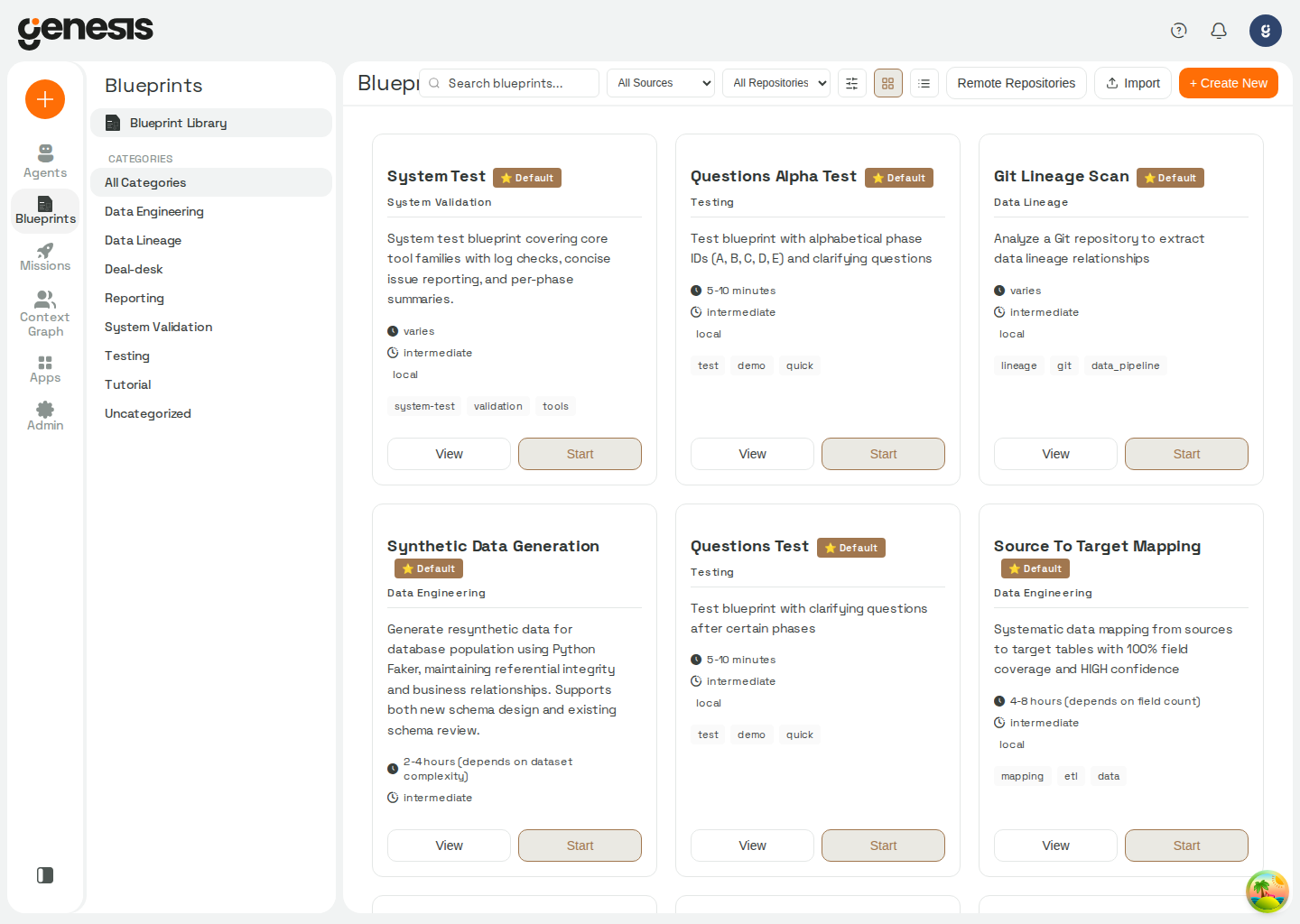 ## Main library actions
| Action | Purpose |
| - | - |
| **Search** | Find blueprints by name, description, or tags. Toggle **Use regular expression** beside the search box for regex matching (session-only — Genesis does not persist regex mode). Invalid patterns show **Invalid regular expression**; patterns rejected by the safety gate show **Pattern too complex — simplify the expression**. |
| **View mode** | Switch between **Tile view** (card grid, default) and **List view** (sortable table with Name, Author, Source, Created, Last modified, and Tags columns). Genesis remembers view mode per signed-in user in persisted user settings (`blueprint_browser_preferences` via `GET`/`PUT` `/api/auth/settings`) so the choice follows you across browsers. |
| **Sort** | Use the **Sort by** dropdown beside the filters. Default is **Recently modified** (last modified, newest first). Other options: **Least recently modified**, **Newest created**, **Oldest created**, **Name A→Z**, **Name Z→A**, **Author A→Z**, **Author Z→A**, **Source: Genesis first**, and **Source: Custom first**. In list view you can also click column headers to toggle sort direction (date columns start newest-first; text columns start A→Z). Sort is persisted with view mode in `blueprint_browser_preferences`. |
| **Filters** | Open the filter menu to narrow by **Source** (Genesis-shipped vs Custom), **author**, **origin** (local vs remote), **created** or **modified** date ranges, **repository**, and **tags**. The filter badge counts active filters only (not sort). Active filters appear as removable chips above the grid; use **Clear all** to reset filters while keeping search text, or **Clear search and filters** from the empty state to reset everything. Selecting multiple tags shows blueprints that have **any** of those tags (OR semantics), consistent with Mission Center. Selected tag filters are reflected in the page URL as repeated `tag` query parameters (for example `?tag=analytics&tag=etl`) so you can bookmark or share a filtered view; tag matching is case-insensitive. |
| **Preview / View / Start** | Open a quick preview from the card, jump to the full blueprint detail page, or launch a mission from the same library flow. |
| **Rename** | Rename an existing non-default blueprint from the library actions menu or the detail-page header when you have `manage` access. |
| **Delete** | Delete a custom blueprint from its actions menu or detail page when permitted. See the [delete API contract](/docs/Genesis-API/API-Reference#blueprint-delete-endpoint) for access requirements and deletion behavior. |
| **Import** | Bring in a blueprint package from a ZIP file from the header actions menu. |
| **Remote Repositories** | Open the header actions menu to connect or review blueprint repositories used as shared catalogs. |
| **Create New** | Use the header actions menu to start a new blueprint workflow where your deployment allows it. |
See [Git Action Tools](/docs/Genbot-Toolkit/Git-Action-Tools) for branch guidance.
## Main library actions
| Action | Purpose |
| - | - |
| **Search** | Find blueprints by name, description, or tags. Toggle **Use regular expression** beside the search box for regex matching (session-only — Genesis does not persist regex mode). Invalid patterns show **Invalid regular expression**; patterns rejected by the safety gate show **Pattern too complex — simplify the expression**. |
| **View mode** | Switch between **Tile view** (card grid, default) and **List view** (sortable table with Name, Author, Source, Created, Last modified, and Tags columns). Genesis remembers view mode per signed-in user in persisted user settings (`blueprint_browser_preferences` via `GET`/`PUT` `/api/auth/settings`) so the choice follows you across browsers. |
| **Sort** | Use the **Sort by** dropdown beside the filters. Default is **Recently modified** (last modified, newest first). Other options: **Least recently modified**, **Newest created**, **Oldest created**, **Name A→Z**, **Name Z→A**, **Author A→Z**, **Author Z→A**, **Source: Genesis first**, and **Source: Custom first**. In list view you can also click column headers to toggle sort direction (date columns start newest-first; text columns start A→Z). Sort is persisted with view mode in `blueprint_browser_preferences`. |
| **Filters** | Open the filter menu to narrow by **Source** (Genesis-shipped vs Custom), **author**, **origin** (local vs remote), **created** or **modified** date ranges, **repository**, and **tags**. The filter badge counts active filters only (not sort). Active filters appear as removable chips above the grid; use **Clear all** to reset filters while keeping search text, or **Clear search and filters** from the empty state to reset everything. Selecting multiple tags shows blueprints that have **any** of those tags (OR semantics), consistent with Mission Center. Selected tag filters are reflected in the page URL as repeated `tag` query parameters (for example `?tag=analytics&tag=etl`) so you can bookmark or share a filtered view; tag matching is case-insensitive. |
| **Preview / View / Start** | Open a quick preview from the card, jump to the full blueprint detail page, or launch a mission from the same library flow. |
| **Rename** | Rename an existing non-default blueprint from the library actions menu or the detail-page header when you have `manage` access. |
| **Delete** | Delete a custom blueprint from its actions menu or detail page when permitted. See the [delete API contract](/docs/Genesis-API/API-Reference#blueprint-delete-endpoint) for access requirements and deletion behavior. |
| **Import** | Bring in a blueprint package from a ZIP file from the header actions menu. |
| **Remote Repositories** | Open the header actions menu to connect or review blueprint repositories used as shared catalogs. |
| **Create New** | Use the header actions menu to start a new blueprint workflow where your deployment allows it. |
See [Git Action Tools](/docs/Genbot-Toolkit/Git-Action-Tools) for branch guidance.